<?xml version="1.0" encoding="UTF-8" ?>
<feed xmlns="http://www.w3.org/2005/Atom">
  <title>pzuraq</title>
  <subtitle>a blog about (mostly) computery things</subtitle>
  <link rel="alternate" type="text/html" href="https://www.pzuraq.com/"/>
  <link rel="self" type="application/atom+xml" href="https://www.pzuraq.com/rss"/>
  <id>https://www.pzuraq.com/rss</id>
  <updated>2024-07-22T00:00:00.000Z</updated>
  <rights>Copyright © 2026, Chris Hewell Garrett</rights>
  
    <entry>
      <title>An Open Letter to the DNC</title>
      <id>https://www.pzuraq.com/blog/open-letter-to-the-dnc</id>
      <published>2024-07-22T00:00:00.000Z</published>
      <updated>2024-07-22T00:00:00.000Z</updated>
      <author>
        <name>pzuraq</name>
        <uri>https://www.pzuraq.com</uri>
      </author>
      <content type="html" xml:base="https://www.pzuraq.com" xml:lang="en">
      <![CDATA[ <p>I normally stick to programming on this blog, but the events of the last few
weeks have been <em>somewhat</em> distracting. I felt early on that it was the best
choice for President Biden to step down, but I also understood that this was a
very difficult choice. Not just because it&#39;s so late in the race, but also
because our process simply does not allow us to work things out without a long,
protracted, public conversation that can be very embarrassing.</p>
<p>I&#39;ve had some conversations these past few weeks with fellow Democrats that felt
downright Trumpian. The impulse has been toward unity, toward strength, toward
not airing our dirty laundry. But I, and many others, felt like we were heading
toward disaster, and so we pressed on.</p>
<p>In the future, I would like to avoid this type of situation altogether. I think
that a huge part of this comes down to <em>process</em>, and so I have some thoughts
about how the process could be improved. I am no political scholar here so I
could be very wrong, but I feel that I have to put this out there somewhere,
and I&#39;m honestly not really sure what the best way to participate is. So, here
it is, an open letter to the DNC.</p>
<hr>
<p>Hello,</p>
<p>So I am really excited with the most recent turn of events, but as a regular Democratic voter and millenial, not as happy with the way we got here. It was a nail-biter, and I think it shows how we really need a better system for picking the Democratic nominee in the future so we can avoid last minute changes like this.</p>
<p>So, some analysis and suggestions. First, the issues:</p>
<ol>
<li><p>The staggered nature of primaries in each state means that early primaries have a much bigger effect than later ones. Early primaries can narrow the field before people in later primaries have had a chance to vote, and this means that we just don&#39;t have good information on the will of the voters. That was a major concern before Biden dropped out because this year there was low primary engagement as well. Ideally we would have a process that allowed us to get more real information here about how Democrats are feeling.</p>
</li>
<li><p>The change after the &#39;68 convention that led to the current system was well-intentioned and solved one issue, but caused another. It&#39;s no longer possible for the party to easily make <em>tactical</em> decisions during the election itself. It was a risk for Biden to drop out, but sometimes we need to take risks during a campaign in order to win. The current system makes risk taking difficult though, because to do so, we need a long drawn out conversation that shows a lack of unity.</p>
<p>This is fundamentally a <em>coordination</em> problem. It&#39;s much easier to get a few thousand people in a room to agree on a direction and present a unified front than to get millions of Democrats across the country together to do so. So, there has been pressure to ignore that and stay-the-course. This time the decision was so clear that we could not avoid that conversation, but ideally, we would have a system that allowed us to make tactical maneuvers, such as changing a candidate, without such a drawn out and messy conversation needing to happen.</p>
</li>
<li><p>The current system is very predictable since we know early on who the nominee will be. That gives the media, the pundits, and the base of the opposition plenty of time to pull together their hatchet jobs and hit pieces against our candidates, and really focus on character assassination.</p>
<p>Hillary Clinton is a great example of how this process works. They had been working on her for decades, with small hit pieces, think pieces, articles, &quot;scandals&quot;, etc. In 2016 when most Republicans heard her name, they just had a general sense of repugnance, but it was not for any specific thing. Moreso, it was because they had heard her name so many times in passing, and always in a negative way. Obviously Clinton was a particularly bad case of this, with 20+ years to lock these negative feelings in, but this strategy requires <em>time</em>, and 8-12 months is a hell of lot more time than 4.</p>
</li>
</ol>
<p>With those laid out, here are some suggestions for process change. I think these could be done independently or together.</p>
<ol>
<li><p>Switch to ranked choice OR approval voting for primaries (See <a href="https://www.youtube.com/watch?v=orybDrUj4vA">this video</a> for a quick breakdown of approval voting). This would fix problem 1 because there would no longer be a reason for a candidate to drop out early or for primary voters in later states to not participate. It would also help with problem 2, because if something should happen to the prospective nominee later in the process, we would have more information about who voters wanted as their <em>second</em> choice, and third, and so on. Who would be the nominee if Biden dropped was a major concern this time, so having that information for the party to decide would be immensely helpful moving forward.</p>
<p>Approval voting works here quite well because it is simpler than ranked-choice, but does give us this information (it&#39;s basically asking &quot;would you vote for this person if they were at the top&quot; for every candidate, which is kind of what we want to know.) It also would give us information about how the current incumbent is really doing, and while that could be a bad look in some years, it could <em>also</em> be really helpful in some, because it could show the best path forward while switching from an unpopular incumbent if necessary.</p>
</li>
<li><p>Hold primaries on the same day nation-wide, especially if they can be held closer to the convention (e.g. May, June). This is harder than the first choice I&#39;m sure, I&#39;m guessing part of the reason they&#39;re at different times is due to different state rules that the party cannot control, but if it is possible this would help to prevent issues 1 and 3. Issue 1 because everyone would be voting all at once, so earlier states could not affect later ones, and issue 3 because doing so later in the year would give less time in general for the media to do its thing.</p>
</li>
<li><p>Reconsider the binding rules for delegates to the convention. This is definitely the most risky change, because it does mean that we would be partially rolling back the changes from &#39;68 and could make it feel like the party is run by insiders, but it could also help with issue 2 the most. I think that combined with change 1, delegates would have a lot more information about what their voters actually want, and could demonstrate that if they don&#39;t choose the <em>top</em> choice from their state, they did choose the second or third choice.</p>
<p>One option here would be to say that delegates can choose anyone out of the top 3-5 candidates from their state, based on approval rating (another reason approval voting would be better than ranked choice here, this is much easier to calculate and demonstrate to voters, so they see that party officials are acting in good faith). This way, there is flexibility <em>guided</em> by the voters, but ultimately a choice can be made by the people <em>actually running the campaign</em>. And, most importantly, that choice can be made together and presented in unity, so we do not have a month long public process that feels like it could shatter the party.</p>
</li>
</ol>
<p>I hope these suggestions help, I would really like to see reforms here as I think they could help us prevent these issues in the future.</p>
 ]]>
      </content>
    </entry>
  
    <entry>
      <title>On Signal Relays</title>
      <id>https://www.pzuraq.com/blog/on-signal-relays</id>
      <published>2024-04-18T00:00:00.000Z</published>
      <updated>2024-04-18T00:00:00.000Z</updated>
      <author>
        <name>pzuraq</name>
        <uri>https://www.pzuraq.com</uri>
      </author>
      <content type="html" xml:base="https://www.pzuraq.com" xml:lang="en">
      <![CDATA[ <p>If you haven&#39;t heard, <a href="https://github.com/tc39/proposal-signals">Signals</a> are a new proposal for the JavaScript language, and they&#39;ve just entered stage 1! As a co-champion for the proposal, I&#39;m personally very excited about this feature and its potential. Reactivity has become one of the most important parts of writing modern JS, and a decent amount of my time these days is spent running plumbing for reactive state - setting up and managing subscriptions and state on render, updating them on changes, and tearing them all down when the component is gone.</p>
<p>Frameworks have filled this void for the most part over the years and made this process much, much easier. I still remember the initial examples we saw of React Hooks, how they tied all of this management up into a neat package that didn&#39;t require me to think of all of these things anymore:</p>
<pre><code class="language-ts">useEffect(() =&gt; {
  const subscription = props.source.subscribe();
  return () =&gt; {
    // Clean up the subscription
    subscription.unsubscribe();
  };
});
</code></pre>
<p>This, to me, was the main reason hooks were so exciting. Yes, there was the fact that everything <em>looked</em> more functional, and functional languages were all the rage back then. And yes, it was cool that you could compose these hooks to create your own, nested hooks, really creating the potential for a whole ecosystem.</p>
<p>But the valuable insight, the core thing that hooks really got <em>right</em>, was realizing that the <strong>app&#39;s lifecycle does not end at the component</strong>.</p>
<p>Before hooks, if you wanted to add and remove a subscription like in the above example, it was easy enough right in the component itself. But as your code started getting more complex, you would find yourself having to drill those lifecycle events down into every related function and class, and add boilerplate to every component to hook them up. It was just like prop-drilling, except maybe a bit worse because you had coordinate multiple lifecycle events every time. With hooks, you could easily avoid all of this because the those events were co-located in one place.</p>
<p>Since then, hooks-like reactivity patterns have proliferated and are now a core part of many frameworks, including Solid, Vue, Svelte (especially Svelte 5 with runes), and many more. These frameworks all approach things a bit differently, but at a high level each of them have the following:</p>
<ol>
<li><em><strong>Root state</strong></em>, the fundamental state of the app (e.g. <code>useState</code> in React, <code>createSignal</code> in Solid, <code>$state</code> in Svelte 5, etc)</li>
<li><em><strong>Derived state</strong></em>, values derived from other state that are invalidated and rederived whenever their inputs an updated (e.g. <code>useMemo</code> in React, <code>createMemo</code> in Solid, <code>$derived</code> in Svelte 5, etc.)</li>
<li><em><strong>Effects</strong></em>, lifecycle functions that take state and turn it into side-effects, like writing to the DOM or subbing/unsubbing from a data source (e.g. <code>useEffect</code> in React, <code>createEffect</code> in Solid, <code>$effect</code> in Svelte 5, etc.)</li>
</ol>
<p>These core primitives are the basis of modern reactive JavaScript UI frameworks, and they&#39;re also the basis for the design of the Signals proposal.</p>
<h3>Cool! So, where are Effects?</h3>
<hr class="mt-4"/>

<p>You may have noticed that effects in the Signals proposal seem a little <em>different</em>. There&#39;s <code>Signal.State</code> which is root state, and <code>Signal.Computed</code> is derived state, and these work pretty similarly to the frameworks I mentioned above. But the closest thing we have to an &quot;effect&quot; is <code>Signal.subtle.Watcher</code> which, (1) why is it under this <code>subtle</code> namespace? And (2) why does it seem fairly hard to use?</p>
<p>Back when hooks were first released, I was a member of the Ember.js core team and working on the next version of our own reactivity model which, eventually, became a sort of proto-signals like model. I&#39;ve since moved on and now spend most of my time working on Svelte apps (with a couple of React projects in tow), but I learned a lot from my time on the Ember team and on that project, and I&#39;ve dug into the guts of <em>many</em> Signals-like implementations over the years, so I&#39;m fairly familiar with how they <em>work</em> across frameworks, where they are <em>similar</em>, and how and why they are <em>different</em>.</p>
<p>The easier parts of the design were root state and derived state, and this makes sense to me because these are <em>very</em> similar across most implementations. Without effects, a system of signals is a <a href="https://en.wikipedia.org/wiki/Pure_function"><em>functionally pure</em></a> reactive graph. State is consumed by functions, the results are cached and then consumed by other functions, until you get your result at the &quot;top&quot;, the original computed value that you were trying to get.</p>
<p>Effects, however, are trickier. Every framework approaches effects a bit differently, because they start to bring in concerns like <em>app lifecycle</em> and <em>rendering</em>. And in addition, there was a general sense among the framework teams that effects were a very <em>powerful</em> tool, and that they were often times misused in ways that caused a lot of developer frustration. In particular, there is one antipattern that effects encourage that is very widespread.</p>
<p>And that is managing state.</p>
<h3>State is the enemy, state is always the enemy...</h3>
<hr class="mt-4"/>

<p>Consider the following Solid.js component:</p>
<pre><code class="language-ts">function Comp(props) {
  const [loading, setLoading] = createSignal(true);
  const [value, setValue] = createSignal(undefined);

  createEffect(() =&gt; {
    setLoading(true);

    fetch(props.url).then((value) =&gt; {
      setLoading(false);
      setValue(value);
    });
  });
}
</code></pre>
<p>Something along these lines is a fairly common pattern in signals-based frameworks. What we have here is:</p>
<ol>
<li>A <code>loading</code> state signal</li>
<li>A <code>value</code> state signal</li>
<li>An effect that manages both of them.</li>
</ol>
<p>This seems pretty straightforward. The <code>fetch</code> here is the side-effect - we&#39;re sending a request for data out into the world, and when it returns we will want to update our <code>value</code> state and rerender. In the meantime, we set the <code>loading</code> state to show a spinner or some other UI to the user so they know what&#39;s going on. We memoize the effect as well so that it doesn&#39;t rerun unless <code>props.url</code> changes.</p>
<p>Seems simple enough! And at first, this pattern works really well. Beginners can pick up on it pretty quickly and it&#39;s all fairly intuitive. But, things that start simple very rarely stay that way.</p>
<h2>Disjointed Implicit Reactivity</h2>
<hr class="mt-4"/>

<p>In time, what you&#39;ll find with the above pattern is that there is <em>drift</em>. More code gets added to the the effect (turns out we need to capture <code>error</code> states as well, oh and maybe we want to preserve the last value?) and it becomes more and more difficult to trace the line from effect to state. Multiple effects are added to the component, and sometimes the effects end up <em>sharing</em> state and mutating each other&#39;s state. Maybe you want to load from cache first, but also do a background refresh. Maybe you have multiple <code>fetch</code>s that can all trigger the <code>loading</code> UI.</p>
<pre><code class="language-ts">function Comp(props) {
  const [loading, setLoading] = createSignal(true);
  const [value, setValue] = createSignal(undefined);
  const [error, setError] = createSignal(undefined);

  createEffect(() =&gt; {
    setLoading(true);

    fetch(props.url).then((value) =&gt; {
      setLoading(false);
      setValue(value);
    });
  });

  // if there was an error, load the backup data instead
  createEffect(() =&gt; {
    if (error &amp;&amp; props.backupUrl) {
      setLoading(true);

      fetch(props.backupUrl).then((value) =&gt; {
        setLoading(false);
        setValue(value);
      });
    }
  });
}
</code></pre>
<p>What&#39;s happening here, effectively, is that we are creating <strong>implicit dependencies</strong> between <em>imperative effect code</em> and <em>declarative state/computed</em> code. Or, maybe put another way, we are doing a bunch of imperative stuff in our otherwise functionally pure code, and bringing all of the problems of imperative programming with it. I call this <strong>disjointed implicit reactivity</strong> (credits to @benlesh for coming up with that), which is to say it is reactive code that no longer has an <em>obvious, intuitive, and declarative</em> flow, where each dependency is easy to see and understand. Instead, you have to start hunting for these implicit dependencies all over your app, and they can happen <em>anywhere</em>.</p>
<p>This is why in many frameworks, effects can become so monstrously complicated and difficult to debug. It is a core cause of <a href="https://en.wikipedia.org/wiki/Action_at_a_distance_(computer_programming)">action-at-a-distance</a> in many apps, and it has caused many a developer pain and sorrow. So, what can we do?</p>
<h2>Isolate the State</h2>
<hr class="mt-4"/>

<p>We can&#39;t get rid of imperative code altogether. I mean, we can if we want to invent a new language, sure. But this is JavaScript, we don&#39;t really have an alternative yet (though WASM is getting better every year...) and regardless, the shear amount of existing code out there is going to prevent most apps and devs from just switching over any time soon.</p>
<p>And in JS, you have to write imperative code sometimes. Our <code>fetch</code> example, for instance, is probably the simplest way you could fetch data from a remote backend without using external libraries, and it has a few imperative statements in it. You might be thinking &quot;that&#39;s not too bad though!&quot;, but as we&#39;ve seen this complexity can grow significantly over time.</p>
<p>So, what&#39;s the alternative?</p>
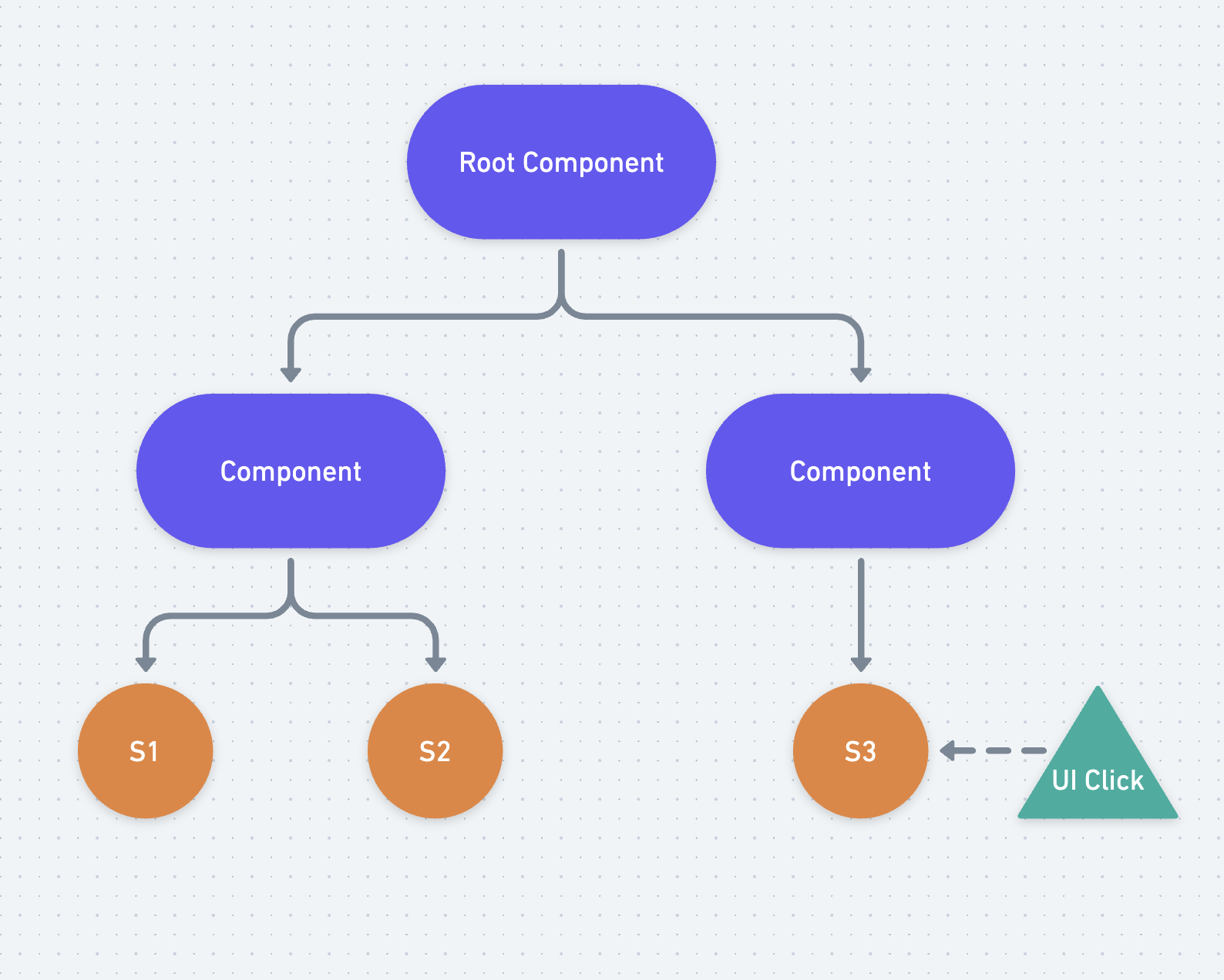
<p>Let&#39;s step back and look at a visualization of the problem. Here is a simple signals graph:</p>
<p><img src="/assets/blog/on-signal-relays-1.png" alt="A signal graph showing a component tree consuming several state signals, and a UI event that updates one of the state signals"></p>
<p>This graph doesn&#39;t yet have any effects, it just has a few components and some state, and in one of the components, that state can be updated by a UI event. This is pretty straightforward to follow, we can see very easily where each piece of state enters the graph, what it&#39;s updated by, and what depends on it. In general, most non-effect based updates will look like this - user events, interactions, browser APIs, maybe some top level communication with a service worker or something like that. If we didn&#39;t ever need to load data, this would be pretty straightforward!</p>
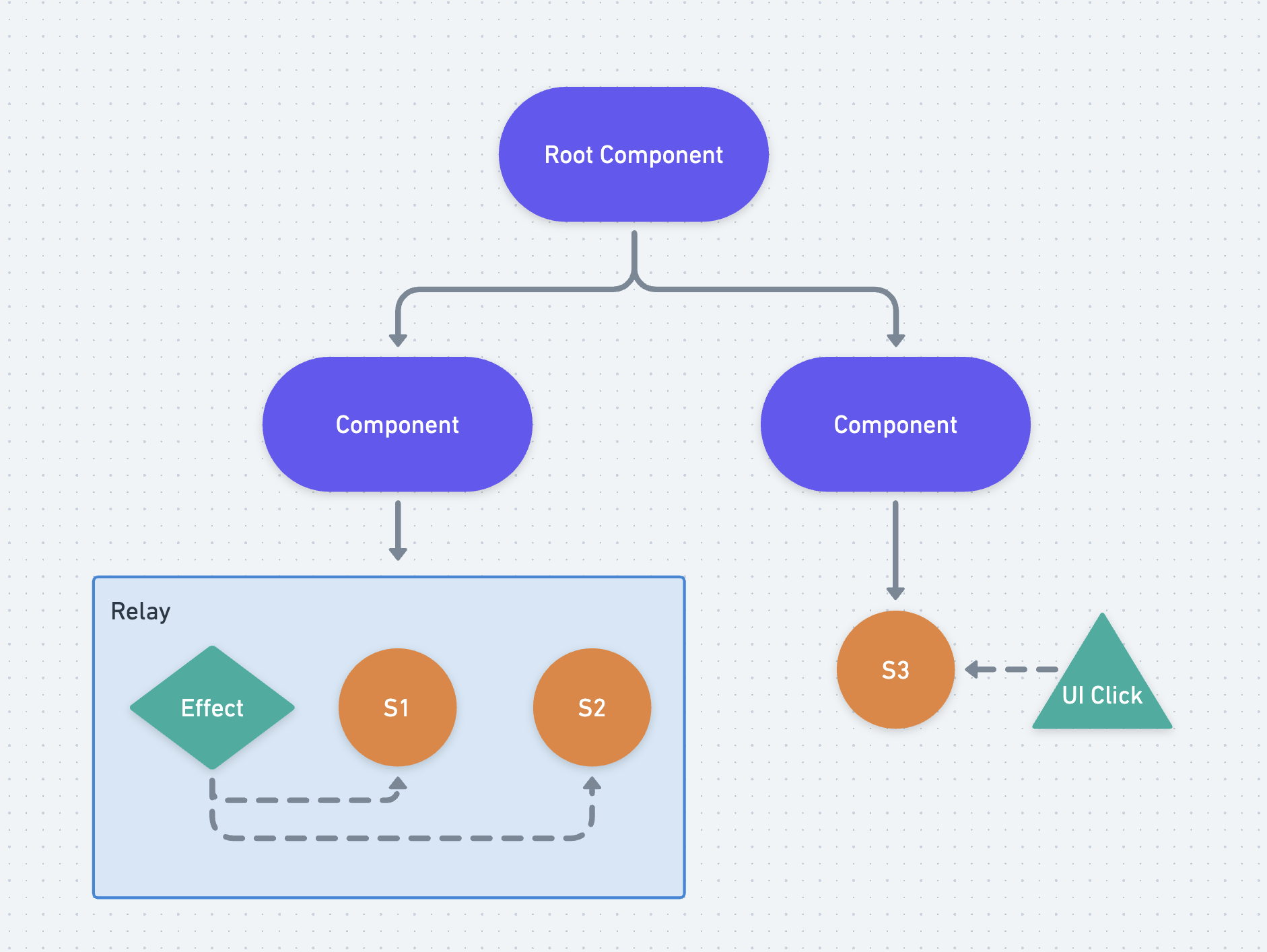
<p>Now let&#39;s add an effect:</p>
<p><img src="/assets/blog/on-signal-relays-2.png" alt="The same signal graph as before, but now two state signals are being managed by an effect that was added to the graph"></p>
<p>Ok, so the effect is the <em>child</em> of one of our components, and it updates the two pieces of state that are its <em>siblings</em>. We&#39;re already starting to get a bit more complicated here, the interaction between the effect and its siblings is one step of indirection and requires the user to actually read the code. At first that&#39;s easy, but what happens if we add 10 or 20 more states? Or, in the worst case, what about something like this?</p>
<p><img src="/assets/blog/on-signal-relays-3.png" alt="The same signal graph as before, but now all three state signals are being managed by the effect even though they&#39;re in different components"></p>
<p>Ok, now this looks like a strawman if I&#39;ve ever seen one. Like, who would even build an app like this? It would require you to go out of your way for this to happen, to <em>somehow</em> get a hold of some piece of state in a completely separate component and start updating it. This is, of course, an oversimplified example.</p>
<p>But it&#39;s more possible than you might think. I have seen such accidents in more complicated apps that have evolved slowly over time, where abstractions were made to handle loading state, and then remade a few times over, and then eventually you get something like this. Tech debt accrues, people leave and people join, and you end up with some rather gnarly looking code.</p>
<p>But what if it weren&#39;t <em>possible</em> to do this? What if effects couldn&#39;t write to just about any piece of state at all, and instead could only write to a limited scope, preventing these kinds of situations altogether?</p>
<p>Here&#39;s the same graph using a Relay, an abstraction that would provide a potential alternative to effects which would do just that:</p>
<p><img src="/assets/blog/on-signal-relays-4.png" alt="The same signal graph as before, but now the effect and the state it is managed are shown collected within a relay"></p>
<p>The idea with Relays is that they are meant to bridge the <em>results</em> of an effect <em>into</em> the graph as state (thus the name <em>relay</em>, meaning &quot;the act of passing along by stages&quot;). Once the result is <em>in</em> the graph, it acts like any other piece of state, and every computed can treat it like a declarative dependency as-per-usual. And if you want to understand <em>how</em> that state is entering the graph, you just need to look one place - the definition of the Relay.</p>
<p>This is actually a fairly common pattern in the JavaScript ecosystem. The first time I remember seeing it was with <a href="https://swr.vercel.app/">SWR</a>, which effectively creates a Relay for managing <code>fetch</code> requests, @modderme123 from the Solid team has written a <a href="https://hackmd.io/@modderme123/SySDMORph">blog post about it</a>, and there&#39;s even <a href="https://github.com/tc39/proposal-signals/issues/178">an issue</a> opened by @dead-claudia, who came to a similar design independently, on the Signals repository at the moment. All this to say, this is already a fairly well established pattern, and it could even be considered a best practice at this point.</p>
<h2>API????</h2>
<hr class="mt-4"/>

<p>Ok but what would it actually look like? Here&#39;s my current thoughts with the existing Signals API:</p>
<pre><code class="language-ts">declare class Relay&lt;T&gt; extends Signal&lt;T&gt; {
  constructor(
    initialValue: T,
    &lt;T&gt;(set: (value: T) =&gt; void, get: () =&gt; T) =&gt; undefined | {
      update?(): void;
      destroy?(): void;
    }
  );
}
</code></pre>
<p>This API is inspired by <a href="https://svelte.dev/docs/svelte-action">Svelte Actions</a>, and splits out the lifecycle of side-effects into three parts:</p>
<ol>
<li>Initialization</li>
<li>Update (optional)</li>
<li>Destruction (optional)</li>
</ol>
<p>In the lifecycle of a Relay, the function passed to the constructor is called to initialize the effect, state dependencies are tracked during initialization, and optionally users can return an object containing <code>update</code> and/or <code>destroy</code>. If the initial dependencies are invalidated, the <code>update</code> function is called to modify the effect that was created - the initialization function as a whole is NOT called again while the relay is still active. Finally, <code>destroy</code> is called when the relay is no longer in use in order to teardown the effect. If the relay is used again later, <em>then</em> initialization is called again and the whole lifecycle is restarted.</p>
<p>This API is a bit different than <code>useEffect</code> or <code>createEffect</code> style APIs which teardown the effect and recreate it on every change. The reasoning I have for this is that while tearing down and recreating is <em>often</em> a simpler API for most users, there are a decent amount of cases where you want to do something a bit more optimal during updates (e.g. maybe you just want to update a subscription and not tear the whole thing down). In my own experience this ends up being something like 20-30% of relays, and given this API is meant to be a language <em>primitive</em> to build upon, the thought is that we should support these cases by default and allow wrappers to be added that can simplify them at a higher level.</p>
<p>Here&#39;s what it might look like in use as a <code>fetch</code> wrapper:</p>
<pre><code class="language-ts">export const fetchJson = (url: Signal&lt;string&gt;) =&gt; {
  return new Signal.Relay(
    {
      isLoading: false,
      value: undefined,
    },
    (set, get) =&gt; {
      // Note: set comes first in the API because every relay will
      // need to `set`, but not every relay will need to `get`

      // Setup some local state for managing the fetch request
      let controller: AbortController;

      // `loadData` is a local function to deduplicate the code
      // in init and update
      const loadData = async () =&gt; {
        controller?.abort();

        // Update isLoading to true, but keep the rest of the state
        set({ ...get(), isLoading: true });

        controller = new AbortController();
        const response = await fetch(url.get(), { signal: controller.signal });
        const value = await response.json();

        set({ ...get(), value, isLoading: false });
      }

      // Call `loadData`, make the initial fetch, and track dependencies
      loadData();

      return {
        update() {
          // When dependencies update, call `loadData` again to
          // cancel the previous fetch and make a new one.
          // Dependencies are tracked again and fed into the next
          // update.
          loadData();
        },

        destroy() {
          // Cancel any existing fetch request on destruction
          controller?.abort();
        }
      }
    }
  );
}
</code></pre>
<blockquote>
<p>Note: This example uses just one externally exposed signal, but you could return an object containing multiple signals, or with getters that are backed by signals, enabling more fine-grained reactive control.</p>
</blockquote>
<p>This neatly wraps up all of the details of fetching data in one spot so that you don&#39;t need to manage those yourself every time. It maintains the lifecycle management benefits of effects, <em>without</em> allowing effects to write to anything they happen to have access to, thus preventing the issues that come with that.</p>
<p>Stepping back, the point here is actually about isolation of state. Relays let you isolate state in a way such that adding a relay doesn&#39;t impact the behaviour of <em>other relays</em> on the page, and similarly removing them doesn&#39;t cause unexpected changes. The business logic of a relay is a black box - you don&#39;t need to know the details of it in order to use it, and it can&#39;t affect anything else that you&#39;re using around it.</p>
<h3>Ok, Relays seem cool, but then why do we need Watchers?</h3>
<hr class="mt-4"/>

<p>Relays on their own are a great abstraction for managing effects and state together. But the issue is that if you <em>start</em> a relay, you will likely need to <em>stop</em> it at some point in order to clean up its contents and release whatever resources it may be using. In the subscription example, for instance, you would want to end the subscription when the relay is no longer being used (and also resubscribe if the relay ever enters the graph again).</p>
<p>This is tricky with just our three main concepts because there&#39;s no simple way to tell when a relay is no longer in use. Let&#39;s look at some options:</p>
<ol>
<li><strong>A relay is no longer in use when it is no longer consumed by any other derived state</strong>: This definition works for a single layer - if a <code>Computed</code> reruns and no longer uses the relay (maybe it creates a new relay instead, for instance), then we can tear it down. The issue here though is that it doesn&#39;t work with <em>nesting</em>. What if we stop using the computed itself? We need to be able to disconnect the entire <em>subgraph</em> that the computed is watching, not just its immediate dependencies.</li>
<li><strong>A relay is no longer in use when all of its consumers have been freed (popped off the stack or garbage collected)</strong>: This definition relies on memory management and garbage collection, which means (A) the exact timing of teardown is no longer controlled by the user and (B) we can run into leaks very easily if we accidentally hold onto a computed/relay, or if we have a high continuous load and GC cannot occur. This would be a non-starter for any app of sufficient complexity.</li>
<li><strong>A relay is no longer in use when all of its consumers have been explicitly destroyed</strong>: We <em>could</em> add a <code>destroy()</code> method to all signals that explicitly disconnects them and leaves lifecycle management up to the user. There are two major issues with this:<ol>
<li><p>Signals don&#39;t <em>necessarily</em> get destroyed and never used again. It&#39;s more like they are no longer in use <em>for now</em>, and at some point in the future they <em>may</em> be used again. Consider for instance a data manager like Apollo Client which has <a href="https://www.apollographql.com/docs/react/api/core/ApolloClient/#watchquery"><code>watchQuery</code></a>, an API that creates a persistent, live-updating query on the data in Apollo&#39;s cache. If the UI stops using that data, we don&#39;t want to evict it from the cache, because the user may navigate back to the page that requires it and then we would have to fetch the data again. We want to stop actively subscribing to it for the time being, but if we ever <em>start</em> again, we want to be able to pick up where we left off.</p>
</li>
<li><p>The exact timing of <em>when</em> we stop (and restart) a relay depends on when it is <em>used</em> by other derived state. For instance, let&#39;s say that you have the following:</p>
<pre><code class="language-ts">function Comp(props) {
  const data = new ApolloWatchQueryRelay(props.query);

  const showData = new Signal.State(true);

  const preprocessedData = new Signal.Computed(() =&gt; {
    return showData.get() ? preprocessData(data.get().value) : undefined;
  });
}
</code></pre>
<p> If <code>showData</code> transitions to <code>false</code>, the expectation would be that any subscriptions setup by the <code>data</code> relay would be torn down. That seems simple enough, we could do that like so:</p>
<pre><code class="language-ts">function Comp(props) {
  const data = new ApolloWatchQueryRelay(props.query);

  const showData = new Signal.State(true);

  const preprocessedData = new Signal.Computed(() =&gt; {
    if (showData.get()) {
      preprocessData(data.get().value) : undefined;
    } else {
      data.unsubscribe();
    }
  });
}
</code></pre>
<p> But what happens if the component itself is removed? Do we need to rerun all of its computeds in order to teardown all subscriptions? And what if <em>multiple</em> computeds are using the relay? We would need to add this management code to each of them. This would be a minefield of management for users and it defeats much of the purpose of signals by forcing users to constantly think about <em>data consumption</em> again, and forcing them to manage all the minutiae of manually subscribing, unsubscribing, etc.</p>
</li>
</ol>
</li>
</ol>
<p>Stepping back, the core idea of relays is that:</p>
<ol>
<li>They are <em>active</em> when they are being used either directly <em>or</em> indirectly by the &quot;core app&quot; (e.g. the UI in frontend apps, or a persistent process such as an actor or thread in backend apps).</li>
<li>They are <em>inactive</em> when they are no longer connected to the core app via the signal graph.</li>
</ol>
<p>In this model, Watchers represent that &quot;core app&quot;. A watcher essentially tells a signal graph that a given node is <em>in use</em> by some external process, so it should remain active. This pushes the complexity of lifecycle management <em>up</em> a level, to the framework that is handling the details of rendering, scheduling, and managing applications. Signal authors can create complex graphs of signals, hand them off to the app, and <em>it</em> can decide when it is watching the graph and when it wants to stop watching the graph. All the user has to do is define what happens when we <em>start</em> watching the graph, and what happens when we <em>stop</em>.</p>
<p>This is why the Watcher API feels like it isn&#39;t really great for Effects - it&#39;s not meant for them. It&#39;s about extracting data from the graph and pushing that data elsewhere (or, in the case of graphs that use side-effects to write the data out, managing the active state of those effects). This is also why it was placed under the <code>subtle</code> namespace, the idea being that it would hint to developers that they should probably avoid using Watchers <em>unless</em> they are making a framework or other persistent process that needs to <em>watch</em> a signal graph.</p>
<h2>Conclusion</h2>
<hr class="mt-4"/>

<p>So, to sum up this post:</p>
<ul>
<li>Signal graphs, in most implementations, consist of Root State, Derived State, and Effects</li>
<li>Sometimes, Effects are used to update root state with the results of async processes</li>
<li>A common anti-pattern is to manage multiple pieces of root state with a singfle effect, or to use multiple effects to manage a single shared piece of root state, creating difficult to debug ownership and timing issues. We can label this anti-pattern as &quot;disjointed implicit reactivity&quot;.</li>
<li>Relays isolate and co-locate these effects <em>with</em> the root state they manage, preventing these issues by ensuring that there is one (and <em>only</em> one) place that the state can be managed and updated from.</li>
</ul>
<p>My current opinion is that if we can gain consensus on the value of the Relay pattern, we can ship a version of Signals that provides better defaults for most users and prevents a lot of painful and difficult to debug situations. If nothing else, I sincerely hope that Signals users end up implementing this pattern more often rather than reaching for Effects directly. It has definitely improved <em>my</em> life in code, and I hope it can make yours easier as well!</p>
<h2>Addenda</h2>
<hr class="mt-4"/>

<h4>Are these really a full replacement for Effects?</h4>
<p>There are really two categories of Effects that users end up writing often:</p>
<ol>
<li>Effects that push <em>out</em> of the graph, e.g. they take some state within the graph, read it, and push it out into the DOM or into some other system.</li>
<li>Effects that push <em>out</em> of the graph, and then write the results back <em>in</em> to the graph, e.g. setting a State signal.</li>
</ol>
<p>Relays are explicitly meant to fully replace the second category, and in my opinion are a much better solution for them. For the first, we <em>could</em> continue to have Effects and make a strong distinction between the two, but my preference would be to just have a Relay that doesn&#39;t use its state value, like a computed that side-effects and returns <code>undefined</code>. It&#39;s ultimately one less API to add, and if it really feels wrong to some, it&#39;s trivial to wrap a Relay with an API that looks more like a plain Effect. But that said, I don&#39;t have a strong opinion here and would be happy if both were added to the proposal.</p>
<h4>Can&#39;t users just use a Watcher directly? Or side-effect in a computed? Or do [insert-bad-thing-here] anyways?</h4>
<p>Yes. Users will always be able to work around the bounds in JavaScript, especially when it comes to async and reactivity (and <em>especially</em> the combination of the two). This is not at all a silver-bullet, users could still create implicit dependencies all over the place with Relays (and Effects, if we also add them).</p>
<p>The goal of Relays is not to prevent <em>all</em> possible anti-patterns all the time. It&#39;s to spread a known good pattern as the <em>default</em>, so that when users end up reaching for a side-effect they start by reaching for a Relay and, hopefully, end up with a fairly self-contained piece of code.</p>
<p>When I look at JS code in the wild, I&#39;d say it&#39;s split 60-40 or even more toward using effects that manages state for any one-off side-effecting thing. Most of the time users are using SWR or TanStack Query or some other abstraction which is effectively the Relay pattern for basic things like <code>fetch</code>, but it&#39;s not the case much of the rest of the time. Ideally, Relays would help to shift the balance the other direction, so that most of the time for something basic that is just reading in state from a side-effect, users end up using a Relay.</p>
<h4>You&#39;ve talked a lot about <code>fetch</code>, what are some of the other things you could use this for?</h4>
<p>Lot&#39;s of things!</p>
<ul>
<li>Websockets could be managed with a Relay that manages the connection and exposes the messages as a queue that updates, or as the latest message to come through</li>
<li>Connections to web workers or service workers could use Relays to facilitate passing messages to the worker (by autotracking dependencies, reading them, and sending them out) and then reading back results</li>
<li>Web APIs like <code>IndexedDB</code> that are async storage mechanisms could be wrapped in Relays</li>
<li>On backends, queries to databases could be wrapped in Relays</li>
<li>Likewise, subscriptions to message buses or producer/consumer queues could be managed by relays</li>
</ul>
<p>Basically any time you have some <em>async</em> action that needs to read state into the graph, you can use a Relay. It&#39;s a really powerful primitive!</p>
<h4>Why weren&#39;t these included in the proposal in the first place?</h4>
<p>As I mentioned above, we couldn&#39;t really get consensus and wanted to get the first draft of the proposal out the door so we could start gathering community feedback. We did, however, get consensus to add all of the APIs you would need to <em>create</em> a Relay abstraction.</p>
<p>That is the purpose of the <code>Signal.subtle.watched</code> and <code>Signal.subtle.unwatched</code> APIs. Without them, you could do <em>most</em> of the things a Relay needs to do using a combination of Computed and State signals that side-effect on initialization and during updates. But you <em>couldn&#39;t</em> cleanup a computed that was no longer in use, <em>or</em> restart a computed that was just added back into the graph. So, those two events were added as a compromise to enable experimentation.</p>
 ]]>
      </content>
    </entry>
  
    <entry>
      <title>Four Eras of JavaScript Frameworks</title>
      <id>https://www.pzuraq.com/blog/four-eras-of-javascript-frameworks</id>
      <published>2022-04-25T00:00:00.000Z</published>
      <updated>2022-04-25T00:00:00.000Z</updated>
      <author>
        <name>pzuraq</name>
        <uri>https://www.pzuraq.com</uri>
      </author>
      <content type="html" xml:base="https://www.pzuraq.com" xml:lang="en">
      <![CDATA[ <p>I started coding primarily in JavaScript back in 2012. I had built a PHP app for a local business from the ground up, a basic CMS and website, and they decided that they wanted to rewrite it and add a bunch of features. The manager of the project wanted me to use .NET, partially because it&#39;s what he knew, but also because he wanted it to feel like a native application - no page refreshes or long pauses between actions. After a bit of research and prototyping, I convinced him that we could do the same thing with the web, using one of the brand new JS frameworks that were just starting to come out.</p>
<p>The first framework I chose was actually Angular 1. I built a decent chunk of the app, with a FuelPHP backend, before I ran into some issues with the community router - it would flicker whenever you rerendered subroutes/outlets, and really it just didn&#39;t feel like it had been designed with that use case in mind. Someone recommended Ruby on Rails + Ember to me, and after giving it a shot I decided it worked pretty well. I liked the philosophy of both frameworks, liked the communities, and overall it was very productive compared to the alternatives at the time.</p>
<p>A lot has changed since then - frameworks have come, gone, and evolved massively. The idea that you could build apps in JavaScript, in the browser, went from somewhat fringe to a standard practice. And the infrastructure that we build on has completely changed, enabling a host of new possibilities.</p>
<p>There&#39;s also been a fair share of competition and conflict between ideas in that time. I think most of us who&#39;ve been in the frontend space for a while have probably been in some debates about... well, everything. Which JavaScript framework to use, how to write your CSS, functional vs object-oriented programming, how best to manage state, which build system or tool was the most flexible and the fastest, and so on. Looking back, it&#39;s funny to me how often we were arguing about the wrong things and missing the larger patterns, but of course that&#39;s the benefit of hindsight.</p>
<p>So I wanted to do a retrospective, looking back at the last few decades of JavaScript development and at how far we&#39;ve come. I think we can roughly divide it into four main eras:</p>
<ol>
<li>The Before Times</li>
<li>The First Frameworks</li>
<li>Component-Centric View Layers</li>
<li>Full-stack Frameworks (<em>← We&#39;re here</em>)</li>
</ol>
<p>Each era had its own main themes and central conflicts, and in each one we learned key lessons as a community and advanced, slowly but surely.</p>
<p>Today the debates rage on: Has the web grown too bloated? Does the average website really <em>need</em> to be written in React? Should we even use JavaScript at all? I don&#39;t think we can see into the future here, and in the end I suspect we&#39;ll probably discover that once again, we were talking past each other and missing the bigger picture. But maybe getting a bit of perspective from the past will help us to move forward.</p>
<h2>The Before Times</h2>
<hr class="mt-4"/>

<p>JavaScript was first released in 1995. Like I mentioned above, I started writing JS in 2012, almost two decades later, near the beginning of the era I&#39;m dubbing the First Frameworks. As you can imagine, I&#39;m probably going to gloss over a lot of history here, and this era could probably be broken down into many sub-eras in their own right, each dominated by its own patterns and libraries and build tools and so-on.</p>
<p>That said, I can&#39;t write about what I didn&#39;t experience. By the time I started writing frontend apps, there was a new generation of frameworks that had just started to reach maturity: Angular.js, Ember.js, Backbone, and more.</p>
<p>Prior to these, the state of the art had been libraries like jQuery and MooTools. These libraries were very important in their time - they helped to smooth over the differences between the way that browsers implemented JavaScript, which were <em>very</em> significant. For instance, Internet Explorer implemented eventing completely differently than Netscape - bubbling events vs capturing events. That&#39;s why the standard we have today implemented both, ultimately, but before that you needed to use libraries to write code that would work in both browsers. These libraries were primarily used to make small, self-contained UI widgets. The majority of application business logic still took place via forms and standard HTTP requests - rendering HTML on the server and serving it up to the client.</p>
<p>There also weren&#39;t many build tools to speak of in this era, at least that I was aware of. JavaScript didn&#39;t have modules yet (at least not standard ones), so there wasn&#39;t any way to import code. Everything was global, and it was pretty difficult to organize things.</p>
<p>In this environment, it&#39;s understandable that JS was generally seen as a toy language and not something you&#39;d write a full app in. It was most commonly used for small, isolated UI widgets, adding a bit of flair to otherwise static sites. As time went on and XHR was introduced and popularized, people started to put parts of their UI flow into a single page, especially for complex flows that required multiple back and forth interactions between the client and the server, but the majority of the app stayed firmly on the server.</p>
<p>This contrasted pretty significantly with mobile apps when they started to hit the scene. From the get go, mobile apps on iOS and Android were full applications written in Serious Languages™ like Objective C and Java. Moreover, they were fully API driven - all of the UI logic lived on the device, and communication with the server was purely in data formats. This resulted a much better UX and mobile apps exploded in popularity, leading quite directly to where we are today with debates about which is better, mobile or the web.</p>
<p>Doing all of <em>that</em> with JavaScript was seen as ludicrous at first. But as time went on, applications started to get more ambitious. Social networks added chat and DMs and other real-time features, Gmail and Google Docs showed that desktop-equivalent experiences <em>could</em> be written in the browser, and more and more companies were turning to writing web apps for more and more use cases, since the web worked everywhere and was easier to maintain over time. This pushed the envelope forward - it was now clear that JS <em>could</em> be used to write non-trivial apps.</p>
<p>Doing so, however, was the hard part. JavaScript did not have all the features it has today - like I said, everything was global and you generally had to manually download and add every external library to your static assets folder. NPM didn&#39;t yet exist, modules weren&#39;t a thing, and JS didn&#39;t have half the features it has today. For the most part, every app was bespoke, with a different setup of plugins on every page, a different system for managing state and rendering updates in every plugin. To solve these issues, the very first JavaScript frameworks started to emerge.</p>
<h2>The First Frameworks</h2>
<hr class="mt-4"/>

<p>Around the late 2000&#39;s and early 2010&#39;s the first JS frameworks specifically designed for writing full client applications started to come out. A few of the notable frameworks of this era were:</p>
<ol>
<li><a href="https://backbonejs.org/">Backbone.js</a></li>
<li><a href="https://angularjs.org/">Angular 1</a></li>
<li><a href="https://knockoutjs.com/">Knockout.js</a></li>
<li><a href="https://sproutcore.com/">SproutCore</a></li>
<li><a href="https://dojotoolkit.org/">Dojo.js</a></li>
<li><a href="https://emberjs.com/">Ember.js</a></li>
<li><a href="https://www.meteor.com/">Meteor.js</a></li>
</ol>
<p>There are, of course, plenty of others, and probably some that were even bigger in some circles. These are the ones that I remember, mostly because I used them to prototype or build things and they were relatively popular. <a href="https://en.wikipedia.org/wiki/Google_Web_Toolkit">Google Web Toolkit</a> also gets an honorable mention here, since it did help to pioneer this space (even though it wasn&#39;t really a Java<em>Script</em> framework).</p>
<p>This was a cambrian explosion, a generation of frameworks that were setting out into uncharted territory. On the one hand, what they were trying to do was highly ambitious, and plenty of people thought it would never really work. There were many detractors who thought that single-page JS apps (SPAs) were fundamentally worse, and in a lot of ways they were right - client side rendering meant that bots couldn&#39;t crawl these pages easily, and that users would have to wait seconds for apps to even start to paint. A lot of these apps were accessibility nightmares, and if you turned off JavaScript they wouldn&#39;t work at all.</p>
<p>On the other hand, we had no experience building full apps in JS, collectively, and so there were tons of competing ideas about the best ways to do it. Most frameworks tried to mimic was was popular on other platforms, so almost all of them ended up being some iteration of Model-View-*: Model-View-Controller, Model-View-Producer, Model-View-ViewModel, etc. None of these really ended up working out though in the long run - they weren&#39;t particularly intuitive and they got really complicated really quickly.</p>
<p>This was also an era when we really began to experiment with how to <em>compile</em> JavaScript applications. Node.js was released in 2009, with NPM following it in 2010, introducing packages to (server-side) JavaScript. CommonJS and AMD competed for how best to define JS modules, and build tools like Grunt, Gulp, and Broccoli competed over how to put those modules together into a shippable final product. For the most part these were very general task-runner-like tools, which could really build anything and just <em>happened</em> to be building JavaScript - and HTML, and CSS/SASS/LESS, and the many other things that go into a web app.</p>
<p>We learned a lot of things from this era, however; important fundamental lessons, including:</p>
<ul>
<li>URL-based routing is fundamental. Apps that don&#39;t have it break the web, and it needs to be thought about from the beginning in a framework.</li>
<li>Extending HTML via templating languages is a powerful abstraction layer. Even if it can be at times a bit clunky, it makes keeping your UI in sync with your state much easier.</li>
<li>Performance for SPAs was <em>hard</em>, and the web has a lot of extra constraints that native apps do not. We need to ship all of our code over the wire, have it JIT, and then run just to get our apps started, whereas native apps are already downloaded and compiled. That was a <em>massive</em> undertaking.</li>
<li>JavaScript had a lot of issues as a language, and it really needed to be improved to make things better - frameworks couldn&#39;t do it alone.</li>
<li>We absolutely needed better build tools, modules, and packaging in order to write apps at scale.</li>
</ul>
<p>Overall, this era was fruitful. Despite the shortcomings, the benefits of separating clients from APIs were massive as apps grew in complexity, and in many cases the resulting UX was phenomenal. If things were different, this era may have continued on and we would still be iterating on MV* style ideas to this day.</p>
<p>But then an asteroid came out of nowhere, smashing the existing paradigms apart and causing a minor extinction event that propelled us into the next era - an asteroid named React.</p>
<h2>Component-Centric View Layers</h2>
<hr class="mt-4"/>

<p>I don&#39;t think React invented components, but to be honest I&#39;m not quite sure where they first came from. I know there&#39;s prior art going back to at least XAML in .NET, and web components were also beginning to develop as a spec around then. Ultimately it doesn&#39;t really matter - once the idea was out there, every major framework adopted it pretty quickly.</p>
<p>It made complete sense in hindsight - extend HTML, reduce long-lived state, tie the JS business logic directly to the template (be that JSX or Handlebars or Directives). Component-based applications removed most of the abstractions necessary to get things done, and also remarkably simplified the lifecycle of code - everything was tied to the lifecycle of the component instead of the app, and that meant you had much less to think about as a developer.</p>
<p>However, there was another shift at the time: frameworks started touting themselves as &quot;view-layers&quot; instead of full-fledged frameworks. Instead of solving all of the problems needed for a frontend app, they would focus on just solving rendering problems. Other concerns, like routing, API communication, and state management, were left up to the user. Notable frameworks from this era include:</p>
<ol>
<li><a href="https://reactjs.org/">React.js</a></li>
<li><a href="https://vuejs.org/">Vue.js</a></li>
<li><a href="https://svelte.dev/">Svelte</a></li>
<li><a href="https://polymer-library.polymer-project.org/3.0/docs/devguide/feature-overview">Polymer.js</a></li>
</ol>
<p>And many, many others. Looking back now, I think that this was a popular framing for this second generation of frameworks because it did do two main things:</p>
<ol>
<li>It reduced scope dramatically. Rather than trying to solve all these problems up front, the core of the framework focused on rendering, and many different ideas and directions could be explored in the wider ecosystem for other functionality. There were plenty of terrible solutions, but there were also good ones, paving the way for the next generation to pick the best ideas from the cream of the crop.</li>
<li>It made it much easier to adopt them. Adopting a full framework that took over your entire web page pretty much meant rewriting most your app, which was a non-starter with existing server-side monoliths. With frameworks like React and Vue, you could drop a little bit of them into an existing app one widget or component at a time, allowing developers to incrementally migrate their existing code.</li>
</ol>
<p>These two factors led to second-gen frameworks growing rapidly and eclipsing the first-gen ones, and from a distance it all seems to make a lot of sense and is a logical evolution. But being in the midst of it was quite a frustrating experience at the time.</p>
<p>For one thing, this was not the framing that was encountered very often when debating which framework to use at work, or if we should rewrite our apps. Instead, very often it was &quot;it&#39;s faster!&quot; or &quot;it&#39;s smaller!&quot; or &quot;it&#39;s all you need!&quot;. There was also the debate over functional programming vs object-oriented programming, with a lot of folks pushing FP as the solution to all of our problems. And to be fair, all of these things were true: View-layer-only-frameworks <em>were</em> smaller (at first) and faster (at first) and all you needed (if you built or stitched together a lot of things yourself). And absolutely, functional programming patterns solved a <em>ton</em> of problems that plagued JavaScript, and I think that on average JS has gotten a lot better because of them.</p>
<p>The reality, however, was that there are no silver bullets - there never are. Apps still grew enormous and bloated and complicated, state was still hard to manage, and fundamental problems like routing and SSR still needed to be solved. And for a lot of us, it seemed like what people wanted was to ditch the solution that was <em>trying</em> to solve all of those problems for one that left that exercise up to the reader. In my experience, this was also universally within engineering orgs which would gladly accept this change in order to ship a new product or feature, and then fail to <em>fund</em> the time needed to fully develop all of that extra functionality.</p>
<p>The result (in my experience, more often than not) was homegrown frameworks built around these view layers that were themselves bloated, complicated, and very difficult to work with. Many of the problems that people have with SPAs I think come from this fragmented ecosystem, which came right at the time when SPA usage was exploding. I still often come across a new site that fails to properly do routing or handle other small details well, and it definitely is frustrating.</p>
<p>But on the other hand, the existing full-service first-gen frameworks weren&#39;t doing too well at solving these problems either. Partially, this was due to a lot of tech-debt baggage. The first generation of frameworks were built before ES6, before modules, before Babel and Webpack, before we&#39;d figured out <em>so</em> many things. Evolving them iteratively was extremely difficult (I know this all too well from my experience as a former-Ember core team member), and rewriting them entirely, like Angular did with Angular 2, killed a ton of their community&#39;s momentum. So, developers were in between a rock and a hard place when it came to JavaScript frameworks - either choose an all-in-one solution that was starting to show its age, or jump into the free-for-all and DIY half your framework, hoping for the best.</p>
<p>Like I said, at the time this was deeply frustrating, but a ton of innovation came out of all of it in the end. The JavaScript ecosystem advanced really quickly as these frameworks figured out their best practices, and a few other key changes happened:</p>
<ul>
<li>Transpilers like Babel became the norm, and helped to modernize the language. Rather than having to wait years for features to standardize, they could be used today, and the language itself started adding features at a much faster and more iterative pace.</li>
<li>ES Modules were standardized and allowed us to finally start building modern build tools like Rollup, Webpack, and Parcel around them. Import based bundling slowly became the norm, even for non-JS assets like styles and images, which dramatically simplified configuration for build tools and allowed them to become leaner, faster, and overall better.</li>
<li>The gap between Node and web standards closed slowly but surely as more and more APIs were standardized. SSR started to become a real possibility, and then something every serious app was doing, but it was still a somewhat bespoke setup each time.</li>
<li>Edge computing was released, giving JavaScript based server apps the benefits of SPAs in terms of distribution/response times (SPAs could previously generally <em>start</em> loading faster due to being static files on a CDN, even if it took them longer to fully load and render in the end).</li>
</ul>
<p>By the end of this era, some problems still remained. State management and reactivity were (and are) still thorny problems, even though we had much better patterns than before. Performance was still a difficult problem, and even though the situation was improving, there were still many, many bloated SPAs out there. And the accessibility situation had improved, but it was (and is) still oftentimes an afterthought for many engineering orgs. But these changes paved the way for the next generation of frameworks, which I would say we are entering just now.</p>
<h2>Full-Stack Frameworks</h2>
<hr class="mt-4"/>

<p>This last era of frameworks has really snuck up on me, personally. I think that&#39;s because I&#39;ve spent the last 4 years or so deep in the internals of Ember&#39;s rendering layer, trying to clean up the aformentioned tech-debt that&#39;s (still) affecting it as a first-gen framework. But it&#39;s also because it was much more subtle, as all of these third-gen frameworks are built around the view-layer frameworks of the previous generation. Notable entries include:</p>
<ol>
<li><a href="https://nextjs.org/">Next.js</a> (React)</li>
<li><a href="https://nuxtjs.org/">Nuxt.js</a> (Vue)</li>
<li><a href="https://remix.run/">Remix</a> (React)</li>
<li><a href="https://kit.svelte.dev/">SvelteKit</a> (Svelte)</li>
<li><a href="https://www.gatsbyjs.com/">Gatsby</a> (React)</li>
<li><a href="https://astro.build/">Astro</a> (Any)</li>
</ol>
<p>These frameworks started up as the view-layers matured and solidified. Now that we all agreed that components were the core primitive to build on top of, it made sense to start standardizing other parts of the app - the router, the build system, the folder structure, etc. Slowly but surely, these meta-frameworks started to build up the same functionality that the all-in-one solutions of the first generation offered out of the box, picking the best patterns from their respective ecosystems and incorporating them as they matured.</p>
<p>And then they went a step further.</p>
<p>Up until this point, SPAs had been exclusively focused on the client. SSR was something every framework aspired to solve, but only as an optimization, a way to get something rendered that would ultimately be replaced once the megabytes of JS had finally loaded. Only one first-gen framework dared to think bigger, Meteor.js, but its idea of &quot;isomorphic JS&quot; never really took off.</p>
<p>But that idea was revisited as apps grew in size and complexity. We noticed that it was actually really useful to have a backend and frontend paired together, so that you could do things like hide API secrets for certain requests, modify headers when a page was returned, proxy API requests. And with Node and Deno implementing more and more web standards, with the gap between server-side JS and client-side JS shrinking every year, it started to seem like it wasn&#39;t such a crazy idea after all. Combine this with edge-computing and amazing tooling to go with it, and you have some incredible potential.</p>
<p>This latest generation of frameworks makes full use of that potential, melding the client and the server together seamlessly, and I cannot stress enough how amazing this feels. I have, in the past 9 months of working with SvelteKit, sat back more times than I can count and said to myself &quot;this is the way we should have always done it.&quot;</p>
<p>Here are just a few of the tasks I&#39;ve had recently that were made <em>incredibly</em> easy by this setup:</p>
<ul>
<li>Adding server-side OAuth to our applications so that auth tokens never leave the server, along with an API proxy that adds the tokens whenever a request is sent to our API.</li>
<li>Proxying certain routes directly to our CDN so we can host static HTML pages built in any other framework, allowing users to make their own custom pages (a service we provide for some of our clients).</li>
<li>Adding several different one-off API routes when we needed to use an external service that required a secret key (no need to add a whole new route to our APIs and coordinate with the backend folks).</li>
<li>Moving our usage of LaunchDarkly server-side so that we can load less JS and incur lower costs overall.</li>
<li>Proxying our Sentry requests through a backend route so we can catch errors that would otherwise go unreported due to ad-blockers.</li>
</ul>
<p>And this is just the tip of the iceberg. There are really so many cool things about this model, one of the biggest ones being how it is revitalizing the idea of <a href="https://en.wikipedia.org/wiki/Progressive_enhancement">progressive enhancement</a>, using the combined nature of the server and client to allow the client to <em>fallback</em> to basic HTML + HTTP in cases where the user has disable JavaScript. I had fully given up on this practice myself when I began working on SPAs, assuming that they were the future, but it is really cool that we could possibly see a world where it makes a comeback.</p>
<p>These are the new features that, experientially, have me classifying these frameworks as a new generation. Problems that previously were either difficult or impossible to solve are now trivial, just a change to a little bit of response handling logic. Solid performance and UX is available out of the box, without any extra config needed. Instead of standing up entire new services, we&#39;re able to add a few extra endpoints or middlewares as needed. It has been life changing.</p>
<p>I think that this generation has also addressed some of the main tension points between the first-gen and second-gen frameworks and their users. It started with the shift to zero-config terminology, but I think ultimately it was driven by the ecosystems around the second-gen frameworks maturing and stabilizing, and it&#39;s been a cultural shift. Third-gen frameworks are now trying to be all-in-one solutions again, trying to solve all of the fundamental problems that we need to solve as frontend devs - not just rendering.</p>
<p>Now more than ever it feels like the community is aligned in solving <em>all</em> of the many problems that have plagued SPAs, and importantly, solving them <em>together</em>.</p>
<h2>Where do we go next?</h2>
<hr class="mt-4"/>

<p>Overall, I think the JavaScript community is heading in the right direction. We are finally developing mature solutions that can build full apps from the ground up, solutions that are not &quot;just a view-layer&quot;. We&#39;re finally starting to compete on the same playing field as SDKs for native apps, providing a full toolkit out of the box. We still have a lot of work to do here. Accessibility has long been an afterthought in the SPA space, and outside of GraphQL I still think that the data story could use some work (like it or not, much of the web still runs on REST). But the trend is in the right direction, and if we keep moving toward shared solutions I think we could solve these problems in a better way than ever before.</p>
<p>I&#39;m also still excited about the potential behind bringing these patterns even further up, into the web platform itself. Web components are still quietly iterating, working on solutions to issues like SSR and getting rid of global registration, which would make them more compatible with these third-gen frameworks. In the other direction, WebAssembly could iterate on this model in an incredible way. Imagine being able to write a full-stack framework in <em>any</em> language. Isomorphic Rust, Python, Swift, Java, etc. could finally reduce the barrier between frontends and backends to almost zero - just a bit of HTML templating at the edge of your system (which ironically brings us pretty much full circle, though with a much better UX).</p>
<p>My biggest hope here is that we&#39;re moving past the era of fragmentation, of every-day-a-new-JS-framework. Freedom and flexibility have bred innovation, but they&#39;ve also resulted in a web experience that is messy, disjointed, and oftentimes fundamentally broken. And it makes sense that when developers have to choose between fifty-odd options and cobble them together themselves, with limited resources and tight deadlines, that this is the experience we would see. Some apps are brilliantly fast, consistent, reliable, and fun to use, while others are frustrating, confusing, slow, and broken.</p>
<p>If we can give devs easier to use tools that do-the-right-thing-by-default, maybe the average website will get a bit better, the average experience a bit smoother. It won&#39;t fix every site - no amount of code can solve for bad UX design. But it would lay a common foundation, so every site starts out a little bit better, and every dev has a little more time to focus on the other things.</p>
 ]]>
      </content>
    </entry>
  
    <entry>
      <title>Introducing @use</title>
      <id>https://www.pzuraq.com/blog/introducing-use</id>
      <published>2020-10-28T00:00:00.000Z</published>
      <updated>2020-10-28T00:00:00.000Z</updated>
      <author>
        <name>pzuraq</name>
        <uri>https://www.pzuraq.com</uri>
      </author><summary>An atomic abstraction for application lifecycle</summary>
      <content type="html" xml:base="https://www.pzuraq.com" xml:lang="en">
      <![CDATA[ <p>At the end of last year, I submitted an RFC, written by Yehuda Katz and myself, that was attempting to plug some gaps we were seeing in Ember&#39;s programming model - the <a href="https://github.com/emberjs/rfcs/pull/567"><code>@use</code> and Resources RFC</a>. The main gaps we were seeing were with component lifecycle hooks, which had been removed in Ember Octane. Leading up to Octane, most of the use cases for lifecycle hooks that we found really fell into two categories - either it was <em>derived state</em> and could be better modeled with getters and tracked properties, or it was <em>DOM modification</em> and so could be handled by Ember&#39;s new modifier APIs. But it became apparent eventually that there were a number of other use cases that didn&#39;t really fit into these buckets really neatly. The end result was that folks were either using modifiers to modify things <em>other than</em> the DOM, which felt like it was a mixing of concerns (and caused issues with, for instance SSR, where modifiers do not run at all), or that they were struggling to figure ways to turn these into &quot;derived state&quot;. I saw quite a few call-a-function-from-a-getter type patterns around that time, and that felt all sorts of off to me.</p>
<p>It may seem like that RFC didn&#39;t go anywhere (after all, I only just closed it), but what actually ended up happening was a flurry of discussions and debates, that lead to four <em>separate</em> RFCs:</p>
<ol>
<li><a href="https://github.com/emberjs/rfcs/blob/master/text/0580-destroyables.md">Destroyables</a></li>
<li><a href="https://github.com/emberjs/rfcs/blob/master/text/0615-autotracking-memoization.md">Autotracking Memoization</a></li>
<li><a href="https://github.com/emberjs/rfcs/blob/master/text/0625-helper-managers.md">Helper Managers</a></li>
<li><a href="https://github.com/emberjs/rfcs/blob/master/text/0626-invoke-helper.md"><code>invokeHelper</code></a></li>
</ol>
<p>These RFCs broke down the functionality needed to build something like the proposed <code>@use</code> decorator entirely in userland. This way, we could iterate on and experiment with higher level APIs without locking ourselves into one from the get-go.</p>
<p>We did this, in part, because this is the pattern that Ember has been following for some time now - first build the primitives, then build the higher level API. It ensures that we&#39;ve really fully rationalized the system, that every core bit of functionality makes sense <em>on its own</em>, and composes nicely into intuitive higher level APIs.</p>
<p>But we also did this because there was pushback against adding <em>another</em> high-level concept to Ember. Octane was about simplifying Ember conceptually - we spent a lot of time honing down various APIs to just the bare essentials, so it felt wrong to add another concept so quickly afterwards. In addition, it felt like there was a lot of overlap between <em>Helpers</em>, <em>Modifiers</em>, and <em>Resources</em>, but they all seemed to be scenario solving a specific use case, rather than sharing a general underlying principle.</p>
<p>So we took a step back, and really thought about what concepts a modern templating layer needed. We also looked around at the wider ecosystem - particularly at the recent direction React had taken with hooks, which seemed to be trying to solve a lot of the same problems. After a while exploring the design space, some concrete ideas started to form.</p>
<p><a href="https://github.com/pzuraq/ember-could-get-used-to-this">ember-could-get-used-to-this</a> is an opinionated implementation of some of these ideas, using the primitive APIs we&#39;ve shipped. The goal of the project is to implement them and actually test them out, so we can get real world feedback on these ideas and see what works and what doesn&#39;t - similar to the way Rob Jackson&#39;s <a href="https://github.com/rwjblue/sparkles-component">sparkles-component</a> was a predecessor to the final Glimmer component design - and eventually upstream them to Ember itself as the new default experience in a future edition. The name itself is meant to be a bit comical, in the tradition of experimental Ember addons like sparkles-component.</p>
<p><img src="https://media.giphy.com/media/Q5LcPLQxjB1ZOm7Ozs/giphy.gif" alt="I could get used to this.gif"></p>
<p><code>ember-could-get-used-to-this</code> rethinks non-component template constructs in general, proposing the following top level concepts:</p>
<ol>
<li><strong>Functions</strong></li>
<li><strong>Resources</strong></li>
<li><strong>Modifiers</strong></li>
<li><strong>Effects</strong> (🚧 Currently under construction 🚧)</li>
</ol>
<p>I&#39;m going to go through each of these concepts one by one and discuss exactly what they are meant for.</p>
<h2>Functions</h2>
<p>In <code>ember-could-get-used-to-this</code>, you can use plain JavaScript functions in templates:</p>
<pre><code class="language-js">// /app/helpers/add.js

export default function add(a, b) {
  return a + b;
}
</code></pre>
<pre><code class="language-handlebars">{{! /app/components/my-component }}

{{add @first @second}}
</code></pre>
<p>Functions are meant to replace simple Ember Helpers defined with the <code>helper()</code> function. Rather than creating a special conceptual wrapper around functions, we can just use them directly! This decreases the amount of boilerplate needed to use functions in templates, and increases the composability and share-ability with utility functions overall.</p>
<p>In the near future, when we land template imports, it will also unlock another possibility: Defining functions <em>inline</em> with components. Using a hypothetical template imports syntax, the above could be rewritten as:</p>
<pre><code class="language-js">function add(a, b) {
  return a + b;
}

&lt;template&gt;
  {{add @first @second}}
&lt;/template&gt;
</code></pre>
<p>This is important, because it means that any component class which <em>only</em> exists because of a couple of getters can instead be defined using functions with a template-only component. This component, for instance</p>
<pre><code class="language-js">import Component from &#39;@glimmer/component&#39;;
import { formatPhone } from &#39;../utils&#39;;

export default class Profile extends Component {
  get fullName() {
    let { user } = this.args;
    let middleInitial = user.middleName[0];

    return `${user.firstName} ${middleInitial} ${user.lastName}`;
  }

  get formattedPhone() {
    return formatPhone(this.args.user.phone);
  }
}
</code></pre>
<pre><code class="language-handlebars">&lt;details class=&#39;profile&#39;&gt;
  &lt;div class=&#39;name&#39;&gt;
    &lt;span&gt;Name:&lt;/span&gt;
    {{this.fullName}}
  &lt;/div&gt;
  &lt;div class=&#39;phone&#39;&gt;
    &lt;span&gt;Phone:&lt;/span&gt;
    {{this.formattedPhone}}
  &lt;/div&gt;
&lt;/details&gt;
</code></pre>
<p>Could be rewritten to something like this:</p>
<pre><code class="language-js">import { formatPhone } from &#39;../utils&#39;;

function fullName(user) {
  let middleInitial = user.middleName[0];

  return `${user.firstName} ${middleInitial} ${user.lastName}`;
}

&lt;template&gt;
  &lt;details class=&quot;profile&quot;&gt;
    &lt;div class=&quot;name&quot;&gt;
      &lt;span&gt;Name:&lt;/span&gt;
      {{fullName @user}}
      &lt;/div&gt;
    &lt;div class=&quot;phone&quot;&gt;
      &lt;span&gt;Phone:&lt;/span&gt;
      {{formatPhone @user.phone}}
    &lt;/div&gt;
  &lt;/details&gt;
&lt;/template&gt;
</code></pre>
<p>This is better in a few ways:</p>
<ul>
<li>It&#39;s less boilerplate overall, we no longer need to write a getter to wrap the <code>formatPhone</code> function, and we don&#39;t need to setup the class for the component itself.</li>
<li>It means we don&#39;t have an unnecessary class that could over time become a state magnet, slowly accruing complexity as values are added to it.</li>
<li>It&#39;s more inline with Ember&#39;s HTML-first mentality, since it&#39;s driven by a template-only component rather than a class-based component.</li>
</ul>
<p>Many of the components I&#39;ve written over the years consisted primarily of derived state - computed properties in classic Ember, getters in modern Ember. By promoting functions to be supported as first class values in templates, those can be converted to template-only components, and they will still be using plain vanilla JS.</p>
<h2>Resources</h2>
<p>Resources are a new concept that <code>ember-could-get-used-to-this</code> introduces. They are most similar to class-based Ember helpers, but with a more targeted goal overall. Resources are meant to <em>bridge a gap</em> between imperative programming and declarative programming.</p>
<p>Ember templates are declarative. When we design a component, like the profile component from our previous example, we are specifying declaratively the HTML that should be rendered. If the data used in the templates ever updates, then Ember will update the rendered output as well, and we don&#39;t have to worry about the details. We don&#39;t have to tell Ember which specific steps to take, and when - it figures everything out for us.</p>
<p>Sometimes, we need to use JavaScript to do a bit of processing on the data before it gets rendered, like the <code>fullName</code> or <code>formatPhone</code> functions. These functions may have imperative steps in them, but from the template&#39;s perspective, they are effectively black boxes whose inputs and outputs are fully declarative.</p>
<p>There are some types of values, however, that are very difficult to express declaratively using just templates and functions or getters. A great example of this is loading data asynchronously. Let&#39;s say we wanted to load the user&#39;s profile data lazily, when we first render the profile component. The core issue is that this must be done in a couple of steps:</p>
<ol>
<li>Make the fetch request to load the data</li>
<li>Handle the response</li>
<li>Assign the result to a <code>@tracked</code> property</li>
</ol>
<p>Ember templates don&#39;t understand the idea of a Promise or async, so we need to handle these steps manually. We also need to store the result in a <code>@tracked</code> property somewhere in order to tell Ember that something has changed later on, so it knows to rerender.</p>
<p>This was one of the use cases for lifecycle hooks in classic components. Lifecycle hooks were essentially an escape hatch that allowed you to handle these types of multi-step processes, and to manage them. In classic Ember, the lazy-profile component might have looked something like this:</p>
<pre><code class="language-js">import Component from &#39;@ember/component&#39;;
import { formatPhone } from &#39;../utils&#39;;

export default class Profile extends Component {
  isLoading = true;

  constructor() {
    super(...arguments);

    fetch(`www.example.com/users/${this.userId}`)
      .then((response) =&gt; response.json())
      .then((user) =&gt; {
        this.set(&#39;user&#39;, user);
        this.set(&#39;isLoading&#39;, false);
      });
  }

  get fullName() {
    let { user } = this;
    let middleInitial = user.middleName[0];

    return `${user.firstName} ${middleInitial} ${user.lastName}`;
  }

  get formattedPhone() {
    return formatPhone(this.user.phone);
  }
}
</code></pre>
<pre><code class="language-handlebars">{{#if this.isLoading}}
  ...Loading
{{else}}
  &lt;details class=&#39;profile&#39;&gt;
    &lt;div class=&#39;name&#39;&gt;
      &lt;span&gt;Name:&lt;/span&gt;
      {{this.fullName}}
    &lt;/div&gt;
    &lt;div class=&#39;phone&#39;&gt;
      &lt;span&gt;Phone:&lt;/span&gt;
      {{this.formattedPhone}}
    &lt;/div&gt;
  &lt;/details&gt;
{{/if}}
</code></pre>
<p>This does the job, but has a number of issues that pop out:</p>
<ol>
<li>It doesn&#39;t cancel the request after the component is destroyed - what happens if we navigate away before the data finished loading?</li>
<li>It doesn&#39;t handle the request failing, which should likely show the user that something went wrong.</li>
<li>It doesn&#39;t update over time if the <code>userId</code> changes. The fetched user is still derived state - if we could query it locally without making a network request we could model it like any other function or getter - so it should be able to respond declaratively to changes in the underlying data. The fact that it does not breaks the declarative black box we discussed earlier.</li>
</ol>
<p>We could add all of this functionality to the component, using other lifecycle hooks like <code>didRender</code> and <code>willDestroy</code>, but it&#39;s a lot of code and if this were a common pattern it would quickly get burdensome. We could also abstract this code to an <code>&lt;Async&gt;</code> component, which yields the result back to us, but we encounter a problem:</p>
<pre><code class="language-handlebars">&lt;Async&gt;
  &lt;:loading&gt;
    ...Loading
  &lt;/:loading&gt;
  &lt;:loaded as |user|&gt;
    &lt;details class=&#39;profile&#39;&gt;
      &lt;div class=&#39;name&#39;&gt;
        &lt;span&gt;Name:&lt;/span&gt;
        {{this.fullName}}
      &lt;/div&gt;
      &lt;div class=&#39;phone&#39;&gt;
        &lt;span&gt;Phone:&lt;/span&gt;
        {{this.formattedPhone}}
      &lt;/div&gt;
    &lt;/details&gt;
  &lt;/:loaded&gt;
&lt;/Async&gt;
</code></pre>
<p>How do <code>this.fullName</code> and <code>this.formattedPhone</code> see the result of the <code>user</code>? We could convert this to use functions instead, like in the previous section, but stepping back, this really demonstrates a fundamental composability issue. Components cannot be used in JavaScript, so there is no way use the same logic for loading data in class based components as in templates, and we ultimately have to have separate abstractions depending on our use case.</p>
<p>Resources, like functions and getters, are black boxes that receive declarative inputs and produce declarative outputs, while handling the details of any non-declarative operations internally. In a sense, they represent a sort of &quot;reactive function&quot; which can be used to bridge any gap where this type of async or lifecycle oriented action has to occur in the middle of your templates. They are also usable in both templates and JavaScript, making them a perfect place to abstract common functionality that may need to be shared and used in many places throughout your app.</p>
<p>Let&#39;s see this in action. We could rewrite the profile component with resources like so:</p>
<pre><code class="language-js">import Component from &#39;@glimmer/component&#39;;
import { tracked } from &#39;@glimmer/tracking&#39;;
import { Resource } from &#39;ember-could-get-used-to-this&#39;;
import { formatPhone } from &#39;../utils&#39;;

class FetchData extends Resource {
  @tracked data = null;
  @tracked isLoading = true;
  @tracked isError = false;

  controller = new AbortController();

  get value() {
    return {
      isLoading: this.isLoading,
      isError: this.isError,
      data: this.data,
    };
  }

  async setup() {
    let { signal } = this.controller;

    try {
      let response = await fetch(this.args.positional[0], { signal });
      let data = await response.json();

      this.isLoading = false;
      this.data = data;
    } catch (error) {
      this.isLoading = false;
      this.isError = true;
      this.data = error;
    }
  }

  teardown() {
    this.controller.abort();
  }
}

export default class Profile extends Component {
  @use user = new FetchData(() =&gt; [`www.example.com/users/${this.args.userId}`]);

  get fullName() {
    let user = this.user.data;
    let middleInitial = user.middleName[0];

    return `${user.firstName} ${middleInitial} ${user.lastName}`;
  }

  get formattedPhone() {
    return formatPhone(this.user.data.phone);
  }
}
</code></pre>
<pre><code class="language-handlebars">{{#if this.user.isLoading}}
  ...Loading
{{else if this.user.isError}}
  Something went wrong!
{{else}}
  &lt;details class=&#39;profile&#39;&gt;
    &lt;div class=&#39;name&#39;&gt;
      &lt;span&gt;Name:&lt;/span&gt;
      {{this.fullName}}
    &lt;/div&gt;
    &lt;div class=&#39;phone&#39;&gt;
      &lt;span&gt;Phone:&lt;/span&gt;
      {{this.formattedPhone}}
    &lt;/div&gt;
  &lt;/details&gt;
{{/if}}
</code></pre>
<p>Breaking this example down, we define a resource class <code>FetchData</code>, which extends from <code>Resource</code>. It contains a few tracked properties representing its internal state:</p>
<pre><code class="language-js">class FetchData extends Resource {
  @tracked data = null;
  @tracked isLoading = true;
  @tracked isError = false;

  controller = new AbortController();
</code></pre>
<p>Resources fundamentally provide a value, some sort of output that gets used elsewhere in the system. We expose this value via the <code>value</code> property, which can be a tracked property, or in this case a getter:</p>
<pre><code class="language-js">  get value() {
    return {
      isLoading: this.isLoading,
      isError: this.isError,
      data: this.data,
    };
  }
</code></pre>
<p>This is the value that we access externally when we read the <code>user</code> property later on, and it is tracked, so Ember will watch it for updates whenever one of these properties change. We can use this value in our other derived state, such as getters and functions and even directly in templates, declaratively.</p>
<p>Now we move on to the lifecycle portion of the resource, the <code>setup</code> and <code>teardown</code> methods:</p>
<pre><code class="language-js">  async setup() {
    let { signal } = this.controller;

    try {
      let response = await fetch(this.args.positional[0], { signal });
      let data = await response.json();

      this.isLoading = false;
      this.data = data;
    } catch (error) {
      this.isLoading = false;
      this.isError = true;
      this.data = error;
    }
  }

  teardown() {
    this.controller.abort();
  }
</code></pre>
<p>This is where we can put our non-declarative logic, such as starting the fetch request, handling it, and cancelling it. <code>setup</code> runs when the resource is first accessed, and <code>teardown</code> runs when the parent the resource is on is destroyed. These lifecycle hooks are also autotracked, so they&#39;ll <em>rerun</em> whenever there are upstream changes, such as the positional argument passed in changing. By default, when something changes, the resources tears itself down and restarts, creating an entirely new instance that then calls <code>setup</code> again. So, in the case of our <code>FetchData</code> resource, if the URL we are fetching from ever changes we will destroy the resource, cancel the existing request, and create a new one for the new URL. Externally, this operation is entirely opaque - nothing else knows about it, they&#39;ll just see the <code>isLoading</code> property change back to <code>true</code> and react accordingly.</p>
<aside>
Resources also allow us to implement an `update` hook. If this is implemented, then the resource is not torn down when changes occur, and the `update` hook is called instead. This allows users to manage the details of updates more directly, but also requires them to be more careful about how they do updates. When using the `update` hook its much easier to read state and then attempt to write to it, which is not allowed and will throw an error, for instance. This is why the default behavior is to create a new resource whenever a change occurs.
</aside>

<p>Finally, we define the resource on our component with the <code>@use</code> decorator:</p>
<pre><code class="language-js">  @use user = new FetchData(() =&gt; [
    `www.example.com/users/${this.args.userId}`
  ]);
</code></pre>
<p>When we create a new resource in JavaScript like this, we pass it a function that generates the arguments passed to it. This function is tracked, which is how the resource knows to update whenever the values change.</p>
<aside>
The args generator can return an array of positional args, or it can return an object containing <code>positional</code> and <code>named</code> args together. This way it matches usages in templates.
</aside>

<p>Overall the resource solution is a bit more verbose than the original one, but it solves all of the basic problems it had:</p>
<ol>
<li>The request is cancelled using an <a href="https://developer.mozilla.org/en-US/docs/Web/API/AbortController">AbortController</a> when the resource is torn down, just before destruction. Resources are destroyed when the parent that they exist in is destroyed, so this handles the case when the we navigate away from the profile component before the request has finished.</li>
<li>We handle error cases and expose the error via the <code>isError</code> property on the resource&#39;s value, which allows users to know that an error occurred and handle it accordingly.</li>
<li>The resource will update whenever the url passed to it changes, meaning it works declaratively like any other part of the system. It&#39;s just a black box that we funnel state through.</li>
</ol>
<p>We can also use this resource directly in templates, without having to use the <code>@use</code> decorator at all. Going back to our first example, we could potentially rewrite the profile component to be a template-only component like so once we have template imports:</p>
<pre><code class="language-js">import { Resource } from &#39;ember-could-get-used-to-this&#39;;
import { formatPhone } from &#39;../utils&#39;;

class FetchData extends Resource {
  @tracked data = null;
  @tracked isLoading = true;
  @tracked isError = false;

  controller = new AbortController();

  get value() {
    return {
      isLoading: this.isLoading,
      isError: this.isError,
      data: this.data,
    };
  }

  async setup() {
    let { signal } = this.controller;

    try {
      let [url] = this.args.positional;
      let response = await fetch(url, { signal });
      let data = await response.json();

      this.isLoading = false;
      this.data = data;
    } catch (error) {
      this.isLoading = false;
      this.isError = true;
      this.data = error;
    }
  }

  teardown() {
    this.controller.abort();
  }
}

function fullName(user) {
  let middleInitial = user.middleName[0];

  return `${user.firstName} ${middleInitial} ${user.lastName}`;
}

&lt;template&gt;
  {{#let (FetchData (concat &quot;www.example.com/users/&quot; @userId)) as |user|}}
    {{#if user.isLoading}}
      ...Loading
    {{else if user.isError}}
      Something went wrong!
    {{else}}
      &lt;details class=&quot;profile&quot;&gt;
        &lt;div class=&quot;name&quot;&gt;
          &lt;span&gt;Name:&lt;/span&gt;
          {{fullName user.data}}
        &lt;/div&gt;
        &lt;div class=&quot;phone&quot;&gt;
          &lt;span&gt;Phone:&lt;/span&gt;
          {{formatPhone user.data.phone}}
        &lt;/div&gt;
      &lt;/details&gt;
    {{/if}}
  {{/let}}
&lt;/template&gt;
</code></pre>
<p>And of course, the logic behind the FetchData resource is fully reusable, so it can now be used throughout our application. We no longer have to write annoying boilerplate based on lifecycle hooks whenever we want to fetch data!</p>
<p>When using <code>ember-could-get-used-to-this</code> at the moment, resources will need to go into the <code>app/helpers</code> folder. This is something that will change in the near future with template imports, but for the time being everything is implemented using Ember&#39;s old helper system, so resources and template functions will need to share the same folder. If this I think the &quot;pit of incoherence&quot; raising its head again, though I believe pretty soon we&#39;ll be on our way back to full coherence with another edition!</p>
<h2>Modifiers</h2>
<p>Next up, we have modifiers. Modifiers were a core part of Ember Octane, and as I mentioned in the beginning of this post, they were meant to handle DOM modifications that was previously done in lifecycle hooks. In <code>ember-could-get-used-to-this</code> they continue to fulfill this role, with an API that mirrors the Resource API.</p>
<pre><code class="language-js">import { Modifier } from &#39;ember-could-get-used-to-this&#39;;

export default class On extends Modifier {
  event = null;
  handler = null;

  setup() {
    let [event, handler] = this.args.positional;

    this.event = event;
    this.handler = handler;

    this.element.addEventListener(event, handler);
  }

  teardown() {
    let { event, handler } = this;

    this.element.removeEventListener(event, handler);
  }
}
</code></pre>
<p>Like resources, modifiers have <code>setup</code> and <code>teardown</code> methods for managing their lifecycle, and they are autotracked. Whenever a tracked value that was used in <code>setup</code> changes, the modifier will be torn down and destroyed, and a new instance will be created. Also like resources, modifiers can also optionally implement the <code>update</code> method, and that method will be called instead of tearing down and creating a new modifier for each change, allowing them to have more fine-tuned control over updates.</p>
<p>Modifiers can also be implemented as functions using the <code>modifier</code> wrapper:</p>
<pre><code class="language-js">import { modifier } from &#39;ember-could-get-used-to-this&#39;;

const on = modifier((element, [eventName, handler]) =&gt; {
  element.addEventListener(eventName, handler);

  return () =&gt; {
    element.removeEventListener(eventName, handler);
  };
});

export default on;
</code></pre>
<p>Functional modifiers run at the same time as the <code>setup</code> lifecycle hook in class modifiers, and are autotracked. They can return an teardown function, which will run whenever a change occurs or when the element is removed from the DOM.</p>
<p>The <code>modifier</code> wrapper on functional modifiers serves a few purposes. It helps to distinguish modifiers from non-modifier functions, so that they are used in the correct positions - functional modifiers which are not used on elements will throw an error. It&#39;s also useful for linting purposes, as access to DOM APIs is legal inside of modifiers but not elsewhere.</p>
<h2>Effects</h2>
<p>Finally we have effects. Effects don&#39;t exist yet in <code>ember-could-get-used-to-this</code>, because the underlying infrastructure for them hasn&#39;t been built yet (though I&#39;m working on that! 👷). The feature is designed though, so I can describe how it will work when it is finished, and how it rounds of the new programming model.</p>
<p>Resources fundamentally produce a value, and are lazy - they don&#39;t execute until they are used. That value flows through the rest of the system, until it is used ultimately somewhere in the template. Modifiers act directly <em>on</em> the template - they take state flow, and push it directly into the DOM by modifying an element. These cover a large number of use cases, but there are a few remaining ones that they do not cover.</p>
<p>These are cases where we want to pull a value out of the system, and use it externally, somewhere else. This could be because we need to interoperate with an external library or plugin for instance. Another very common reason is because we need to add an event listener to the document itself. This is something that we can use an effect for. Effects have essentially the same class-based API as modifiers and resources:</p>
<pre><code class="language-js">import { Effect } from &#39;ember-could-get-used-to-this&#39;;

export default class OnDocument extends Effect {
  event = null;
  handler = null;

  setup() {
    let [event, handler] = this.args.positional;

    this.event = event;
    this.handler = handler;

    document.addEventListener(event, handler);
  }

  teardown() {
    let { event, handler } = this;

    document.removeEventListener(event, handler);
  }
}
</code></pre>
<p>This effect would then be usable directly in the template, in the same place as a helper:</p>
<pre><code class="language-js">import Component from &#39;@glimmer/component&#39;;
import { tracked } from &#39;@glimmer/tracking&#39;;

export default class Modal extends Component {
  @tracked isOpen = false;

  open = () =&gt; {
    this.isOpen = true;
  };

  close = () =&gt; {
    this.isOpen = false;
  };
}
</code></pre>
<pre><code class="language-handlebars">&lt;button {{on &#39;click&#39; this.open}}&gt;Show Modal&lt;/button&gt;

{{#if this.isOpen}}
  {{on-document &#39;click&#39; this.close}}

  &lt;dialog&gt;
    {{yield}}
  &lt;/dialog&gt;
{{/if}}
</code></pre>
<p>When this modal component is open, its will trigger the effect, adding an event listener to the document. When the modal is closed, it will teardown this effect and remove the listener. We can now extend our declarative data flow outside of the system, to any other JavaScript API.</p>
<p>Like modifiers, effects also have a functional API:</p>
<pre><code class="language-js">import { effect } from &#39;ember-could-get-used-to-this&#39;;

const onDocument = effect(([eventName, handler]) =&gt; {
  document.addEventListener(eventName, handler);

  return () =&gt; {
    document.removeEventListener(eventName, handler);
  };
});
</code></pre>
<p>Unlike resources or functions, they do <em>not</em> produce a value. They also run their effects after the rendering process is complete, so that they don&#39;t block rendering, and so they operate on the complete rendered output, similar to modifiers. Finally, effects <em>do</em> run during SSR, unlike modifiers. Some effects may operate on the DOM, but others may not, especially ones which integrate with external libraries, so they do have that capability.</p>
<h2>Conclusion</h2>
<p>I hope you give <code>ember-could-get-used-to-this</code> a shot! I&#39;m really excited by these features and what they&#39;ll mean for the future of Ember. I believe that the problems that the library is trying to solve represent the largest gaps in Ember&#39;s declarative programming model that remain to date, and they really are problems that we&#39;ve never have had great, generalized solutions for. Ember Concurrency did provide solutions to some extent for async tasks, but it still required being manually triggered via a lifecycle hook, so it was not direct derivation. It also was not a generalized primitive, focusing only on async tasks. I believe that resources would be a perfect primitive for rebuilding the next iteration of Ember Concurrency on top of, however, and am definitely interested to see where it goes in the future.</p>
<p>If you have any feedback about these ideas or the library, feel free to open an issue for discussion or to reach out on the Ember Discord!</p>
 ]]>
      </content>
    </entry>
  
    <entry>
      <title>Comparing Ember Octane and React</title>
      <id>https://www.pzuraq.com/blog/comparing-ember-octane-and-react</id>
      <published>2020-05-07T00:00:00.000Z</published>
      <updated>2020-05-07T00:00:00.000Z</updated>
      <author>
        <name>pzuraq</name>
        <uri>https://www.pzuraq.com</uri>
      </author>
      <content type="html" xml:base="https://www.pzuraq.com" xml:lang="en">
      <![CDATA[ <p>In this post, I&#39;m going to directly compare Ember and React, using the latest idioms and best practices from both frameworks. That means I&#39;ll be using Ember Octane, the latest Edition of Ember, and React&#39;s new hooks API. A lot has changed in both frameworks in the last couple years, so I think that its definitely a good time to take stock and see how they measure up!</p>
<p>This comparison will focus on the programming models and developer experience of working in either framework. It will not focus on performance metrics, except in cases where developers must do additional work in order to write performant code. I&#39;m also going to assume the reader has basic knowledge of both frameworks and their latest APIs. If you don&#39;t, you can check out the latest <a href="https://guides.emberjs.com/release/">Ember.js</a> documentation, and the official <a href="https://reactjs.org/docs/hooks-intro.html">React hooks</a> documentation for reference.</p>
<p>I&#39;ll also note for full disclosure that I am an Ember.js core team member, and while I&#39;m going to try to be as objective as possible in this post, I have my own personal bias here.</p>
<p>Alright, let&#39;s get started!</p>
<h2>The Example</h2>
<p>Since I&#39;m pretty familiar with Ember and its best practices, I decided to start this post by finding a solid example of an idiomatic React component written with hooks. I wanted to make sure that the React example was well thought out and wouldn&#39;t have any beginner mistakes. After browsing around a bit, I landed on an example from the book <a href="https://www.roadtoreact.com/">Road to React</a>. The book is pretty well written and easy to follow, and very well reviewed by the community, so I thought it would be a good base for this post.</p>
<p>Based on this example, I&#39;m following a number of constraints:</p>
<ol>
<li><p>Minimal external libraries. The React example only includes one library, <code>axios</code>, to simplify data fetching, otherwise it is plain vanilla React. In keeping with that spirit, I&#39;ve only included <code>axios</code> and a couple of minor libraries, <code>ember-truth-helpers</code> and <code>ember-modifier</code>, which are both considered idiomatic and part of the standard Ember programming model. Larger libraries like <code>ember-concurrency</code>, <code>ember-redux</code>, or <code>ember-data</code> might clean things up with higher level abstractions, but then we would be comparing apples to oranges. I want this comparison to be as 1-to-1 as possible.</p>
</li>
<li><p>In keeping with the 1-to-1 theme, I&#39;m going to avoid changing the structure of the example much, and try to keep them overall as similar as possible, while still being idiomatic. This includes things like data-flow in general, which is why I ended up using a similar clone-the-state approach for updating async state in the Ember example for instance (to keep it similar to the reducer in the React example).</p>
</li>
</ol>
<p>Below is one of the later code samples from the book, which incorporates a number of standard app behaviors and use cases. This example is for a basic search form which fetches search results from <a href="https://news.ycombinator.com/">Hacker News</a>, and can be seen <a href="https://codesandbox.io/s/github/the-road-to-learn-react/hacker-stories/tree/hs/Async-Await-in-React">in action here</a> (based on the public <a href="https://github.com/the-road-to-learn-react/hacker-stories">GitHub repo</a> from the author). I&#39;ll step through each portion of it in detail so we have some sense of what&#39;s going on here in just a moment, but first lets see the whole thing in its entirety, along with the equivalent in Ember Octane:</p>
<pre><code class="language-js">import React from &#39;react&#39;;
import axios from &#39;axios&#39;;

const API_ENDPOINT = &#39;https://hn.algolia.com/api/v1/search?query=&#39;;

const useSemiPersistentState = (key, initialState) =&gt; {
  const [value, setValue] = React.useState(
    localStorage.getItem(key) || initialState
  );

  React.useEffect(() =&gt; {
    localStorage.setItem(key, value);
  }, [value, key]);

  return [value, setValue];
};

const storiesReducer = (state, action) =&gt; {
  switch (action.type) {
    case &#39;STORIES_FETCH_INIT&#39;:
      return {
        ...state,
        isLoading: true,
        isError: false,
      };
    case &#39;STORIES_FETCH_SUCCESS&#39;:
      return {
        ...state,
        isLoading: false,
        isError: false,
        data: action.payload,
      };
    case &#39;STORIES_FETCH_FAILURE&#39;:
      return {
        ...state,
        isLoading: false,
        isError: true,
      };
    case &#39;REMOVE_STORY&#39;:
      return {
        ...state,
        data: state.data.filter(
          story =&gt; action.payload.objectID !== story.objectID
        ),
      };
    default:
      throw new Error();
  }
};

const App = () =&gt; {
  const [searchTerm, setSearchTerm] = useSemiPersistentState(
    &#39;search&#39;,
    &#39;React&#39;
  );

  const [url, setUrl] = React.useState(
    `${API_ENDPOINT}${searchTerm}`
  );

  const [stories, dispatchStories] = React.useReducer(
    storiesReducer,
    { data: [], isLoading: false, isError: false }
  );

  const handleFetchStories = React.useCallback(async () =&gt; {
    dispatchStories({ type: &#39;STORIES_FETCH_INIT&#39; });

    try {
      const result = await axios.get(url);

      dispatchStories({
        type: &#39;STORIES_FETCH_SUCCESS&#39;,
        payload: result.data.hits,
      });
    } catch {
      dispatchStories({ type: &#39;STORIES_FETCH_FAILURE&#39; });
    }
  }, [url]);

  React.useEffect(() =&gt; {
    handleFetchStories();
  }, [handleFetchStories]);

  const handleRemoveStory = item =&gt; {
    dispatchStories({
      type: &#39;REMOVE_STORY&#39;,
      payload: item,
    });
  };

  const handleSearchInput = event =&gt; {
    setSearchTerm(event.target.value);
  };

  const handleSearchSubmit = () =&gt; {
    setUrl(`${API_ENDPOINT}${searchTerm}`);
  };

  return (
    &lt;div&gt;
      &lt;h1&gt;My Hacker Stories&lt;/h1&gt;

      &lt;InputWithLabel
        id=&quot;search&quot;
        value={searchTerm}
        isFocused
        onInputChange={handleSearchInput}
      &gt;
        &lt;strong&gt;Search:&lt;/strong&gt;
      &lt;/InputWithLabel&gt;

      &lt;button
        type=&quot;button&quot;
        disabled={!searchTerm}
        onClick={handleSearchSubmit}
      &gt;
        Submit
      &lt;/button&gt;

      &lt;hr /&gt;

      {stories.isError &amp;&amp; &lt;p&gt;Something went wrong ...&lt;/p&gt;}

      {stories.isLoading ? (
        &lt;p&gt;Loading ...&lt;/p&gt;
      ) : (
        &lt;List list={stories.data} onRemoveItem={handleRemoveStory} /&gt;
      )}
    &lt;/div&gt;
  );
};

const InputWithLabel = ({
  id,
  value,
  type = &#39;text&#39;,
  onInputChange,
  isFocused,
  children,
}) =&gt; {
  const inputRef = React.useRef();

  React.useEffect(() =&gt; {
    if (isFocused) {
      inputRef.current.focus();
    }
  }, [isFocused]);

  return (
    &lt;&gt;
      &lt;label htmlFor={id}&gt;{children}&lt;/label&gt;
      &amp;nbsp;
      &lt;input
        ref={inputRef}
        id={id}
        type={type}
        value={value}
        onChange={onInputChange}
      /&gt;
    &lt;/&gt;
  );
};

const List = ({ list, onRemoveItem }) =&gt;
  list.map(item =&gt; (
    &lt;Item
      key={item.objectID}
      item={item}
      onRemoveItem={onRemoveItem}
    /&gt;
  ));

const Item = ({ item, onRemoveItem }) =&gt; (
  &lt;div&gt;
    &lt;span&gt;
      &lt;a href={item.url}&gt;{item.title}&lt;/a&gt;
    &lt;/span&gt;
    &lt;span&gt;{item.author}&lt;/span&gt;
    &lt;span&gt;{item.num_comments}&lt;/span&gt;
    &lt;span&gt;{item.points}&lt;/span&gt;
    &lt;span&gt;
      &lt;button type=&quot;button&quot; onClick={() =&gt; onRemoveItem(item)}&gt;
        Dismiss
      &lt;/button&gt;
    &lt;/span&gt;
  &lt;/div&gt;
);

export default App;
</code></pre>
<p>And here is the Ember Octane equivalent (which you can see live <a href="https://glitch.com/~comparing-ember-octane-and-react">here</a>):</p>
<pre><code class="language-js">// /app/components/search-form.js
import Component from &#39;@glimmer/component&#39;;
import axios from &#39;axios&#39;;
import { tracked } from &#39;@glimmer/tracking&#39;;
import { action } from &#39;@ember/object&#39;;

const API_ENDPOINT = &#39;https://hn.algolia.com/api/v1/search?query=&#39;;

export default class SearchForm extends Component {
  @tracked searchTerm = localStorage.getItem(&#39;searchTerm&#39;) ?? &#39;Ember.js&#39;;

  @tracked stories = {
    data: [],
    isLoading: false,
    isError: false,
  };

  get url() {
    return `${API_ENDPOINT}${this.searchTerm}`;
  }

  constructor(...args) {
    super(...args);

    this.fetchStories();
  }

  @action
  handleSearchInput(event) {
    let { value } = event.target;

    this.searchTerm = value;
    localStorage.set(&#39;searchTerm&#39;, value);
  }

  @action
  handleRemoveStory({ objectID }) {
    this.stories = {
      ...this.stories,
      data: this.stories.data.filter(
        story =&gt; objectID !== story.objectID
      ),
    }
  }

  @action
  async fetchStories() {
    this.stories = {
      ...this.stories,
      isLoading: true,
      isError: false,
    };

    try {
      let result = await axios.get(this.url);

      this.stories = {
        ...this.stories,
        data: result.data.hits,
        isLoading: false,
        isError: false,
      };
    } catch {
      this.stories = {
        ...this.stories,
        isLoading: false,
        isError: true,
      };
    }
  }
}
</code></pre>
<pre><code class="language-handlebars">&lt;!-- /app/components/search-form.hbs --&gt;
&lt;div&gt;
  &lt;h1&gt;My Hacker Stories&lt;/h1&gt;

  &lt;InputWithLabel
    @id=&quot;search&quot;
    @value={{this.searchTerm}}
    @isFocused={{true}}
    @onInputChange={{this.handleSearchInput}}
  &gt;
    &lt;strong&gt;Search:&lt;/strong&gt;
  &lt;/InputWithLabel&gt;

  &lt;button
    type=&quot;button&quot;
    disabled={{not this.searchTerm}}
    {{on &quot;click&quot; this.fetchStories}}
  &gt;
    Submit
  &lt;/button&gt;

  &lt;hr /&gt;

  {{#if this.stories.isError}}
    &lt;p&gt;Something went wrong ...&lt;/p&gt;
  {{/if}}

  {{#if this.stories.isLoading}}
    &lt;p&gt;Loading ...&lt;/p&gt;
  {{else}}
    &lt;List @list={{this.stories.data}} @onRemoveItem={{this.handleRemoveStory}} /&gt;
  {{/if}}
&lt;/div&gt;
</code></pre>
<pre><code class="language-handlebars">&lt;!-- /app/components/input-with-label.hbs --&gt;
&lt;label {{set-focus @isFocused}} for={{@id}}&gt;{{yield}}&lt;/label&gt;
&amp;nbsp;
&lt;input
  id={{@id}}
  value={{@value}}

  type=&quot;text&quot;
  ...attributes

  {{on &quot;change&quot; @onInputChange}}
/&gt;
</code></pre>
<pre><code class="language-handlebars">&lt;!-- /app/components/list.hbs --&gt;
{{#each @list as |item|}}
  &lt;Item @item={{item}} @onRemoveItem={{@onRemoveItem}} /&gt;
{{/each}}
</code></pre>
<pre><code class="language-handlebars">&lt;!-- /app/components/item.hbs --&gt;
&lt;div&gt;
  &lt;span&gt;
    &lt;a href={{@item.url}}&gt;{{@item.title}}&lt;/a&gt;
  &lt;/span&gt;
  &lt;span&gt;{{@item.author}}&lt;/span&gt;
  &lt;span&gt;{{@item.num_comments}}&lt;/span&gt;
  &lt;span&gt;{{@item.points}}&lt;/span&gt;
  &lt;span&gt;
    &lt;button type=&quot;button&quot; {{on &quot;click&quot; (fn @onRemoveItem @item)}}&gt;
      Dismiss
    &lt;/button&gt;
  &lt;/span&gt;
&lt;/div&gt;
</code></pre>
<pre><code class="language-js">// /app/modifiers/set-focus.js
import { modifier } from &#39;ember-modifier&#39;;

export default modifier((element, [isFocused]) =&gt; {
  if (isFocused) {
    element.focus();
  }
});
</code></pre>
<p>Ok, a lot going on there! Let&#39;s break it down a bit and dig into each example to see how it works, and what the tradeoffs are in their designs.</p>
<h2>React</h2>
<p>We&#39;ll start on the React side by breaking down the <code>App</code> component, which is the entry point for the app. We&#39;ll break it down one section at a time, since it&#39;s a fairly large component, and dig into each part individually. Starting from the top:</p>
<pre><code class="language-js">const App = () =&gt; {
  const [searchTerm, setSearchTerm] = useSemiPersistentState(
    &#39;search&#39;,
    &#39;React&#39;
  );
</code></pre>
<p>Here we start off the definition of the component by creating some local state, the <code>searchTerm</code> which will be used to query Hacker News. You&#39;ll notice that this isn&#39;t the standard <code>useState</code> hook that React ships with - it&#39;s a custom hook, defined above. Let&#39;s look at the definition for it:</p>
<pre><code class="language-js">const useSemiPersistentState = (key, initialState) =&gt; {
  const [value, setValue] = React.useState(
    localStorage.getItem(key) || initialState
  );

  React.useEffect(() =&gt; {
    localStorage.setItem(key, value);
  }, [value, key]);

  return [value, setValue];
};
</code></pre>
<p>So, this hook creates a piece of state using <code>useState</code>, and integrates it with <code>localStorage</code>. It sets the default value of the state to the value of the provided key in <code>localStorage</code>, and then uses <code>useEffect</code> to sync the state back to <code>localStorage</code> whenever it changes. It passes the <code>key</code> and <code>value</code> properties as memoization keys to <code>useEffect</code> in order to only do this when the value has actually changed. Finally, it returns both the <code>value</code> and <code>setValue</code> setter, so from a public API perspective it can effectively be used like <code>useState</code>. Moving on:</p>
<pre><code class="language-js">  const [url, setUrl] = React.useState(
    `${API_ENDPOINT}${searchTerm}`
  );
</code></pre>
<p>Here we have create the <code>url</code> state, which is set to the default query value. The reason for creating a separate piece of state rather that simply deriving the state is so that it can be updated separately. This is important for how we fetch data, which we&#39;ll see in a moment. Next up, the <code>stories</code> state:</p>
<pre><code class="language-js">  const [stories, dispatchStories] = React.useReducer(
    storiesReducer,
    { data: [], isLoading: false, isError: false }
  );
</code></pre>
<p>This state represents the result of the query to Hacker News, and is implemented using the <code>useReducer</code> hook from React. This hook is basically a built in mini-version of Redux, and allows us to define some self-contained logic based around events. We can look at that logic above and see how it works:</p>
<pre><code class="language-js">const storiesReducer = (state, action) =&gt; {
  switch (action.type) {
    case &#39;STORIES_FETCH_INIT&#39;:
      return {
        ...state,
        isLoading: true,
        isError: false,
      };
    case &#39;STORIES_FETCH_SUCCESS&#39;:
      return {
        ...state,
        isLoading: false,
        isError: false,
        data: action.payload,
      };
    case &#39;STORIES_FETCH_FAILURE&#39;:
      return {
        ...state,
        isLoading: false,
        isError: true,
      };
    case &#39;REMOVE_STORY&#39;:
      return {
        ...state,
        data: state.data.filter(
          story =&gt; action.payload.objectID !== story.objectID
        ),
      };
    default:
      throw new Error();
  }
};
</code></pre>
<p>The reducer takes the current state, and an action, and combines them to produce the <em>next</em> state. In this case, there are four events:</p>
<ol>
<li>Beginning a fetch</li>
<li>Completing a fetch successfully</li>
<li>Completing a fetch with an error</li>
<li>Removing a story from the current results</li>
</ol>
<p>The first three events ensure that the <code>isLoading</code>, <code>isError</code>, and <code>data</code> properties on our state are always correctly in sync, and that no contradictory state can be reached (for instance <code>isError</code> and <code>isLoading</code> cannot both be true at the same time, it doesn&#39;t make sense). The last one allows our users to update the state and hide/remove search results.</p>
<p>We&#39;ll see how all these events are hooked up and triggered in the next few sections of code, but one interesting thing to note is how we have to think about <em>updating</em> the state here. The <code>REMOVE_STORY</code> action is a great example here, since we have to clone the <code>data</code> array and filter it to remove the story. In general, all mutations have to be thought about in these terms, since we&#39;re not allowed to mutate the state directly.</p>
<aside>
  <p>
    This is <strong>not</strong> meant to be a value judgement of any sort about mutability or immutability! This explanation is for those who may not be familiar with this approach to state management. I'll discuss the pros and cons of it later on, after the breakdown section.
  </p>
</aside>

<p>Next up, data fetching:</p>
<pre><code class="language-js">  const handleFetchStories = React.useCallback(async () =&gt; {
    dispatchStories({ type: &#39;STORIES_FETCH_INIT&#39; });

    try {
      const result = await axios.get(url);

      dispatchStories({
        type: &#39;STORIES_FETCH_SUCCESS&#39;,
        payload: result.data.hits,
      });
    } catch {
      dispatchStories({ type: &#39;STORIES_FETCH_FAILURE&#39; });
    }
  }, [url]);

  React.useEffect(() =&gt; {
    handleFetchStories();
  }, [handleFetchStories]);
</code></pre>
<p>Here we create a callback function using <code>useCallback</code>. This is at first glance an interesting choice - couldn&#39;t we just create a normal callback and pass it down to the form component, so it can be called on submit? The reason we can&#39;t here is we also need to call the callback on <em>initial load</em>, the very first render. Rather than tracking this state separately with its own <code>useState</code>, we <em>memoize</em> the callback function with <code>useCallback</code> by passing in the <code>[url]</code> parameter at the end there.</p>
<p>We then call the callback using <code>useEffect</code> to actually load the data. This is memoized based on the callback itself - it reruns whenever <code>handleFetchStories</code> updates, and <code>handleFetchStories</code> updates whenever <code>url</code> updates. Since <code>url</code> is its own piece of state, this will happen whenever the user clicks the <code>Submit</code> button (we&#39;ll see how that works in a moment). This is why we needed to have the <code>url</code> be a separately controlled piece of state - if we based this flow on the <code>searchTerm</code> directly, then we would be triggering a new fetch every time the user updated the input, instead of only once when they click <code>Submit</code>.</p>
<aside>
  <p>
    It's worth noting that the author mentions in the book that they extracted out the callback here in order to demonstrate the technique, so this could potentially be simplified by using just memoizing <code>useEffect</code> based on <code>url</code> directly and not creating a separate callback.
  </p>
</aside>

<p>Alright, now that we understand the memoization/callback story, let&#39;s dig into the fetch logic. Whenever we begin fetching, we dispatch the <code>STORIES_FETCH_INIT</code> event to the reducer, resetting the state to its initial loading state. We then use a <code>try/catch</code> (this is an <code>async</code> function, so we can do that) to wrap a call to fetch with the current URL. If it succeeds without any issues, with dispatch the <code>STORIES_FETCH_SUCCESS</code> event, which includes the results, updating the state to show the latest results. If we hit an error, we enter the <code>catch</code> statement and dispatch the <code>STORIES_FETCH_FAILURE</code> event, alerting the user to the issue.</p>
<p>Next up, the event handlers:</p>
<pre><code class="language-js">  const handleRemoveStory = item =&gt; {
    dispatchStories({
      type: &#39;REMOVE_STORY&#39;,
      payload: item,
    });
  };

  const handleSearchInput = event =&gt; {
    setSearchTerm(event.target.value);
  };

  const handleSearchSubmit = () =&gt; {
    setUrl(`${API_ENDPOINT}${searchTerm}`)
  };
</code></pre>
<p>These three functions are passed down to child components, and they ultimately are run when the user interacts with the UI. Going through them individually:</p>
<ul>
<li><code>handleRemoveStory</code> is run whenever the user clicks the <code>Dismiss</code> button next to a story, and dispatches the <code>REMOVE_STORY</code> event we saw earlier to the stories reducer.</li>
<li><code>handleSearchInput</code> runs whenever the user types anything into the search input field, and updates the <code>searchTerm</code> state we saw at the very beginning of the <code>App</code> component. This doesn&#39;t do anything else on its own, until we <em>submit</em> the form.</li>
<li><code>handleSearchSubmit</code> runs when the user clicks the <code>Submit</code> button on the form. This sets the <code>url</code> state we saw earlier to the new search URL, combining the <code>API_ENDPOINT</code> constant and the <code>searchTerm</code> value that has presumably been updated by <code>setSearchTerm</code>. Updating <code>url</code> then triggers the update to <code>handleFetchStories</code> in the next render pass, which then does the fetch.</li>
</ul>
<p>Ok, that covers the majority of the application&#39;s program logic! Now we can dig into the template.</p>
<pre><code class="language-js">  return (
    &lt;div&gt;
      &lt;h1&gt;My Hacker Stories&lt;/h1&gt;

      &lt;InputWithLabel
        id=&quot;search&quot;
        value={searchTerm}
        isFocused
        onInputChange={handleSearchInput}
      &gt;
        &lt;strong&gt;Search:&lt;/strong&gt;
      &lt;/InputWithLabel&gt;

      &lt;button
        type=&quot;button&quot;
        disabled={!searchTerm}
        onClick={handleSearchSubmit}
      &gt;
        Submit
      &lt;/button&gt;

      &lt;hr /&gt;

      {stories.isError &amp;&amp; &lt;p&gt;Something went wrong ...&lt;/p&gt;}

      {stories.isLoading ? (
        &lt;p&gt;Loading ...&lt;/p&gt;
      ) : (
        &lt;List list={stories.data} onRemoveItem={handleRemoveStory} /&gt;
      )}
    &lt;/div&gt;
  );
};
</code></pre>
<p>If you&#39;re familiar with JSX this should be pretty straightforward. Near the top, we invoke the <code>InputWithLabel</code> component with some arguments and children (a block, for Ember users). We then add the submit button, which disables itself if we don&#39;t have a search term. A few notable things to call out here:</p>
<ol>
<li>Template interpolations are done with single curlies: <code>{searchTerm}</code></li>
<li>When passing a prop to a component, it looks like <code>prop={value}</code>, which is syntactically the same as attributes.</li>
<li>Because we&#39;re using hooks and functional components, all of the values are in scope as is. We don&#39;t need to reference <code>this</code> to access them.</li>
<li>React automatically adds an event listener based on the <code>onClick</code> prop when passed to an element instead of a component. This is the conventional way to add simple event listeners in React.</li>
</ol>
<p>Next, we have some template logic based on the state of <code>stories</code>. We have two sections of template that are dynamic here:</p>
<ol>
<li>In the first, we do a check to see if <code>stories.isError</code> is truthy, and if so we render a generic error message.</li>
<li>Next, we use a ternary expression to branch. If <code>stories.isLoading</code> is truthy, we should a loading message, otherwise we invoke the <code>List</code> component to render the currently loaded stories.</li>
</ol>
<p>Next up, let&#39;s take a look at that <code>InputWithLabel</code> component.</p>
<pre><code class="language-js">const InputWithLabel = ({
  id,
  value,
  type = &#39;text&#39;,
  onInputChange,
  isFocused,
  children,
}) =&gt; {
  const inputRef = React.useRef();

  React.useEffect(() =&gt; {
    if (isFocused) {
      inputRef.current.focus();
    }
  }, [isFocused]);

  return (
    &lt;&gt;
      &lt;label htmlFor={id}&gt;{children}&lt;/label&gt;
      &amp;nbsp;
      &lt;input
        ref={inputRef}
        id={id}
        type={type}
        value={value}
        onChange={onInputChange}
      /&gt;
    &lt;/&gt;
  );
};
</code></pre>
<p>This component is interesting, because it&#39;s the first time we get to see React&#39;s ref system in action. We create the <code>inputRef</code> in the beginning of the component, and schedule an effect to occur later on with <code>useEffect</code>. This effect is memoized based on the value of <code>isFocused</code>, which is an argument we can pass to the component. If <code>isFocused</code> is true, it will focus the current value of the ref.</p>
<p>We then pass the ref to the <code>&lt;input&gt;</code> below with <code>ref={inputRef}</code>. This sets the current value of <code>inputRef</code> to the input element, which allows the effect we scheduled earlier to access it and focus the element.</p>
<p>Another couple of things to note here:</p>
<ul>
<li>The <code>type</code> argument here is set to a default value of <code>&quot;text&quot;</code> using standard JS default syntax.</li>
<li>The <code>{children}</code> argument and interpolation is how React specifies where its children (the block of HTML passed to it) go. For Ember users, this is analagous to <code>{{yield}}</code> or to slots for users of other frameworks.</li>
</ul>
<p>Finally, lets take a look at the last couple of components, <code>List</code> and <code>Item</code>.</p>
<pre><code class="language-js">const List = ({ list, onRemoveItem }) =&gt;
  list.map(item =&gt; (
    &lt;Item
      key={item.objectID}
      item={item}
      onRemoveItem={onRemoveItem}
    /&gt;
  ));

const Item = ({ item, onRemoveItem }) =&gt; (
  &lt;div&gt;
    &lt;span&gt;
      &lt;a href={item.url}&gt;{item.title}&lt;/a&gt;
    &lt;/span&gt;
    &lt;span&gt;{item.author}&lt;/span&gt;
    &lt;span&gt;{item.num_comments}&lt;/span&gt;
    &lt;span&gt;{item.points}&lt;/span&gt;
    &lt;span&gt;
      &lt;button type=&quot;button&quot; onClick={() =&gt; onRemoveItem(item)}&gt;
        Dismiss
      &lt;/button&gt;
    &lt;/span&gt;
  &lt;/div&gt;
);
</code></pre>
<p>These are pretty straightforward overall. The interesting things to note here are:</p>
<ul>
<li>These are pure functional components, without any hooks at all. They don&#39;t have any local state or effects to worry about, they&#39;re effectively a mapping from props to DOM. This makes them very easy to reason about, as we don&#39;t have to worry about any state changes over time.</li>
<li>The list of item components is created by <code>map</code>ping over the <code>list</code> argument, which is the list of results, rather than by any built in looping construct or using a standard JS loop. This is standard in React, but generally not how you would do it in a template based/non-JSX equivalent.</li>
<li>The <code>onClick</code> handler set on the <code>Dismiss</code> button is passed a closure which calls the <code>onRemoveItem</code> prop with the <code>item</code> in question. This is how we pass parameters up to event handlers in general, which is good to know.</li>
</ul>
<p>Alright, so that&#39;s the entire React example! Next up, lets step through Ember.</p>
<h2>Ember</h2>
<p>The first thing that is a clear difference with the Ember Octane version is that it&#39;s split across multiple files. Ember uses conventions in the file system to define different types of constructs, such as components, helpers, and routes. In Ember Octane, we introduced component/template colocation, so now component templates live side-by-side with their JavaScript (if it exists).</p>
<p>We&#39;ll start digging in with the entry point for the Ember implementation, which is the <code>SearchForm</code> component. Technically, the entry point to an Ember application is the <code>application.hbs</code> file, via the routing structure, but for small apps like this where we don&#39;t need routing we can simply invoke a component at the top level:</p>
<pre><code class="language-handlebars">&lt;!-- /app/templates/application.hbs --&gt;
&lt;SearchForm/&gt;
</code></pre>
<p>So, let&#39;s step through this component just like we did with the React version, starting first with the JavaScript:</p>
<pre><code class="language-js">// /app/components/search-form.js
import Component from &#39;@glimmer/component&#39;;
import axios from &#39;axios&#39;;
import { tracked } from &#39;@glimmer/tracking&#39;;
import { action } from &#39;@ember/object&#39;;

const API_ENDPOINT = &#39;https://hn.algolia.com/api/v1/search?query=&#39;;

export default class SearchForm extends Component {
</code></pre>
<p>The Ember implementation begins by defining a backing class for the component. Ember uses native JavaScript classes for components that contain state or other complex functionality. For components that are more pure or stateless, there is a classless alternative, which we&#39;ll see in a moment. But first, let&#39;s see how Ember defines state:</p>
<pre><code class="language-js">  @tracked searchTerm = localStorage.getItem(&#39;searchTerm&#39;) ?? &#39;Ember.js&#39;;

  @tracked stories = {
    data: [],
    isLoading: false,
    isError: false,
  };
</code></pre>
<p>Here we define two mutable properties - the <code>searchTerm</code> property, and the <code>stories</code> property. Ember defines mutable properties using the <code>@tracked</code> decorator. MobX and Vue users will likely understand how this works pretty intuitively: Any properties that are tracked can be updated later on, and these updates will trigger subsequent updates to any derived values that depend on them. Templates, computed properties, method calls, etc. will be dirtied and updated if they ever <em>used</em> this state.</p>
<p>We&#39;ll see how they are updated later on, but first let&#39;s see what some of that derived state looks like.</p>
<pre><code class="language-js">  get url() {
    return `${API_ENDPOINT}${this.searchTerm}`;
  }
</code></pre>
<p>Here we have the <code>url</code> property, which is implemented as a standard JavaScript getter. Unlike in the React implementation, we don&#39;t create a new piece of state for the <code>url</code>. This is because we don&#39;t need to worry about sending a fetch request every time <code>searchTerm</code> is updated since the logic here is structured a bit differently in Ember, as we&#39;ll see in a moment.</p>
<p>An important detail here is that this getter doesn&#39;t need any decoration to let Ember know what it is. From Ember&#39;s perspective, it&#39;s just accessing a property which happens to use a tracked value. That value will become entangled indirectly wherever <code>url</code> is used. This entanglement can reach through many layers (e.g. the getter could use another getter, or a method), and it would still work.</p>
<p>Next up, the <code>constructor</code>:</p>
<pre><code class="language-js">  constructor(...args) {
    super(...args);

    this.fetchStories();
  }
</code></pre>
<p>Here we run some initial setup logic the first time the component loads to fetch the initial stories. Unlike functional components in React, Ember components create and reuse an instance for as long as the component exists, so we don&#39;t need to worry about this code running again, and we don&#39;t need to schedule logic with something like <code>useEffect</code> and memoization to load the stories.</p>
<p>The <code>constructor</code> is one of only two lifecycle hooks Ember components have, however, the other one being for teardown (<code>willDestroy</code>). So, we have to do something different for updates. That brings us to our next concept: Actions.</p>
<pre><code class="language-js">  @action
  handleSearchInput(event) {
    let { value } = event.target;

    this.searchTerm = value;
    localStorage.set(&#39;searchTerm&#39;, value);
  }

  @action
  handleRemoveStory({ objectID }) {
    this.stories = {
      ...this.stories,
      data: this.stories.data.filter(
        story =&gt; objectID !== story.objectID
      ),
    }
  }

  @action
  async fetchStories() {
    this.stories = {
      ...this.stories,
      isLoading: true,
      isError: false,
    };

    try {
      let result = await axios.get(this.url);

      this.stories = {
        ...this.stories,
        data: result.data.hits,
        isLoading: false,
        isError: false,
      };
    } catch {
      this.stories = {
        ...this.stories,
        isLoading: false,
        isError: true,
      };
    }
  }
}
</code></pre>
<p>Actions are how Ember applications update state and respond to user input. They&#39;re a conventional way of creating <em>bound functions</em>, so effectively the same as callbacks in React. Our stories component has three actions:</p>
<ol>
<li><code>handleSearchInput</code>, which updates the <code>searchTerm</code> tracked property, and also updates its value in LocalStorage.</li>
<li><code>handleRemoveStory</code>, which removes a story from the current <code>stories</code> object by cloning it, and filtering the <code>data</code> property.</li>
<li><code>fetchStories</code>, which loads the stories and updates the state of <code>stories</code>.</li>
</ol>
<p>Since we don&#39;t generally have lifecycle hooks in Ember components, state changes have to happen through actions. So fetching updated stories happens directly as a result of a user action, rather than indirectly because the <code>url</code> value changed. This is why we didn&#39;t need to create a separate piece of state for <code>url</code> earlier. This also means that we use an action to update <code>localStorage</code> rather than using something like an effect, so the update is direct instead of indirect here.</p>
<p>Beyond this, Ember doesn&#39;t have a very strong opinion about how you update this state currently. There&#39;s no equivalent to React&#39;s built-in <code>useReducer</code>, so we update <code>stories</code> where we need to directly, rather than via dispatching events. We could definitely add a state library like Redux to this implementation, but as I mentioned earlier I wanted to compare as closely as possible without introduce major external libraries, so that we get as close to 1-to-1 with the <em>default</em> user experience as possible.</p>
<p>Now, let&#39;s take a look at the template:</p>
<pre><code class="language-handlebars">&lt;!-- /app/components/search-form.hbs --&gt;
&lt;div&gt;
  &lt;h1&gt;My Hacker Stories&lt;/h1&gt;

  &lt;InputWithLabel
    @id=&quot;search&quot;
    @value={{this.searchTerm}}
    @isFocused={{true}}
    @onInputChange={{this.handleSearchInput}}
  &gt;
    &lt;strong&gt;Search:&lt;/strong&gt;
  &lt;/InputWithLabel&gt;
</code></pre>
<p>The beginning of the template looks pretty similar, with us invoking the <code>InputWithLabel</code> component in pretty much the same way. However, there are some key differences:</p>
<ol>
<li><p>Template interpolations are done with <em>double</em> curlies: <code>{{this.searchTerm}}</code></p>
</li>
<li><p>Ember distinguishes <em>arguments</em> from <em>attributes</em> with the <code>@</code> sigil in templates. Arguments are like props in React, they get passed to the component and the user controls what they do and where they go. Attributes, on the other hand, get applied directly to one-or-more of the underlying elements inside the component. This means we don&#39;t need to pass down the <code>type</code> prop explicitly for instance, like we did in the React version. We can remove the <code>@</code>, and it will be passed and applied to the underlying <code>input</code> correctly: <code>&lt;InputWithLabel type=&quot;number&quot;&gt;</code>.</p>
<p>Note that this is different from React&#39;s ability to spread props down to underlying components and elements, since React will spread <em>all</em> props downward. Attribute syntax in Ember, by contrast, only spreads attributes - arguments will not be applied to the place where the <code>...attributes</code> keyword is used.</p>
</li>
<li><p>Values are not automatically in scope for the template, so we need to reference <code>this</code> to access them.</p>
</li>
</ol>
<p>Next up we have the submit button:</p>
<pre><code class="language-handlebars">  &lt;button
    type=&quot;button&quot;
    disabled={{not this.searchTerm}}
    {{on &quot;click&quot; this.fetchStories}}
  &gt;
    Submit
  &lt;/button&gt;
</code></pre>
<p>Here we can see that <code>button</code> is treated like a standard HTML element, with standard attribute syntax - no <code>@</code> sigil here. We have the <code>{{not this.searchTerm}}</code> binding, which disables the button if there is no search term currently. We also have a new syntax: <code>{{on &quot;click&quot; this.fetchStories}}</code>.</p>
<p>This is a <em>modifier</em>, which is how Ember abstracts imperative side effects on HTML. In this case, <code>{{on}}</code> is a built-in modifier which adds an event listener to the element. It receives the name of the event listener (<code>&quot;click&quot;</code>) and the callback function to add (the <code>this.fetchStories</code> action) as arguments, and it handles the details of how to add, update, and remove this listener.</p>
<p>Finishing up this template:</p>
<pre><code class="language-handlebars">  &lt;hr /&gt;

  {{#if this.stories.isError}}
    &lt;p&gt;Something went wrong ...&lt;/p&gt;
  {{/if}}

  {{#if this.stories.isLoading}}
    &lt;p&gt;Loading ...&lt;/p&gt;
  {{else}}
    &lt;List @list={{this.stories.data}} @onRemoveItem={{this.handleRemoveStory}} /&gt;
  {{/if}}
&lt;/div&gt;
</code></pre>
<p>This portion is fairly similar, with the main difference being the usage of the <code>{{if}}</code> keyword in Ember&#39;s template language instead of JavaScript boolean logic and expressions.</p>
<p>Next up, the <code>InputWithLabel</code> component:</p>
<pre><code class="language-handlebars">&lt;!-- /app/components/input-with-label.hbs --&gt;
&lt;label {{set-focus @isFocused}} for={{@id}}&gt;{{yield}}&lt;/label&gt;
&amp;nbsp;
&lt;input
  id={{@id}}
  value={{@value}}

  type=&quot;text&quot;
  ...attributes

  {{on &quot;change&quot; @onInputChange}}
/&gt;
</code></pre>
<p>Here we can see in a few things in action. First, this is a template-only component - there is no backing JavaScript class. Template-only components are stateless, and effectively are pure functions of their inputs - arguments.</p>
<p>You can&#39;t even reference <code>this</code> in a template-only component, it&#39;s <code>null</code>. Ember instead has a special syntax for referring directly to the arguments passed to a component, using the <code>@</code> sigil. This mirrors the way the argument is passed <em>in</em> to the component.</p>
<p>Next, we can see a new modifier, the <code>{{set-focus}}</code> modifier. This is a custom modifier that sets the focus to the element its applied to if the argument passed to it is truthy. Let&#39;s take a look at the implementation:</p>
<pre><code class="language-js">// /app/modifiers/set-focus.js
import { modifier } from &#39;ember-modifier&#39;;

export default modifier((element, [isFocused]) =&gt; {
  if (isFocused) {
    element.focus();
  }
});
</code></pre>
<p>The modifier receives the element as was applied to as the first parameter, and an array of arguments as its second. We check the <code>isFocused</code> argument to see if its truthy, and if so, we focus the element.</p>
<p>The other two things to note in the <code>InputWithLabel</code> component are:</p>
<ol>
<li><p>The <code>{{yield}}</code> keyword. This is how Ember specifies where child elements should go in a component.</p>
</li>
<li><p>The <code>...attributes</code> syntax used on the <code>input</code> element. This is how Ember components specify which element to apply attributes on (remember from earlier, attributes are specified <em>without</em> the <code>@</code> sigil, separate from arguments). Placing <code>...attributes</code> after <code>type=&quot;text&quot;</code> allows users to override the text parameter, while still providing a default value.</p>
</li>
</ol>
<p>Finally, we have the last two components, <code>List</code> and <code>Item</code></p>
<pre><code class="language-handlebars">&lt;!-- /app/components/list.hbs --&gt;
{{#each @list as |item|}}
  &lt;Item @item={{item}} @onRemoveItem={{@onRemoveItem}} /&gt;
{{/each}}
</code></pre>
<pre><code class="language-handlebars">&lt;!-- /app/components/item.hbs --&gt;
&lt;div&gt;
  &lt;span&gt;
    &lt;a href={{@item.url}}&gt;{{@item.title}}&lt;/a&gt;
  &lt;/span&gt;
  &lt;span&gt;{{@item.author}}&lt;/span&gt;
  &lt;span&gt;{{@item.num_comments}}&lt;/span&gt;
  &lt;span&gt;{{@item.points}}&lt;/span&gt;
  &lt;span&gt;
    &lt;button type=&quot;button&quot; {{on &quot;click&quot; (fn @onRemoveItem @item)}}&gt;
      Dismiss
    &lt;/button&gt;
  &lt;/span&gt;
&lt;/div&gt;
</code></pre>
<p>Like the <code>InputWithLabel</code> component, these are template-only components, which are pure functions of their arguments. The <code>List</code> component uses Ember&#39;s <code>{{each}}</code> syntax to loop over the list of items, which invokes an <code>Item</code> component for each item.</p>
<p>The most interesting thing to note here is the <code>fn</code> helper. This helper is used for currying, so we can pass arguments to callbacks in our templates. Here we pass the <code>@item</code> to the <code>@onRemoveItem</code> callback, so that it&#39;s called for the correct item.</p>
<h2>Takeaways</h2>
<p>Alright, that about does it for the breakdown portion of this post. Now I&#39;m going to share my own personal takeaways from this comparison. This next section is all personal opinion and commentary, and I realize that I&#39;m not as familiar with hooks and don&#39;t have much experience with them. As a core team member of a different framework, I have read up on them and experimented to understand how they work (always good to see what we can learn from each other!), but that&#39;s not the same as working with them every day developing an application. So, a lot of my own experience and feelings here could absolutely be coming from that lack of familiarity.</p>
<h3>Hooks have great composability</h3>
<p>One of the things that has stuck out to me since hooks were first introduced was their composability. The fact that hooks can be used to combine code arbitrarily sort of brings the same composability that <em>components</em> and <em>templates</em> have, to JavaScript code.</p>
<p>Working through this example, it was cool to see the different ways that you could combine hooks together to derive state and trigger effects based on changes to state. The end result allows us to create very <em>declarative</em> code. In particular, the declarative nature of the data fetching, where it responded to changes to the <code>url</code> state rather than being triggered by user interaction, is a good example of this.</p>
<p>Fetching data based on an action or event is more straightforward, but it is a bit limiting overall. It can bloat your event handlers, and if you&#39;re not structured with your data flow it can quickly become spaghetti. Adding a data layer like Ember Data or Redux can help here, but there are still times when it makes more sense to fetch and manage data declaratively.</p>
<p>This is what we&#39;ve been working on in Ember with the proposal for the <a href="https://github.com/emberjs/rfcs/pull/567"><code>@use</code> decorator</a>, which was definitely inspired in part by the composability of hooks. Being able to create self-contained, self-managed, composable pieces of functionality that can be reused is something that at the moment feels like a noticeable gap. Our take on it is a bit different, but the end goal is very similar.</p>
<h3>Hooks feel overly granular</h3>
<p>For the things that are great about hooks, I also have to say that they feel very complicated. I spent a lot of time thinking through how different code was going to run, when it was going to run, and how it could potentially interact with other hooks and code around it.</p>
<p>A good example of this is the way that focus is set on an input. This is a fairly simple interaction, and modifiers in Ember make it very straightforward - you apply a function to the element, declaratively. By contrast, hooks force us to create a separate ref, set that ref, and then run an effect to actually set the focus. It all makes sense in the end, and it&#39;s also declarative, but it&#39;s a bit harder to follow the intent all the way through.</p>
<p>I&#39;ve heard from the React community before that built-in hooks really are meant to be a primitive, and higher level abstractions should be built on top of them. Coming away from this, I really feel like that is true, and if I were to start using this pattern I would definitely try to stick to libraries and higher level hooks as often as possible.</p>
<p>I also worry about the kind of complexity that can emerge when you begin combining many different types of hooks in many different ways, both low and high level. Part of me feels like it would work, but there&#39;s this nagging doubt that there will be a lot of edge and corner cases that could get really tricky. I think this may in part be due to my lack of familiarity with them, but I would be nervous about shipping an API similar to hooks without really digging in and building something large with them first, myself.</p>
<h3>Autotracking is pretty great</h3>
<p>One of the things that stuck out to me as the <em>most</em> complicated part of hooks was the memoization. Thinking through what dependencies were needed for a particular piece of state, or a particular effect, was really really tricky. I think the one that really got me was the <code>useCallback</code> usage, which created a stable callback that was <em>then</em> used as a dependency of an effect. As I mentioned above, this particular use case could have been simplified, but I can imagine that some hooks would end up using this technique in practice.</p>
<p>I think the fact that React reruns the entire component every time here really increases the complexity too. It does ensure that the developer writes the correct dependencies, but it also makes you think about all the different possible starting states and interactions of these hooks all the time.</p>
<p>By contrast, letting Ember&#39;s autotracking handle the decisions about when to rerun a particular piece of code felt much less complicated. If something changes, then all related state and code will rerun. Everything else will necessarily be static, so we don&#39;t need to worry about it. The guarantees given by autotracking here really allowed me to focus on the intent of the code rather than the exact flow it would be taking. In a lot of ways it feels <em>similar</em> to the guarantees that <a href="https://www.rust-lang.org/">Rust&#39;s</a> borrowing system gives the developer.</p>
<p>It&#39;s worth noting that complexity can occur if you end up trying to do stateful things via autotracking (like, for instance, side-effecting during render). But like hooks, Ember has taken steps to prevent that, like removing lifecycle hooks (where imperative/effect-ful code tends to conglomerate) and asserting when state is mutated after it has been used.</p>
<h3>@arguments make templates very easy to read</h3>
<p>Both templating systems were pretty similar in the end, with pros and cons. I liked the flexibility of JSX, and the ability to use plain JS expressions in some places, particularly with boolean logic. In others, I preferred the more first class template constructs in Ember templates, particularly for loops with <code>{{each}}</code>. I don&#39;t think these differences in general would tip me one way or the other though.</p>
<p>The thing that <em>did</em> stand out was how separating arguments/props from attributes really helped to clarify intent, and tell what a template was doing at a glance. In the React templates, I had to search a bit to figure out which things were components, and which were elements. Everything had the same general look, so I really had to hunt for the capital letters at the beginning of a <code>&lt;Tag&gt;</code>. With Ember, it was pretty clear immediately which things were components and which were just standard HTML, without having to look at it in detail.</p>
<h3>State-less components are really good</h3>
<p>In both frameworks, the easiest to reason about components were the state-less ones. This has always been true, but what&#39;s really cool to see is how hooks in React and modifiers in Ember are allowing more and more components to <em>become</em> stateless. In previous versions of both Ember and React, <code>InputWithLabel</code> would have been focused using a lifecycle hook on first render. That lone piece of functionality would have <em>required</em> a backing class, and all the weight that comes with it.</p>
<p>With hooks on the React side and modifiers on the Ember side, that&#39;s not needed anymore, and it really helps. I think this is something we should be exploring more, and between <code>@use</code> and <a href="https://github.com/emberjs/rfcs/pull/454">template imports</a> coming up, I&#39;m really excited to see what template-only components can do in the future of Ember 😁</p>
<h2>What&#39;s next?</h2>
<p>If all you care about is the state of the art, then you may want to skip this section. Here I&#39;m going to show where I think Ember will be in ~1 year or so, after we&#39;ve incorporated some of the learnings from hooks and other changes that are in the pipeline.</p>
<p>The main framework features that I think would help to clean up this example even more are:</p>
<ol>
<li><p><a href="https://github.com/emberjs/rfcs/pull/625">Helper Managers</a> and <a href="https://github.com/emberjs/rfcs/pull/626">JavaScript helper invocation</a>. Between these two features, it&#39;ll be possible to create a higher level API that enables more composable patterns, like the one proposed in the <a href="https://github.com/emberjs/rfcs/pull/567"><code>@use</code> decorator RFC</a>. This will unlock a lot of the pull-based flows that are similar to what hooks allow in React today.</p>
</li>
<li><p><a href="https://github.com/emberjs/rfcs/blob/master/text/0496-handlebars-strict-mode.md">Template Strict Mode</a>, which will enable template imports, making it much clearer where values are coming from.</p>
</li>
<li><p>Allowing plain functions to work as modifiers and helpers in Ember templates. This is something we&#39;ve been discussing for some time now, and especially with imports, it&#39;s beginning to feel more like the right move.</p>
</li>
<li><p>Including something like <a href="https://github.com/pzuraq/tracked-built-ins">tracked-built-ins</a> in the core of the framework. This would give us some more basic building blocks for creating and manipulating autotracked state.</p>
</li>
</ol>
<p>In addition, I think that the way we handle <code>localStorage</code> in this example is not ideal. Local storage is a form of root state, and a form of <em>global</em> root state. It should update <em>everywhere</em> it is used, whenever it updates. If we use the <code>searchTerm</code> key from local storage in two places, an update anywhere should affect both. The React example also falls short here (though I&#39;m sure there&#39;s a solid hook in the ecosystem that doesn&#39;t have this issue). I would make a tracked wrapper around <code>localStorage</code>, so that it integrated seamlessly into Ember&#39;s autotracking, and all references would be updated correctly.</p>
<p>All of these features will be available in the coming year or so, and then the Ember addon ecosystem will begin to experiment with them. It will take a while to figure out what the final high level APIs will be, but here&#39;s one possible future version of what Ember could look like once we do:</p>
<pre><code class="language-js">import Component, { glm, tracked, action } from &#39;@glimmer/component&#39;;
import { inject as service } from &#39;@ember/service&#39;;
import { use, resource } from &#39;@ember/resource&#39;;

const API_ENDPOINT = &#39;https://hn.algolia.com/api/v1/search?query=&#39;;

class FetchTask {
  @tracked isLoading = true;
  @tracked isError = false;
  @tracked result = null;

  constructor(url, format) {
    this.run(url, format);
  }

  async run(url, format) {
    try {
      let response = await fetch(url);
      let data = await response.json();

      this.data = format ? format(data) : data;
    } catch {
      this.isError = true;
    } finally {
      this.isLoading = false;
    }
  }
}

const remoteData = resource(class {
  get state(url, format) {
    return new FetchTask(url, format);
  }
});

export default class SearchForm extends Component {
  @service localStorage;

  @tracked url = `${API_ENDPOINT}${this.localStorage.searchTerm}`;

  @use stories = remoteData(this.url, (result) =&gt; result.hits);

  @action
  handleSearchInput(event) {
    this.localStorage.searchTerm = event.target.value;
  }

  @action
  handleRemoveStory({ objectID }) {
    this.stories.data = this.stories.data.filter(
      story =&gt; objectID !== story.objectID
    );
  }

  @action
  handleSearchSubmit() {
    this.url = `${API_ENDPOINT}${this.localStorage.searchTerm}`;
  }

  static template = glm`
    &lt;div&gt;
      &lt;h1&gt;My Hacker Stories&lt;/h1&gt;

      &lt;InputWithLabel
        @id=&quot;search&quot;
        @isFocused={{true}}

        value={{this.localStorage.searchTerm}}
        @onInputChange={{this.handleSearchInput}}
      &gt;
        &lt;strong&gt;Search:&lt;/strong&gt;
      &lt;/InputWithLabel&gt;

      &lt;button
        type=&quot;button&quot;
        disabled={{not this.searchTerm}}
        {{on &quot;click&quot; this.fetchStories}}
      &gt;
        Submit
      &lt;/button&gt;

      &lt;hr /&gt;

      {{#if this.stories.isLoading}}
        &lt;p&gt;Loading ...&lt;/p&gt;
      {{else if this.stories.isError}}
        &lt;p&gt;Something went wrong ...&lt;/p&gt;
      {{else}}
        &lt;List @list={{this.stories.data}} @onRemoveItem={{this.handleRemoveStory}} /&gt;
      {{/if}}
    &lt;/div&gt;
  `;
}

function setFocus(element, isFocused) {
  if (isFocused) {
    element.focus();
  }
}

const InputWithLabel = glm`
  &lt;label {{setFocus @isFocused}} htmlFor={{@id}}&gt;{{yield}}&lt;/label&gt;
  &amp;nbsp;
  &lt;input id={{@id}} ...attributes {{on &quot;change&quot; @onInputChange}} /&gt;
`;

const List = glm`
  {{#each @list as |item|}}
    &lt;Item @item={{item}} @onRemoveItem={{@onRemoveItem}} /&gt;
  {{/each}}
`;

const Item = glm`
  &lt;div&gt;
    &lt;span&gt;
      &lt;a href={{@item.url}}&gt;{{@item.title}}&lt;/a&gt;
    &lt;/span&gt;
    &lt;span&gt;{{@item.author}}&lt;/span&gt;
    &lt;span&gt;{{@item.num_comments}}&lt;/span&gt;
    &lt;span&gt;{{@item.points}}&lt;/span&gt;
    &lt;span&gt;
      &lt;button type=&quot;button&quot; {{on &quot;click&quot; (fn @onRemoveItem @item)}}&gt;
        Dismiss
      &lt;/button&gt;
    &lt;/span&gt;
  &lt;/div&gt;
`;
</code></pre>
<p>The main differences here are:</p>
<ol>
<li><p>All the state management for fetching and loading data is now contained with the <code>remoteData</code> resource. Resources allow users to abstract out common, self-contained patterns like this, in a way that is similar at a high level to hooks, but slightly less granular. This really helps to clean up the data story in general here.</p>
</li>
<li><p>Using template imports allows us to define everything in a single file. This really feels much more flexible, and I really like how it means we can define modifiers in the same file as the component they are used in. This means related code can be kept together easily.</p>
</li>
<li><p>The <code>setFocus</code> modifier is a plain function that doesn&#39;t need to be wrapped at all, and receives arguments normally, not in an array. This feels much more natural for the simple cases, and we can always define a class modifier for something more complex where we need more control.</p>
</li>
<li><p>The <code>localStorage</code> service here really clarifies that we&#39;re accessing a piece of global state, and in a way that is autotracked and will update correctly accordingly. This is much nicer than worrying about the details every time we need to use local storage.</p>
</li>
</ol>
<p>Overall, I really like how this cleans up the current example even more and makes everything feel more composable and declarative. I&#39;m excited to see the primitives land in the coming months, and to begin experimenting with these types of APIs!</p>
<h2>Conclusion</h2>
<p>Overall, I want to say that I think that both frameworks handle the problem of rendering DOM and responding to user input pretty well, and have their advantages. In the end we&#39;re all writing JavaScript, solving very similar problems 😄 I may be an Ember Core team member, but we&#39;ve learned a lot from React over the years, and I know they&#39;ve learned a thing or two from us as well.</p>
<p>In writing this post, I feel like I got to experience React with hooks much more deeply than the research I&#39;ve done before, and I enjoyed learning them and working with them. It is an interesting programming model, and while I&#39;m not entirely sold yet (I think I&#39;d still prefer something more akin to <a href="https://elm-lang.org/">Elm</a> personally) I can definitely see why people like them, and what the advantanges are.</p>
<p>I&#39;m also really proud to see how far Ember has come in the last couple years. Ember Octane is night-and-day compared to Ember Classic, and frankly, I think if we compared Ember Classic to modern React, it really wouldn&#39;t measure up. It was a lot of hard work, but I think overall things have turned out really well.</p>
<p>If you&#39;re trying to choose a framework, or are just curious about what the differences are between the two, I hope this post helped you out!</p>
 ]]>
      </content>
    </entry>
  
    <entry>
      <title>Autotracking Case Study - TrackedMap</title>
      <id>https://www.pzuraq.com/blog/autotracking-case-study-trackedmap</id>
      <published>2020-04-21T00:00:00.000Z</published>
      <updated>2020-04-21T00:00:00.000Z</updated>
      <author>
        <name>pzuraq</name>
        <uri>https://www.pzuraq.com</uri>
      </author>
      <content type="html" xml:base="https://www.pzuraq.com" xml:lang="en">
      <![CDATA[ <p>This blog post is my fourth post in a series on autotracking, the new reactivity system in Ember.js. The previous three posts dug into the details of <em>how</em> autotracking works.</p>
<ol>
<li><a href="/blog/what-is-reactivity/">What Is Reactivity?</a></li>
<li><a href="/blog/what-makes-a-good-reactive-system/">What Makes a Good Reactive System?</a></li>
<li><a href="/blog/how-autotracking-works/">How Autotracking Works</a></li>
</ol>
<p>This post, by contrast, is going to be less theory oriented. Instead, we&#39;ll be examining how you can <em>use</em> autotracking in practice. Pull-based
reactivity can be somewhat counterintuitive to work with when you’re used to push-based reactivity, because it often requires a different way of approaching various
problems. This post will be a case study on how we can create a data structure which applies that theory: <code>TrackedMap</code>.</p>
<h3>Terminology</h3>
<p>A quick recap on some autotracking terminology. I used these terms loosely in previous posts, but now I want to define them more thoroughly so they can be used to describe the dynamics of what we&#39;re doing with autotracking:</p>
<ul>
<li><strong>Tracked value</strong>: A value that will, when consumed, entangle with any active tracked computations, and when updated, invalidate those computations.</li>
<li><strong>Tracked/memoized compututation</strong>: A computation whose output is connected to any tracked values that were consumed during its runtime. It will only rerun if any of these values updates, otherwise it will return the previously computed value.</li>
<li><strong>Entanglement</strong>: The act of linking a tracked value to a tracked computation.</li>
<li><strong>Consume</strong>: To track a value, so that any state derived from the value will update the next time the value is updated.</li>
<li><strong>Dirty</strong>: To update a value, so that any state derived from it is dirtied and will update the next time it is accessed.</li>
</ul>
<h2>What is TrackedMap?</h2>
<p>In this post, we&#39;re going to build a <code>TrackedMap</code> class from the ground up. <code>TrackedMap</code> is an autotracked version of JavaScript&#39;s built-in <a href="https://developer.mozilla.org/en-US/docs/Web/JavaScript/Reference/Global_Objects/Map"><code>Map</code></a> class. It has the same public API as standard <code>Map</code> and behaves the same in every way, but it also integrates with autotracking.</p>
<pre><code class="language-js">export default class Profile extends Component {
  skills = new TrackedMap([
    [&#39;Ember.js&#39;, &#39;Expert&#39;],
    [&#39;Archery&#39;, &#39;Novice&#39;],
    [&#39;Cooking&#39;, &#39;Expert&#39;],
    [&#39;Baking&#39;, &#39;Apprentice&#39;],
  ]);

  // This will update whenever we update the `Ember.js` key
  // in `skills`
  get emberLevel() {
    return this.skills.get(&#39;Ember.js&#39;);
  }

  // Whenever we add a new skill to, remove a skill from,
  // or update a skill in the `skills` property,
  // `expertSkills` will update.
  get expertSkills() {
    return Array.from(this.skills).filter(([skill, level]) =&gt; level === &#39;Expert&#39;);
  }
}
</code></pre>
<p>Whenever we read a key on a <code>TrackedMap</code>, it autotracks that key. If we ever update that key, by setting it to a new value for instance, then any derived values will also update. <code>TrackedMap</code> will also autotrack iterations, so that whenever we derive state from the <em>entire</em> collection, using <code>forEach</code> or <code>Symbol.iterator</code> for example, that state will be updated if we add, remove, or update items in general.</p>
<p>The techniques we&#39;ll use to do this can be used to wrap other types of collections as well: <code>Set</code>, <code>WeakMap</code>, even <code>Array</code>. They can also be used to create custom collections, or to wrap external libraries that provide classes and collections.</p>
<h3>Why do we need a &quot;tracked&quot; Map?</h3>
<p>You may be thinking, why do we need to have a tracked version of <code>Map</code>? It&#39;s more to annotate and remember in general, and maybe it feels like it will be burdensome. The fact is though that in JavaScript, a <code>Map</code> is a form of <em>root state</em>. It is a class that is built-in to the language, like object properties. And like object properties and <code>@tracked</code>, if you want to use a <code>Map</code>, you probably want a tracked version of it.</p>
<p>To see why, let&#39;s try to use a normal <code>Map</code> with autotracking. We&#39;ll start with a technique that was pushed during the original RFC for <code>@tracked</code> properties, and one that I was actually a proponent of at the time - resetting a tracked property that <em>contains</em> the <code>Map</code> whenever something in it changes:</p>
<pre><code class="language-js">export default class Profile extends Component {
  skills = new Map([
    [&#39;Ember.js&#39;, &#39;Expert&#39;],
    [&#39;Archery&#39;, &#39;Novice&#39;],
    [&#39;Cooking&#39;, &#39;Expert&#39;],
    [&#39;Baking&#39;, &#39;Apprentice&#39;],
  ]);

  @action
  setLevel(key, value) {
    this.skills.set(key, value);
    this.skills = this.skills;
  }
}
</code></pre>
<p>Right away we have a few issues:</p>
<ol>
<li><p>We have this very odd syntax, <code>this.skills = this.skills</code>. To a new Ember developer, this may look like a mistake, a refactoring error of some sort. It&#39;s not clear that this is meant to actually have a meaning just by looking at it.</p>
</li>
<li><p>It&#39;s pretty easy to imagine that the developer may <em>forget</em> to do this. There is no guarantee that updating the <code>Map</code> will also cause the tracked property to update, the developer always has to be vigilant and keep track of what is mutating, and when to reset it.</p>
</li>
<li><p>We also don&#39;t have any <em>granularity</em> here. We&#39;re updating the entire <code>Map</code> of skills each time any of them changes. This could lead to performance issues in the future, especially if we&#39;re dealing with a big collection.</p>
</li>
</ol>
<p>The issues run deeper than this though. Let&#39;s see what happens if we forget which root property <em>owns</em> this state:</p>
<pre><code class="language-js">export default class Parent extends Component {
  @tracked map = new Map();

  @action
  updateMap(map) {
    this.map = map;
  }
}
</code></pre>
<pre><code class="language-hbs">{{! components/parent.hbs }}
&lt;Child @map={{this.map}} @onSave={{this.updateMap}} /&gt;
</code></pre>
<pre><code class="language-js">export default class Child extends Component {
  @tracked localMap = this.args.map;

  @action
  updateLocal(key, value) {
    this.localMap.set(key, value);
    this.localMap = this.localMap;
  }

  @action
  saveMap() {
    this.args.onSave(this.localMap);
  }
}
</code></pre>
<p>In this example, the child is attempting to copy the map that was passed to it by the parent, and mutate it locally. We create a <code>localMap</code> tracked property and use that for local updates, and everything works as expected.</p>
<p>The issue is, we aren&#39;t <em>actually</em> creating a copy; we’re just assigning a reference to the <code>Map</code> in another location, the <code>localMap</code> class field. There&#39;s a subtle bug here, where we&#39;re mutating the original map, but it doesn&#39;t reflect that change in the parent until later when we call the <code>onSave()</code> action. Our data is out of sync with our UI, and the rest of our system in general. This will inevitably lead to more issues and headaches as time goes on.</p>
<p>This is the danger that comes with attempting to sidestep autotracking. After working with this technique for some time in the early days of autotracking, I came to the conclusion that these issues would always arise in time. The only way to avoid them in general is to ensure that <em>any</em> root state that is mutated and updated is <em>always</em> tracked, and this is why we need a <code>TrackedMap</code>.</p>
<aside>
  <p>
    Note that this rule is explicitly about state that is <strong>mutated</strong>. If you don't mutate a value to update it, but instead make a copy, then you won't run into the same issues. You can do this with libraries like <a href="https://immerjs.github.io/immer/docs/introduction">Immer.js</a>, which make the process of making copies with changes very easy and ergonomic, and mesh very well with autotracking.
  </p>

  <p>
    There is an issue with Immer.js usage in Ember today, but it’s totally unrelated to autotracking and isn’t broken in Glimmer, and will be fixed Soon™ in Ember. See <a href="https://github.com/emberjs/ember.js/issues/18769">this issue</a> for more details.
  </p>
</aside>

<h3>Is this Ember.Array 2.0?</h3>
<p>Ember veterans may be reminded of <code>Ember.Array</code>, with its custom KVO methods like <code>objectAt</code> and <code>pushObject</code>, and how it felt for a long time like Ember had it&#39;s own custom version for everything that you had to learn and be aware of constantly. Wouldn&#39;t <code>TrackedMap</code> continue down that same path?</p>
<p>The thing to remember is that autotracking doesn&#39;t eliminate annotations altogether - it reverses them. Before, for normal properties, we had to use <code>Ember.get</code> and <code>Ember.set</code> to access and update them. Now, we use <code>@tracked</code>. The responsibility is on the <em>definition</em> of the state and, crucially, the <em>consumer</em> doesn&#39;t need to know anything about this.</p>
<pre><code class="language-js">class Person {
  name = &#39;Liz&#39;;
}

class TrackedPerson {
  @tracked name = &#39;Chris&#39;;
}

function sayHello(person) {
  console.log(`Hello, ${person.name}!`);
}
</code></pre>
<p>In this example, we could pass an instance of <code>Person</code> <em>or</em> <code>TrackedPerson</code> to the <code>sayHello</code> function, and it would log exactly the same thing. The only difference is that if the function was being tracked, and we passed a <code>TrackedPerson</code>, we would now know to rerun the function whenever the person&#39;s <code>name</code> changed. By annotating root state this way, we can then treat it like <em>normal</em> state in the rest of the program. <em>That</em> is the ergonomic benefit that autotracking gives us.</p>
<p>The same goes for collections like <code>TrackedMap</code>. The goal with creating a tracked version of <code>Map</code> isn&#39;t to make something that is similar, but slightly different. It&#39;s to create a drop-in replacement, one that is indistinguishable in every way from a normal <code>Map</code> in terms of public APIs. This way, our code won&#39;t have to care if it&#39;s working with a normal <code>Map</code> or a <code>TrackedMap</code>, just like it doesn&#39;t have to know if it&#39;s working with a normal property or a <code>@tracked</code> property.</p>
<p>This is significantly different from <code>Ember.Array</code>. With Ember arrays, it was <em>very</em> important to know which one you were working with. You had to use <code>objectAt</code> to access values, and <code>replace</code>/<code>pushObject</code>/<code>shiftObject</code>/etc. to update them, methods that were effectively the equivalent of <code>Ember.get</code> and <code>Ember.set</code> for arrays. Ember Arrays affected the code surrounding them much more in this way, and via the way dependencies chained on them with the <code>[]</code> property. There were even more complexities they introduced, between prototype extensions, the <code>Ember.A()</code> wrapper, array observers, array proxies, and more, but we won&#39;t get into all of that.</p>
<p>So, in short - <code>TrackedMap</code>, and tracked classes like it, are <em>very</em> different from <code>Ember.Array</code>. They don&#39;t have the same caveats, and like tracked properties they add clarity through making it clear what is meant to mutate and what isn&#39;t.</p>
<h2>Implementation</h2>
<p>Now that we know what <code>TrackedMap</code> is, and why we need it, how do we build it?</p>
<p>The first thing we&#39;ll need is a way to add tracked values <em>dynamically</em>. <code>@tracked</code> gives us a way to define properties that we know should be mutable ahead of time, but with a <code>Map</code> any number of keys can be defined over time, and we need to be able to track changes to all of them.</p>
<p>It turns out, we don&#39;t need a new public API to do this. We can use <code>@tracked</code> to create a class whose sole purpose is to act as a storage cell:</p>
<pre><code class="language-js">class Cell {
  @tracked value;
}
</code></pre>
<p>Now, whenever we need to track a new value, we can make a <code>new Cell()</code>. This may seem expensive, but it actually ends up being a pretty tiny object overall, and since we <em>usually</em> need a place to store the underlying value anways, this solves both problems pretty well for a very low cost! Ember may add better APIs here in the future, but for the time being this should generally cover our needs without becoming a bottleneck.</p>
<aside>
  <p>
    Stepping through that, let's consider how we might architect this if we had some lower level APIs, like the <code>createTag()</code> function from the previous blog post, that allowed us to create our own tags. We would need to store both the tag <strong>and</strong> the value, so we have two options:
  </p>

  <ul>
    <li>
      Create two <code>Map</code>s, one to hold the value and one to hold the tag, which both use the same key to store the value. This solution works, but doubles our lookup time, so its more CPU intensive.
    </li>
    <li>
      Create a single map, and an object that holds both the tag and the value. This is the strategy that we'll dig into in a minute, and it results in using more memory, but costs less in CPU time per operation. This is effectively the same as the <code>Cell</code> approach.
    </li>
  </ul>

  <p>
    So there is a tradeoff here in general, and in many cases we'll end up wanting to optimize for CPU time over memory usage, especially when memory usage is not excessive (in this case, it's a few extra bytes for a very small object). There are, of course, cases where you may want to do the opposite, and there may be autotracking APIs that enable this in the future, but for now the <code>Cell</code> approach actually is pretty optimal for memory.
  </p>
</aside>

<p>Ok, so we have tracked cells. Now, let&#39;s make a basic <code>TrackedMap</code> class with them.</p>
<pre><code class="language-js">class TrackedMap {
  #map = new Map();

  // Private methods aren&#39;t a thing yet, unfortunately
  _getCell(key) {
    let cell = this.#map.get(key);

    if (cell === undefined) {
      cell = new Cell();
      this.#map.set(key, cell);
    }

    return cell;
  }

  get(key) {
    return this._getCell(key).value;
  }

  set(key, value) {
    this._getCell(key).value = value;
  }
}
</code></pre>
<aside>
  If you aren't familiar with the <code>#map</code> syntax, it's the new way to define private fields in JavaScript. Check out <a href="https://developer.mozilla.org/en-US/docs/Web/JavaScript/Reference/Classes/Class_fields#Private_fields">the docs</a> to learn more about them.
</aside>

<p>Let&#39;s walk through how this works:</p>
<ol>
<li><p>Our <code>TrackedMap</code> class has an internal, private <code>#map</code> property, which is a <code>Map</code> instance. This is how we store our cells. Since we&#39;re trying to replicate the functionality of a <code>Map</code>, it makes sense to use one as the backing storage for our class. It&#39;ll handle 90% of the functionality we need, and in the end we end up providing a thin layer of functionality on top.</p>
</li>
<li><p>Whenever we access a value in the map, we first create a storage cell for it. That cell holds the <em>real</em> value in a tracked property.</p>
</li>
<li><p>When we <code>get</code> a key, we get the cell that backs that key, and return its <code>value</code> property. In doing this, we track the property for that cell specifically.</p>
</li>
<li><p>When we <code>set</code> a key, we get the cell that backs that key, and update its <code>value</code> property. In doing this, we dirty the tracked property, and if that key has been accessed before with <code>get</code>, then we will be invalidating all tracking computations that consumed it.</p>
</li>
</ol>
<p>Awesome, this is a pretty good first pass! But there are a number of other APIs we need to address. <code>Map</code> has the following methods:</p>
<ul>
<li><code>clear</code></li>
<li><code>delete</code></li>
<li><code>entries</code></li>
<li><code>forEach</code></li>
<li><code>get</code></li>
<li><code>has</code></li>
<li><code>keys</code></li>
<li><code>set</code></li>
<li><code>values</code></li>
<li><code>Symbol.iterator</code></li>
</ul>
<p>The first thing to notice is that we can divide these methods into two categories, methods that operate on a <em>single</em> entry in the map, and methods that operate on <em>every</em> entry, or the <em>whole collection</em>.</p>
<ul>
<li><p>Single Entry Methods</p>
<ul>
<li><code>delete</code></li>
<li><code>get</code></li>
<li><code>has</code></li>
<li><code>set</code></li>
</ul>
</li>
<li><p>Whole Collection Methods</p>
<ul>
<li><code>clear</code></li>
<li><code>entries</code></li>
<li><code>forEach</code></li>
<li><code>keys</code></li>
<li><code>values</code></li>
<li><code>Symbol.iterator</code></li>
</ul>
</li>
</ul>
<p>This is critical, because we can make a very important performance optimization here for whole collection methods, but we&#39;ll get back to that in a moment. Let&#39;s make sure that we have all the single entry methods finished first.</p>
<p>Now, <code>has</code> is going to be a bit trickier. We need to create a cell for <code>has</code> still, because it&#39;s result can change later if a value is set for it. But we need to return <code>false</code> even if that cell exists in the underlying map, and remember, it&#39;s perfectly valid for the value to be <code>undefined</code>, so we can&#39;t use that (or any other standard JS value) to represent this state. Instead, we can do this by creating a <code>Symbol</code> to represent the <code>DOES_NOT_EXIST</code> state.</p>
<pre><code class="language-js">const DOES_NOT_EXIST = Symbol();

class TrackedMap {
  #map = new Map();

  _getCell(key) {
    let cell = this.#map.get(key);

    if (cell === undefined) {
      cell = new Cell();
      cell.value = DOES_NOT_EXIST;
      this.#map.set(key, cell);
    }

    return cell;
  }

  has(key) {
    return this._getCell(key).value !== DOES_NOT_EXIST;
  }

  get(key) {
    let value = this._getCell(key).value;

    return value === DOES_NOT_EXIST ? undefined : value;
  }

  set(key, value) {
    this._getCell(key).value = value;
  }
}
</code></pre>
<p>Perfect. Now, when we create a new cell, it will still be uninitialized until the value has actually been <code>set</code> for the first time, but we&#39;ll have a storage cell that is entangling properly the whole time.</p>
<p><code>delete</code> is a bit easier. We actually <em>do</em> want to delete the cell in this case, otherwise we may accidentally leak memory, with the map continuing to grow as new values are added to it over time. We just want to make sure that we dirty before we delete the cell.</p>
<pre><code class="language-js">const DOES_NOT_EXIST = Symbol();

class TrackedMap {
  #map = new Map();

  _getCell(key) {
    let cell = this.#map.get(key);

    if (cell === undefined) {
      cell = new Cell();
      cell.value = DOES_NOT_EXIST;
      this.#map.set(key, cell);
    }

    return cell;
  }

  has(key) {
    return this._getCell(key).value !== DOES_NOT_EXIST;
  }

  get(key) {
    let value = this._getCell(key).value;

    return value === DOES_NOT_EXIST ? undefined : value;
  }

  set(key, value) {
    this._getCell(key).value = value;
  }

  delete(key) {
    let cell = this.#map.get(key);

    if (cell !== undefined) {
      // wipe out the cell value if it exists
      cell.value = null;

      this.#map.delete(key);
    }
  }
}
</code></pre>
<p>We access the <code>#map</code> property directly so we don&#39;t create a cell if one doesn&#39;t exist and do more work for no reason.</p>
<p>It&#39;s also ok to delete the cell like we do here, even though it means that the next time we access that key, we&#39;ll create a new one. This is safe because tracked computations don&#39;t hold onto references to specific tracked values. Whenever a computation is dirtied, it throws away all it knows about the values that it tracked, and reruns, getting <em>new</em> tracked values. So, as long as we dirty the cell (which we do here with <code>cell.value = null</code>) before we delete it, any tracked computations that depended on it will rerun and get the new cell, <em>if needed</em>. If not, then the cell will be cleaned up and we won&#39;t leak memory!</p>
<p>Ok, we now have all the single entry methods working! But before we get into the other methods, there&#39;s one important detail that we should address. We want to make a <em>drop-in</em> replacement for native <code>Map</code>, and it won&#39;t be a drop-in replacement unless you can use <code>instanceof</code> on it:</p>
<pre><code class="language-js">let map = new TrackedMap();

map instanceof Map; // false, currently
</code></pre>
<p>To accomplish this, we&#39;ll need to refactor to use either native <code>Proxy</code> as a wrapper, or inheritance. Proxies are a bit more complicated, so for this post we&#39;ll use inheritance.</p>
<pre><code class="language-js">const DOES_NOT_EXIST = Symbol();

class TrackedMap extends Map {
  _getCell(key) {
    let cell = super.get(key);

    if (cell === undefined) {
      cell = new Cell();
      cell.value = DOES_NOT_EXIST;
      super.set(key, cell);
    }

    return cell;
  }

  has(key) {
    return this._getCell(key).value !== DOES_NOT_EXIST;
  }

  get(key) {
    let value = this._getCell(key).value;

    return value === DOES_NOT_EXIST ? undefined : value;
  }

  set(key, value) {
    this._getCell(key).value = value;
  }

  delete(key) {
    let cell = super.get(key);

    if (cell !== undefined) {
      // wipe out the cell value if it exists
      cell.value = null;

      super.delete(key);
    }
  }
}
</code></pre>
<p>This is very similar to what we had before overall, and now we don&#39;t need to have the internal <code>#map</code> instance, we can just use <code>super</code> to access the map&#39;s own storage. Pretty neat!</p>
<p>Ok, now on to the whole collection methods.</p>
<h3>Tracking Iteration</h3>
<p>Like I mentioned before, the collection methods are important because they give us a chance to make a perfomance optimization that, at scale, could matter quite a lot. The key thing to realize about any method that operates on the entire collection is that we don&#39;t really need to consume <em>every</em> value in the collection.</p>
<p>In fact, we can&#39;t! If you use <code>Symbol.iterator</code> or <code>forEach</code> on a map instance, and we later add a <em>new</em> value to the map, the results would be invalid. But, we wouldn&#39;t have the storage cell for that new value ahead of time! There&#39;s nothing for us to consume when the method is called, and nothing for us to dirty later on.</p>
<p>So, to get around this, we&#39;ll create a special, empty storage cell: the <em>collection</em> cell.</p>
<pre><code class="language-js">class TrackedMap extends Map {
  #collectionCell = new Cell();

  // ...single entry methods
}
</code></pre>
<p>This cell represents the overall state of the collection. Whenever we call a collection method that is geared toward consumption, we will consume <em>this</em> cell.</p>
<pre><code class="language-js">class TrackedMap extends Map {
  #collectionCell = new Cell();

  // ...single entry methods

  [Symbol.iterator]() {
    // consume the cell, autotracking it
    this.#collectionCell.value;

    return super[Symbol.iterator]();
  }

  forEach(fn) {
    this.#collectionCell.value;

    return super.forEach(fn);
  }

  keys() {
    this.#collectionCell.value;

    return super.keys();
  }

  values() {
    this.#collectionCell.value;

    return super.values();
  }

  entries() {
    this.#collectionCell.value;

    return super.forEach();
  }
}
</code></pre>
<p>That <em>works</em>, but it doesn&#39;t read very well. The consumption looks like a mistake here, and could likely even trigger lint errors! Let&#39;s extract that to a function so at least we&#39;re only doing it in one place, and it&#39;s clear what we&#39;re doing.</p>
<pre><code class="language-js">function consumeCell(cell) {
  // consume the cell, autotracking it
  cell.value;
}

class TrackedMap extends Map {
  #collectionCell = new Cell();

  // ...single entry methods

  [Symbol.iterator]() {
    consumeCell(this.#collectionCell);

    return super[Symbol.iterator]();
  }

  forEach(fn) {
    consumeCell(this.#collectionCell);

    return super.forEach(fn);
  }

  keys() {
    consumeCell(this.#collectionCell);

    return super.keys();
  }

  values() {
    consumeCell(this.#collectionCell);

    return super.values();
  }

  entries() {
    consumeCell(this.#collectionCell);

    return super.forEach();
  }
}
</code></pre>
<p>And whenever <em>any</em> method updates anything in the Map, we&#39;ll want to dirty it. We can do this by setting the value to anything, since it&#39;ll dirty even if the value hasn&#39;t changed. We&#39;ll also create a function that does this explicitly, to make it clear what we&#39;re doing.</p>
<pre><code class="language-js">function dirtyCell(cell) {
  // dirty the cell by setting it to a new value
  cell.value = null;
}

class TrackedMap extends Map {
  // ...

  set(key, value) {
    this._getCell(key).value = value;

    dirtyCell(this.#collectionCell);
  }

  delete(key) {
    let cell = super.get(key);

    if (cell !== undefined) {
      dirtyCell(cell.value);

      super.delete(key);
    }

    dirtyCell(this.#collectionCell);
  }

  // ...
}
</code></pre>
<p>Finally, we&#39;ll also want to add the <code>clear()</code> method. This method is a bit tricky - it affects the entire collection, <em>and</em> every item in it. In order to be consistent, we&#39;ll need to dirty the collection cell, and every other cell too, to dirty any and all tracking computations that used any of the values.</p>
<pre><code class="language-js">class TrackedMap extends Map {
  // ...

  clear() {
    // Dirty the collection
    dirtyCell(this.#collectionCell);

    // Dirty every cell
    super.forEach(dirtyCell);

    // Actually clear
    return super.clear();
  }
}
</code></pre>
<h2>Putting It All Together</h2>
<p>Here&#39;s our whole <code>TrackedMap</code> class, altogether:</p>
<pre><code class="language-js">const DOES_NOT_EXIST = Symbol();

class Cell {
  @tracked value;
}

function consumeCell(cell) {
  // consume the cell, autotracking it
  cell.value;
}

function dirtyCell(cell) {
  // dirty the cell by setting it to a new value
  cell.value = null;
}

class TrackedMap extends Map {
  #collectionCell = new Cell();

  _getCell(key) {
    let cell = this.#map.get(key);

    if (cell === undefined) {
      cell = new Cell();
      cell.value = DOES_NOT_EXIST;
      this.#map.set(key, cell);
    }

    return cell;
  }

  // Single Entry Methods

  has(key) {
    return this._getCell(key).value !== DOES_NOT_EXIST;
  }

  get(key) {
    let value = this._getCell(key).value;

    return value === DOES_NOT_EXIST ? undefined : value;
  }

  set(key, value) {
    this._getCell(key).value = value;

    // dirty the entire collection as well
    dirtyCell(this.#collectionCell);
  }

  delete(key) {
    let cell = super.get(key);

    if (cell !== undefined) {
      // wipe out the cell value if it exists
      dirtyCell(cell);

      super.delete(key);
    }

    dirtyCell(this.#collectionCell);
  }

  // Collection Methods

  [Symbol.iterator]() {
    consumeCell(this.#collectionCell);

    return super[Symbol.iterator]();
  }

  forEach(fn) {
    consumeCell(this.#collectionCell);

    return super.forEach(fn);
  }

  keys() {
    consumeCell(this.#collectionCell);

    return super.keys();
  }

  values() {
    consumeCell(this.#collectionCell);

    return super.values();
  }

  entries() {
    consumeCell(this.#collectionCell);

    return super.forEach();
  }

  clear() {
    // Dirty the collection
    dirtyCell(this.#collectionCell);

    // Dirty every cell
    super.forEach(dirtyCell);

    // Actually clear
    return super.clear();
  }
}
</code></pre>
<p>In the end we have a <code>Map</code> class that is tracked. Any mutation to it will properly update all tracked computations that access it, and it will always consume and dirty properly. No need to worry about our state getting out of sync 😄</p>
<p>If you&#39;re a fan of Immer.js you may not need <code>TrackedMap</code> after all, but it&#39;s helpful to know how to create this form of root state. These techniques can be used in general to wrap external libraries and make them consumable to Ember.js apps, and to create new forms of trackable root state as a whole. You also don&#39;t need to build them yourself - you can use the following packages instead:</p>
<ul>
<li><a href="https://github.com/pzuraq/tracked-built-ins">tracked-built-ins</a><ul>
<li>Does not support IE11</li>
<li>Includes <code>TrackedArray</code>, <code>TrackedObject</code>, and maps and sets</li>
</ul>
</li>
<li><a href="https://github.com/pzuraq/tracked-maps-and-sets">tracked-maps-and-sets</a><ul>
<li>Supports IE11</li>
<li>Includes <code>TrackedMap</code>, <code>TrackedWeakMap</code>, <code>TrackedSet</code>, and <code>TrackedWeakSet</code></li>
</ul>
</li>
</ul>
<p>Next time we&#39;ll build on these tools to explore some different autotracking techniques, with the <code>@localCopy</code> decorator!</p>
 ]]>
      </content>
    </entry>
  
    <entry>
      <title>How Autotracking Works</title>
      <id>https://www.pzuraq.com/blog/how-autotracking-works</id>
      <published>2020-02-26T00:00:00.000Z</published>
      <updated>2020-02-26T00:00:00.000Z</updated>
      <author>
        <name>pzuraq</name>
        <uri>https://www.pzuraq.com</uri>
      </author>
      <content type="html" xml:base="https://www.pzuraq.com" xml:lang="en">
      <![CDATA[ <p>This blog post is the third in a series on <em>autotracking</em>, the new reactivity system in Ember.js. I also discuss the concept of reactivity in general, and how it manifests in JavaScript.</p>
<ol>
<li><a href="what-is-reactivity/">What Is Reactivity?</a></li>
<li><a href="what-makes-a-good-reactive-system/">What Makes a Good Reactive System?</a></li>
<li><a href="/blog/how-autotracking-works/">How Autotracking Works</a> <em>← This post</em></li>
</ol>
<p>In the previous blog post, we discussed a number of reactivity models and extracted a few principles for designing reactive systems:</p>
<ol>
<li>For a given state, no matter how you arrived at that state, the output of the system is always the same</li>
<li>Usage of state within the system results in reactive derived state</li>
<li>The system minimizes excess work by default</li>
<li>The system prevents inconsistent derived state</li>
</ol>
<p>In this post, we&#39;ll dive into autotracking to see how it works, and how it fulfills these design principles.</p>
<h2>Memoization</h2>
<p>Last time, we ended on Elm&#39;s reactivity model and how (I thought) it used <em>memoization</em> as a method for minimizing excess work. Memoization is a technique where we cache the previous arguments that a function was called with along with the result they produced. If we receive the same arguments again, then we return the previous result.</p>
<p>But it turns out I was wrong about about Elm using it by default. An Elm user helpfully pointed out to me after reading that post that Elm does <em>not</em> memoize by default, but does provide a way to add memoization to components easily when you want to add it. I made my mistake here by taking the original Elm whitepaper for granted, without digging too deeply into the actual state of the framework today.</p>
<figure>
  <img src="/assets/blog/how-autotracking-works-1.png" alt="Elm white paper"/>
  <figcaption class="-mt-8">A feeeeew things have changed since 2012</figcaption>
</figure>

<p>However, I still think memoization is the best way to understand what autotracking is doing. And it actually turns out that the reason Elm doesn&#39;t use it by default relates to the types of problems that autotracking solves quite a lot!</p>
<p>The issue comes down to <em>equality</em> in JavaScript. In JS, objects and arrays are not equal to one another even if they contain exactly the same values.</p>
<pre><code class="language-js">let object1 = { foo: &#39;bar&#39; };
let object2 = { foo: &#39;bar&#39; };

object1 === object2; // false
</code></pre>
<p>When memoizing, this presents us with a dilemma - if one of the arguments to your function is an object, how can you tell if any of <em>its</em> values have changed. Recall this example from the last post:</p>
<pre><code class="language-js">// Basic memoization in JS
let lastArgs;
let lastResult;

function memoizedRender(...args) {
  if (deepEqual(lastArgs, args)) {
    // Args
    return lastResult;
  }

  lastResult = render(...args);
  lastArgs = args;

  return lastResult;
}
</code></pre>
<p>In this example, I used a <code>deepEqual</code> function to check the equality of <code>lastArgs</code> and <code>args</code>. This function isn&#39;t defined (for brevity) but it would check the equality of every value in the object/array, recursively. This works, but this strategy leads to its own performance issues over time, especially in an Elm-like app where all state is externalized. The arguments to the top level component will get bigger and bigger, and that function will take longer and longer to run.</p>
<p>So, lets assume that&#39;s off the table! Are there any other options? Well, if we aren&#39;t memoizing based on deep-equality, then the only other option is to memoize based on <em>referential equality</em>. If we&#39;re passed the same object as before, then we assume nothing has changed. Let&#39;s try this on a simplified example and see what happens.</p>
<pre><code class="language-js">let state = {
  items: [{ name: &#39;Banana&#39; }, { name: &#39;Orange&#39; }],
};

const ItemComponent = memoize((itemState) =&gt; {
  return `&lt;li&gt;${itemState.name}&lt;/li&gt;`;
});

const ListComponent = memoize((state) =&gt; {
  let items = state.items.map((item) =&gt; ItemComponent(item));

  return `&lt;ul&gt;${items.join(&#39;&#39;)}&lt;/ul&gt;`;
});

let output = ListComponent(state);
</code></pre>
<p>In this example all we&#39;re trying to create is a string of HTML (much simpler than actually updating and maintaining real DOM, but that&#39;s a topic for another post). Does memoization based on referential equality help us if all we want to do is change the name of the first item in the list?</p>
<p>For starters, it depends on how we perform this update. We could either:</p>
<ol>
<li>Create an entirely new <code>state</code> object, or...</li>
<li>Update the part of the <code>state</code> object that changed</li>
</ol>
<p>Let&#39;s try strategy 1. If we blow away the state for every render, and start fresh, then memoization for any object will <em>always</em> fail. So, our <code>ListComponent</code> and <code>ItemComponent</code> functions will both always run again. So clearly, this doesn&#39;t work.</p>
<p>What if we try strategy 2? We update only the <code>name</code> property of the first item in the list.</p>
<pre><code class="language-js">state.items[0].name = &#39;Strawberry&#39;;

let output = ListComponent(state);
</code></pre>
<p>This won&#39;t work because the <em><code>state</code></em> object hasn&#39;t changed now, so the <code>ListComponent</code> function will return the same output as last time.</p>
<p>In order for this to work, we would have to update every object and array in the state tree that is a <em>parent</em> of the final, rendered state that has changed, and keep every other node in that tree the same. In a large application, which could have many state changes occur in a single update, this would be incredibly difficult to keep straight, and would almost definitely be as expensive (if not more expensive) than our <code>deepEqual</code> from before.</p>
<pre><code class="language-js">// This only gets worse in the general case
let [firstItem, restItems] = state.items;

state = {
  ...state,
  items: [{ ...firstItem, name: &#39;Strawberry&#39; }, ...restItems],
};
</code></pre>
<p>So that strategy doesn&#39;t work either. Even with all of our state externalized, we can&#39;t memoize by default - we have to opt-in every time and design a very particular part of the tree to be memoized.</p>
<p>This problem may be solved for Elm-like applications in the future, if TC39 ends up moving forward with <a href="https://github.com/tc39/proposal-record-tuple">Records and Tuples</a>. This would allow <em>value equality</em> to work with object-like and array-like data structures, making this a non-issue for them. But the future there is uncertain (it&#39;s only stage 1 at the moment), and it only works for apps that follow the externalized state pattern to the extreme. Otherwise, all we have is referential equality.</p>
<p>But what if we could know which properties were <em>used</em> on that state object when rendering was happening? And what if we could know if one of them changed with very low cost? Would that open up some possibilities?</p>
<h2>Enter Autotracking</h2>
<p>Autotracking, at its core, is about tracking the values that are used during a computation so we can <em>memoize</em> that computation. We can imagine a world where our <code>memoize</code> function is aware of autotracking. Here&#39;s an inventory component that is slightly more complex than the previous example, with autotracking integrated:</p>
<pre><code class="language-js">class Item {
  @tracked name;

  constructor(name) {
    this.name = name;
  }
}

class State {
  @tracked showItems = true;

  @tracked selectedType = &#39;Fruits&#39;;

  @tracked itemTypes = [&#39;Fruits&#39;, &#39;Vegetables&#39;];

  @tracked fruits = [new Item(&#39;Banana&#39;), new Item(&#39;Orange&#39;)];

  @tracked vegetables = [new Item(&#39;Celery&#39;), new Item(&#39;Broccoli&#39;)];
}

const OptionComponent = memoize((name) =&gt; {
  return `&lt;option&gt;${name}&lt;/option&gt;`;
});

const ListItemComponent = memoize((text) =&gt; {
  return `&lt;li&gt;${text}&lt;/li&gt;`;
});

const InventoryComponent = memoize((state) =&gt; {
  if (!state.showItems) return &#39;&#39;;

  let { selectedType } = state;

  let typeOptions = state.itemTypes.map((type) =&gt; OptionComponent(type));

  let items = state[selectedType.toLowerCase()];

  let listItems = items.map((item) =&gt; ListItemComponent(item.name));

  return `
    &lt;select&gt;${typeOptions.join(&#39;&#39;)}&lt;/select&gt;
    &lt;ul&gt;${listItems.join(&#39;&#39;)}&lt;/ul&gt;
  `;
});

let state = new State();
let output = InventoryComponent(state);
</code></pre>
<p>In this world, <code>memoize</code> will track accesses to any tracked properties passed to the function. In <em>addition</em> to comparing the arguments that were passed to it, it will <em>also</em> check to see if any of the tracked properties have changed. This way, when we update the <code>name</code> of an item, each memoized function will know whether or not to rerender.</p>
<pre><code class="language-js">state.fruits[0].name = &#39;Strawberry&#39;;

// The outer InventoryComponent reruns, and the
// first ListItemComponent reruns, but none of the
// other components rerun.
let output = InventoryComponent(state);
</code></pre>
<p>Awesome! We now have a way to memoize deeply by default without doing a deep-equality check. And for the functional programmers out there, this mutation could be handled as part of a reconciliation step (I imagine Elm could compile down to something like this for state changes, under the hood).</p>
<p>But is it <em>performant</em>? To answer that, we need to dig into the guts of autotracking.</p>
<h2>Revisions and Tags</h2>
<p>The core of autotracking revolves around a single number. This number is the <em>global revision counter</em>.</p>
<pre><code class="language-ts">let CURRENT_REVISION: number = 0;
</code></pre>
<p>Another way to think of this is as a global &quot;clock&quot;. Except rather than counting <em>time</em>, it counts <em>changes</em>. Whenever something changes in the application, the we increase the clock&#39;s value by 1.</p>
<p><img src="/assets/blog/how-autotracking-works-2.png" alt="Clock is incremented from 0 to 1 when something changes"></p>
<p>So, each value of the clock represents a <em>version</em> of state that the application was in. We were in version 0 at one point, the initial state of the app. Then we changed something, creating <em>version 1</em> of the state. By incrementing the clock, we are tracking the current version of state.</p>
<p><img src="/assets/blog/how-autotracking-works-3.png" alt="Timeline of clock versions as state changes"></p>
<p>We can use a clock like this to check for very simple changes. Is the number greater than it was last time we looked? Yes? Alright, something is different, we need to update! But this doesn&#39;t help us with our memoization problem. We don&#39;t want our memoized functions to rerun whenever the clock changes, because it could have changed for completely unrelated state. We only want to rerun whenever tracked state <em>within</em> the function has changed. For that, we need <em>tags</em>.</p>
<p>Tags represent state within the application. For each unique piece of updatable state that is added to the system, we create a tag and assign it to that state.</p>
<aside>
Tags take their name from <a href="https://en.wikipedia.org/wiki/HTTP_ETag">HTTP ETags</a>, which were an optional part of the HTTP spec. ETags were essentially a way for browsers to check if anything had changed on a page before reloading it, and conceptually are very similar.
</aside>

<p>Tags have a single value, which is a version from the clock. Whenenever we modify the state that tag represents, we dirty the tag. To do this, we increase the value of the clock, and then we assign its new value to the tag.</p>
<p><img src="/assets/blog/how-autotracking-works-4.png" alt="Assigning value of clock to tag"></p>
<p>So the tag essentially stores the <em>last version</em> that this state was updated at. Following the clock metaphor, this was the last point in <em>time</em> the state was updated.</p>
<p>Now for the memoization. As we run our program the first time, and we use every piece of state, we we collect these tags, and save them along with the result of the computation. This is called tag <em>consumption</em>.</p>
<p><img src="/assets/blog/how-autotracking-works-5.png" alt="Mapping from state to tags"></p>
<p>We also save the current <em>maximum version</em> of all of the tags we&#39;ve collected. This represents the most recent version for all of the state we accessed. Nothing has been modified within this computation <em>since</em> that version.</p>
<p><img src="/assets/blog/how-autotracking-works-6.png" alt="Max version of tags"></p>
<p>The next time we come back to this computation, we get the maximum version of all the tags again. If any one of them has been dirtied, it will be the <em>most</em> recent version of state. And that version will <em>necessarily</em> be higher than the maximum possible value last time we checked.</p>
<p><img src="/assets/blog/how-autotracking-works-7.png" alt="Diff in max version"></p>
<p>So, if the value is higher, then we know that something has changed! We rerun the computation and get the new result.</p>
<p>We can also look at the opposite case - what happens when we update state <em>elsewhere</em> in the application. Like before, we bump the global clock and assign its value to the tag that was updated.</p>
<p><img src="/assets/blog/how-autotracking-works-8.png" alt="State updated elsewhere"></p>
<p>But when we go to check if our memoized function needs to rerun, since we are only checking the values of the tags that were <em>used</em> within it, they will return the same maximum as last time. So our function <em>only</em> reruns when it should, unrelated changes will not affect it.</p>
<h2>Fulfilling the Principles</h2>
<p>The overhead of this form of memoization is, on its own, pretty low. Listing out the different actions involved:</p>
<ol>
<li><strong>Tag creation.</strong> We create an object with a single property for each piece of mutable <em>root state</em>, the first time that state is created and used.</li>
<li><strong>Consumption.</strong> As the function is running, we keep a <code>Set</code> of values and push tags into it.</li>
<li><strong>Dirtying.</strong> When we update state, we increase a number (<code>++</code>) and we assign its value once.</li>
<li><strong>Validating.</strong> When we finish a computation, we take all of the revisions (<code>Array.map</code> to get them) and then get the maximum value from them (<code>Math.max</code>). When revalidating, we do this again.</li>
</ol>
<p>Each of these operations is very cheap. They do scale as we add state to the system, but minimally so. In most cases, as long as we aren&#39;t adding excessive amounts of state, it will likely be very fast - much faster than rerunning the computations we want to memoize.</p>
<p>So, this system absolutely fulfills principle number 3:</p>
<blockquote>
<p>3. The system minimizes excess work by default</p>
</blockquote>
<p>But what about the remaining principles? Let&#39;s go through them one by one.</p>
<h3>Principle 1: Predictable Output</h3>
<blockquote>
<p>1. For a given state, no matter how you arrived at that state, the output of the system is always the same</p>
</blockquote>
<p>To answer this, let&#39;s start out with the original <code>ListComponent</code> from the beginning of this post, converted to use <code>@tracked</code>.</p>
<pre><code class="language-js">class Item {
  @tracked name;

  constructor(name) {
    this.name = name;
  }
}

class State {
  @tracked items = [new Item(&#39;Banana&#39;), new Item(&#39;Orange&#39;)];
}

const ItemComponent = memoize((itemState) =&gt; {
  return `&lt;li&gt;${itemState.name}&lt;/li&gt;`;
});

const ListComponent = memoize((state) =&gt; {
  let items = state.items.map((item) =&gt; ItemComponent(item));

  return `&lt;ul&gt;${items.join(&#39;&#39;)}&lt;/ul&gt;`;
});

let state = new State();
let output = ListComponent(state);
</code></pre>
<p><code>ListComponent</code> is a pure function. It does not modify the state as it is running, so we don&#39;t have to worry about unpredictability caused by that. We know that if we don&#39;t memoize at all, and we pass a given <code>state</code> object to it, it will always return the same output. So, the question for this example is whether or not the memoization works correctly. Based on the way autotracking works, as long as all properties and values that are mutated are marked with <code>@tracked</code> or have a tag associated with them, it should.</p>
<p>So it works for simple functions that only use arguments and don&#39;t mutate any state. What about something a little bit more complex? What if the function had an <code>if</code> statement in it, for instance?</p>
<pre><code class="language-js">class Item {
  @tracked name;

  constructor(name) {
    this.name = name;
  }
}

class State {
  @tracked showItems = false;

  @tracked items = [new Item(&#39;Banana&#39;), new Item(&#39;Orange&#39;)];
}

const ItemComponent = memoize((itemState) =&gt; {
  return `&lt;li&gt;${itemState.name}&lt;/li&gt;`;
});

const ListComponent = memoize((state) =&gt; {
  if (state.showItems) {
    let items = state.items.map((item) =&gt; ItemComponent(item));

    return `&lt;ul&gt;${items.join(&#39;&#39;)}&lt;/ul&gt;`;
  }

  return &#39;&#39;;
});

let state = new State();
let output = ListComponent(state);
</code></pre>
<p>In this example we would expect the output to be empty on initial render, since <code>showItems</code> is false. But that also means we never accessed the <code>items</code> array, or the names of the items in it. So if we update one of them, will our output still be consistent?</p>
<p>It turns out it will, since those values didn&#39;t affect the result in the first place. If <code>showItems</code> is false, then changes to the rest of the list items shouldn&#39;t affect the output - it should always still be an empty string. If <code>showItems</code> changes, however, then it will change the output - and it will consume all of the other tags at <em>that</em> point. The system works out correctly in this case.</p>
<p>So, complex functions with branching and loops work correctly. What about functions that don&#39;t just use the arguments passed to them? Many applications also end up using external state in their functions - JavaScript certainly <em>allows</em> that. Does autotracking still ensure predictable output if our function does this? Let&#39;s consider another example:</p>
<pre><code class="language-js">class Locale {
  @tracked currentLocale;

  constructor(locale) {
    this.currentLocale = locale;
  }

  get(message) {
    return this.locales[this.currentLocale][message];
  }

  locales = {
    en: {
      greeting: &#39;Hello&#39;,
    },

    sp: {
      greeting: &#39;Hola&#39;,
    },
  };
}

class Person {
  @tracked firstName;
  @tracked lastName;

  constructor(firstName, lastName) {
    this.firstName = firstName;
    this.lastName = lastName;
  }
}

let locale = new Locale(&#39;en&#39;);
let liz = new Person(&#39;Liz&#39;, &#39;Hewell&#39;);

const WelcomeComponent = memoize((person) =&gt; {
  return `${locale.get(&#39;greeting&#39;)}, ${person.firstName}!`;
});

let output = WelcomeComponent(liz);
</code></pre>
<p>In this example, we pass a person to the <code>WelcomeComponent</code> to render a greeting. But we also reach out to the local <code>locale</code> variable, which is an instance of the <code>Locale</code> class, used for translating.</p>
<p>What if we changed that language in the future? Would our <code>WelcomeComponent</code>&#39;s output properly update, the next time we called it?</p>
<p>The answer is once again <em>yes</em> - the tag associated with <code>currentLocale</code> was properly consumed when we ran it the first time, it doesn&#39;t matter that it was external. So, updating it to <code>&#39;sp&#39;</code> will cause <code>WelcomeComponent</code> to rerender in Spanish, just like if that was the original state. As long as all mutable values that are used within the function are properly tracked, the function will update consistently, no matter where they come from.</p>
<p>Finally, what if the function <em>mutates</em> state as it&#39;s running? This one is trickier, and it&#39;s really one of the roots of many issues within reactive systems. For instance, let&#39;s consider a different version of a <code>ListComponent</code>:</p>
<pre><code class="language-js">class State {
  @tracked items = [];
}

const ListComponent = memoize((state) =&gt; {
  state.items = [...state.items, Math.random()];

  let items = state.items.map((item) =&gt; `&lt;li&gt;${item}&lt;/li&gt;`);

  return `&lt;ul&gt;${items}&lt;/ul&gt;`;
});

let state = new State();
let output = ListComponent(state);
</code></pre>
<p>It seems like this component undermines our system! Every time this list re-renders, it&#39;ll add a new value, incrementing value. And since we memoize at the <em>end</em> of the function, it also means that we&#39;ll lock in that value until something else changes the <code>items</code> array. This is very different semantically than what would happen if we hadn&#39;t memoized the component.</p>
<p>This is a case where autotracking has a weakness - it is possible to write code that abuses its semantics like this. We <em>could</em> potentially lock down all tracked state and prevent it from changing at <em>all</em> during computation. But there are lots of valuable patterns where updating state - and even more often, creating <em>new</em> state_ - does make sense, so we unfortunately cannot prevent changes altogether. I&#39;ll be exploring some of these patterns in future case studies to show exactly what I mean there.</p>
<p>However, most real world use cases don&#39;t involve a constantly growing list of items. Let&#39;s look at something a bit more realistic.</p>
<pre><code class="language-js">class State {
  @tracked items = [];
}

const ListComponent = memoize((state) =&gt; {
  if (state.items.length === 0) {
    state.items = [&#39;Empty List&#39;];
  }

  let items = state.items.map((item) =&gt; `&lt;li&gt;${item}&lt;/li&gt;`);

  return `&lt;ul&gt;${items}&lt;/ul&gt;`;
});

let output = ListComponent(new State());
</code></pre>
<p>In this case, we&#39;re only pushing into the array if we detect that it is empty. This seems more like something someone would actually write, but definitely has a codesmell. This type of mutation could cause quite a bit of unpredictability, since we won&#39;t know the final state of the program until <em>after</em> we run it.</p>
<p>However, in this case autotracking knows this, and prevents us from following this pattern. Autotracking has a rule, meant to help guide users toward more declarative and predictable code - if state has already been <em>read</em> during a computation, it can no longer be mutated. So, this series of statements:</p>
<pre><code class="language-js">if (state.items.length === 0) {
  state.items = [&#39;Empty List&#39;];
}
</code></pre>
<p>Would throw an error! We&#39;ve just <em>read</em> <code>state.items</code> to get the current state, we can no longer update it during the same computation.</p>
<p>So, autotracking results in predictable output for <em>most</em> reasonable uses, and guides users towards predictable output. We had to go out of our way to get something quirky, and <em>usually</em> autotracking will throw errors if we&#39;re doing something bad (though there are still some failure cases).</p>
<p>I think this is pretty good personally! Computed properties in Ember Classic had the same quirks and edge cases along with others (such as depending on values you <em>didn&#39;t use</em> in the computation), but with significantly more overhead, both for the computer and for the programmer. And most other reactive systems, such as Rx.js or MobX, can also be abused in similar ways. Even Elm would have it, if it allowed mutations like JavaScript does (just part of the reason they invented a new language).</p>
<h3>Principle 2: Entanglement</h3>
<blockquote>
<p>2. Usage of state within the system results in reactive derived state</p>
</blockquote>
<p>Autotracking is entirely <em>consumption</em> based. Tags are added when tracked properties (and other reactive state) are accessed, and <em>only</em> when they are accessed. There is no way to accidentally access a value without adding its tag, so we can&#39;t end up in the types of situations that event listeners can cause, where we forgot to register something that should update.</p>
<p>In addition, state dirties its tag when updated, so there&#39;s no way we could accidentally forget to notify the system when something has changed. However, we probably want to also <em>do</em> something when we detect a change. Autotracking has this covered as well, via the <code>setOnTagDirtied</code> API:</p>
<pre><code class="language-js">let currentRender = false;

setOnTagDirtied(() =&gt; {
  if (currentRender) return;

  currentRender = setTimeout(() =&gt; {
    render();
    currentRender = false;
  });
});
</code></pre>
<p>This callback will be called whenever <em>any</em> tracked property is dirtied, and allows us to schedule an update in frameworks. It also does not receive any information about the tag that was dirtied, so it cannot be abused to add event-based patterns back into the system. It is a one way notification that allows us to schedule a revalidation, so our output will always be in sync with the input, and will always update based on <em>usage</em>.</p>
<aside>
Note: This API is currently called the <code>setPropertyDidChange</code> API in the Glimmer codebase, for historical reasons. I updated the name in this post to make it clearer what it does - it runs for any tag being dirtied, not just properties changing.
</aside>

<h3>Principle 4: Consistent State</h3>
<blockquote>
<p>4. The system prevents inconsistent derived state</p>
</blockquote>
<p>We already discussed how autotracking <em>does</em> allow for updates during computation, and how this can result in some edge cases that are problematic. The biggest issue that can arise is one that we discussed last time - inconsistent output <em>during</em> render. If we update our state halfway through, half of our output could contain the old version, while the other half contains the new version.</p>
<p>We saw how React handled this problem:</p>
<pre><code class="language-js">class Example extends React.Component {
  state = {
    value: 123;
  };

  render() {
    let part1 = &lt;div&gt;{this.state.value}&lt;/div&gt;

    this.setState({ value: 456 });

    let part2 = &lt;div&gt;{this.state.value}&lt;/div&gt;

    return (
      &lt;div&gt;
        {part1}
        {part2}
      &lt;/div&gt;
    );
  }
}
</code></pre>
<p>In this example, <code>setState</code> wouldn&#39;t update the state until the <em>next</em> render pass. So, the value would still be <code>123</code> in part 2, and everything would be consistent. However, developers always need to keep this in mind when running code - any <code>setState</code> they do won&#39;t be applied immediately, so they can&#39;t use it to setup initial state, for instance.</p>
<p>Autotracking prevents this inconsistency differently. Like I mentioned before, it <em>knows</em> when you first use a value, and it <em>prevents</em> you from changing it after that first usage.</p>
<pre><code class="language-js">class Example extends Component {
  @tracked value;

  get derivedProp() {
    let part1 = this.doSomethingWithValue();

    // This will throw an error!
    this.value = 123;

    let part2 = this.doSomethingElseWithValue();

    return [part1, part2];
  }

  // ...
}
</code></pre>
<p>If any state has been used during a computation, it can no longer be updated - it is effectively locked in. This guides users to write better, more predictable code, and it <em>also</em> prevents any inconsistency from entering the output of memoized functions. This is a core part of the autotracking design, and one of the main helpers for writing declarative, predictable code within this system.</p>
<p>So, autotracking does fulfill all of the principles! And it does so with an incredibly minimal, low-overhead approach.</p>
<h2>An Implementation is Worth a Thousand Words</h2>
<p>Autotracking is, in many ways, the core that powers Ember.js and the Glimmer VM. Reactivity is one of the first things a framework has to decide on, because it permeates every decision the framework makes after that. A good reactivity model pays dividends for the entire lifetime of the framework, while a bad one adds debt, bugs, and bloat left and right.</p>
<p>I think I have a bit of a unique perspective on reactivity, since I got to see a framework fundamentally change its model (and even helped to lift the finishing pieces into place). I saw how much complexity and bloat the event-based chains model added under the hood. I&#39;ve seen many, <em>many</em> bugs resulting from the <em>most</em> subtle tweaks to parts of the codebase. I&#39;ve fixed a few of those bugs myself. And as an Ember user for the past 7+ years, I also dealt with the knock-on effects of that complexity in my own applications.</p>
<p>By contrast, autotracking is like a breath of fresh air. In part, because it&#39;s much more efficient. In part, because its pull-based nature makes it much easier to reason about code. And in part, because the new patterns and restrictions it adds encourage leaner, more consistent code.</p>
<p>But I think more than anything, I love it for its simplicity. And to demonstrate just how simple it is, here is the most minimal implementation of autotracking I could think of:</p>
<pre><code class="language-ts">type Revision = number;

let CURRENT_REVISION: Revision = 0;

//////////

const REVISION = Symbol(&#39;REVISION&#39;);

class Tag {
  [REVISION] = CURRENT_REVISION;
}

export function createTag() {
  return new Tag();
}

//////////

let onTagDirtied = () =&gt; {};

export function setOnTagDirtied(callback: () =&gt; void) {
  onTagDirtied = callback;
}

export function dirtyTag(tag: Tag) {
  if (currentComputation.has(tag)) {
    throw new Error(&#39;Cannot dirty tag that has been used during a computation&#39;);
  }

  tag[REVISION] = ++CURRENT_REVISION;
  onTagDirtied();
}

//////////

let currentComputation: null | Set&lt;Tag&gt; = null;

export function consumeTag(tag: Tag) {
  if (currentComputation !== null) {
    currentComputation.add(tag);
  }
}

function getMax(tags: Tag[]) {
  return Math.max(tags.map((t) =&gt; t[REVISION]));
}

export function memoizeFunction&lt;T&gt;(fn: () =&gt; T): () =&gt; T {
  let lastValue: T | undefined;
  let lastRevision: Revision | undefined;
  let lastTags: Tag[] | undefined;

  return () =&gt; {
    if (lastTags &amp;&amp; getMax(lastTags) === lastRevision) {
      if (currentComputation &amp;&amp; lastTags.length &gt; 0) {
        currentComputation.add(...lastTags);
      }

      return lastValue;
    }

    let previousComputation = currentComputation;
    currentComputation = new Set();

    try {
      lastValue = fn();
    } finally {
      lastTags = Array.from(currentComputation);
      lastRevision = getMax(lastTags);

      if (previousComputation &amp;&amp; lastTags.length &gt; 0) {
        previousComputation.add(...lastTags);
      }

      currentComputation = previousComputation;
    }

    return lastValue;
  };
}
</code></pre>
<p>Just 80 lines of TypeScript, with a few comments for spacing. These are the <em>low level</em> tracking APIs, and are fairly similar to what Ember uses internally today, with a few refinements (and without a few optimizations and legacy features).</p>
<p>We create tags with <code>createTag()</code>, dirty them with <code>dirtyTag(tag)</code>, consume them when autotracking with <code>consumeTag(tag)</code>, and we create memoized functions with <code>memoizeFunction()</code>. Any memoized function will automatically consume any tags that are consumed with <code>consumeTag()</code> while running.</p>
<pre><code class="language-js">let tag = createTag();

let memoizedLog = memoizeFunction(() =&gt; {
  console.log(&#39;ran!&#39;);
  consumeTag(tag);
});

memoizedLog(); // logs &#39;ran!&#39;
memoizedLog(); // nothing is logged

dirtyTag(tag);
memoizedLog(); // logs &#39;ran!&#39;
</code></pre>
<p>The <code>@tracked</code> decorator would be implemented with these APIs like so:</p>
<pre><code class="language-js">export function tracked(prototype, key, desc) {
  let { initializer } = desc;

  let tags = new WeakMap();
  let values = new WeakMap();

  return {
    get() {
      if (!values.has(this)) {
        values.set(this, initializer.call(this));
        tags.set(this, createTag());
      }

      consumeTag(tags.get(this));

      return values.get(this);
    },

    set(value) {
      values.set(this, value);

      if (!tags.has(this)) {
        tags.set(this, createTag());
      }

      dirtyTag(tags.get(this));
    },
  };
}
</code></pre>
<p>And there are many other ways that they can be used to instrument state. We&#39;ll see one of these next time, when we dig into creating a <code>TrackedMap</code> class like the one provided by <a href="https://github.com/pzuraq/tracked-built-ins">tracked-built-ins</a>.</p>
<p>The core team expects to make these APIs publicly available in the near future, and while they may end up being a <em>little</em> different, this is the rough shape of what they&#39;ll look like. As such, I&#39;ll be using these APIs for future posts and examples. Don&#39;t worry about remembering them though, I&#39;ll re-explain them when I do!</p>
<p>Some notes on this implementation:</p>
<ol>
<li><p>We use a symbol here to store the revision on <code>Tag</code> because it should be an opaque detail, not accessible to users normally. It&#39;s only for the autotracking system. Same reason for the <code>createTag</code> function - right now we return an instance of the <code>Tag</code> class, but that could be optimized in the future.</p>
</li>
<li><p><code>memoizeFunction</code> does not take a function that receives arguments, unlike the <code>memoize</code> I used in earlier examples. Instead, it <em>only</em> focuses on memoizing based on autotracking/tags. This is because memoizing based on arguments actually becomes problematic at scale - you may end up holding onto cached values for quite a long time, bloating memory usage. The <code>memoize</code> shown in the code samples above could be implemented using this lower level API.</p>
</li>
</ol>
<h2>A Note on Vector Clocks</h2>
<p>There&#39;s another reason why I called the global counter a &quot;clock&quot;. In concurrent programming, there is a concept known as a <a href="https://en.wikipedia.org/wiki/Vector_clock">vector clock</a>, which is used for keeping track of changes to state. Vector clocks are usually used in distributed systems - on multiple machines that need to constantly synchronize their state.</p>
<p>Like our clock, vector clocks constantly &quot;tick&quot; forward as state changes, and check current values against previous values to see if things are in sync. Unlike our clock, there are more than one in a given system!</p>
<p><img src="/assets/blog/how-autotracking-works-9.png" alt="vector-clocks"></p>
<p>Currently we don&#39;t have to deal with this, which is nice, but in the future we actually might need to - with web workers and service workers for instance. Once you have more than one process, a single global clock no longer works on its own.</p>
<p>That&#39;s a ways out at the moment, but I&#39;m excited to start exploring it when things calm down a bit. I had my start with distributed programming when I worked at Ticketfly, building a peer-to-peer ticket scanning system and it was some the most fun work I ever did.</p>
<h2>Conclusion</h2>
<p>As I&#39;ve said before, autotracking is, to me, the most exciting feature that shipped in Ember Octane. It&#39;s not every day that a framework completely rethinks it reactivity model, and I can&#39;t think of one that did <em>and</em> was able to do so seamlessly, without any breaking changes.</p>
<p>Personally, I think that the next wave of Ember applications are going to be faster, less error prone, and easier to understand thanks to autotracking. I also think that Ember app&#39;s are just going to be a lot more fun to write 😄</p>
<p>I hope you enjoyed this deep dive, and I can&#39;t wait to see what the Ember community builds with this new reactive core. In the coming weeks, I&#39;ll start working through various use cases, and how to solve them with autotracking techniques, in a case studies series. If you have something you&#39;d like to see solved, let me know!</p>
 ]]>
      </content>
    </entry>
  
    <entry>
      <title>What Makes a Good Reactive System?</title>
      <id>https://www.pzuraq.com/blog/what-makes-a-good-reactive-system</id>
      <published>2020-02-10T00:00:00.000Z</published>
      <updated>2020-02-10T00:00:00.000Z</updated>
      <author>
        <name>pzuraq</name>
        <uri>https://www.pzuraq.com</uri>
      </author>
      <content type="html" xml:base="https://www.pzuraq.com" xml:lang="en">
      <![CDATA[ <p>This blog post is the second in a series on <em>autotracking</em>, the new reactivity system in Ember.js. I also discuss the concept of reactivity in general, and how it manifests in JavaScript.</p>
<ol>
<li><a href="/blog/what-is-reactivity/">What Is Reactivity?</a></li>
<li><a href="/blog/what-makes-a-good-reactive-system/">What Makes a Good Reactive System?</a> <em>← This post</em></li>
<li><a href="/blog/how-autotracking-works/">How Autotracking Works</a></li>
</ol>
<p>In the previous blog post, we discussed what it means for a system to be <em>reactive</em>. The definition I landed on for the purposes of this series was:</p>
<blockquote>
<p>Reactivity: A <strong>declarative</strong> programming model that updates automatically based on changes to <strong>state</strong>.</p>
</blockquote>
<p>I tweaked this slightly since last time so it reads better, but it&#39;s effectively the same. In this post, I&#39;ll discuss another aspect of reactivity in general: What makes a good reactive system?</p>
<p>Rather than trying to define this in a bubble, I&#39;ll start by taking a look at the reactivity of a few other languages and frameworks. From these case studies, I&#39;ll try to extract a few principles of good reactive design. This will, I think, both help to keep things grounded, and show a variety of different ways to accomplish the same fundamental goal. As I said in the first post of this series, there are <em>many</em> different ways to do reactivity, each with its own pros and cons.</p>
<p>I also want to say up front that I am not an expert in all of the technologies we&#39;ll be taking a look at. My understanding of them is mostly based on research I&#39;ve done during my work on autotracking, to better understand reactivity as a whole. So, I may get a few things wrong and miss details here and there! Please let me know if you see something that&#39;s a little off (or completely backwards 😬).</p>
<h2>HTML</h2>
<p>In the last post, I used HTML as an example of a <em>fully</em> declarative language. Before we dive into some frameworks, I wanted to expand on that a little bit more, and also discuss the language&#39;s built-in reactivity model. That&#39;s right, HTML (along with CSS) actually <em>is</em> reactive on its own, without any JavaScript!</p>
<p>First off, what makes HTML declarative? And why is it so good at being a declarative language? Let&#39;s consider a sample of HTML for a login page:</p>
<pre><code class="language-html">&lt;form action=&quot;/my-handling-form-page&quot; method=&quot;post&quot;&gt;
  &lt;label&gt;
    Email:
    &lt;input type=&quot;email&quot; /&gt;
  &lt;/label&gt;

  &lt;label&gt;
    Password:
    &lt;input type=&quot;password&quot; /&gt;
  &lt;/label&gt;

  &lt;button type=&quot;submit&quot;&gt;Log in&lt;/button&gt;
&lt;/form&gt;
</code></pre>
<p>This sample describes the structure of a form to the browser. The browser then takes it, and renders the fully functional form directly to the user. No extra setup steps are necessary - we don&#39;t need to tell the browser what order to append the elements in, or to add the handler for the button to submit the form, or any extra logic. We&#39;re telling the browser what the login form should look like, not how to render it.</p>
<p>This is the core of declarative programming: we describe <em>what</em> output we want, not <em>how</em> we want it made. HTML is good at being declarative specifically because it is very restricted - we actually <em>can&#39;t</em> add any extra steps to rendering without adding a different language (JavaScript). But if that&#39;s the case, how can HTML be reactive? Reactivity requires state, and changes to state, so how can HTML have that?</p>
<p>The answer is through interactive HTML elements, such as <code>input</code> and <code>select</code>. The browser automatically wires these up to be interactive and update their own state by changing the values of their attributes. We can use this ability to create many different types of components, like say, a dropdown menu.</p>
<pre><code class="language-html">&lt;style&gt;
  input[type=&#39;checkbox&#39;] + ul {
    display: none;
  }

  input[type=&#39;checkbox&#39;]:checked + ul {
    display: inherit;
  }
&lt;/style&gt;

&lt;nav&gt;
  &lt;ul&gt;
    &lt;li&gt;
      &lt;label for=&quot;dropdown&quot;&gt;Dropdown&lt;/label&gt;
      &lt;input id=&quot;dropdown&quot; type=&quot;checkbox&quot; /&gt;
      &lt;ul&gt;
        &lt;li&gt;Item 1&lt;/li&gt;
        &lt;li&gt;Item 2&lt;/li&gt;
      &lt;/ul&gt;
    &lt;/li&gt;
  &lt;/ul&gt;
&lt;/nav&gt;
</code></pre>
<p>My favorite example of these features taken to the extreme is Estelle Weyl&#39;s excellent <a href="https://github.com/estelle/doyouknowcss">Do You Know CSS</a> presentation. See the <code>./index.html</code> example for a pure HTML/CSS slideshow, with some stunning examples of the platform&#39;s native features.</p>
<p>In this model for reactivity, every user interaction maps directly onto a change in the HTML (e.g. the <code>checked</code> attribute being toggled on checkboxes). That newly modified HTML then renders, exactly as it would have if that had been the initial state. This is an important aspect of any declarative system, and the first principle of reactivity we&#39;ll extract:</p>
<blockquote>
<p>1. For a given state, no matter how you arrived at that state, the output of the system is always the same</p>
</blockquote>
<p>Whether we arrived at a page with the checkbox already checked, or we updated it ourselves, the HTML will render the same either way in the browser. It will not look different after we&#39;ve toggled the checkbox 10 times, and it will not look different if we started the page in a different state.</p>
<p>This model for reactivity is great in the small-to-medium use cases. For many applications, though, it becomes limiting at some point. This is when JS comes into play.</p>
<h2>Push-Based Reactivity</h2>
<p>One of the most fundamental types of reactivity is <em>push-based</em> reactivity. Push-based reactivity propagate changes in state when they occur, usually via <em>events</em>. This model will be familiar to anyone who has written much JavaScript, since events are pretty fundamental to the browser.</p>
<p>Events on their own are not particularly very declarative, though. They depend on each layer manually propagating the change, which means there are lots of small, imperative steps where things can go wrong. For instance, consider this custom <code>&lt;edit-word&gt;</code> web component:</p>
<pre><code class="language-js">customElements.define(
  &#39;edit-word&#39;,
  class extends HTMLElement {
    constructor() {
      super();

      const shadowRoot = this.attachShadow({ mode: &#39;open&#39; });
      this.form = document.createElement(&#39;form&#39;);
      this.input = document.createElement(&#39;input&#39;);
      this.span = document.createElement(&#39;span&#39;);

      shadowRoot.appendChild(this.form);
      shadowRoot.appendChild(this.span);

      this.isEditing = false;
      this.input.value = this.textContent;

      this.form.appendChild(this.input);

      this.addEventListener(&#39;click&#39;, () =&gt; {
        this.isEditing = true;
        this.updateDisplay();
      });

      this.form.addEventListener(&#39;submit&#39;, (e) =&gt; {
        this.isEditing = false;
        this.updateDisplay();
        e.preventDefault();
      });

      this.input.addEventListener(&#39;blur&#39;, () =&gt; {
        this.isEditing = false;
        this.updateDisplay();
      });

      this.updateDisplay();
    }

    updateDisplay() {
      if (this.isEditing) {
        this.span.style.display = &#39;none&#39;;
        this.form.style.display = &#39;inline-block&#39;;
        this.input.focus();
        this.input.setSelectionRange(0, this.input.value.length);
      } else {
        this.span.style.display = &#39;inline-block&#39;;
        this.form.style.display = &#39;none&#39;;
        this.span.textContent = this.input.value;
        this.input.style.width = this.span.clientWidth + &#39;px&#39;;
      }
    }
  },
);
</code></pre>
<p>This web component allows users to click on some text to edit it. When clicked, it toggles the <code>isEditing</code> state, and then runs the <code>updateDisplay</code> method to hide the <code>span</code> and show the editing <code>form</code>. When submitted or blurred, it toggles it back. And importantly, each event handler has to <em>manually</em> call <code>updateDisplay</code> to propagate that change.</p>
<p>Logically, the state of the UI elements is <em>derived state</em> and the <code>isEditing</code> variable is <em>root state</em>. But because events only give us the ability to run imperative commands, we have to <em>manually</em> sync them. This brings us to our second general principle for good reactivity:</p>
<blockquote>
<p>2. Usage of state within the system results in reactive derived state</p>
</blockquote>
<p>In an ideal reactive system, <em>using</em> the <code>isEditing</code> state would automatically lead to the system picking up updates as it changed. This can be done in many different ways, as we&#39;ll see momentarily, but it&#39;s core to ensuring that our reactivity is always updating all derived state.</p>
<p>Standard events don&#39;t give us this property on their own, but there <em>are</em> push-based reactive systems that do.</p>
<h3>Ember Classic</h3>
<p>Ember Classic was heavily push-based in nature, under the hood. Observers and event listeners were the primitives that the system was built on, and they had the same issues as the browser&#39;s built in eventing system. On the other hand, the <em>binding</em> system, which eventually became the dependency chain system, was more declarative.</p>
<p>We can see this system in action with the classic <code>fullName</code> example:</p>
<pre><code class="language-js">import { computed, set } from &#39;@ember/object&#39;;

class Person {
  firstName = &#39;Liz&#39;;
  lastName = &#39;Hewell&#39;;

  @computed(&#39;firstName&#39;, &#39;lastName&#39;)
  get fullName() {
    return `${this.firstName} ${this.lastName}`;
  }
}

let liz = new Person();

console.log(liz.fullName);
(&#39;Liz Hewell&#39;);

set(liz, &#39;firstName&#39;, &#39;Elizabeth&#39;);

console.log(liz.fullName);
(&#39;Elizabeth Hewell&#39;);
</code></pre>
<p>Under the hood in Classic Ember, this system worked via property notifications. Whenever we used a computed property, template, or observer for the first time, Ember would setup <em>dependency chains</em> through to all of its dependencies. Then, when we updated the property with <code>set()</code>, it would notify those dependencies.</p>
<p><img src="/assets/blog/what-makes-a-good-reactive-system-1.png" alt="Ember-classic reactivity"></p>
<p>Observers would run eagerly of course, but computed properties and templates would only update <em>when used</em>. This is what made them so much better than observers, in the end - they fulfilled the second principle of reactivity we just defined. Derived state (computeds and templates) became reactive when <em>used</em>, automatically.</p>
<p>This was the core of Ember&#39;s reactivity for a very long time, and drove most of the ecosystem as observers fell out of common usage. It was not without its weaknesses though. In particular, it was a very <em>object-oriented</em> system. It essentially required defining objects and classes in order to setup dependency chains, pushing developers in this direction. Object-Oriented Programming (OOP) is not a bad thing, but it can definitely be restrictive if it&#39;s the only programming model available.</p>
<p>Also, while computed properties were better for performance than observers and event listeners on average, dependency chains and event notifications were still costly . Setting up the dependency system had to be done on startup, and every property change produced events that flowed throughout the entire system. While this was good, it could still have been better.</p>
<h3>Observables, Streams, and Rx.js</h3>
<p>Another take on the push-based model that makes things more declarative is the Observable model. It was popularized in JavaScript by <a href="https://rxjs-dev.firebaseapp.com/">RxJS</a>, and is used by Angular as the foundation for its reactivity.</p>
<p>This model organizes events into <em>streams</em>, which are kind of like a lazy-array of events. Every time you push an event into one end of the stream, it will get passed along through various transformations until it reaches subscribers at the other end.</p>
<pre><code class="language-js">// Plain JS
let count = 0;
document.addEventListener(&#39;click&#39;, () =&gt; console.log(`Clicked ${++count} times`));
</code></pre>
<pre><code class="language-js">// With Streams
import { fromEvent } from &#39;rxjs&#39;;
import { scan } from &#39;rxjs/operators&#39;;

fromEvent(document, &#39;click&#39;)
  .pipe(scan((count) =&gt; count + 1, 0))
  .subscribe((count) =&gt; console.log(`Clicked ${count} times`));
</code></pre>
<p>This may seem similar to Ember&#39;s observers on the surface, but they have a key difference - they are passed the values that they are observing directly, and return new values based on them. This means that they fulfill the second principle of good reactivity, because derived state is <em>necessarily</em> reactive.</p>
<p>The downside with streams is that they are by default always <em>eager</em>. Whenever an event is fired on one end, it immediately triggers all of the transformations that are observing that stream. By default, we do a lot of work for every single state change.</p>
<p><img src="/assets/blog/what-makes-a-good-reactive-system-2.png" alt="Stream reactivity"></p>
<p>There are techniques to lower this cost, such as debouncing, but they require the user to actively be thinking about the flow of state. And this brings us to our third principle:</p>
<blockquote>
<p>3. The system minimizes excess work by default</p>
</blockquote>
<p>If we update two values in response to a single event, we shouldn&#39;t rerender twice. If we update a dependency of a computed property, but never actually use that property, we shouldn&#39;t rerun its code eagerly. In general, if we can avoid work, we should, and good reactivity should be designed to help us do this.</p>
<p>Push-based reactivity, unfortunately, can only take us so far in this regard. Even if we use it to model lazy systems, like Ember Classic&#39;s computed properties, we still end up doing a lot of work for each and every change. This is because, at its core, push-based systems are about propagating changes <em>when the change occurs</em>.</p>
<p>On the other end of the spectrum, there are reactive systems that propagate changes <em>when the system updates</em>. This is <strong>pull-based</strong> reactivity.</p>
<h2>Pull-Based Reactivity</h2>
<p>I find the easiest way to explain pull-based reactivity is with a thought experiment. Let&#39;s say we had an incredibly fast computer, one that could render our application almost instantaneously. Instead of trying to keep everything in sync manually, we could rerender the whole app every time something changed and start fresh. We wouldn&#39;t have to worry about propagating changes through the app when they occured, because those changes would be picked up as we rerendered everything.</p>
<p>This is, with some hand-waving, how pull-based models work. And of course, the downside here is performance. We don&#39;t have infinitely powerful computers, and we can&#39;t rerender entire applications for every change on laptops and smart phones.</p>
<p>To get around this, every pull-based reactivity model has some tricks to lower that update cost. For instance, the &quot;Virtual DOM&quot;.</p>
<h3>React and Virtual DOM</h3>
<p>The Virtual DOM is probably one of the most famous features of React.js, and was one of the original keys to their success. The concept takes advantage of the fact that adding HTML to the browser is the most expensive part. Instead of doing this directly, the app creates a model that <em>represents</em> the HTML, and React translates the parts that changed into <em>actual</em> HTML.</p>
<p>On initial render, this ends up being all the HTML in the app. But on rerenders, only the parts that have <em>changed</em> are updated. This minimizes one of the most expensive portions of a frontend application.</p>
<p><img src="/assets/blog/what-makes-a-good-reactive-system-3.png" alt="VDOM diffing example"></p>
<p>The second way that React&#39;s reactivity model optimizes is by only rerunning the part that something has <em>definitely</em> changed in. This is partially what the <code>setState</code> API (and the setter from the <code>useState</code> hook) are about.</p>
<pre><code class="language-jsx">class Toggle extends React.Component {
  state = { isToggleOn: true };

  handleClick = () =&gt; {
    this.setState((state) =&gt; ({
      isToggleOn: !state.isToggleOn,
    }));
  };

  render() {
    return &lt;button onClick={this.handleClick}&gt;{this.state.isToggleOn ? &#39;ON&#39; : &#39;OFF&#39;}&lt;/button&gt;;
  }
}
</code></pre>
<p>When a user changes state via one of these, only that component (and its subcomponents) are rerendered during the next pass.</p>
<p><img src="/assets/blog/what-makes-a-good-reactive-system-4.png" alt="VDOM diff tree"></p>
<p>One interesting choice here that was made to maintain consistency is that <code>setState</code> and <code>useState</code> do not update immediately when called. Instead, they wait for the <em>next</em> render to update, since logically the new state is new input to the app (and necessitates another rerender). This is counter-intuitive to many users at first before they learn React, but it actually brings us to our final principle of good reactivity:</p>
<blockquote>
<p>4. The system prevents inconsistent derived state</p>
</blockquote>
<p>React takes a strong stance here precisely because they <em>can&#39;t</em> know if you&#39;ve already used state somewhere else. Imagine if in a React component we could change the state midway through render:</p>
<pre><code class="language-jsx">class Example extends React.Component {
  state = {
    value: 123;
  };

  render() {
    let part1 = &lt;div&gt;{this.state.value}&lt;/div&gt;

    this.setState({ value: 456 });

    let part2 = &lt;div&gt;{this.state.value}&lt;/div&gt;

    return (
      &lt;div&gt;
        {part1}
        {part2}
      &lt;/div&gt;
    );
  }
}
</code></pre>
<p>If the state change were applied immediately, it would result in <code>part1</code> of the component&#39;s template seeing the state <em>before</em> the change, and <code>part2</code> seeing it <em>after</em>. While sometimes this may be the behavior the user wanted, it oftentimes comes from deeper inconsistencies that lead to bugs. For instance, you could render a user&#39;s email in one part of the app, only to update it and render a completely different email in another part. React is pre-emptively preventing that inconsistency from appearing, but at a higher mental cost to the developer.</p>
<p>Overall, React&#39;s two-pronged approach to reactivity is fairly performant up to a certain point, but definitely has its limitations. This is why APIs like <code>shouldComponentUpdate()</code> and <code>useMemo()</code> exist, as they allow React users to manually optimize their applications even further.</p>
<p>These APIs work, but they also move the system overall toward a less declarative approach. If users are manually adding code to optimize their applications, there are plenty of opportunities for them to get it just slightly wrong.</p>
<h3>Vue: A Hybrid Approach</h3>
<p>Vue is also a virtual DOM based framework, but it has an extra trick up its sleeve. Vue includes a reactive <code>data</code> property on every component:</p>
<pre><code class="language-js">const vm = new Vue({
  data: {
    a: 1,
  },
});
</code></pre>
<p>This property is what Vue uses instead of <code>setState</code> or <code>useState</code> (at least for the current API), and it&#39;s particularly special. Values on the <code>data</code> object are <em>subscribed</em> to, when accessed, and trigger events for those subscriptions when updated. Under the hood, this is done using observables.</p>
<p>For instance, in this component example:</p>
<pre><code class="language-js">const vm = new Vue({
  el: &#39;#example&#39;,

  data: {
    message: &#39;Hello&#39;,
  },

  computed: {
    reversedMessage() {
      return this.message.split(&#39;&#39;).reverse().join(&#39;&#39;);
    },
  },
});
</code></pre>
<p>The <code>reversedMessage</code> property will automatically subscribe to the changes of <code>message</code> when it runs, and any future changes to the <code>message</code> property will update it.</p>
<p>This hybrid approach allows Vue to be more performant by default than React, since various calculations can automatically cache themselves. It also means that memoization on its own is more declarative, since users don&#39;t have to add any manual steps to determine if they should update. But, it is still ultimately push-based under the hood, and so it has the extra cost associated with push-based reactivity.</p>
<h3>Elm</h3>
<p>The final reactivity model I want to discuss in this post isn&#39;t actually a JavaScript-based model. To me, though, it&#39;s conceptually the most similar to autotracking in a number of ways, particularly its simplicity.</p>
<p><a href="https://elm-lang.org/">Elm</a> is a programming language that made a splash in the functional programming community in the last few years. It&#39;s a language designed around reactivity, and built specifically for the browser (it compiles down to HTML + JS). It is also a <em>pure</em> functional language, in that it doesn&#39;t allow any kind of imperative code at all.</p>
<p>As such, Elm follows the pure-functional reactivity model I discussed in my last post. All of the state in the application is fully externalized, and for every change, Elm reruns the application function to produce new output.</p>
<p><img src="/assets/blog/what-makes-a-good-reactive-system-5.svg" alt="Elm render loop"></p>
<p>Because of this, Elm can take advantage of caching technique known as <em>memoization</em>. As the application function is running, it breaks the model down into smaller chunks for each sub-function, which are essentially components. If the arguments to that function/component have not changed, then it uses the last result instead.</p>
<pre><code class="language-js">// Basic memoization in JS
let lastArgs;
let lastResult;

function memoizedRender(...args) {
  if (deepEqual(lastArgs, args)) {
    // Args
    return lastResult;
  }

  lastResult = render(...args);
  lastArgs = args;

  return lastResult;
}
</code></pre>
<p>Because the function is &quot;pure&quot;, and the arguments passed to it are the same, there is no chance anything changed, so Elm can skip it entirely.</p>
<p>This is a massive win for performance. Unnecessary work is completely minimized, since the code to produce the new HTML isn&#39;t even run, unlike React/Vue/other Virtual DOM based frameworks.</p>
<p>The catch is that in order to benefit from this, you have to learn a new language. And while there are many potential upsides to learning Elm, and it is a beautiful language, it&#39;s not always practical to switch to something less well-known and widely used.</p>
<p>Likewise, attempting to bring Elm&#39;s pure-functional approach to JavaScript usually has varying degrees of success. JavaScript is, for better or worse, a multi-paradigm language. The model of externalizing all state also has issues, from lots of overhead conceptually to issues with scale. Redux is a library built around this concept, but even leaders in that community <a href="https://medium.com/@dan_abramov/you-might-not-need-redux-be46360cf367">don&#39;t always recommend it</a> for those reasons.</p>
<p>What we really want are the benefits of memoization, but with the ability to store our state <em>within</em> the function - on components, near where it is used. And we want to fulfill all the other principles we&#39;ve discussed as well.</p>
<p>But that&#39;s a topic for the next post!</p>
<h2>Conclusion</h2>
<p>So, in this post we looked at a number of different reactivity models, including:</p>
<ul>
<li>HTML/CSS</li>
<li>Push-based reactivity<ul>
<li>Vanilla JavaScript</li>
<li>Ember Classic</li>
<li>Observables/Rx.js</li>
</ul>
</li>
<li>Pull-based reactivity<ul>
<li>React.js</li>
<li>Vue.js</li>
<li>Elm</li>
</ul>
</li>
</ul>
<p>We also extracted a few general principles for designing a good reactive system:</p>
<ol>
<li>For a given state, no matter how you arrived at that state, the output of the system is always the same</li>
<li>Usage of state within the system results in reactive derived state</li>
<li>The system minimizes excess work by default</li>
<li>The system prevents inconsistent derived state</li>
</ol>
<p>I don&#39;t think this list is necessarily comprehensive, but it covers a lot of what makes reactive systems solid and usable. In the next post, we&#39;ll dive into <em>autotracking</em> and find out how it accomplishes these goals.</p>
 ]]>
      </content>
    </entry>
  
    <entry>
      <title>What Is Reactivity?</title>
      <id>https://www.pzuraq.com/blog/what-is-reactivity</id>
      <published>2020-01-27T00:00:00.000Z</published>
      <updated>2020-01-27T00:00:00.000Z</updated>
      <author>
        <name>pzuraq</name>
        <uri>https://www.pzuraq.com</uri>
      </author>
      <content type="html" xml:base="https://www.pzuraq.com" xml:lang="en">
      <![CDATA[ <p>Ember Octane has landed along with a large number of new features, but none of these features is more exciting to me personally than <em>autotracking</em>. Autotracking is Ember&#39;s new reactivity system, which is what allows Ember to know when stateful values (such as <code>@tracked</code> properties) have changed. This was a massive update under the hood, and involved completely rewriting some of Ember&#39;s oldest abstractions on top of this new core.</p>
<p>Autotracking is, at first glance, very similar to Ember Classic&#39;s reactivity model (based on computed properties, observers, and <code>Ember.set()</code>). If you compare the two side by side, the main difference seems to be where the annotations are placed. In Octane you decorate the properties that you depend on, while in Classic you decorate the getters and setters.</p>
<pre><code class="language-js">class OctaneGreeter {
  @tracked name = &#39;Liz&#39;;

  get greeting() {
    return `Hi, ${this.name}!`;
  }
}

class ClassicGreeter {
  name = &#39;Liz&#39;;

  @computed(&#39;name&#39;)
  get greeting() {
    return `Hi, ${this.name}!`;
  }
}
</code></pre>
<p>But if you were to dig deeper you&#39;d find that autotracking is quite a lot more flexible and powerful. For instance, you can autotrack the results of <em>functions</em>, which was something that was impossible in Ember Classic. Take this model for a simple 2d video game, for example:</p>
<pre><code class="language-js">class Tile {
  @tracked type;

  constructor(type) {
    this.type = type;
  }
}

class Character {
  @tracked x = 0;
  @tracked y = 0;
}

class WorldMap {
  @tracked character = new Character();

  tiles = [
    [new Tile(&#39;hills&#39;), new Tile(&#39;beach&#39;), new Tile(&#39;ocean&#39;)],
    [new Tile(&#39;hills&#39;), new Tile(&#39;beach&#39;), new Tile(&#39;ocean&#39;)][
      (new Tile(&#39;beach&#39;), new Tile(&#39;ocean&#39;), new Tile(&#39;reef&#39;))
    ],
  ];

  getType(x, y) {
    return this.tiles[x][y].type;
  }

  get isSwimming() {
    let { x, y } = this.character;

    return this.getType(x, y) === &#39;ocean&#39;;
  }
}
</code></pre>
<p>We can see that the <code>isSwimming</code> getter would update whenever <code>character</code> changed position (x/y coordinates). But it would <em>also</em> update whenever the tile that <code>getType</code> returned updated, keeping the system in sync . This type of dynamism popped up from time to time when working with CPs, without any great solutions. It usually required adding many intermediate values to calculate the derived state .</p>
<p>The point being, autotracking is pretty fundamentally <em>different</em> from Ember Classic. This is great, and exciting! But it&#39;s also a bit confusing, because many of the patterns that Ember developers have learned over the years don&#39;t work as well in Octane.</p>
<p>This is why I&#39;ve decided to start a new blog post series on autotracking, discussing the design behind autotracking as a system. This series will show how to use autotracking in different ways for a variety of use cases. I&#39;ll say up front that these blog posts are not meant to be <em>comprehensive</em>. The goal is to setup the mental model for how autotracking works under the hood, and how to build patterns and libraries that work with it.</p>
<p>So far I have 7 posts planned. The first few will be introductory posts discussing the &quot;big picture&quot;, and the rest will be case studies dealing with the nitty-gritty:</p>
<ol>
<li><a href="/blog/what-is-reactivity/">What Is Reactivity?</a> <em>← This post</em></li>
<li><a href="/blog/what-makes-a-good-reactive-system/">What Makes a Good Reactive System?</a></li>
<li><a href="/blog/how-autotracking-works/">How Autotracking Works</a></li>
</ol>
<p>As we go along I&#39;m hoping to add more case studies for interesting or difficult cases that new Octane users encounter. So, if you have anything that you&#39;d like me to dig into as part of this series, let me know! You can reach out to me via <a href="mailto:me@pzuraq.com">email</a> or on Discord.</p>
<p>Now then, let&#39;s get on to our first topic: What is &quot;reactivity&quot;?</p>
<h2>Reactivity in Plain English</h2>
<p>Reactivity, or &quot;reactive programming&quot;, is one of those buzz words that has been thrown around a lot in the past decade or so. It has been applied to many different contexts, and is a very broad concept, so it can be hard to try to distill down exactly what it means. But, I&#39;m going to try 😄</p>
<blockquote>
<p>Reactivity: A <em>declarative</em> programming model for updating based on changes to <em>state</em>.</p>
</blockquote>
<p>Note that I&#39;m defining the term &quot;reactivity&quot; directly, rather than &quot;reactive programming&quot; or &quot;reactivity model&quot;. In common conversation, I find that we tend to refer to &quot;Ember&#39;s reactivity&quot; or &quot;Vue&#39;s reactivity&quot;, so I think it makes sense as a noun itself in the context of programming. In the end, all these terms essentially mean the same thing.</p>
<p>So, we have a definition that fits into a sentence! So far so good, I think we&#39;re beating Wikipedia here.</p>
<p><img src="/assets/blog/what-is-reactivity-1.png" alt="Reactive programming wiki entry"></p>
<p>But now we have two more terms that our definition is based on that are possibly equally hazy to many: &quot;declarative&quot; and &quot;state&quot;. What do we mean by &quot;declarative programming&quot;, and how does it differ from other styles such as &quot;imperative&quot; and &quot;functional&quot; programming? And what exactly <em>is</em> &quot;state&quot;? We talk a lot about it in the programming world, but it can be hard to find a down-to-earth definition, so let&#39;s dig in.</p>
<h3>State</h3>
<p>&quot;State&quot; is in a lot of ways a fancy term for &quot;variables&quot;. When we refer to the state of the program, we refer to any of the values that can change within it; that is, any values that aren&#39;t <em>static</em>. In JavaScript, state exists as:</p>
<ul>
<li>Variables declared with <code>let</code> and <code>const</code></li>
<li>Properties on objects</li>
<li>Values within arrays or other collections, such as maps and sets</li>
</ul>
<p>These are forms of what I&#39;ll call <em>root state</em>, meaning that they represent real, concrete values in the system. By contrast, there is also <em>derived state</em>, which is state that is produced by <em>combining</em> root state. For instance:</p>
<pre><code class="language-js">let a = 1;
let b = 2;

function aPlusB() {
  return a + b;
}
</code></pre>
<p>In this example, <code>aPlusB()</code> returns a new value that is <em>derived</em> from the value of <code>a</code> and <code>b</code>. Calling the function does not introduce any local variables or values, so it does not have any of its own root state. This is an important distinction, because it means that if we know the value of <code>a</code> and the value of <code>b</code>, then we also know the value of <code>aPlusB()</code>. We also know that if <code>a</code> or <code>b</code> changes, then <code>aPlusB()</code> will also change, which is crucial for building a reactive system.</p>
<h3>Declarative Programming</h3>
<p>You may have heard the terms &quot;imperative&quot;, &quot;declarative&quot;, and &quot;functional&quot; tossed around before when talking about various styles of programming, but it can be difficult to know exactly what the difference is between them. Fundamentally, it comes down to this distinction:</p>
<blockquote>
<p>In <strong>declarative</strong> programming, the programmer describes <em>what</em> they want to happen, without worrying about the details of <em>how</em> it is done.</p>
<p>In <strong>imperative</strong> programming, the programmer describes the exact steps for <em>how</em> something should be done.</p>
</blockquote>
<p>&quot;Imperative&quot; means to give a command, and in imperative programming, the application runs as <em>a series of steps (commands)</em>. This is a very broad definition and doesn&#39;t help much - aren&#39;t <em>most</em> programs a &quot;series of steps&quot;? Where it matters though is what it implies about imperatively derived state, specifically that it is <em>not actually derived state</em> (at least, as defined in the previous section).</p>
<p>Let&#39;s take a look at the first example again, and derive the value of <code>aPlusB</code> imperatively. Rather than defining a function that can be called to get the value at any time, we&#39;ll instead derive the value manually in a few steps:</p>
<ol>
<li>Create a new variable (a new root state).</li>
<li>Assign it to the value of <code>a + b</code>.</li>
</ol>
<pre><code class="language-js">let a = 1;
let b = 2;

let aPlusB = a + b;
</code></pre>
<p>At first, this example may appear to be much simpler than the previous one, as we&#39;re only assigning one more variable in one more step. But the complexity comes when we want to <em>update</em> <code>a</code> or <code>b</code>. Since <code>aPlusB</code> is its own root state, we must now update it as well:</p>
<pre><code class="language-js">let a = 1;
let b = 2;

let aPlusB = a + b;

// update `a`
a = 4;
aPlusB = a + b;

// update `b`
b = 7;
aPlusB = a + b;
</code></pre>
<p>Because we created a new root state imperatively, we must now always keep that root state in sync with the other state imperatively as well. Every time you command the computer to update <code>a</code>, you must <em>also</em> command it to update <code>aPlusB</code>. For a more concrete example, you could imagine a component API that forced you to manually rerender whenever you changed a value:</p>
<pre><code class="language-js">export default class Counter extends Component {
  count = 0;

  @action
  incrementCount() {
    this.count++;
    this.rerender();
  }
}
</code></pre>
<p>This would be a lot to remember, and could easily introduce bugs and errors if <code>rerender()</code> was called in the wrong way, or at the wrong time, or not called at all. The core issue here is that both of these designs require a <em>command</em> to tell them to update each time something changes.</p>
<p>By contrast, &quot;declarative&quot; programming does not force the user to manually sync things up every time. Let&#39;s consider the original example for <code>aPlusB()</code> again.</p>
<pre><code class="language-js">let a = 1;
let b = 2;

function aPlusB() {
  return a + b;
}
</code></pre>
<p>In this design, instead of assigning the value to a new variable which we have to update, we create a function that derives the value. Effectively, we are describing the &quot;how&quot; once, so that we never have to do it again. Instead, everywhere else in our code, we can call <code>aPlusB()</code> and know that we will get the right result. We can <em>declare</em> the values that we want to use, and then declare how they should interact with their surroundings.</p>
<p>This is what makes templates in frameworks like Ember, Vue, and Svelte so powerful, and (if perhaps to a lesser extent) what makes JSX feel better than manually returning the function calls that JSX compiles down to. HTML is fundamentally a <em>declarative-only</em> programming language - you can&#39;t tell the browser <em>how</em> to render, you can only tell it <em>what</em> to render. By extending HTML, templates are in turn extending that declarative paradigm, and modern frameworks use that as the basis for their reactivity. The &quot;what&quot; that programmers are describing is, in the end, DOM, and frameworks figure out <em>how</em> to translate your app&#39;s state into that DOM, without you ever needing to worry about it.</p>
<h4>What About FP?</h4>
<p>There are many different ways to accomplish declarative programming. You can use &quot;streams&quot; and &quot;agents&quot; and &quot;actors&quot;, you can use objects or functions or a mixture of both. You can create your own language, such as HTML, that is purely declarative, and many UI systems have done this in the past because of how well it works in general.</p>
<p>One such way is <em>functional programming</em> (or FP), which has been very much in vogue recently for a variety of reasons. In what is known as &quot;pure&quot; functional programming, no new root state is ever introduced or changed when calculating a value - everything is a direct result of its <em>inputs</em>.</p>
<pre><code class="language-js">let a = 1;
let b = 2;

function plus(first, second) {
  return first + second;
}

// to get a + b;
plus(a, b);
</code></pre>
<p>In the most extreme form of this model, state for the entire application is fully externalized and then fed into the main function for the app. When state is updated, you run the function again with the new state, generating the new output.</p>
<p><img src="/assets/blog/what-is-reactivity-2.png" alt="State update diagram"></p>
<p>This may seem like an expensive strategy, but there are ways to reduce the cost (we&#39;ll get more into that in the next post). What&#39;s important here is that pure FP is <em>necessarily</em> declarative, because everything boils down to a function that receives an input and produces an output, without making any changes. This means there&#39;s no wiggle room for imperative steps that can cause things to be out of sync.</p>
<p>This is one of the reasons why people like functional programming. It is a very strict form of programming, but it has a lot of benefits that come with that strictness, declarative-ness being one of them.</p>
<p>In the end, though, declarative programming is not limited to functional programming, and so reactivity as a whole is not either. Most reactivity systems end up being a blend of abstractions and paradigms, with some leaning more toward a &quot;pure&quot; FP style and others leaning into Object-Oriented Programming on some level (for instance, actor-based systems ultimately store state per-process, which isn&#39;t all that different from OOP. Check out the history of the term &quot;message-passing&quot; to see some more similarities!). What every reactive system has in common though is declarative-ness.</p>
<h2>Summing Up</h2>
<p>So, in this post we learned:</p>
<ol>
<li><p>&quot;Reactivity&quot; <em>roughly</em> means &quot;a declarative programming model for updating based on changes to <em>state</em>&quot;. This definition probably wouldn&#39;t pass academic muster, but it&#39;s the definition I&#39;m going with for this series at least!</p>
</li>
<li><p>&quot;State&quot; means all of the values that can change in a program. There are two types of state (again, for the purposes of this series):</p>
<ul>
<li><em>Root state</em>, which are actual values stored in variables, in arrays, or on objects directly.</li>
<li><em>Derived state</em>, which are values that are derived from root state via getters, functions, templates, or other means.</li>
</ul>
</li>
<li><p>&quot;Declarative programming&quot; means a style in which the programmer describes <em>what</em> they want their output to be, without describing <em>how</em> exactly to do it. HTML is an example of a purely declarative programming language, and functional programming is a style that ensures code is declarative. There are many ways to write declarative programs, libraries, and frameworks using every programming paradigm.</p>
</li>
</ol>
<p>Next time we&#39;ll dig into a number of different reactivity models at a high level, and discuss what the properties of a good reactive system are. We&#39;ll discuss, in particular, how it is possible to make reactive systems which incorporate object-oriented and imperative code, while still fundamentally being declarative. And we&#39;ll discuss where the pitfalls of those styles are, and how user&#39;s can &quot;break&quot; declarative-ness in some cases.</p>
 ]]>
      </content>
    </entry>
  
    <entry>
      <title>Do You Need EmberObject?</title>
      <id>https://www.pzuraq.com/blog/do-you-need-ember-object</id>
      <published>2019-11-22T00:00:00.000Z</published>
      <updated>2019-11-22T00:00:00.000Z</updated>
      <author>
        <name>pzuraq</name>
        <uri>https://www.pzuraq.com</uri>
      </author>
      <content type="html" xml:base="https://www.pzuraq.com" xml:lang="en">
      <![CDATA[ <p>As native classes have stabilized and more and more of the Ember community has begun converting over to them, I&#39;ve heard a lot of misinformation being spread around about what they are and aren&#39;t capable of. This is a pretty important transition for Ember, so I wanted to set the record straight really quickly about a few key things.</p>
<h2>Myth 1: Computed properties only work with class that extend EmberObject</h2>
<p>One pervading idea I&#39;ve heard a lot is that computed properties, one of Ember&#39;s core APIs for creating reactive values, only work with classes that extend from EmberObject, either using classic class or native class syntax.</p>
<p>As of Ember 3.10 (and earlier with the <a href="https://github.com/pzuraq/ember-decorators-polyfill">polyfill</a>), computed properties are now native JavaScript decorators. This means that they can work with <em>any JavaScript class</em>.</p>
<pre><code class="language-js">class Person {
  firstName = &#39;Liz&#39;;
  lastName = &#39;Hewell Garrett&#39;;

  @computed(&#39;firstName&#39;, &#39;lastName&#39;)
  get fullName() {
    return `${this.firstName} ${this.lastName}`;
  }
}

let liz = new Person();

liz.fullName; // Liz Hewell Garrett
</code></pre>
<p>The key difference for classes that don&#39;t extend from EmberObject is that they don&#39;t have a <code>set</code> <em>method</em> that can be used to invalidate the computed properties. There are three ways that we can work around this:</p>
<ol>
<li><p>Use the functional version of <code>set</code> instead.</p>
<pre><code class="language-js">import { set } from &#39;@ember/object&#39;;

set(liz, &#39;firstName&#39;, &#39;Elizabeth&#39;);
</code></pre>
</li>
<li><p>In modern versions of Ember, use <code>@tracked</code> for these values, so you can treat them like standard properties.</p>
<pre><code class="language-js">class Person {
  @tracked firstName = &#39;Liz&#39;;
  @tracked lastName = &#39;Hewell Garrett&#39;;

  @computed(&#39;firstName&#39;, &#39;lastName&#39;)
  get fullName() {
    return `${this.firstName} ${this.lastName}`;
  }
}

let liz = new Person();

liz.firstName = &#39;Elizabeth&#39;;
</code></pre>
</li>
<li><p>You can also use the functional version of <code>notifyPropertyChange</code> if you were using that method before. This is generally only used when you&#39;re doing very detailed micromanagement of state, but it translates over pretty directly.</p>
<pre><code class="language-js">import { notifyPropertyChange } from &#39;@ember/object&#39;

// update the value
liz.firstName = &#39;Elizabeth&#39;;

// notify that the value has changed
notifyPropertyChange(liz, &#39;firstName&#39;);
</code></pre>
</li>
</ol>
<p>As a side note, computed properties now also support native setters when being set directly. If you use them along with tracked values, you shouldn&#39;t need to use <code>set</code> to update anything:</p>
<pre><code class="language-js">class Person {
  @tracked firstName = &#39;Liz&#39;;
  @tracked lastName = &#39;Hewell Garrett&#39;;

  @computed(&#39;firstName&#39;, &#39;lastName&#39;)
  get fullName() {
    return `${this.firstName} ${this.lastName}`;
  }

  set fullName(value) {
    let [firstName, ...lastNames] = value.split(&#39; &#39;);

    this.firstName = firstName;
    this.lastName = lastNames.join(&#39; &#39;);
  }
}

let liz = new Person();

liz.firstName = &#39;Elizabeth&#39;;
liz.fullName = &#39;Elizabeth Hewell Garrett&#39;;
</code></pre>
<h2>Myth 2: Observers only work with classes that extend from EmberObject</h2>
<p>This myth is a bit trickier, as Ember did not add an observer decorator directly to the framework. If you still use <a href="https://ember-decorators.github.io/ember-decorators/">ember-decorators</a>, you may also have noticed if you ever tried to use <a href="https://ember-decorators.github.io/ember-decorators/docs/api/modules/@ember-decorators/object#observes">@observes</a> on a native class like so:</p>
<pre><code class="language-js">class MyClass {
  @observes(&#39;foo&#39;)
  someObserver() {
    // ...
  }
}
</code></pre>
<p>You would get an error message like this:</p>
<pre><code>You attempted to use @observes on MyClass#someObserver, which does not extend
from EmberObject. Unfortunately this does not work with stage 1 decorator
transforms, and will break in subtle ways. You must rewrite your class to
extend from EmberObject.
</code></pre>
<p>This definitely sounds like &quot;observers only work with EmberObject&quot; (and we could probably work on that error message), but the truth here is that observer <em>decorators</em> only work with EmberObject. This is because decorators today are a bit limited - they can&#39;t do any setup code on the object when it is instantiated, and observers need to initialize themselves after an object has been constructed. However, there is another API we can use to add observers to the class: <code>addObserver</code>.</p>
<pre><code class="language-js">import { action } from &#39;@ember/object&#39;;
import { addObserver, removeObserver } from &#39;@ember/object/observers&#39;;

export class MyClass {
  constructor() {
    addObserver(this, &#39;foo&#39;, this.someObserver);
  }

  cleanup() {
    removeObserver(this, &#39;foo&#39;, this.someObserver);
  }

  @action
  someObserver() {
    // ...
  }
}
</code></pre>
<p>Note that we&#39;re using the <code>@action</code> decorator here to bind the context of the <code>someObserver</code> method, so it&#39;s <code>this</code> always refers to the class instance. This also makes the code in the <code>cleanup</code> method much easier to read and work with, since we need to refer to a stable value to remove it. Also note that the <code>cleanup</code> method here is just a normal method - it&#39;s not a lifecycle hook, so it would have to be called manually at some point (also true of <code>destroy</code> on EmberObject).</p>
<p>This is definitely much less ergonomic than <code>observer()</code> or <code>@observes()</code>, but observers have been considered an anti-pattern in Ember for quite some time now, and with autotracking becoming available they should become less and less necessary over time. The point here is mainly that if you <em>need</em> an observer, for instance for backwards compatibility, there is a way to do it entirely with native classes, and without EmberObject at all.</p>
<h2>Myth 3: Event listeners only work with classes that extend from EmberObject</h2>
<p>Much like observers, event listeners also didn&#39;t get a decorator equivalent to the <code>on()</code> method for defining them. However, like observers, there is another API that can be used to define them:</p>
<pre><code class="language-js">import { action } from &#39;@ember/object&#39;;
import { addListener, removeListener, sendEvent } from &#39;@ember/object/events&#39;;

export class MyClass {
  constructor() {
    addListener(this, &#39;event&#39;, this.handleEvent);
  }

  cleanup() {
    removeListener(this, &#39;event&#39;, this.handleEvent);
  }

  @action
  handleEvent() {
    // ...
  }
}

let instance = new MyClass();

// trigger the event
sendEvent(instance, &#39;event&#39;);
</code></pre>
<p>This is, like observers, less ergonomic than it used to be, but can be used if necessary to maintain backwards compatibility. Alternatively, you could use a plain JS library that implements a <em>generic</em> event listener API, such as <a href="https://www.npmjs.com/package/events">events</a> or <a href="https://www.npmjs.com/package/eventemitter3">EventEmitter3</a>:</p>
<pre><code class="language-js">import { action } from &#39;@ember/object&#39;;
import EventEmitter from &#39;events&#39;;

export class MyClass {
  #emitter = new EventEmitter();

  constructor() {
    this.#emitter.on(&#39;event&#39;, this.handleEvent);
  }

  sendEvent(...args) {
    this.#emitter.emit(&#39;event&#39;, ...args);
  }

  @action
  handleEvent(...args) {
    // ...
  }
}

let instance = new MyClass();

// trigger the event
instance.sendEvent(123);
</code></pre>
<h2>Myth 4: Mixins only work with EmberObject</h2>
<p>This myth is actually mostly true: Ember&#39;s <code>Mixin</code> class is really only designed to work with EmberObject, and there are no plans to update it. There are a lot of reasons for this (mostly tied to the way that classic classes were designed to work under the hood), but that doesn&#39;t mean there aren&#39;t alternatives. There are actually a few, in order of preference:</p>
<ul>
<li><p><strong>Utility functions.</strong> In general, mixins are often about sharing <em>methods</em> between a few classes. You can usually pull out most method code into a function, and then use that function in both classes.</p>
<pre><code class="language-js">// Before
const HelloMixin = Mixin.create({
  sayHello() {
    console.log(this.message);
  }
});

const MyComponent = Component.extend(HelloMixin, {
  message: &#39;hello&#39;;
});

// After
function sayHello(message) {
  console.log(message);
}

class MyComponent extends Component {
  sayHello() {
    sayHello(&#39;hello&#39;);
  }
}
</code></pre>
</li>
<li><p><strong>Services.</strong> In cases where mixins methods or properties are interacting with other long-lived state, such as a service, it may make sense to create a new service to encapsulate the functionality. You can inject whatever services are needed into the intermediary service, and it can manage its own state.</p>
<pre><code class="language-js">// Before
const DataMixin = Mixin.create({
  store: service(),

  getData() {
    this.store.query(this.url);
  }
});

const MyComponent = Component.extend(DataMixin, {
  url: &#39;my/example/api&#39;;

  init() {
    this._super(...arguments);

    this.dataPromise = this.getData();
  }
});

// After
// services/data.js
export default DataService extends Service {
  @service store;

  getData(url) {
    this.store.query(url);
  }
}

// components/my-component.js
class MyComponent extends Component {
  @service data;

  constructor() {
    super(...arguments);

    this.dataPromise = this.data.getData(&#39;my/example/api&#39;);
  }
}
</code></pre>
<p>Note that simple helper functions that accept the service or its state as an argument can also work here.</p>
</li>
<li><p><strong>Delegates.</strong> If you prefer to work within the OOP model and mindset, one option is to avoid inheritance altogether and focus instead of creating independent classes that do one thing, and do it well. This is the <a href="https://en.wikipedia.org/wiki/Delegation_pattern"><em>delegate</em> pattern</a>, where you share functionality by delegating responsibilities to different objects. For example, instead of using Ember&#39;s built-in <code>Evented</code> mixin, we could the EventEmitter package that I discussed earlier:</p>
<pre><code class="language-js">// Before
const MyObject = EmberObject.extend(Evented, {
  init() {
    this._super(...arguments);
    this.on(&#39;someEvent&#39;, this.doThings);
  },

  doThings() {
    // ...
  },

  triggerEvent(...args) {
    this.send(&#39;someEvent&#39;, ...args);
  },
});

// After
import EventEmitter from &#39;events&#39;;

class MyObject {
  emitter = new EventEmitter();

  constructor() {
    this.emitter.on(&#39;someEvent&#39;, this.doThings);
  }

  doThings() {
    // ...
  }

  triggerEvent(...args) {
    this.emitter.emit(...args);
  }
}
</code></pre>
<p>With this solution, it&#39;s very clear which class is responsible for which functionality. When you have some business logic that is highly stateful and self contained, it may make sense to create delegate objects to model the logic and use them throughout your codebase, rather than using mixins for multiple inheritance.</p>
</li>
<li><p><strong>Class decorators.</strong> There are still times where you really do need some way to annotate a class and provide some extra functionality or information to it, and where all of the previous methods would require a lot of boilerplate and be very verbose. In these cases, you can use a class decorator:</p>
<pre><code class="language-js">function withEvents(Class) {
  return class WithEvents extends Class {
    // mixin things here...
  }
}

@withEvents
class MyClass {

}
</code></pre>
<p>Class decorators are a function that receives the the class definition as its first parameter, and can return a new class. So you can extend the class and add some functionality to it, in a similar way to classic class mixins. If you want to add parameters to a class decorator, you can create a function that <em>returns</em> a decorator:</p>
<pre><code class="language-js">function withEvents(...eventNames) {
  return (Class) =&gt; {
    return class WithEvents extends Class {
      // mixin things here...
    }
  }
}

@withEvents(&#39;event&#39;, &#39;types&#39;)
class MyClass {}
</code></pre>
</li>
</ul>
<h3>A note on decorators stability</h3>
<p>Decorators are still an in-flux spec. The usage of a decorator isn&#39;t likely to change much, but the way you <em>define</em> them is.</p>
<pre><code class="language-js">// this will probably change
function myMixin(Class) {}

// this will probably *not* change
@myMixin
class MyClass {
  // this also will probably not change
  @tracked foo;
}
</code></pre>
<p>This is why we don&#39;t generally recommend that you write a large number of class field and method decorators. However, class decorators are much safer, since they are simple functions and will likely be very easy to codemod:</p>
<pre><code class="language-js">@myMixin
export default class MyClass {}

// can be codemodded to

class MyClass {}

export default myMixin(MyClass);
</code></pre>
<p>You can also use class decorators like this directly, and avoid decorator syntax altogether.</p>
<h2>What do you need EmberObject for?</h2>
<p>That&#39;s a lot of functionality we just covered! So if all of these features are usable without EmberObject, why do we need it at all?</p>
<p>There are of course backwards compatibility concerns. Ember defines a lot of its objects with EmberObject as a base class, and since many users are still using classic class syntax, it&#39;ll need to be that way for quite some time. Addon authors who wrote their own base classes will also need to continue extending EmberObject, until they release their next major version at least. And if you&#39;re depending on a mixin provided by a library, or by Ember, you will still need to use EmberObject to get its functionality.</p>
<p>But in general, the answer is: <strong>You don&#39;t!</strong></p>
<p>All of the related functionality of Ember has either been made compatible with both native and classic syntax, or in the case of mixins has multiple alternatives in the native class world. We&#39;ve been working really hard to make sure this is the case, because we want to make sure that updating is as smooth a process as possible, without the need for big rewrites and completely redoing everything.</p>
<p>So, if you find yourself in a situation where you think you need to extend EmberObject for some reason or another, and it&#39;s not because you&#39;re using a mixin from a library you don&#39;t control, please, reach out! I&#39;m usually available in #st-native-classes and #topic-octane-migration channels on the <a href="https://discordapp.com/invite/emberjs">community Discord</a>, and always happy to help figure out the transition path to native classes. And, there&#39;s always the possibility we missed something, or there&#39;s a bug or another issue, and we&#39;d like to get those solved right away.</p>
<p>The end result should be that if you ever define a class extending from EmberObject, like so:</p>
<pre><code class="language-js">const Person = EmberObject.extend({
  fullName: computed(&#39;firstName&#39;, &#39;lastName&#39;, function() {
    return `${this.firstName} ${this.lastName}`;
  });
});

let liz = Person.create({ firstName: &#39;Liz&#39;, lastName: &#39;Hewell Garrett&#39; });
</code></pre>
<p>You should be able to update it to an equivalent class with native syntax:</p>
<pre><code class="language-js">class Person {
  constructor(firstName, lastName) {
    this.firstName = firstName;
    this.lastName = lastName;
  }

  @computed(&#39;firstName&#39;, &#39;lastName&#39;)
  get fullName() {
    return `${this.firstName} ${this.lastName}`;
  }
}

let chris = new Person(&#39;Chris&#39;, &#39;Hewell Garrett&#39;);
</code></pre>
<p>There will sometimes be changes, like the way the class is constructed, but you won&#39;t need to completely rewrite all your computed properties, and you can continue to use <code>get</code>, <code>set</code>, <code>notifyPropertyChange</code>, and even observers and event listeners on native classes - it all still works!</p>
 ]]>
      </content>
    </entry>
  
    <entry>
      <title>On {{mut}} and 2-Way-Binding</title>
      <id>https://www.pzuraq.com/blog/on-mut-and-2-way-binding</id>
      <published>2019-10-08T00:00:00.000Z</published>
      <updated>2019-10-08T00:00:00.000Z</updated>
      <author>
        <name>pzuraq</name>
        <uri>https://www.pzuraq.com</uri>
      </author>
      <content type="html" xml:base="https://www.pzuraq.com" xml:lang="en">
      <![CDATA[ <aside>
  Note: This blog post didn't survive a migration from my old blog to my new one. I'm not really sure what happened there, so half of it is missing, but for posterity I'm keeping what I do have up here. Sorry about that!
</aside>

<hr>
<p>I&#39;ve been quiet on my blog for a while now, mostly because we&#39;ve been heads down working on getting Octane out the door, and I made a promise to myself not to get overloaded and to wait until everything was shipped 🚢 before I started up again! However, there is a lot of work we have planned for post-Octane, some of which has been discussed in the <a href="https://github.com/emberjs/rfcs/pull/519">2019-2020 Roadmap</a>.</p>
<p>In particular, I&#39;ve been focusing on the plan to slim Ember down by (slowly) deprecating and removing old code that is no longer necessary due to the Octane programming model. We have a rough idea of which features should be removed, in what order, and around which versions, but a lot of the details are still up in the air and most of the core team has been too busy to actually hammer out the details in full RFCs. Still, it&#39;s good to communicate often and early, which is why we decided to open up a <a href="https://github.com/emberjs/rfcs/issues/533">number</a> <a href="https://github.com/emberjs/rfcs/issues/537">of</a> <a href="https://github.com/emberjs/rfcs/issues/534">issues</a> <a href="https://github.com/emberjs/rfcs/issues/535">on</a> <a href="https://github.com/emberjs/rfcs/issues/536">the</a> <a href="https://github.com/emberjs/rfcs/issues/540">RFC</a> <a href="https://github.com/emberjs/rfcs/issues/541">repo</a> both to signal the intent to deprecate, and as invitation for community members to help co-author these RFCs with me (if anyone is interested in taking one of these on, let me know!)</p>
<p>I think most Ember users were pretty prepared for the majority of these deprecations - these are non-trivial features, like <a href="https://github.com/emberjs/rfcs/issues/536">Computed Properties</a> and <a href="https://github.com/emberjs/rfcs/issues/535"><code>EmberObject</code></a>, but we have been pretty loud and clear about most of them coming at some point, once the new programming model lands. The reaction to one of them, however, stood out: <a href="https://github.com/emberjs/rfcs/issues/538">The <code>mut</code> helper</a>.</p>
<h2>What&#39;s wrong with <code>mut</code>?</h2>
<p>If you&#39;re not familiar with the <code>mut</code> helper, most users know it as a quick shorthand for creating an action that updates a value:</p>
<pre><code class="language-handlebars">&lt;input
  value={{this.value}}
  {{action (mut this.value) value=&quot;target.value&quot;}}
/&gt;
</code></pre>
<p>On its surface, this seems completely fine, especially for Data Down, Actions Up style patterns. It would feel very unergonomic to have to create an action on the component class just to set a value, so having a shorthand for it makes a ton of sense.</p>
<p>So, totally understandably, many members of the community were vocal about the idea of a deprecation:</p>
<blockquote>
<p>I would prefer it if we offered a built-in ergonomic alternative before deprecating the existing solution.</p>
</blockquote>
<blockquote>
<p>The first I&#39;ve heard that it was a &quot;known antipattern&quot;, and &quot;actively discouraged by core&quot; was just a few months ago during a conversation about using the built in &quot;input helpers&quot;. For a definite set time (at least from my understanding) the preferred default way to deal with form controls was to use mut.</p>
</blockquote>
<blockquote>
<p>And I only learned this week that its use is actively discouraged.</p>
</blockquote>
<p>It was pretty clear after a bit of discussion that I&#39;d made some missteps in this pre-RFC. I even (embarrassingly) wrongly claimed that we had removed <code>mut</code> from the official guides, when that wasn&#39;t true at all:</p>
<p><em>(And this is where I lost the rest of this)</em></p>
 ]]>
      </content>
    </entry>
  
    <entry>
      <title>Ember Octane Update: Async Observers</title>
      <id>https://www.pzuraq.com/blog/ember-octane-update-async-observers</id>
      <published>2019-06-17T00:00:00.000Z</published>
      <updated>2019-06-17T00:00:00.000Z</updated>
      <author>
        <name>pzuraq</name>
        <uri>https://www.pzuraq.com</uri>
      </author>
      <content type="html" xml:base="https://www.pzuraq.com" xml:lang="en">
      <![CDATA[ <p>Time for another Octane Update! In this post, we&#39;ll be talking about some changes that are coming to observers. Specifically, we&#39;ve introduced a plan to make observers run <em>asynchronously</em>. This is both more inline with the internal architecture behind tracked properties, and will hopefully encourage better programming practices in the future.</p>
<h2>Why Async?</h2>
<p>Making observers asynchronous may seem like a strange decision at first. After all, observers are functions that are triggered by property changes, so shouldn&#39;t they run immediately after the property changes?</p>
<p>If we break down the various use cases for observers, we can see that there are two categories of use cases:</p>
<ol>
<li><p>Cases where observers <em>must</em> run immediately. These are cases where the code run by the observer will affect other synchronously run code - for instance, when we&#39;re using an observer to update another property:</p>
<pre><code class="language-js">const Person = EmberObject.extend({
  firstName: null,
    givenName: null,

    syncNames: observer(&#39;firstName&#39;, function() {
       this.set(&#39;givenName&#39;, this.firstName);
  }),
});

let rob = Person.create();

// The `syncNames` observer _must_ run immediately
// in order for `givenName` to be updated when we
// go to access it down below.
rob.set(&#39;firstName&#39;, &#39;Rob&#39;);

rob.get(&#39;givenName&#39;); // &#39;Rob&#39;
</code></pre>
</li>
<li><p>Cases where observers&#39; side-effects will be asynchronous anyways, and can be scheduled for later. For instance:</p>
<ul>
<li>Updating a value in a template</li>
<li>Updating a helper</li>
<li>Syncing values between two related data-models</li>
<li>Syncing property changes back to a server</li>
</ul>
</li>
</ol>
<p>Out of these two categories, asynchronous use cases tend to dominate, especially since we&#39;ve pushed so hard as a community to model data flows using computed properties instead of observers. In fact, the example I give for why synchronous observers are necessary is itself a bit contrived - <code>givenName</code> could just be a standard computed <code>alias</code> instead.</p>
<p>Synchronous observers also tend to be absolute <em>magnets</em> for spaghetti code. Observer code almost entirely consists of <a href="https://en.wikipedia.org/wiki/Action_at_a_distance_(computer_programming)">spooky action at a distance</a>, but at least the async use cases make some sense - they aren&#39;t about affecting any of the code that is <em>currently running</em>, they tend to be about alerting some other part of the system, or a completely different system (like the server) about a change in state. While there may be better ways to structure these updates, these are generally isolated and easy to understand.</p>
<p>By contrast, synchronous observers by their very nature interact with the code they are observing. This means that to follow the flow of execution for any piece of code that contains updates to state, you also must be aware of all observers for that state, at all times. Observers that may be in a completely different file, in a different part of the application. That may trigger <em>other</em> observers, in other parts of the app.</p>
<p>This starts to get messy very quickly, as you can imagine! This is a major part of the reason why Ember has moved away from observers as a whole, and while async observers don&#39;t completely obviate the problems, they do help to promote better practices in general, and prevent users from writing <em>completely</em> convoluted code.</p>
<h2>Why Sync?</h2>
<p>Now you may be wondering, if all of that is true, then why do we need synchronous observers at all? It seems like they just promote bad practices, and their use cases are tenuous at best. Are they solely technical debt that could be refactored using computed properties and derived state?</p>
<p>Unfortunately, there <em>were</em> cases where sync observers were required, and computed properties alone were not enough. Specifically, when a computed property&#39;s dependencies were too dynamic to express in the definition.</p>
<p>For instance, consider the <code>sort</code> macro provided by Ember. In one of its usage modes, it receives the key on an array to sort, and a <em>sort definition</em>:</p>
<pre><code class="language-js">const FriendList = Component.extend({
  friends: [{ name: &#39;David&#39; }, { name: &#39;Kelly&#39; }],

  friendSort: [&#39;name:asc&#39;],
  sortedFriends: sort(&#39;friends&#39;, &#39;friendSort&#39;);
});
</code></pre>
<p>The sort definition, <code>friendSort</code>, tells the sort macro to sort by the <code>name</code> property of each of the friends. But how does the <code>sortedFriends</code> property know to update whenever the name of a person changes? And what happens if we update <code>friendSort</code> to sort by a different property?</p>
<p>The answer, up until recently, has been to use observers to watch for changes to these properties and manually invalidate the computed property. Most computeds are not this complicated, so this wasn&#39;t a major issue, but it&#39;s one of the reasons why observers have been kept around for so long.</p>
<p>If only we had a way to automatically know which properties should invalidate our computeds 🤔</p>
<h2>Look Ma, No Observers!</h2>
<p>You may have noticed I said that there <em>were</em> cases where observers were necessary. Technically there still are, but once we enable tracked properties, there no longer will be! Autotracking solves the same problem by attacking it from a different angle - rather than manually updating the properties we watch, we watch all values that we&#39;ve interacted with.</p>
<p>For instance, for the sort definition above, our <code>sortedFriends</code> property will:</p>
<ol>
<li>Get the <code>friends</code> array, which means we know to watch it for changes. If any items are added to the array, or removed from it, we know to update.</li>
<li>Get the <code>friendsSort</code> array, which means we also know to watch the sort definition for any changes.</li>
<li>Loop over the <code>friends</code> array to sort it, accessing the <code>name</code> property on every object in the array. Assuming the <code>name</code> property is tracked, or is accessed using <code>get</code> and updated using <code>set</code>, we now know to update if any of the names change.</li>
</ol>
<p>This means that no matter how we update the <code>friends</code> array or the objects in it, we&#39;ll know to update the <code>sortedFriends</code> array too - no observers necessary 😄</p>
<h2>The Path Forward</h2>
<p>We started out attempting to make observers asynchronous entirely on Canary, but it turned out that there are too many apps that depend on synchronous observers, for better or worse. In addition, after we merged the change it was brought to our attention that the timing of observers <em>was</em> documented in some of the API docs (<em>not</em> the observer API docs though, which was how we missed them 🙃).</p>
<p>Instead, our plan now is to introduce the ability for users to specify themselves whether or not an observer should be async. A <a href="https://github.com/emberjs/rfcs/pull/494">new RFC</a> specifies the proposed APIs for this, along with an optional feature for setting the default. Future applications will have the optional feature on by default, so observers in new applications will be async by default.</p>
<p>For existing applications, the path forward is:</p>
<ol>
<li>For the time being, refactor as many observers as possible to work as though they were async. In general, that means don&#39;t rely on the side-effects of observers in your own code - act as though they cannot affect anything, that they will run <em>eventually</em> but that you don&#39;t have any knowledge of <em>when</em> that will be.</li>
<li>When async observers ship, either start marking observers as async one-by-one, or if all your observers work as async already then flip the optional feature flag.</li>
<li>If you encounter an observer that <em>must</em> be sync, wait until autotracking is available, then refactor it to use autotracking instead.</li>
</ol>
<p>Hopefully, you either won&#39;t need to refactor much at all, or at the end of this process you&#39;ll have a better factored codebase overall!</p>
<h2>Conclusion</h2>
<p>Making observers async has actually been a goal of the core team since before the v1.0 release, so it&#39;s good to see that we&#39;re finally getting around to it. This will help us clean up a lot of code internally in Ember (I&#39;m excited to see what the impact will be in terms of code we can remove!), and in the long run I think will result in much better applications overall.</p>
 ]]>
      </content>
    </entry>
  
    <entry>
      <title>Ember 2019: The Next Edition</title>
      <id>https://www.pzuraq.com/blog/ember-2019-the-next-edition</id>
      <published>2019-06-04T00:00:00.000Z</published>
      <updated>2019-06-04T00:00:00.000Z</updated>
      <author>
        <name>pzuraq</name>
        <uri>https://www.pzuraq.com</uri>
      </author>
      <content type="html" xml:base="https://www.pzuraq.com" xml:lang="en">
      <![CDATA[ <p>Ember&#39;s 2019 roadmap process has begun, and we&#39;ve already started seeing some great posts from various community members! We&#39;re on the tail end of the feature work for Octane, and now that we have some breathing room, I&#39;d like to take a step back and look forward at what the next year in Ember could bring. In this post I&#39;ll be talking about what I&#39;d like to see Ember focus on next year - the Next Edition™️ (disclaimer: not an actual name!).</p>
<h2>Another Edition?</h2>
<p>You may be thinking, isn&#39;t it a little soon to be thinking about the next edition of Ember? We haven&#39;t even shipped Octane yet, after all, and a large part of the theme of the 2018 roadmap was to &quot;finish what we started&quot;. We absolutely need to do that, first and foremost, so I don&#39;t think we should begin working on the Next Edition™️ until Octane is fully tested, documented, and out the door.</p>
<p>To be clear, I don&#39;t think Ember should be trying to ship a new edition every year either. This isn&#39;t about having a steady flow of new releases - Editions are supposed to be released <em>when they make sense</em>, as in when new features and programming models have coalesced in Ember and we have a paradigm shifting moment. That is fundamentally at odds with the idea of releasing on a schedule - once per year like the next version of iOS, or every six weeks like Chrome.</p>
<p>So why do I think we think we need a Next Edition™️ at all?</p>
<p>The fact is that a lot of features were left on the cutting room floor to ship Octane. This was in a lot of ways a good thing, because it helped us keep Octane focused primarily on improving the <em>runtime</em> experience for Ember developers. Almost all of the major features we landed - Glimmer Components, native classes, decorators, tracked properties - were primarily focussed on giving developers better primitives and tools in the code they write every day, for every component, service, and class in their apps. Collectively, these tools solve a set of pain points that have been irking Ember developers for years, since the early v2.0 days.</p>
<p>But that doesn&#39;t mean that everything is fixed. There&#39;s another set of issues, one that I encounter almost daily. I&#39;m talking of course about the pain points related to Ember&#39;s <em>build</em> system. A short list of these grievances includes:</p>
<ul>
<li>No tree shaking built into the build system</li>
<li>No way to specify lazy imports/bundles, except via lazy engines (which are not polished and still experimental)</li>
<li>No official way to co-locate component Templates and JavaScript, or to have single-file components.</li>
<li>Overall a confusing module resolution system - it&#39;s hard to figure out where a component or helper came from, especially for beginners.</li>
<li>No way to have local helpers or components. This is especially bad for routes, which often have components that are made specifically for a particular route and which are only used in one place, but end up polluting the global namespace.</li>
</ul>
<p>There are plenty of other, smaller paper cuts, but these are some of the major issues your average Ember developer has to deal with on a day-to-day basis. These are issues that have affected me personally for years, and that I had been eagerly awaiting the solutions to. Module Unification was meant to solve many of these problems, but as Tom Dale discussed in <a href="https://blog.emberjs.com/2019/03/11/update-on-module-unification-and-octane.html">his blog post on MU</a> it ultimately turned out to be the wrong design.</p>
<p>However, the core team has been thinking about these problems just as much as (if not more than) the runtime features - we have a plan to address each of them, and the design work for the solutions is anywhere from partially to mostly complete. In addition, some of these new features, such as template imports, would <em>definitely</em> be considered paradigm shifting. So, we find ourselves in a unique situation, where we had to cut some features to ship Octane, but we still have enough features in the pipeline to make up a whole new edition.</p>
<p>I think we should push on this opportunity, both to get these build improvements out there quickly, and to have a quick 1-2-punch to help show that Ember has updated significantly in the last couple of years, and to clear out the feature backlog (as much as possible, anyways)! That&#39;s why I think the focus this year should be on a <em>build-centric</em> edition to followup on Octane&#39;s <em>runtime-centric</em> features.</p>
<h2>Key Features</h2>
<p>Like I said, the core team has been working a number of features for build improvements, including:</p>
<ol>
<li>Template Imports</li>
<li>Single File Components</li>
<li>New File Layout</li>
<li>Embroider</li>
</ol>
<p>There are other features that are highly related, such as <a href="https://github.com/emberjs/rfcs/pull/496">template strict mode</a>, but these are the major high level features, and I&#39;ll dive into each of these briefly.</p>
<h3>Template Imports</h3>
<p>When the core team decided to use imports in templates for components, helpers, and modifiers, it was the final nail in the coffin for Module Unification. MU required users to learn a large number of implicit lookup rules to figure out where something was resolved from, and those rules also made it very, very difficult to write a build system. This was one of major drawbacks of the system, and ultimately part of the reason it took so long to write, and why we decided not to ship it.</p>
<p>By contrast, template imports solve both problems in a much more straightforward way. By using direct import statements, they make it easy for people to see where a value is coming from, and they make it easy for a bundler to follow that link as well, along with any other standardized tooling such as language servers or IDEs. They should also be fairly easy to learn, since the work the same as JavaScript imports which are ubiquitous in code today.</p>
<p>They also solve one of the oldest complaints with Ember&#39;s build system - that it&#39;s too rigid. In Ember today, you have to put your files in just the right spot for anything to work. This is fine, until your app starts to grow to have hundreds or thousands of components! Template imports will allow users to place component, helper, and modifier files where they make sense and break the &quot;rules&quot; if they see fit. While other constructs like routes and models will still need to follow the rules, this should help loosen things up significantly, and make it easier both for users to learn and for them to organize their apps.</p>
<h3>Single File Components</h3>
<p>Components in Ember have traditionally consisted of two files - a JavaScript file and a template file. This is a nice separation of concerns, but many times components don&#39;t actually <em>need</em> to separate the two, and it can feel like a premature optimization. It also prevents you from using named exports to export multiple components from the same file, which could be very useful with template imports.</p>
<p>I think having a way to easily write a simple component, or multiple components, in a single file should absolutely be part of Ember. I also still think that for sufficiently complex components, it should be possible to separate the template from the JavaScript, but being more flexible here will really help speed up development and lower the learning curve in my opinion.</p>
<p>The primitives for template imports and Single File Components are actually interrelated, and are currently <a href="https://github.com/emberjs/rfcs/pull/454">in RFC</a>. The final design is not complete - there are a few different ideas for how they could be done - but once the primitives are shipped we&#39;ll be able to start experimenting, and I think we&#39;ll land on a final design relatively quickly after that!</p>
<h3>New File Layout</h3>
<p>With template imports, we technically won&#39;t need as much of an enforced file structure as before. However, a lot of thinking that went into MU about what an app&#39;s file structure <em>should</em> be is still relevant - even if it isn&#39;t enforced by code, we can have a convention as a community.</p>
<p>This is the last part of MU that I would like to see salvaged. We&#39;ve already begun this process with the <a href="https://github.com/emberjs/rfcs/blob/master/text/0481-component-templates-co-location.md">Component Template Co-location</a> RFC, but I would also like to see:</p>
<ul>
<li>Routes, route templates, and controllers co-located</li>
<li>Models, adapters, and serializers co-located</li>
<li>&quot;Private&quot; collections - if a component or utility is only used in a particular route, it you should put it in <code>/routes/my-route/-components/</code> or <code>/routes/my-route/-utils</code> or something like that.</li>
</ul>
<p>Changing the defaults for routes and models will help to setup the new &quot;skeleton&quot; for Ember applications, since their locations will still be enforced. Personally, I don&#39;t think component or helper locations should be enforced, but we could have the app blueprint and various generators set things up this way, and update our guides as well. We could also potentially include a <em>very</em> lightweight and configurable filename linter for them in the default blueprint, but the main thing is that we have a general sense, as a community, of how an Ember app <em>should</em> be organized - and that it&#39;s better than what we have today.</p>
<h3>Embroider</h3>
<p>Finally, the last feature I propose for the Next Edition™️ is to land the Embroider project in Ember CLI. Embroider is a new build pipeline for Ember apps that replaces much of the existing Broccoli-based build pipeline with one based on standard bundlers (currently Webpack, but in principle this could be replaced with another bundler). The general idea is that we should bring Ember apps, and the ecosystem of Ember addons, into alignment with the rest of the frontend web development ecosystem.</p>
<p>Broccoli allows us to do some pretty incredible things, and it was a much better build tool that Grunt or Gulp back in the day. However, using it to bundle packages together is fairly complicated, and ultimately the current setup makes each individual package a &quot;black box&quot; that could be doing anything - generating random files, adding build steps, moving things around - and this makes it very difficult, maybe <em>impossible</em>, to treat a Broccoli based package in a standardized way.</p>
<p>Broccoli will still be an essential part of the build system as a whole, but adopting a more standardized package layout and bundling pipeline will allow us to leverage more widely adopted tooling for large portions of Ember CLI. This, in turn, will mean we are <em>both</em> more interoperable with the rest of the ecosystem, <em>and</em> have less to maintain in our own ecosystem (building a bundler is a lot of work, as it turns out!) This is a win all around that&#39;ll allow us to focus more on the features that are <em>unique</em> to Ember, instead of reinventing the wheel for the entire ecosystem.</p>
<h2>Landing Svelte</h2>
<p>That&#39;s all of the features that I think should be core to the (as-of-yet-unnamed) Next Edition™️. However, there is one more thing I&#39;d like to see happen in Ember in 2019. It involves cleaning up the cruft.</p>
<p>With Octane landing soon, and many more features in the pipeline, there are now quite a few features in Ember that have modern alternatives and are a bit out dated. We absolutely should have an upgrade period, but as many other roadmap posts have pointed out, Ember needs to start moving a bit faster. Legacy features and code hurts us thrice:</p>
<ul>
<li>It&#39;s confusing to new developers, since there are two ways of doing many things.</li>
<li>It&#39;s code we have to continue supporting - every time something breaks in observers, someone on the core team is getting pulled off of a new feature to work on the fix.</li>
<li>It&#39;s dead code that gets shipped to <em>everyone&#39;s</em> applications. More weight, with no real benefit.</li>
</ul>
<p>I&#39;m not suggesting we remove these features overnight! But it is time to start deprecating things. A few items on my short list are:</p>
<ul>
<li>Observers</li>
<li>Computed Properties</li>
<li>Event listeners</li>
<li><code>EmberObject</code></li>
<li><code>{{action}}</code></li>
<li>Classic Components</li>
</ul>
<p>There are plenty more small things, but that would be a good start, and a hefty chunk of code! Some of these would probably need to stay around for quite some time - I can&#39;t see removing <code>EmberObject</code>  or Classic Components permanently any time soon - but we can start removing things progressively.  We can move some things into addons, and we can land &quot;svelting&quot;, where users opt out of deprecated features and they get removed from Ember&#39;s code at build time. The goal should be that new Ember apps don&#39;t need to pay the cost at all, and existing apps can slowly remove these features over the next couple of major versions.</p>
<h2>Extra Wishlist</h2>
<p>There are a few other items that I think are very important, but I don&#39;t think would be possible to accomplish <em>this</em> year necessarily. We can try, but we can&#39;t do everything, and we definitely need to <em>focus</em> on landing the features we do plan on. That said, if we somehow get through everything else by November, I wouldn&#39;t <em>mind</em> seeing...</p>
<ul>
<li>Work done on the story for &quot;installing your way to Ember&quot;. Both from a feature standpoint, <em>and</em> from an internal organization and code cleanup standpoint, this would be a huge step forward.</li>
<li>A better solution for query parameters. Every time I use them, they feel clunky and problematic, and <a href="https://gokatz.me/blog/emberjs-2019-roadmap/">several</a> <a href="https://imposter-syndrome.lol/posts/a-few-thoughts-on-ember/">blog</a> <a href="http://andrewcallahan.com/to-have-a-future-ember-must-kill-its-past/">posts</a> have mentioned it now so it seems like that&#39;s not an uncommon opinion!</li>
<li>A replacement for controllers. In my experience, they are consistently the most confusing thing to new learners, and they don&#39;t fit neatly into Ember&#39;s learning model anymore. I&#39;m not sure what the best solution here is (maybe a much simplified form of routable components?) but I do think we should replace them sooner rather than later.</li>
<li>A way to spread arguments onto a child component, similar to attributes, e.g.</li>
</ul>
<pre><code class="language-handlebars">&lt;MyComponent ...arguments /&gt;
</code></pre>
<p>This would help immensely with component composability, and has been something we&#39;ve been discussing on the core team for some time (we affectionately refer to the feature &quot;splarguments&quot; 😛)</p>
<ul>
<li>A way to scope services to a component subtree, similar to React&#39;s Context API. This is something that we don&#39;t really have a great analog to today, and it&#39;s something that controllers <em>do</em> solve, somewhat unintentionally, so it&#39;d be ideal to have a replacement in the wings.</li>
</ul>
<h2>Have a Happy 2019!</h2>
<p>One common piece of motivational advice that I see around is to not compare yourself to other people, but instead to the person you were yesterday. It&#39;s hard to start thinking that way, whenever you want to dive into a new hobby, or get back into exercise, or improve yourself in any other way. I think it&#39;s something that the Ember community has struggled with historically. We&#39;ve had a hard time admitting to ourselves that we aren&#39;t the biggest community, or the fastest growing framework, and that that may not change in a while.</p>
<p>I&#39;ve definitely gotten defensive of Ember in the past. I love this community, and I want to see it thrive. And yes, if we compare ourselves to the dominance of React, it may seem like we aren&#39;t going anywhere.</p>
<p>But if we compare ourselves to <em>ourselves</em>, one year ago, we see a different story. I&#39;ve seen <a href="https://nullvoxpopuli.com/">new community members</a> come and join us, and start making real contributions. I&#39;ve seen a <a href="https://github.com/bakerac4/glimmer-native">Glimmer Native</a> project start up, and start to make real progress. I&#39;ve seen a ton of features land and code get cleaned up in Ember itself. And I&#39;ve seen the first new edition of Ember come together, with a whole lot of help.</p>
<p>In the end, we&#39;ll keep shipping improvements and features, and building a better framework. I think Ember has a niche, and it&#39;s going to stick around for quite a while as long as we keep pushing and working together. (At least, until WASM <em>really</em> hits the scene and everyone ditches JavaScript altogether 😛)</p>
<p>So have a great year everyone! I look forward to making Ember better with all of your help!</p>
 ]]>
      </content>
    </entry>
  
    <entry>
      <title>Ember Octane Update: Landing Decorators</title>
      <id>https://www.pzuraq.com/blog/ember-octane-update-landing-decorators</id>
      <published>2019-04-30T00:00:00.000Z</published>
      <updated>2019-04-30T00:00:00.000Z</updated>
      <author>
        <name>pzuraq</name>
        <uri>https://www.pzuraq.com</uri>
      </author>
      <content type="html" xml:base="https://www.pzuraq.com" xml:lang="en">
      <![CDATA[ <p>Hello again, welcome to another Ember Octane update! I&#39;ve been lagging behind on the posts recently, mostly because I&#39;ve been incredibly busy planning a wedding 😄 The big event is this Saturday, and I&#39;m going to be taking some <em>much</em> needed vacation time over the next few weeks, so I&#39;ll be a bit quieter than usual. However, I wanted to give everyone one last update about a major feature that is <em>finally</em> landing soon: Decorators!</p>
<p>Decorators are currently enabled in beta, and slated to land in Ember 3.10.0 (barring any major issues that require us to turn the feature off, but it&#39;s looking good so far!) This is incredibly satisfying to see, it represents the culmination of several years of work and research, and a massive effort from many members in the community. Before we go on, I want to say thank you to everyone who helped with decorators over time, including:</p>
<ul>
<li><strong>Yehuda Katz</strong>, for working to actually get the feature into the language.</li>
<li><strong>Rob Jackson</strong>, for setting up the first experimental library that eventually became the <code>ember-decorators</code> project.</li>
<li><strong>Jan Buschtöns</strong>, for helping to maintain said project.</li>
<li><strong>Preston Sego</strong>, for helping with writing the RFC and implementing the feature in Ember.</li>
<li><strong>The Typed Ember team</strong>, for helping with TypeScript support and providing a ton of help, guidance, and real world testing for <code>ember-decorators</code>, including:<ul>
<li>Chris Krycho</li>
<li>Dan Freeman</li>
<li>James C. Davis</li>
<li>and Mike North</li>
</ul>
</li>
<li><strong>Sam Selikoff</strong> and <strong>Dan Freeman</strong> (again) for all their help getting <code>ec-addon-docs</code> to a state where we could use it for <code>ember-decorators</code>.</li>
<li><strong>Cyril Fluck</strong> for pushing me to start down this path in the first place.</li>
<li>And everyone else who helped with debugging, testing, feedback, and bug fixes throughout the years!</li>
</ul>
<p>In the rest of this post I&#39;m going to give a brief overview of the new APIs and what is officially supported now. There are some differences between the official Ember APIs and what used to be available in <code>ember-decorators</code> as well, so I&#39;ll be going over those too. We&#39;ll go over:</p>
<ul>
<li>The decorators provided by Ember officially</li>
<li>Decorators that were <em>not</em> added to Ember</li>
<li>Support in addons, like Ember Data</li>
<li>The new Babel transforms, and stage 1 vs stage 2 decorators</li>
</ul>
<h2>The Official Decorators</h2>
<p>When decorators are officially released, the main change is that all <code>computed()</code>, <code>service()</code>, <code>controller()</code>, and all of the computed property macros will become native decorators <em>directly</em>. You will not need to import them from a separate file path. The following will Just Work™️:</p>
<pre><code class="language-js">import { computed } from &#39;@ember/object&#39;;
import { readOnly } from &#39;@ember/object/computed&#39;;
import { inject as service } from &#39;@ember/service&#39;;
import Component from &#39;@ember/component&#39;;

// We can use all of these decorators in classic classes...
const ClassicPersonComponent = Component.extend({
  auth: service(),

    fullName: computed(&#39;firstName&#39;, &#39;lastName&#39;, function() {
    return `${this.firstName} ${this.lastName}`;
  }),

  isAuthenticated: readOnly(&#39;auth.isAuthenticated&#39;),
});

// Or in native classes!
class NativePersonComponent extends Component {
  @service auth;

  @computed(&#39;firstName&#39;, &#39;lastName&#39;)
  get fullName() {
    return `${this.firstName} ${this.lastName}`;
  }

  @readOnly(&#39;auth.isAuthenticated&#39;)
  isAuthenticated;
}
</code></pre>
<p>The above code works, and both classes are essentially the same. We accomplished this trick by aligning the way Ember applies computed properties with the decorator spec, and the way you can think about this is that you are doing the same thing, there&#39;s just a slightly different syntax in classic vs native. The list of added decorators is as follows:</p>
<pre><code class="language-js">import { computed, action } from &#39;@ember/object&#39;;
import { * } from &#39;@ember/object/computed&#39;;
import { inject as service } from &#39;@ember/service&#39;;
import { inject as controller } from &#39;@ember/controller&#39;;
</code></pre>
<p>That&#39;s in! Note we used the <code>*</code> here to represent all of the computed macros, I didn&#39;t want to type the full list out here, but they can all be used as decorators now!</p>
<p>These decorators <a href="https://github.com/pzuraq/ember-decorators-polyfill">have also been polyfilled via an addon</a>. If you are using <code>ember-decorators</code>, the recommendation is to switch over to the polyfill before upgrading. This should be a pretty straightforward process of changing out the import paths, since the decorator APIs are for the most part the same, with the only differences being a few features that were deprecated in <code>ember-decorators</code> some time ago.</p>
<h2>The Unofficial Decorators</h2>
<p>You may have noticed that not all of the decorators from <code>ember-decorators</code> made it into Ember directly. Specifically, the component decorators, the Ember Data decorators, and the observer and event listener decorators were left out. We&#39;ll cover the data decorators in the next section on addon support, but let&#39;s quickly go over the others.</p>
<h3>Component Decorators</h3>
<p>The component decorators in <code>ember-decorators</code> provided decorators for some classic component APIs that don&#39;t have an alternative in native classes, such as <code>@tagName</code>, <code>@layout</code>, <code>@classNames</code>, and more. If you are converting your classic components to native classes, and you end up using these APIs at all, you&#39;ll need these decorators.</p>
<p>However, a major part of Octane is also introducing the new Glimmer component API, and Glimmer components <em>don&#39;t</em> require any of these APIs to accomplish the same thing. This is why we decided not to include these decorators in Ember directly, and instead continue to provide them in the <code>ember-decorators</code> project for any users who want to adopt native classes early, or who already have adopted them. These decorators will continue to be supported in <code>ember-decorators</code> for the foreseeable future, as long as classic components are supported in Ember.</p>
<h3>Observers and Event Listeners</h3>
<p>Observers and event listeners are an aging part of the Ember object model. That&#39;s not to say that they aren&#39;t valuable constructs - observable/reactive APIs <a href="https://github.com/tc39/proposal-observable">are in consideration to be added to the language</a>, and event listeners are a fundamental part of JavaScript already. However, they aren&#39;t on-by-default for every native class out there, and we have been overly reliant on them in the past in Ember and have been moving away from them over time. In the future, it shouldn&#39;t be Ember&#39;s responsibility to provide these features to users - instead, they should be able to leverage the platform and add them when needed to their own classes, however they see fit.</p>
<p>That said, they haven&#39;t been deprecated just yet - there are certain patterns which are still only possible with observers today (though this will be changing with auto tracking in the near future), and observers and event listeners are fairly comingled in the code, so they make sense to deprecated together. However, given they probably don&#39;t have a much longer shelf-life, it didn&#39;t make sense to expand their functionality directly in Ember - <em>especially</em> since they can only work with classes that extend from <code>EmberObject</code>.</p>
<p>For users who need observers and event listeners, <code>ember-decorators</code> will continue to provide them and support them as long as they are available in Ember.</p>
<h3>Ember Decorators v6</h3>
<p>The latest version of <code>ember-decorators</code> has been stripped of all decorators that are now a part of Ember - it just contains the component and observer/event listener decorators mentioned above. This means you can move forward to the official APIs and keep <code>ember-decorators</code> without any conflicts or extra weight added - you only bring what you use!</p>
<h2>Addon Support and Ember Data</h2>
<p>Now, let&#39;s address the elephant in the room - if <code>ember-decorators</code> isn&#39;t providing data decorators anymore, and Ember isn&#39;t providing them, who is?</p>
<p>This is where it may get a bit confusing to follow, so bear with me. As we mentioned above, the way we got the <code>computed()</code> function to work in both native <em>and</em> classic classes was by bringing the internal APIs in Ember into alignment with native decorators. A consequence of this was that every computed property <em>macro</em> in the Ember ecosystem has automatically become a decorator!</p>
<p>If you&#39;ve ever seen some code that looks like this:</p>
<pre><code class="language-js">function computedFormattedPercent(percentPropertyName) {
  return computed(percentPropertyName, function() {
    let value = this.get(percentPropertyName);
    if (!value) {
      return &#39;--&#39;;
    }

    value = value.toFixed(2);
    return `${value}%`;
  });
}

export default Component.extend({
formattedPercentOfErrorBuilds: computedFormattedPercent(&#39;percentOfErrorBuilds&#39;),
formattedPercentOfFailedBuilds: computedFormattedPercent(&#39;percentOfFailedBuilds&#39;),
formattedPercentOfPassedBuilds: computedFormattedPercent(&#39;percentOfPassedBuilds&#39;),
});
</code></pre>
<p><em>That</em> is what we mean by a computed property macro - it <em>returns</em> a computed property. That can now be used as a decorator:</p>
<pre><code class="language-js">export default class Summary extends Component {
  @computedFormattedPercent(&#39;percentOfErrorBuilds&#39;)
  formattedPercentOfErrorBuilds;

  @computedFormattedPercent(&#39;percentOfFailedBuilds&#39;)
  formattedPercentOfFailedBuilds;

  @computedFormattedPercent(&#39;percentOfPassedBuilds&#39;)
  formattedPercentOfPassedBuilds;
}
</code></pre>
<p>The code for the macro doesn&#39;t need to change at all. For the ecosystem as a whole, lots of addons use or provide their own custom computed properties, and now all of them are decorators!</p>
<p>This includes Ember Data. <code>DS.attr</code>, <code>DS.hasMany</code>, and <code>DS.belongsTo</code> are all implemented as computed property macros under the hood, so they are all decorators now!</p>
<pre><code class="language-js">const { Model, attr, hasMany } = DS;

class Person extends Model {
  @attr() name;
  @hasMany() friends;
}
</code></pre>
<p>One thing that may seem a little off here is that even though we aren&#39;t providing any arguments to the decorators, we still need to include parentheses. That&#39;s because these functions are functions that <em>return</em> decorators, so you always have to call them first, even if you&#39;re not calling them with a value. Ember Data will likely be fixing this soon by providing a wrapper around the function that determines if it is called as a decorator a not, but in the meantime, it&#39;s safe to adopt as long as you always use parens.</p>
<h2>Babel Transforms and Stage 1 vs Stage 2</h2>
<p>Since decorators are still not part of JavaScript directly, we have to use Babel transforms to set them up. This functionality used to be provided by the <code>@ember-decorators/babel-transforms</code> package, but now we provide it directly in the latest versions of <code>ember-cli-babel</code>! It was first enabled in v7.7.3, so if you&#39;re on an earlier version you may have to upgrade. That&#39;s all there is to it, you shouldn&#39;t need to setup any more configuration whatsoever!</p>
<p>One change here is that when we added the transforms to Ember officially, we reverted them from the more recent stage 2 transforms to the stage 1/legacy transforms. The reasons for this are covered <a href="https://github.com/emberjs/rfcs/blob/master/text/0440-decorator-support.md">in detail in the RFC for the decision</a>, but the TL;DR is that TC39 has decided to do a large overhaul of the decorators spec, and in the meantime is recommending that the community use the older, more stable, and more well supported legacy transforms.</p>
<p><code>ember-decorators</code> supported both the stage 1 and stage 2 transforms simultaneously, so you should be able to move forward without issues if those were the only decorators you were using. Some additional addons  also provided decorators, such as <code>@ember-decorators/argument</code> and <code>ember-concurrency-decorators</code>, and these will need to be updated separately by their maintainers.</p>
<h2>See You in a Month!</h2>
<p>That concludes the updates! I&#39;ll be half way around the world by the time Ember 3.10 is released, but so far it looks like it&#39;ll all be going very smoothly, and I absolutely believe the rest of the core team will be able to get it over the finish line 🏁</p>
<p>I&#39;m going to be taking some much needed rest for my honeymoon, but I&#39;ll be trying to get back into a regular cadence of blogging over the summer, as we continue to finish up Octane and push out new features. It&#39;s all coming together piece by piece, and I can&#39;t wait until we can finally announce it for everyone!</p>
<p>So long for now! 👋</p>
 ]]>
      </content>
    </entry>
  
    <entry>
      <title>Ember Octane Update: What&amp;apos;s up with `@action`?</title>
      <id>https://www.pzuraq.com/blog/ember-octane-update-action</id>
      <published>2019-04-09T00:00:00.000Z</published>
      <updated>2019-04-09T00:00:00.000Z</updated>
      <author>
        <name>pzuraq</name>
        <uri>https://www.pzuraq.com</uri>
      </author>
      <content type="html" xml:base="https://www.pzuraq.com" xml:lang="en">
      <![CDATA[ <p>It&#39;s been a little over two weeks since EmberConf, and three weeks since we launched the Ember Octane preview period! In that time the core teams have been hard at work smoothing over the rough edges and getting the new features ready for prime time in stable Ember. We don&#39;t have a definitive target for the release that will officially become Octane just yet, but we&#39;ve already surfaced a number of bugs and issues that we&#39;re addressing currently, and have enabled Decorators in beta - they&#39;re currently slated to be on in the 3.10.0 release - so overall progress is being made rapidly!</p>
<p>Some of the issues, however, are less about bugs and more about the nature of the APIs themselves, and confusion surrounding them. The biggest piece of feedback we received at EmberConf was that the new <code>@action</code> decorator <em>in particular</em> seemed unnecessary and redundant. Experienced Ember users were confused as to why we were recommending that <code>@action</code> be applied to their methods, when <code>{{action}}</code> seemed to work just fine without it? In addition, folks asked why we weren&#39;t recommending using the <code>onclick={{action ...}}</code> style of event handling, since it seems more straightforward and flexible than <code>{{action}}</code>.</p>
<p>The answer to both these questions was that we were planning on landing a more substantial rethink of event handling sometime post-Octane. We discussed pushing the new features through as part of Octane originally, but were afraid that it may end up being too much change too quickly. As it turned out, however, it ended up being <em>more</em> confusing to be in a half-way state, so we immediately made it a priority to land the new event handling APIs after EmberConf.</p>
<p>The result of this work are two RFCs which have recently been moved into Final Comment Period:</p>
<ul>
<li><a href="https://github.com/emberjs/rfcs/pull/471">The <code>{{on}}</code> modifier</a></li>
<li><a href="https://github.com/emberjs/rfcs/pull/470">The <code>{{fn}}</code> helper</a></li>
</ul>
<p>Between these and the <code>@action</code> decorator, we have a complete picture of event handling in Ember Octane, one which is more well defined and future-proofed. These RFCs have been in design for some time now - the <code>{{on}}</code> modifier was first suggested by in <del><a href="https://github.com/emberjs/rfcs/pull/353">the original Modifiers RFC</a></del> (Correction: It was actually discussed as far back as the <a href="https://github.com/emberjs/rfcs/pull/112"><em>original</em> original Modifiers RFC</a>, as the <code>{{on-event}}</code> modifier, and may have been discussed before that!), and the <code>{{fn}}</code> helper, originally the <code>{{bind}}</code> helper, has been discussed alongside it for about as long - but it was the feedback from the community that made it clear we needed to solve this now.</p>
<h2>What&#39;s wrong with <code>{{action}}</code>?</h2>
<p>&quot;Action&quot; is an overloaded term in Ember parlance. Actions are:</p>
<ol>
<li><p>Methods on the <code>actions</code> hash</p>
<pre><code class="language-javascript">actions: {
  helloWorld() {}
}
</code></pre>
</li>
<li><p>But also modifiers that setup event handlers?</p>
<pre><code class="language-handlebars">&lt;div {{action &#39;helloWorld&#39;}}&gt;&lt;/div&gt;
</code></pre>
</li>
<li><p>Oh, and they are partial applied functions too:</p>
<pre><code class="language-handlebars">{{some-component onClick=(action &#39;addNumbers&#39; 1 2 3)}}
</code></pre>
</li>
<li><p>Also, they usually receive strings, but can also receive functions?</p>
<pre><code class="language-handlebars">&lt;div {{action this.someMethod}}&gt;&lt;/div&gt;
</code></pre>
</li>
</ol>
<p>They&#39;re something we pass downward, but also something we send back up (as in Data Down, Actions Up). They are the way you interact with the DOM, except when you need to actually access the <em>event</em> itself, or when you use the <code>click</code> method on a classic component class. The point is, if you try to ask a group of experienced Ember devs to define what an &quot;action&quot; is, you may get a few contradicting/overlapping opinions 😄</p>
<p>Actions have served many different purposes over the years, and this makes them difficult to learn, to teach, and to repurpose. Ryan Tablada did an excellent job when writing the <code>fn</code> RFC to describe the many different ways one could accomplish the same end goal with the <code>{{action}}</code> modifier and helper:</p>
<pre><code class="language-handlebars">&lt;button {{action &#39;increment&#39; 5}}&gt;Click&lt;/button&gt;
&lt;button {{action this.increment 5}}&gt;Click&lt;/button&gt;
&lt;button onclick={{action &#39;increment&#39; 5}}&gt;Click&lt;/button&gt;
&lt;button onclick={{action this.increment 5}}&gt;Click&lt;/button&gt;
&lt;button {{action (action &#39;increment&#39; 5)}}&gt;Click&lt;/button&gt;
&lt;button {{action (action this.increment 5)}}&gt;Click&lt;/button&gt;
</code></pre>
<p>We wanted to separate out the different responsibilities here, and the <code>@action</code> decorator was the first part of the puzzle, and the other two pieces are the <code>{{fn}}</code> helper and <code>{{on}}</code> modifier, but I&#39;m getting ahead of myself here.</p>
<h3>What even are the responsibilities of actions?</h3>
<p>In total, actions concretely do four things in templates:</p>
<ol>
<li>Turn string actions into actual functions that call the correct method, e.g. <code>{{action &#39;foo&#39;}}</code> calls <code>this.actions.foo</code>. They can also receive a method directly, bypassing the need for this.</li>
<li>Provide the correct <code>this</code> context (binding). Functions are passed around as values in templates, so if they aren&#39;t already bound, they need to be somehow.</li>
<li>Partially apply methods (e.g. passing arguments like <code>{{action &#39;foo&#39; 1 2 3}}</code>). Actions are functions that are generally called <em>later</em>, so if you want to pass parameters you need to essentially create a <em>new</em> function that stores the parameters in it.</li>
<li>Add event handlers that call these methods.</li>
</ol>
<p>Both the helper and modifier do binding and partial application, but only the modifier adds event handlers.</p>
<p>The first responsibility, turning strings into actual methods, is not something we want to continue supporting in the future. It really was part of the older non-native class model, and now that we are moving toward native classes it makes much more sense to just reference methods directly of the list. So, we needed new APIs for the other three responsibilities. We thought long and hard, and came up with:</p>
<ul>
<li><code>@action</code> for binding</li>
<li><code>{{on}}</code> for adding event handlers</li>
<li><code>{{fn}}</code> for partial application</li>
</ul>
<h2><code>@action</code></h2>
<p>The <code>@action</code> decorator in modern components can be applied directly to a method to bind it:</p>
<pre><code class="language-javascript">class Profile extends Component {
  @action
  save() {
    this.args.model.save();
  }
}
</code></pre>
<p>Binding ensures that <code>this</code> will always be correct - it&#39;ll always refer to the <code>Profile</code> component instance. If that seems confusing, then I really am sorry, because it is, and the source of so, so much pain in JavaScript 😞 I recommend <a href="https://javascript.info/object-methods#this-is-not-bound">this guide</a> to understanding the details here.</p>
<p>However, if you&#39;ve used the <code>{{action}}</code> helper much, you may have noticed that it already does this somehow! In fact, this will work today:</p>
<pre><code class="language-javascript">class Profile extends Component {
  save() {
    this.args.model.save();
  }
}
</code></pre>
<pre><code class="language-handlebars">&lt;button {{action this.save}}&gt;&lt;/button&gt;
</code></pre>
<p>So what&#39;s going on there? <code>{{action}}</code> has always been special. It actually has access to the ambient <code>this</code> of a template - via a template transform. The <code>button</code> code above gets turned into this when it compiles:</p>
<pre><code class="language-handlebars">&lt;button {{action this this.save}}&gt;&lt;/button&gt;
</code></pre>
<p>From there, we&#39;re able to call the function with the correct context and everything works. Aside from that funky template transform, this seems pretty great right? We don&#39;t have to pass any extra args to the modifier, and we have less code overall? So what&#39;s the issue?</p>
<p>There are a few, it turns out. First, it&#39;s just not always correct. Consider if you wanted to, say, reference a method on a <em>service</em> instead of the class:</p>
<pre><code class="language-handlebars">&lt;button {{action this.save}} {{action this.tracking.sendEvent &#39;saved&#39;}}&gt;
&lt;/button&gt;
</code></pre>
<p>You might expect this to work, but it will attempt to call the <code>sendEvent</code> method with the <em>component</em> instead of the <em>service</em> as <code>this</code>, and it will most likely break. @serabe&#39;s <a href="https://github.com/Serabe/ember-bind-helper">bind helper</a> provided an alternative possibility here, by transforming to pass the last chain of the context along:</p>
<pre><code class="language-handlebars">{{bind this.tracking.sendEvent context=this.tracking}}
</code></pre>
<p>So we could in theory have created a new helper that does this instead, but there are deeper problems here. Really, the question we should be asking is, should helpers be able to do something like this at all?</p>
<p>The ability to access the ambient context in a helper is actually pretty strange as a language feature. Helpers are analogous to <em>functions</em> in other languages like JavaScript. So, if any given helper was able to access a special keyword, like <code>context</code>, to get the current context it was executing in, it would actually be similar to if something like this worked in JavaScript:</p>
<pre><code class="language-javascript">function doUpdates() {
  this.name = &#39;Liz&#39;;
}

class Person {
  updateName() {
    doUpdates();
  }
}
</code></pre>
<p>Imagine if a function could access the <code>this</code> of a class, just by being called inside the class. That&#39;s essentially what <code>{{action}}</code> is able to do, it can access the <code>this</code> of a template just by being called in that template.</p>
<p>I don&#39;t know about you, but this sets off <em>major</em> alarms for me on a language design level. Helpers being able to access context implicitly like this in general seems like it could just <em>maybe</em> be problematic 😬</p>
<p>There is another alternative here - we could say <code>action</code> is not a <em>helper</em>, but a <em>keyword</em>. A special, unique syntax built into the template language. This would work, but it means that we would have to explain this uniqueness to users, and explain why, for instance, they have to wrap every single one of their methods in <code>{{action}}</code>, every time they use it. Now that more modifiers are becoming available, this is going to become redundant quickly:</p>
<pre><code class="language-handlebars">&lt;button {{on &#39;click&#39; (action this.save)}}&gt;&lt;/button&gt;

&lt;SomeComponent @onUpdate={{action this.save}} /&gt;
</code></pre>
<h3>Binding at the source</h3>
<p>All of these problems come from trying to add context back to a method <em>from the template</em>, when really, we can turn this problem around. In templates, we care about what calls a methods, but we shouldn&#39;t care about where it came from. Really, that&#39;s a concern of the <em>method</em>. After all, some functions/methods don&#39;t even need to be bound, if they never use <code>this</code> for instance:</p>
<pre><code class="language-javascript">class Foo {
  logSomething() {
    console.log(&#39;no need to bind me!&#39;);
  }
}
</code></pre>
<p>Though these should probably just be pure functions (which <em>may</em> be coming sooner rather than later with template imports, but that&#39;s a topic for another time). Additionally, you might actually want to use a bound method somewhere else! For instance, you could use it in a <code>setTimeout</code> or <code>setInterval</code>:</p>
<pre><code class="language-javascript">class Timer {
  constructor() {
    setInternval(this.updateTime, 1000);
  }

  @action
  updateTime() {
    this.currentTime = performance.now();
  }
}
</code></pre>
<p>Or you may want to pass around an API for other components to consume. This also solves the problem with services - they can have actions too!</p>
<p>Additionally, this gives the user a really good hint when looking at this code that the method will be used in the template, or asynchronously somewhere else. This is really helpful when learning how a given component works, since otherwise it is just a bucket of methods and fields, without context for what is connected to the template and what isn&#39;t.</p>
<p>Finally, the authors of the decorator spec are explicitly <em>designing</em> for this exact decorator. This is a really common issue in general in JavaScript (thank you weird <code>this</code> 🙃), and decorators solve it neatly <em>everywhere</em>. In fact, the <a href="https://github.com/tc39/proposal-decorators#bound"><code>@bound</code></a> decorator is a candidate for being built into the browser in the future, which would potentially make decorators even more performant.</p>
<p>With all this in mind, we believe that using a decorator is the best way to bind context, and that we shouldn&#39;t be mixing these concerns up into template helpers or syntax. This also neatly divides the responsibilities, so we have one tool for each job. Now, onto <code>{{on}}</code>!</p>
<aside>
Note: There is an ongoing discussion about making a new decorator such as <code>@callback</code> or <code>@bound</code> to replace <code>@action</code> in the long run as well. Its functionality would be identical, sans-compatibility with old-school string actions, so the mental model is the same, as are all the other benefits, and this would primarily be about dropping the older "action" terminology and the baggage associated with it, and giving a more generic name to the functionality it provides. This new API would need to be RFC'd, so stay tuned!
</aside>

<h2><code>{{on}}</code></h2>
<p>The <code>{{on}}</code> modifier is a replacement for the <em>event handling</em> responsibilities of <code>{{action}}</code>. Its API is a thin wrapper around <code>addEventListener</code>, the bare native API for adding event handlers:</p>
<pre><code class="language-handlebars">&lt;button {{on &#39;click&#39; this.handleClick passive=true}}&gt;
  Hello, world!
&lt;/button&gt;
</code></pre>
<p>You pass the event name and the handler function as the first and second positional parameters, and can pass additional options such as <code>capture</code> and <code>passive</code> as named parameters. Additionally, the event handler will receive the <em>event</em>, which was something that was not passed along by the <code>{{action}}</code> modifier, so users can truly use it as a full replacement for <code>{{action}}</code> and component event handlers, along with other libraries used for event handling like <a href="https://github.com/ember-lifeline/ember-lifeline">ember-lifeline</a>.</p>
<p><code>{{on}}</code> will suffer from the same problems as other event handlers and <code>onclick=</code> style handlers with regards to interop with <code>{{action}}</code>. Since <code>{{action}}</code> uses a global event dispatcher, it means that at times the ordering of individual event handlers will be messed up (see <a href="https://medium.com/square-corner-blog/deep-dive-on-ember-events-cf684fd3b808">Marie Chatfield&#39;s excellent deep dive</a> for more details on that). Unfortunately, we couldn&#39;t find a way to ensure that there would be a completely smooth transition here - it would either be a toggle-able setting which would likely break existing apps all over the place, or a one-by-one transition where bugs would occasionally pop up, but be localized and possible to deal with incrementally. The RFC currently suggests that we accept that transitioning apps incrementally is better than trying to do a big-bang swap, and keeps the whole process much simpler on a technical level overall, so less things can go wrong.</p>
<h3>Why not <code>onclick=</code>?</h3>
<p>You may be wondering, why can&#39;t we use the existing <code>on*=</code> properties that work in templates today?</p>
<pre><code class="language-handlebars">&lt;button onclick={{this.handleClick}}&gt;
  Hello, world!
&lt;/button&gt;
</code></pre>
<p>There are a few major reasons we opted not to go this route:</p>
<ol>
<li><code>onclick=</code> <em>looks</em> like an HTML attribute, but it&#39;s <em>actually</em> a JavaScript property (e.g. something like <code>document.querySelector(&#39;button&#39;).onclick = ...</code>). It goes through a completely different process for being assigned, which could be confusing (and often is for debugging purposes) and requires additional complexity. In the future, this may be something we want to deprecate, in order to make templates more consistent overall.</li>
<li>There&#39;s no way to pass options like <code>once</code>, <code>capture</code>, or <code>passive</code> to these properties, so there&#39;s no way to control the details of event handling.</li>
<li>Assigning properties like this is <em>actively hostile</em> toward Server Side Rendering. After all, properties cannot be serialized to the DOM or transferred as HTML, so we have to wait until we rehydrate and rerender before we can assign them. Since they are <em>properties</em> and not modifiers, which were specifically designed to have well-defined behavior in SSR, it makes this process even more difficult.</li>
<li>These properties do not work just like <code>addEventListener</code> (React users will tell you horror stories about <a href="https://github.com/facebook/react/issues/6410">focus events</a>), and do not work consistently across different types of elements. For some elements, like <code>svg</code>, they don&#39;t work at all.</li>
<li>They don&#39;t work at all with native web components, which are beginning to see more usage. Native web components expect event handlers to be attached using <code>addEventListener</code>, and send their own events. If we want to be able to interop with a wider range of custom components, we need a more generalized solution.</li>
</ol>
<p>Given these issues, it&#39;s clear we would definitely need some sort of modifier for advanced cases, even if <code>on*=</code> would work for most simple ones. The <code>{{on}}</code> modifier is overall not <em>that</em> much more verbose than assigning to the property, and given that, it made sense to consolidate to a single solution for event handling in general in Ember.</p>
<h2><code>{{fn}}</code></h2>
<p>Finally, we have our partial application helper, <code>{{fn}}</code>. Partial application is a fancy way of saying &quot;make a new function with these parameters&quot;. So, for instance, when we do:</p>
<pre><code class="language-handlebars">&lt;div {{on &#39;click&#39; (fn this.save model)}}&gt;&lt;/div&gt;
</code></pre>
<p>What this translates to is:</p>
<pre><code class="language-javascript">let eventHandler = (...args) =&gt; {
  this.save(model, ...args);
};

element.addEventListener(&#39;click&#39;, eventHandler);
</code></pre>
<p>This is something that <code>{{action}}</code> was used for frequently in Ember apps in its helper form, especially when passing actions into subcomponents:</p>
<pre><code class="language-handlebars">{{#power-select
  selected=destination
  options=cities
  onchange=(action &#39;chooseDestination&#39;)
  as |name|
}}
  {{name}}
{{/power-select}}
</code></pre>
<p>The behavior of this helper was not at all that controversial - the hard part was the <em>name</em>. We spent a lot of time debating this on the core team and in the community, and we didn&#39;t find a term that was quite <em>perfect</em>. <code>bind</code> is strongly associated with binding <code>this</code>, and this helper isn&#39;t really about that at all. <code>with-args</code> was floated for a while, but was fairly verbose. <code>partial</code> was common in other languages, but both technical and taken by a (thankfully deprecated) feature in Ember.</p>
<p><code>fn</code> is the current proposal because it describes the value that is <em>returned</em> - a new function - and because it&#39;s nice and terse for a commonly used feature. This new function is just like the old function, with some extra values added, and it&#39;s fairly reasonable to infer that parameters passed to <code>fn</code> are treated this way. It also matches with our other primitive helpers, <code>{{arr}}</code> and <code>{{hash}}</code> (which should really be <code>{{obj}}</code>, if anyone wants <a href="https://github.com/emberjs/rfcs/issues/473">to write that RFC</a>!)</p>
<h2>Conclusion</h2>
<p>That&#39;s all I have for the time being, like I said we&#39;re hard at work getting all of the other features landed for Octane, and we&#39;re absolutely loving all the feedback we&#39;re getting! Thanks so much to everyone who has raised issues, concerns, questions, bug reports, and so on. We wouldn&#39;t be able to do this without you ❤️Also, major thanks to <a href="http://ryantablada.com/">Ryan Tablada</a> for helping out so much with the design here!</p>
<p>We&#39;ll have more updates soon, so long for now!</p>
 ]]>
      </content>
    </entry>
  
    <entry>
      <title>EmberConf 2019 Reflections</title>
      <id>https://www.pzuraq.com/blog/emberconf-2019-reflections</id>
      <published>2019-03-25T00:00:00.000Z</published>
      <updated>2019-03-25T00:00:00.000Z</updated>
      <author>
        <name>pzuraq</name>
        <uri>https://www.pzuraq.com</uri>
      </author>
      <content type="html" xml:base="https://www.pzuraq.com" xml:lang="en">
      <![CDATA[ <p>Another year, another EmberConf! I always love coming up to Portland and visiting the community and my friends within it, it&#39;s a nice break after what is usually a hectic season at the start of the year. This year I decided to do a quick retrospective post, to get my thoughts and feels out there while they&#39;re still fresh.</p>
<h3>Lots of New Faces</h3>
<p>The Ember community is fairly tight-knit, a lot of us know each other pretty well, or have at least seen each other around over the years. In fact, I definitely missed a few people who couldn&#39;t make it this year, or have moved on to other frameworks and communities. But there were a whole bunch of new attendees there this year as well!</p>
<p>A lot of the newcomers had showed up in Discord or in other places online before the conference, but plenty hadn&#39;t. Overall it felt like the community had grown, and grown a bit more diverse at that! It always feels good to see new faces and people joining up, and I really hope their EmberConf was a good as my first one.</p>
<p>It&#39;s also a reminder that we are always growing, and that we have to remember to make sure we don&#39;t get carried away and forget that there are always beginners and other folks trying to level-up, and we shouldn&#39;t accidentally leave them behind. This is going to be a major focus to me personally this quarter as I begin to focus on the upgrade story for Ember Octane, and making sure it&#39;s as straightforward and easy as possible. Speaking of Octane...</p>
<h3>The Octane Excitement Was Real</h3>
<p>I had so many different conversations with so many different people who were incredibly enthusiastic about Octane! This is probably the most excited I&#39;ve seen the community in years about new features, and it really felt validating for all the hard work we&#39;ve been putting into them. There were a lot of hard decisions we had to make along the way, but it&#39;s all paying off now!</p>
<p>Of course, we still have to polish up and ship the edition in the coming months, but all of the early feedback has been invaluable, and really at this point it&#39;s mostly about fixing bugs and patching up a few holes here and there. I think the move toward the Edition concept and terminology is really going over well, and I&#39;m more eager than ever to get the final edition out there for Ember users to adopt in their apps!</p>
<h3>A11y Was Front-And-Center</h3>
<p>It was really great to see such a large emphasis place on accessibility this year. From Melanie&#39;s <a href="https://www.youtube.com/watch?v=O3RKLHvpUAI&t=29591s">excellent day-one closer</a>, to the variety of conversations I had with folks who were clearly passionate about an accessible web, it was clear the community cares about this and wants to make it better. I think Ember is on track to be one of the better SPA frameworks out there for a11y, and our emphasis on conventions will really help us here in the long run.</p>
<p>It was also very encouraging to see that this was a major concern in leadership as well! The core teams talked about this a lot at the all-hands face-to-face, and it was clear that they all cared a lot about it. We had some great ideas spark out of that conversation, and I&#39;m excited to work on them - hopefully I&#39;ll have more to share on that in the near-future 😄</p>
<h3>I Love This Community</h3>
<p>Really, my biggest take-away personally this year was how much I love being an Emberist. This community is full of amazing, wonderful, smart, caring, and thoughtful people, and I really enjoy being a part of it and coming back every year. There are tons of little details - the fact that we have child-care to make it as easy as possible for folks with families to come, the pronoun stickers, the swag-recycle drop, the no-photography lanyards, the MCs - that capture just how much time and effort goes into it every year. All of this is emblematic of the values of the Ember community, that we always try to outdo ourselves, always try to find a way to be <em>better</em> than we were before.</p>
<p>Coming back to Portland always feels like, in many ways, coming back home, because of that. I&#39;m so glad I got to see everyone again this year, and if I missed you, I hope I&#39;ll see you next time! ❤️</p>
 ]]>
      </content>
    </entry>
  
    <entry>
      <title>Coming Soon in Ember Octane: Glimmer Components</title>
      <id>https://www.pzuraq.com/blog/coming-soon-in-ember-octane-part-5-glimmer-components</id>
      <published>2019-03-08T00:00:00.000Z</published>
      <updated>2019-03-08T00:00:00.000Z</updated>
      <author>
        <name>pzuraq</name>
        <uri>https://www.pzuraq.com</uri>
      </author>
      <content type="html" xml:base="https://www.pzuraq.com" xml:lang="en">
      <![CDATA[ <p>Hello again, and welcome back! This is the fifth and final entry in the multipart <em>Coming Soon in Ember Octane</em> series, where we&#39;re previewing some of the various features that are landing in Ember&#39;s upcoming Octane edition, including:</p>
<ul>
<li><a href="/blog/coming-soon-in-ember-octane-part-1-native-classes/">Native Classes (+Decorators)</a></li>
<li><a href="/blog/coming-soon-in-ember-octane-part-2-angle-brackets-and-named-arguments/">Angle Brackets &amp; Named Arguments</a></li>
<li><a href="/blog/coming-soon-in-ember-octane-part-3-tracked-properties/">Tracked Properties</a></li>
<li><a href="/blog/coming-soon-in-ember-octane-part-4-modifiers/">Modifiers</a></li>
<li><a href="/blog/coming-soon-in-ember-octane-part-5-glimmer-components/">Glimmer Components</a> <em>← this post</em></li>
</ul>
<p>These aren&#39;t <em>all</em> of the new features that will be part of Octane, just the ones that I&#39;m most familiar with personally. This series is aimed at existing Ember users, but if you&#39;re new to Ember or tried Ember a while ago and want to see how things are changing, I&#39;ll be providing context on the existing features as we go along. These posts won&#39;t be doing deep dives on all the edge cases of the functionality, they are moreso meant as an overview of what&#39;s coming. If you&#39;re curious about what an <em>edition</em> is exactly, you can check out a quick break down in <a href="/blog/coming-soon-in-ember-octane-part-1-native-classes#what-are-editions">the first post in the series</a>.</p>
<p>Now, let&#39;s move onto Glimmer Components!</p>
<h2>A Better Component API</h2>
<p>Near the end of the Ember@v1 cycle, the community started noticing some pain points around Ember&#39;s component API. While components were a big hit overall, and quickly overtook views to become the default rendering primitive in Ember, there were a few paper cuts here and there that made them feel more difficult to use than they should have. In particular:</p>
<ol>
<li><strong>Syntax</strong>: The fact that components required the same <code>{{double-curly}}</code> syntax as helpers and bindings in templates could sometimes make them hard to parse out. There was a lot of visual clutter, and it could be hard to figure out what was being invoked where:</li>
</ol>
<pre><code class="language-handlebars">{{#modal-dialog}}
  {{#power-select options=names onchange=(action &#39;foo&#39;) as |name|}}
    {{capitalize name}}
  {{/power-select}}
{{/modal-dialog}}
</code></pre>
<ol start="2">
<li><strong>Wrapper Element</strong>: Components had an implicit wrapper element that always wrapped the template, and required creating a class to customize:</li>
</ol>
<pre><code class="language-js">import Component from &#39;@ember/component&#39;;

export default Component.extend({
  tagName: &#39;button&#39;,
  classNames: [&#39;btn&#39;],
});
</code></pre>
<p>This meant that the template was not the only source-of-truth for the final output of the component - users had to read the component class to know if it had customized the template in some way. It also meant users would oftentimes have to create a class just to customize this element, in what would otherwise be a Template-Only component. 3. <strong>Arguments</strong>: Arguments to a component were assigned directly as properties on the component&#39;s instance. This would often lead to conflicts between arguments and properties or methods on a component, and make it difficult to tell the two apart:</p>
<pre><code class="language-js">import Component from &#39;@ember/component&#39;;

export default Component.extend({
  init() {
    this._super(...arguments);

    // You may wonder where this magic `filter`
    // value came from. Is it a method on the
    // superclass? Actually, it&#39;s an argument
    // that was passed to the component, a callback.
    this.filter(&#39;&#39;).then((results) =&gt; {
      return this.set(&#39;results&#39;, results);
    });
  },
});
</code></pre>
<ol start="4">
<li><strong>Two-Way Bindings</strong>: Ember started off at a time when two-way data binding was the standard in frontend frameworks, but as time went on it became clear, both from a performance standpoint, and from a code organization standpoint, that one-way data flow made the most sense. Ember components can still currently modify values bound in the parent class&#39;s template, but this behavior tends to be buggy and error prone.</li>
</ol>
<p>These, along with many other small paper cuts along the way, led the core team to a rethink of the component API. Along the way, parts of that rethink were broken out into individual pieces that we&#39;ve already covered in this series, such as <code>&lt;AngleBracket&gt;</code> syntax, and the infrastructure was put in place to rationalize Ember&#39;s component API internally so that an entirely new API could be added, side-by-side to the original. Components are foundational to an Ember app, usually containing by and large the most code in the app, so being able to upgrade one component at a time rather than through a massive rewrite was incredibly important.</p>
<p>Glimmer Components are the final result of all that hard work. They&#39;re lighter, simpler, more ergonomic, and address all of these issues and more.</p>
<h2>Less is More</h2>
<p>More than anything, Glimmer Components are a dramatic simplification of Ember&#39;s component API, which is now being referred to as Classic Components in the community. Classic Components have built up a lot of cruft over the years, including:</p>
<ul>
<li><strong>13</strong> Standard lifecycle hooks, such as
<code>didInsertElement</code>/<code>willDestroyElement</code> and <code>didUpdate</code>.</li>
<li><strong>29</strong> Event handlers, such as <code>click</code>, <code>mouseEnter</code>, and <code>dragStart</code>.</li>
<li><strong>9</strong> element/element customization properties, such as <code>element</code> and
<code>tagName</code>.</li>
<li><strong>21</strong> standard framework functions, such as <code>get</code>/<code>set</code>,
<code>addObserver</code>/<code>removeObserver</code> and <code>toggleProperty</code>.</li>
</ul>
<p>By comparison, Glimmer Components have just <strong>2</strong> lifecycle hooks and <strong>3</strong> properties. They don&#39;t have any element or DOM based properties, hooks, or event handler functions, whose responsibilities have been passed on to element modifiers. This <em>dramatically</em> simplifies what you need to learn in order to start using the bread-and-butter class of Ember, allowing you to focus on productivity out of the box.</p>
<p>The other major differences include:</p>
<ul>
<li><strong>Outer HTML Semantics</strong></li>
<li><strong>Namespaced Arguments</strong></li>
<li><strong>Unidirectional Dataflow</strong></li>
<li><strong>Stateless Template-Only Components</strong></li>
</ul>
<p>And last, but certainly not least, the namesake of Glimmer Components - compatibility with <em>Glimmer.js</em>, the minimal component framework that complements Ember.</p>
<h3>Lifecycle Hooks &amp; Modifiers</h3>
<p>As mentioned above, Glimmer Components have just two lifecycle hooks - the <code>constructor</code> function for setting up the component, and the <code>willDestroy</code> function for tearing it down. It also has just 3 properties: <code>isDestroying</code>, <code>isDestroyed</code>, and <code>args</code> (which we&#39;ll go over later on).</p>
<pre><code class="language-ts">interface GlimmerComponent&lt;T = object&gt; {
  args: T;

  isDestroying: boolean;
  isDestroyed: boolean;

  constructor(owner: Opaque, args: T): void;
  willDestroy(): void;
}
</code></pre>
<p>You may be wondering how you can replace hooks like <code>didInsertElement</code> and <code>didUpdateAttrs</code>, or properties like <code>this.element</code>. After all, there were <em>13</em> hooks, and that has to cover a lot of functionality right? In actuality, our case studies showed that many of these hooks had significant overlap with each other, and that most of their functionality could either be replaced by <em>getters</em> and derived state, or by <a href="/blog/coming-soon-in-ember-octane-part-4-modifiers/">Modifiers</a>. I discussed Modifiers in depth in my last post, but the gist is that they&#39;re the new primitive for DOM manipulation, and with Glimmer Components they&#39;ll be the <em>only</em> method for accessing the DOM.</p>
<p>Reducing the number of lifecycle hooks makes designing a component that much simpler. There&#39;s no longer debating about which hooks to use, the benefits and tradeoffs and timing differences between <code>didRender</code> and <code>didReceiveAttrs</code>, when to use <code>willDestroyElement</code> and <code>didDestroyElement</code>. Instead, as much business logic should be pushed into getters and tracked properties as possible, with modifiers being used for any advanced side-effecting DOM logic.</p>
<h3>Outer HTML</h3>
<p>In Glimmer Components, what you see in the template is what you get in the output. There is no wrapping element around the template - the template represents the &quot;outer edge&quot; of the component, instead of being just the &quot;inside&quot;. This means that you don&#39;t have to use APIs like <code>tagName</code>, <code>classNames</code>, or <code>attributeBindings</code> to customize your template, ever. This component:</p>
<pre><code class="language-js">// app/templates/hello-button.js
import Component from &#39;@ember/component&#39;;

export default Component.extend({
  tagName: &#39;button&#39;,
  classNames: [&#39;btn&#39;],
  attributeBindings: [&#39;role&#39;],
  role: &#39;button&#39;,
});
</code></pre>
<pre><code class="language-handlebars">&lt;!-- app/templates/components/hello-button.hbs --&gt;
Hello, world!
</code></pre>
<p>Can be rewritten as:</p>
<pre><code class="language-handlebars">&lt;!-- app/templates/components/hello-button.hbs --&gt;
&lt;button class=&#39;btn&#39; role=&#39;button&#39;&gt;
  Hello, world!
&lt;/button&gt;
</code></pre>
<p>This makes templates much easier to reason about, since the full definition is no longer split between two different files. You no longer have to remember that there is an outer element of some kind, and that it <em>may-or-may-not-be-but-usually-is</em> a <code>div</code>.</p>
<p>This does bring up the question of attribute reflection though. As we learned about in the post on <a href="/blog/coming-soon-in-ember-octane-part-2-angle-brackets-and-named-arguments/">Angle Bracket syntax</a>, attributes that are added to a component when used with angle brackets will be reflected onto the main element:</p>
<pre><code class="language-hbs">&lt;MyButton class=&#39;custom-btn&#39; aria-labelledby=&#39;my-label&#39; /&gt;
</code></pre>
<p>With Classic Components, the main component <em>is</em> the wrapper element. In Glimmer Components, there is no clear main element - there could be multiple top level elements, or there could be <em>no</em> elements, just text. This is what the special <code>...attributes</code> syntax is used for:</p>
<pre><code class="language-hbs">&lt;!-- app/templates/components/hello-button.hbs --&gt;
&lt;button ...attributes class=&#39;btn&#39; role=&#39;button&#39;&gt;
  Hello, world!
&lt;/button&gt;
</code></pre>
<p>This syntax allows you to choose which element(s) the attributes get applied to. It can be applied multiple times, or not at all, in which case using attributes on the component will throw an error. This allows us to see clearly where element attributes are getting applied, and also to control it more easily. You could, for instance, use it on a <em>nested</em> element instead of a top level one.</p>
<p>Another cool feature of this syntax is that the <em>order</em> it is applied in can be used to determine how it overrides attributes. Attributes that come <em>before</em> <code>...attributes</code> will be overridden, but attributes that come <em>after</em> will not. For example, given these two possibilities:</p>
<pre><code class="language-hbs">&lt;div data-foo=&#39;inner&#39; ...attributes&gt;&lt;/div&gt;
&lt;div ...attributes data-foo=&#39;inner&#39;&gt;&lt;/div&gt;
</code></pre>
<p>With this invocation:</p>
<pre><code class="language-hbs">&lt;Foo data-foo=&#39;outer&#39; /&gt;
</code></pre>
<p>We would get this result:</p>
<pre><code class="language-hbs">&lt;div data-foo=&#39;outer&#39;&gt;&lt;/div&gt;
&lt;div data-foo=&#39;inner&#39;&gt;&lt;/div&gt;
</code></pre>
<p>This system is much more flexible overall, and means we can write easier to understand components with cleaner, more readable and self-explanatory templates!</p>
<h3>Namespaced Arguments</h3>
<p>Arguments in Glimmer Components are placed on the <code>args</code> property, instead of directly on component properties. This makes it much more clear what values are <em>arguments</em> that are passed to the component, and which are properties that the component uses itself internally. Revisiting our example from the introduction, this:</p>
<pre><code class="language-js">import Component from &#39;@ember/component&#39;;

export default Component.extend({
  init() {
    this._super(...arguments);

    this.filter(&#39;&#39;).then((results) =&gt; {
      return this.set(&#39;results&#39;, results);
    });
  },
});
</code></pre>
<p>Becomes this:</p>
<pre><code class="language-js">import Component from &#39;@glimmer/component&#39;;
import { tracked } from &#39;@glimmer/tracking&#39;;

export default class FilterComponent extends Component {
  @tracked results;

  constructor() {
    super(...arguments);

    this.args.filter(&#39;&#39;).then((results) =&gt; {
      this.results = results;
    });
  }
}
</code></pre>
<p>And we can now clearly see that <code>filter</code> is an argument, and not some API function that came out of nowhere.</p>
<p>The <code>args</code> object is also immutable (though the arguments <em>themselves</em> are not). This enforces <strong>unidirectional dataflow</strong>, from parent components to child components, and prevents two-way data binding in general. It also means that when you see an argument, you <em>know</em> that it is a value passed down by the parent, and not something managed internally by the component. This distinction also helps with reasoning about component code.</p>
<h3>Stateless Template-Only Components</h3>
<p>Template-Only components are useful for extracting bits and pieces of functionality from other components quickly, without bringing along business logic. They keep things simpler by only having one file, and by keeping it focussed on presentation. However, with Classic Components they had two major issues:</p>
<ol>
<li>There was no way to control the wrapping element, and oftentimes a class would have to be made just for that. Glimmer Components solve this with Outer HTML semantics, like we discussed above.</li>
<li>Even though Template-Only components didn&#39;t have any logic, with Classic Components they <em>did</em> have state. They needed an instance to hold their argument values, and it was <em>possible</em>, albeit somewhat difficult, to assign values to that instance and make them stateful using built-in helpers.</li>
</ol>
<p>With Template-Only Glimmer Components, components are <em>completely</em> stateless. They have no backing instance at all, making them much faster, and they have no way to set or access any state except for their arguments, making them much easier to reason about in general.</p>
<h3>Glimmer.js Compatibility</h3>
<p>Glimmer.js has been the proving ground for a lot of the ideas that have made it into Ember over the past few years. It is a thin wrapper on top of the Glimmer VM, the rendering engine that both Glimmer.js and Ember share. While Ember is an all in solution for ambitious applications, Glimmer.js seeks to be a minimal, component-only framework that allows users to build up functionality as they need it. Eventually, the idea is that we&#39;ll be able to install our way to Ember, one package at a time.</p>
<p>Glimmer Components being cross-compatible means that Ember users can share code with a more minimal framework, that can better serve targeted use cases. In time, it&#39;ll mean that the ecosystem can work with both, and we&#39;ll be able to unify the two as we split apart the monolith one piece at a time.</p>
<h2>Putting It All Together</h2>
<p>Like always, I&#39;d like to end on a high note. Here&#39;s an example from the popular <a href="https://github.com/knownasilya/ember-toggle">ember-toggle</a> addon, which provides a nice toggle component, the <code>x-toggle-label</code> component:</p>
<pre><code class="language-js">import { readOnly } from &#39;@ember/object/computed&#39;;
import Component from &#39;@ember/component&#39;;
import { computed } from &#39;@ember/object&#39;;
import layout from &#39;./template&#39;;

export default Component.extend({
  layout,
  tagName: &#39;label&#39;,
  attributeBindings: [&#39;for&#39;],
  classNames: [&#39;toggle-text&#39;, &#39;toggle-prefix&#39;],
  classNameBindings: [&#39;labelType&#39;],
  for: readOnly(&#39;switchId&#39;),
  isVisible: readOnly(&#39;show&#39;),

  labelType: computed(&#39;type&#39;, function () {
    let type = this.get(&#39;type&#39;);

    return `${type}-label`;
  }),

  type: computed(&#39;value&#39;, {
    get() {
      return this.get(&#39;value&#39;) ? &#39;on&#39; : &#39;off&#39;;
    },
  }),

  click(e) {
    e.stopPropagation();
    e.preventDefault();
    this.sendToggle(this.get(&#39;value&#39;));
  },
});
</code></pre>
<pre><code class="language-handlebars">{{#if hasBlock}}
  {{yield label}}
{{else}}
  {{label}}
{{/if}}
</code></pre>
<p>As you can see, the component code is really heavy, and most of that is customization of the element. Converting it over to a Glimmer component, along with all the other improvements from Octane, we have:</p>
<pre><code class="language-js">import Component from &#39;@glimmer/component&#39;;
import { action } from &#39;@ember/object&#39;;

export default class XToggleLabel extends Component {
  get type() {
    return this.args.value ? &#39;on&#39; : &#39;off&#39;;
  }

  @action
  handleClick(e) {
    e.stopPropagation();
    e.preventDefault();
    this.args.sendToggle(this.args.value);
  }
}
</code></pre>
<pre><code class="language-handlebars">&lt;label
  for=&#39;{{@switchId}}&#39;
  onclick={{this.handleClick}}
  class=&#39;toggle-text toggle-prefix {{this.type}}-label {{if @show &quot;is-visible&quot; &quot;is-hidden&quot;}} &#39;
&gt;
  {{#if hasBlock}}
    {{yield label}}
  {{else}}
    {{label}}
  {{/if}}
&lt;/label&gt;
</code></pre>
<p>The class definition here is much smaller overall because we&#39;re able to strip out all of the logic for setting up the <em>template</em>, and we&#39;re able to put that where it really belongs: the template! This is much easier to read overall, since we don&#39;t have to jump back and forth between the template and the class definition to understand what the final HTML will look like. It&#39;s all in one place.</p>
<h2>Conclusion</h2>
<p>Glimmer Components are a long-overdue refinement of Ember&#39;s component system, and I&#39;m really excited to see how they clean up our code. The design process for this API took a very long time, but in the end I think we came up with the best possible component API for Ember, and I think it&#39;ll serve us well for years to come. I&#39;m also very excited to see how Glimmer.js evolves now that users will be able to write components for both!</p>
<p>This wraps up this blog series! I hope you&#39;ve enjoyed these posts, and look forward to the preview launching in the coming weeks! Ember in 2019 is going to be a very different framework 😄</p>
 ]]>
      </content>
    </entry>
  
    <entry>
      <title>Coming Soon in Ember Octane: Modifiers</title>
      <id>https://www.pzuraq.com/blog/coming-soon-in-ember-octane-part-4-modifiers</id>
      <published>2019-03-01T00:00:00.000Z</published>
      <updated>2019-03-01T00:00:00.000Z</updated>
      <author>
        <name>pzuraq</name>
        <uri>https://www.pzuraq.com</uri>
      </author>
      <content type="html" xml:base="https://www.pzuraq.com" xml:lang="en">
      <![CDATA[ <p>Hello again, and welcome back! This is the fourth entry in the multipart <em>Coming Soon in Ember Octane</em> series, where we&#39;re previewing some of the various features that are landing in Ember&#39;s upcoming Octane edition, including:</p>
<ul>
<li><a href="/blog/coming-soon-in-ember-octane-part-1-native-classes">Native Classes (+Decorators)</a></li>
<li><a href="/blog/coming-soon-in-ember-octane-part-2-angle-brackets-and-named-arguments">Angle Brackets &amp; Named Arguments</a></li>
<li><a href="/blog/coming-soon-in-ember-octane-part-3-tracked-properties">Tracked Properties</a></li>
<li><a href="/blog/coming-soon-in-ember-octane-part-4-modifiers">Modifiers</a> <em>← this post</em></li>
<li><a href="/blog/coming-soon-in-ember-octane-part-5-glimmer-components">Glimmer Components</a></li>
</ul>
<p>These aren&#39;t <em>all</em> of the new features that will be part of Octane, just the ones that I&#39;m most familiar with personally. This series is aimed at existing Ember users, but if you&#39;re new to Ember or tried Ember a while ago and want to see how things are changing, I&#39;ll be providing context on the existing features as we go along. These posts won&#39;t be doing deep dives on all the edge cases of the functionality, they are moreso meant as an overview of what&#39;s coming. If you&#39;re curious about what an <em>edition</em> is exactly, you can check out a quick break down in <a href="/blog/coming-soon-in-ember-octane-part-1-native-classes#what-are-editions">the first post in the series</a>.</p>
<p>Alright, now let&#39;s talk about modifiers, Ember&#39;s new tool for working with the DOM!</p>
<h2>What Are &quot;Modifiers&quot;</h2>
<p>Modifiers are similar to Handlebars helpers, they are functions or classes that can be used in templates directly using <code>{{double-curlies}}</code>. The major difference with modifiers is that they are applied directly to <em>elements</em>:</p>
<pre><code class="language-handlebars">&lt;button {{on &#39;click&#39; this.handleClick}}&gt;
  Hello, World!
&lt;/button&gt;
</code></pre>
<p>Modifiers are used for manipulating or reading from the DOM somehow. For instance, the example above uses the <a href="https://github.com/buschtoens/ember-on-modifier#readme"><code>on</code> modifier</a> to add a click handler to the <code>button</code> element it is modifying. In general modifiers act on the element they are modifying, but they could also act on the the subtree of that element.</p>
<p>Modifiers are not an entirely new concept in Ember. In fact, they&#39;ve existed in some form or another since some of the earliest days of Ember, in the form of the <code>{{action}}</code> modifier, and the <code>{{bind-attr}}</code> modifier from the v1 era of the framework. However, it&#39;s never been possible before for users to make their <em>own</em> modifiers. Now they&#39;re being given first class support to allow users more fidelity in how they interact with the DOM, and to allow DOM code to be more easily shared across components and other templates.</p>
<h3>The New <code>didInsertElement</code></h3>
<p>You may be thinking, don&#39;t lifecycle hooks solve the same problem? Can&#39;t I put logic like adding event listeners and measuring elements in <code>didInsertElement</code> or <code>didRender</code> on my component class and call it a day? Why do we need a new concept for this kind of logic?</p>
<p>There are a few reasons modifiers end up being a better solution for DOM manipulation in general:</p>
<ol>
<li><p><strong>They allow targeting specific elements more easily.</strong> Lifecycle hooks only allow you to work with the component&#39;s <em>root</em> element, if it has one. If you want to target any other element in the component, it can be a lot of work. For instance, to do the same thing as our original example with the <code>on</code> modifier, we would have to use <code>querySelector</code> in our <code>didInsertElement</code> hook to find the <code>button</code> element:</p>
<pre><code class="language-js">didInsertElement() {
  this.element
    .querySelector(&#39;button&#39;)
    .addEventListener(&#39;click&#39;, this.handleClick);
}
</code></pre>
<p>This type of code can get even trickier in larger components, where you may have multiple elements that need event listeners, or have elements that only exist conditionally:</p>
<pre><code class="language-handlebars">&lt;button&gt;Hello, World!&lt;/button&gt;

{{#if this.showTutorial}}
  &lt;span class=&#39;tooltip&#39;&gt;Click the button!&lt;/span&gt;
{{/if}}
</code></pre>
<pre><code class="language-js">didInsertElement() {
  this.element
    .querySelector(&#39;button&#39;)
    .addEventListener(&#39;click&#39;, this.handleClick);

  let tooltip = this.element.querySelector(&#39;.tooltip&#39;);

  if (tooltip) {
    tooltip.addEventListener(&#39;mouseover&#39;, this.toggleTooltip);
  }
}
</code></pre>
<p>We <em>could</em> create new components instead, and this may make sense at times - for instance, the tooltip logic is something we&#39;d likely want to reuse across the app. But in many cases, like our &quot;Hello, world!&quot; button, this would be a pretty heavy-handed solution, with a lot of boilerplate being generated for a very small amount of functionality. Compare this to modifiers, which can be applied directly to the elements that they operate on:</p>
<pre><code class="language-handlebars">&lt;button {{on &#39;click&#39; this.handleClick}}&gt;
  Hello, World!
&lt;/button&gt;

{{#if this.showTutorial}}
  &lt;span class=&#39;tooltip&#39; {{on &#39;mouseover&#39; this.toggleTooltip}}&gt;
    Click the button!
  &lt;/span&gt;
{{/if}}
</code></pre>
<p>This cleans things up considerably. We don&#39;t have to duplicate logic in the component and the template, only one <code>if</code> statement is needed, and we can easily see what event listeners are applied to which elements. No need to make more components!</p>
</li>
<li><p><strong>They allow related code to live in the same place.</strong> The above example is even more complicated in actuality, because it&#39;s missing its <em>teardown</em> logic. If we aren&#39;t careful, we could end up leaking event listeners, or in an inconsistent state when the <code>if</code> statement toggles. Here&#39;s what the <em>full</em> logic for our component should look like:</p>
<pre><code class="language-js">class HelloWorld extends Component {
  addTooltipListener() {
    // save the element so we can remove the listener later
    this._tooltip = this.element.querySelector(&#39;.tooltip&#39;);

    if (this._tooltip) {
      this._tooltip.addEventListener(&#39;mouseover&#39;, this.toggleTooltip);
    }
  }

  removeTooltipListener() {
    if (this._tooltip) {
      this._tooltip.removeEventListener(&#39;mouseover&#39;, this.toggleTooltip);
    }
  }

  didInsertElement() {
    this.element.querySelector(&#39;button&#39;).addEventListener(&#39;click&#39;, this.handleClick);

    this.addTooltipListener();
  }

  didUpdate() {
    this.removeTooltipListener();
    this.addTooltipListener();
  }

  willDestroyElement() {
    this.element.querySelector(&#39;button&#39;).removeEventListener(&#39;click&#39;, this.handleClick);

    this.removeTooltipListener();
  }

  // ...
}
</code></pre>
<p>As you can see, this is just a <em>bit</em> convoluted. We have a lot of conditional code all over the place, <em>and</em> we have mixing of concerns between the logic for the tooltip and the logic for the button. By contrast, modifiers have their own setup and teardown logic, completely self-contained. They also run on the insertion and destruction of the <em>element</em> they are modifying, not the component, so we don&#39;t need to check for the element&#39;s existence to see if we should be doing anything. The modifier will run when <code>showTutorial</code> switches to true, and it&#39;ll be torn down when <code>showTutorial</code> switches to false.</p>
</li>
<li><p><strong>They make sharing code between components much easier.</strong> Often times the same types of DOM manipulations need to be used in many components throughout an app, and <em>usually</em> it isn&#39;t easy or natural to share them via class inheritance. On the other hand, utility functions generally feel very bloated and boilerplate heavy to use for these purposes, since they <em>must</em> use state from the component and be integrated into its hooks. Addons like <a href="https://github.com/ember-lifeline/ember-lifeline"><code>ember-lifeline</code></a> do a good job at reducing the boilerplate, but it&#39;s still not ideal.</p>
<p>This is one of the remaining use cases for Ember&#39;s mixin functionality, and arguably modifiers solve it even more cleanly since the modifications are applied <em>where they happen</em>.</p>
</li>
<li><p><strong>They work with template-only components.</strong> Currently you must always create a component class to do even simple DOM manipulation. With modifiers that&#39;s no longer necessary. In the future, this will mean more performance wins for simpler components, since they won&#39;t need a class instance.</p>
</li>
<li><p><strong>They work with tag-less components and Glimmer components.</strong> Currently, tag-less components (components with <code>tagName: &#39;&#39;</code>) have lifecycle hooks, but they don&#39;t have the <code>this.element</code> property since they don&#39;t have a wrapping element. This means that manipulating the DOM in them is pretty hard, you generally have to add a unique <code>id</code> to an element and select by that. Glimmer components also don&#39;t have <code>this.element</code> since they don&#39;t have a wrapping element either (more on that next time), and on top of that, they also don&#39;t have <em>any</em> lifecycle hooks beyond the <code>constructor</code> and <code>willDestroy</code>.</p>
<p>Modifiers disconnect the component class definition from DOM manipulation, which means that they work even without these APIs. In fact, they will work with any component API. This allows more thorough separation concerns, and makes transitioning forward from classic components to Glimmer components even easier.</p>
</li>
</ol>
<p>These benefits are the reasoning behind introducing a new concept. We also aren&#39;t the only framework to have noticed the benefits of this pattern, most recently React&#39;s new Hooks API is accomplishing a lot of the same goals in a similar manner, especially the <code>useLayoutEffect</code> hook which is specifically for running <a href="https://en.wikipedia.org/wiki/Side_effect_(computer_science)">side-effecting</a> layout code. Ember modifiers fill a similar gap.</p>
<h3>So What Do They Look Like?</h3>
<p>The usage side of modifiers has been defined since Ember v1. A modifier is the same syntax as a helper, but applied directly to an element instead of to an attribute:</p>
<pre><code class="language-handlebars">&lt;div {{my-modifier &#39;hello&#39; &#39;world!&#39;}} role={{my-helper &#39;some&#39; &#39;value&#39;}}&gt;&lt;/div&gt;
</code></pre>
<p>Notably, there is an <code>{{action}}</code> helper and an <code>{{action}}</code> modifier, which is why it appears like the action helper can be used in both places:</p>
<pre><code class="language-handlebars">&lt;!-- this is the action modifier --&gt;
&lt;div {{action this.handleClick}}&gt;&lt;/div&gt;

&lt;!-- this is the action helper --&gt;
&lt;div onclick={{action this.handleClick}}&gt;&lt;/div&gt;
</code></pre>
<p>Modifiers run whenever the element is <em>inserted</em> or <em>destroyed</em>, and whenever any of arguments to them change.</p>
<p>User defined modifiers haven&#39;t been finalized just yet. Instead, Ember has created a low level API, the <em>Modifier Manager</em>. This allows us to experiment with different APIs for modifiers in the addon ecosystem before committing to a specific API. There are two major design proposals (and many variations on them) for modifiers that have been floated around at the moment.</p>
<p><strong>NOTE: These are NOT actual Ember APIs. They can currently be implemented in addons (and definitely should be!), but they may change in the future before Ember picks recommended/standard APIs!</strong></p>
<ol>
<li><p><strong>Class Based Modifiers</strong></p>
<p>These modifiers would be more fully featured, with an instance and state, and the ability to control each lifecycle event:</p>
<pre><code class="language-js">export default class DarkMode extends Modifier {
  @service userSettings;

  didInsert(element, [darkModeClass]) {
    if (this.userSettings.darkModeEnabled) {
      this._previousDarkModeClass = darkModeClass;
      element.classList.add(darkModeClass);
    }
  }

  willDestroy(element) {
    element.classList.remove(this._previousDarkModeClass);
  }

  didUpdate() {
    this.willDestroy(...arguments);
    this.didInsert(...arguments);
  }
}
</code></pre>
<pre><code class="language-handlebars">&lt;!-- usage --&gt;
&lt;div {{dark-mode &#39;ui-dark&#39;}}&gt;&lt;/div&gt;
</code></pre>
<p>This API gives users the ability to have fine grained control over how they update the element each time the arguments change. In some cases, this level of control will be very useful for fine tuning performance, but in many cases (including this one) it may be more complicated than is necessary.</p>
</li>
<li><p><strong>Functional Modifiers</strong></p>
<p>These modifiers would use a functional API, similar to <code>useLayoutEffect</code> in React, where they would consist of a single function that returns a cleanup function (if needed):</p>
<pre><code class="language-js">function darkMode(userSettings, element, [darkModeClass]) {
  if (userSettings.darkModeEnabled) {
    element.classList.add(darkModeClass);

    return () =&gt; {
      element.classList.remove(darkModeClass);
    };
  }
}

export default modifier({ services: [&#39;userSettings&#39;] }, darkMode);
</code></pre>
<pre><code class="language-handlebars">&lt;!-- usage --&gt;
&lt;div {{dark-mode &#39;ui-dark&#39;}}&gt;&lt;/div&gt;
</code></pre>
<p>The cleanup function would run <em>every</em> time the modifier updates, so in some cases this won&#39;t be performant enough. In many cases though, like this one, the increased ergonomics of it will be worth the extra cost. This version would also clean up very nicely in the future if decorators are made available to functions and function parameters:</p>
<pre><code class="language-js">@modifier
function darkMode(
  @service userSettings,
  element,
  [darkModeClass]
) {
  if (userSettings.darkModeEnabled) {
    element.classList.add(darkModeClass);

    return () =&gt; {
      element.classList.remove(darkModeClass);
    }
  }
}
</code></pre>
</li>
</ol>
<p>In the end, it&#39;s likely that a couple different modifier APIs will be recommended for most use-cases. Custom modifier APIs that are created will also continue to be supported indefinitely, part of the power and flexibility of the manager pattern that Ember is now using for userland APIs.</p>
<h3>So, What Can I Use Now?</h3>
<p>There are several addons that have created modifiers that you can use in your apps today, including:</p>
<ul>
<li><p><a href="https://github.com/emberjs/ember-render-modifiers"><code>@ember/render-modifiers</code></a>, an official Ember addon that includes:</p>
<ol>
<li><code>{{did-insert}}</code></li>
<li><code>{{did-update}}</code></li>
<li><code>{{will-destroy}}</code></li>
</ol>
<p>These modifiers are meant to be simple primitives that allow you to run code on each of the major lifecycle events that modifiers (and modifier managers) can have. They&#39;re also meant to help users refactor from classic components forward to Glimmer components, since Glimmer components don&#39;t have their own lifecycle hooks, though there are still some differences - notably, <code>{{did-update}}</code> does <em>not</em> update every time the component rerenders, only when its arguments change.</p>
</li>
<li><p><a href="https://github.com/buschtoens/ember-on-modifier"><code>ember-on-modifier</code></a>, created by Jan Buschtöns, allows you to add event listeners of any kind directly to elements. This means you can cleanup any <code>ember-lifeline</code> code you have lying around and switch on over!</p>
</li>
<li><p><a href="https://github.com/lifeart/ember-ref-modifier"><code>ember-ref-modifier</code></a>, created by Alex Kanunnikov, mimics React&#39;s &quot;ref&quot; system for storing references to elements. This allows you to use them on your component directly if you need to, for more complicated component use cases.</p>
</li>
</ul>
<p>If you&#39;re willing to work at a lower level and experiment with new APIs, you can also check out the <a href="https://github.com/rwjblue/ember-modifier-manager-polyfill">modifier-manager-polyfill</a>, but be warned that it is meant for <em>low level</em> infrastructure, and shouldn&#39;t generally be used to write modifiers directly. The Modifier Manager API is still very new, and it&#39;ll take some time to solidify the userland APIs, but they&#39;ll be available soon!</p>
<h3>Putting It All Together</h3>
<p>As always, we&#39;ll end with an example of a component before and after, to see how this new feature impacts real applications. This time we&#39;ll use an example from <code>ember-paper</code>, the Material UI addon for Ember, specifically <a href="https://github.com/miguelcobain/ember-paper/blob/14e3f0ffcaff3c4cfb9b93ff44f989da2a9a64dd/addon/components/paper-toast-inner.js">the paper-toast-inner component</a>, which uses the <a href="http://hammerjs.github.io">Hammer.js</a> library for recognizing touch events.</p>
<p>We&#39;ll also be using <em>theoretical</em> user APIs this time around, because the details of writing a component manager are definitely <em>not</em> ergonomic.</p>
<p><strong>NOTE: These examples contain <em>PROPOSED</em> APIs that have not been finalized, and could change in the future.</strong></p>
<p>Starting out, this is what our component looks like:</p>
<pre><code class="language-js">import Component from &#39;@ember/component&#39;;

import { run } from &#39;@ember/runloop&#39;;
import { computed } from &#39;@ember/object&#39;;
import { htmlSafe } from &#39;@ember/string&#39;;
import layout from &#39;../templates/components/paper-toast-inner&#39;;
import TransitionMixin from &#39;ember-css-transitions/mixins/transition-mixin&#39;;
import { invokeAction } from &#39;ember-invoke-action&#39;;

/**
 * @class PaperToastInner
 * @extends Ember.Component
 */
export default Component.extend(TransitionMixin, {
  layout,
  tagName: &#39;md-toast&#39;,

  // ...

  _setupHammer() {
    // Enable dragging the slider
    let containerManager = new Hammer.Manager(this.element, {
      dragLockToAxis: true,
      dragBlockHorizontal: true,
    });
    let swipe = new Hammer.Swipe({
      direction: Hammer.DIRECTION_ALL,
      threshold: 10,
    });
    let pan = new Hammer.Pan({
      direction: Hammer.DIRECTION_ALL,
      threshold: 10,
    });
    containerManager.add(swipe);
    containerManager.add(pan);
    containerManager
      .on(&#39;panstart&#39;, run.bind(this, this.dragStart))
      .on(&#39;panmove&#39;, run.bind(this, this.drag))
      .on(&#39;panend&#39;, run.bind(this, this.dragEnd))
      .on(&#39;swiperight swipeleft&#39;, run.bind(this, this.dragEnd));
    this._hammer = containerManager;
  },

  didInsertElement() {
    this._super(...arguments);
    if (this.get(&#39;swipeToClose&#39;)) {
      this._setupHammer();
    }
  },

  didUpdateAttrs() {
    this._super(...arguments);

    if (this.get(&#39;swipeToClose&#39;) &amp;&amp; !this._hammer) {
      // if it is enabled and we didn&#39;t init hammer yet
      this._setupHammer();
    } else if (!this.get(&#39;swipeToClose&#39;) &amp;&amp; this._hammer) {
      // if it is disabled and we did init hammer already
      this._teardownHammer();
    }
  },

  willDestroyElement() {
    this._super(...arguments);
    if (this._hammer) {
      this._teardownHammer();
    }
  },

  _teardownHammer() {
    this._hammer.destroy();
    delete this._hammer;
  },

  dragStart(event) {
    // ...
  },

  drag(event) {
    // ...
  },

  dragEnd() {
    // ...
  },
});
</code></pre>
<p>You&#39;ll notice that I&#39;ve omitted some of the implementation details of the component so we can focus on the parts we&#39;re going to replace with modifiers. The same functionality can be refactored with two different functional modifiers - <code>if</code> and <code>hammer</code>:</p>
<pre><code class="language-js">// /addon/modifiers/if.js
function _if(element, [conditional, modifier, ...rest], named) {
  if (Boolean(conditional)) {
    return modifier(element, rest, named);
  }
}

export default modifier(_if);
</code></pre>
<pre><code class="language-js">// /addon/modifiers/hammer.js
const HAMMER_TYPE = {
  swipe: Hammer.Swipe,
  pan: Hammer.Pan,
  // remaining types...
};

const HAMMER_DIRECTION = {
  all: Hammer.DIRECTION_ALL,
  // remaining directions...
};

function hammer(element, positional, { recognizers = [], options = {}, ...events }) {
  let hammer = new Hammer.Manager(element, options);

  for (let { type, direction, ...rest } of recognizers) {
    let Recognizer = HAMMER_TYPE[type];
    direction = HAMMER_DIRECTION[direction];

    hammer.add(new Recognizer({ direction, ...rest }));
  }

  for (let event in events) {
    hammer.on(event, events[event]);
  }

  return () =&gt; {
    hammer.destroy();
  };
}

export default modifier(hammer);
</code></pre>
<p>The <code>if</code> modifier conditionally applies another modifier based on the the value passed to it, and the <code>hammer</code> modifier is a general purpose wrapper around the Hammer library. We can now use these modifiers without writing <em>any</em> component code:</p>
<pre><code class="language-js">import Component from &#39;@ember/component&#39;;
import template from &#39;../templates/components/paper-toast-inner&#39;;
import TransitionMixin from &#39;ember-css-transitions/mixins/transition-mixin&#39;;

import { layout, tagName } from &#39;@ember-decorators/component&#39;;

/**
 * @class PaperToastInner
 * @extends Ember.Component
 */
@tagName(&#39;&#39;)
@layout(template)
export default class PaperToastInner extends Component.extend(TransitionMixin) {
  // ...

  dragStart(event) {
    // ...
  }

  drag(event) {
    // ...
  }

  dragEnd() {
    // ...
  }
}
</code></pre>
<pre><code class="language-handlebars">&lt;md-toast
  {{if
    @swipeToClose
    hammer
    panstart=this.dragStart
    panmove=this.drag
    panend=this.dragEnd
    swiperight=this.dragEnd
    swipeleft=this.dragEnd
    recognizers=(arr
      (hash type=&#39;swipe&#39; direction=&#39;all&#39; threshold=10)
      (hash type=&#39;pan&#39; direction=&#39;all&#39; threshold=10)
    )
    options=(hash dragLockToAxis=true dragBlockHorizontal=true)
  }}
&gt;
  ...
&lt;/md-toast&gt;
</code></pre>
<p>As you can see, this is a fair amount less code overall. It&#39;s also code that is <em>very</em> easy to reuse now, since all of the implementation concerns for Hammer have been extracted. We could also pre-apply some of the modifiers options directly, for instance if the horizontal-swipe settings are used commonly in the app:</p>
<pre><code class="language-js">// /addon/modifiers/horizontal-swipe.js
import hammer from &#39;./hammer&#39;;

export default modifier((element, positional, named) =&gt; {
  return hammer(element, positional, {
    ...named,

    recognizers: [
      { type: &#39;swipe&#39;, direction: &#39;all&#39;, threshold: 10 }
      { type: &#39;pan&#39;, direction: &#39;all&#39;, threshold: 10 }
    ],

    options: {
      dragLockToAxis: true,
      dragBlockHorizontal: true,
    },
  });
});
</code></pre>
<pre><code class="language-handlebars">&lt;md-toast
  {{if
    @swipeToClose
    horizontalSwipe
    panstart=this.dragStart
    panmove=this.drag
    panend=this.dragEnd
    swiperight=this.dragEnd
    swipeleft=this.dragEnd
  }}
&gt;
  ...
&lt;/md-toast&gt;
</code></pre>
<h2>Conclusion</h2>
<p>Modifiers are one of the most exciting features landing in Octane to me. They definitely are a shift in the mental model for DOM and lifecycle hooks, but in my experience so far the component&#39;s I&#39;ve refactored with them are much easier to reason about, and much more composable. Nailing down the userland APIs is going to be an exciting and interesting part of the design, and I&#39;m hoping we get some interesting new ideas from the community (and if anyone wants to implement either of the managers I&#39;ve described, please do! The class based one has even been mostly spec&#39;d out in <a href="https://github.com/emberjs/rfcs/pull/353">Chad Hietala&#39;s RFC</a>. Ping me in Discord if you want help!) Overall, I&#39;m looking forward to seeing how they turn out 😄</p>
<p>That&#39;s all I have for this week! Next Friday will be the last post in this series - Glimmer components, the next generation of components in Ember.</p>
 ]]>
      </content>
    </entry>
  
    <entry>
      <title>Coming Soon in Ember Octane: Tracked Properties</title>
      <id>https://www.pzuraq.com/blog/coming-soon-in-ember-octane-part-3-tracked-properties</id>
      <published>2019-02-22T00:00:00.000Z</published>
      <updated>2019-02-22T00:00:00.000Z</updated>
      <author>
        <name>pzuraq</name>
        <uri>https://www.pzuraq.com</uri>
      </author>
      <content type="html" xml:base="https://www.pzuraq.com" xml:lang="en">
      <![CDATA[ <p>Hello again, and welcome back! This is the third entry in the multipart <em>Coming Soon in Ember Octane</em> series, where we&#39;re previewing some of the various features that are landing in Ember&#39;s upcoming Octane edition, including:</p>
<ul>
<li><a href="/blog/coming-soon-in-ember-octane-part-1-native-classes">Native Classes (+Decorators)</a></li>
<li><a href="/blog/coming-soon-in-ember-octane-part-2-angle-brackets-and-named-arguments">Angle Brackets &amp; Named Arguments</a></li>
<li><a href="/blog/coming-soon-in-ember-octane-part-3-tracked-properties">Tracked Properties</a> <em>← this post</em></li>
<li><a href="/blog/coming-soon-in-ember-octane-part-4-modifiers">Modifiers</a></li>
<li><a href="/blog/coming-soon-in-ember-octane-part-5-glimmer-components">Glimmer Components</a></li>
</ul>
<p>These aren&#39;t <em>all</em> of the new features that will be part of Octane, just the ones that I&#39;m most familiar with personally. This series is aimed at existing Ember users, but if you&#39;re new to Ember or tried Ember a while ago and want to see how things are changing, I&#39;ll be providing context on the existing features as we go along. These posts won&#39;t be doing deep dives on all the edge cases of the functionality, they are moreso meant as an overview of what&#39;s coming. If you&#39;re curious about what an <em>edition</em> is exactly, you can check out a quick break down in <a href="/blog/coming-soon-in-ember-octane-part-1-native-classes#what-are-editions">the first post in the series</a>.</p>
<p>On to tracked properties!</p>
<h2>Tracked Properties: Automatic <code>shouldComponentUpdate</code></h2>
<p>For most Ember users, typing out lists of dependencies should be second nature. Ember has never had the equivalent of React&#39;s <code>shouldComponentUpdate</code> or <code>React.memo</code>, instead relying on <code>set</code> (roughly equivalent to <code>setState</code>), and explicit property dependencies for computed properties:</p>
<pre><code class="language-js">// components/clock.js
export default Component.extend({
  init() {
    setInterval(() =&gt; {
      this.set(&#39;date&#39;, new Date());
    }, 1000);
  },

  formattedTime: computed(&#39;date&#39;, function () {
    return moment(this.get(&#39;date&#39;)).format(&#39;h:mm:ss a&#39;);
  }),

  message: computed(&#39;formattedTime&#39;, function () {
    return `It is currently ${this.get(&#39;formattedTime&#39;)}!`;
  }),
});
</code></pre>
<p>This system means that users don&#39;t usually have to <em>think</em> about whether or not a component should update. If any values have updated, they will inform their dependencies, and Ember will know whether or not to rerender the template if something that has been marked as dirty was rendered before. This is similar to to React&#39;s new <code>useMemo</code> hook, but is used by <em>default</em> for every value in an Ember app.</p>
<p>Better yet, it also means Ember can <em>minimize</em> the amount that is rerendered - each individual value in the template can know whether or not it has been updated, meaning entire sections of the template (and components within those sections) can be skipped:</p>
<pre><code class="language-handlebars">&lt;!-- This wrapper component gets ignored completely during rerenders --&gt;
&lt;ClockWrapper theme=&#39;dark&#39;&gt;
  &lt;!-- This text node is the _only_ thing that gets touched --&gt;
  {{this.message}}
&lt;/ClockWrapper&gt;
</code></pre>
<p>This is also what enables Ember&#39;s <a href="https://guides.emberjs.com/release/applications/services/"><em>dependency injection</em> system</a>. Instead of having to wrap every component in a Context/Provider that is updating the component&#39;s props, we can directly inject the instance of a service and passively watch it for changes, reducing a layer of indirection.</p>
<p>However, this all comes at a cost. We have to use <code>set</code> <em>everywhere</em> to ensure that the system picks up changes (up until recently we also had to use <code>get</code> to get them, but thankfully that constraint was <a href="https://github.com/emberjs/rfcs/blob/master/text/0281-es5-getters.md">mostly removed recently</a>), and we have to type out these lists of dependencies for any derived values in the system. This can take quite a lot of time and effort, and requires diligence to maintain.</p>
<p>So, Ember&#39;s current system isn&#39;t quite &quot;automatic&quot; either. It&#39;s <em>conventional</em> - by following the rules, you get the benefits of <code>shouldComponentUpdate</code> without having to work out the details yourself. It&#39;s pretty easy to follow those rules, because they <em>are</em> simple and straightforward, but it still can be tedious and feels like boilerplate, and if there&#39;s an unofficial Ember motto it may be &quot;get rid of the boilerplate!&quot;</p>
<h3>Flip It Around!</h3>
<p>Tracked properties are Ember&#39;s next iteration on this system. They address all of the above pain points, and then some. The way they work is by explicitly annotating all <em>trackable</em> properties on a class, instead of annotating the dependencies for every single getter, effectively reversing where the annotation occurs. Trackable properties are any properties which:</p>
<ol>
<li>Change over time and</li>
<li>May cause the DOM to update in response to those changes</li>
</ol>
<p>For example, here&#39;s the <code>ClockComponent</code> class from earlier refactored with tracked properties:</p>
<pre><code class="language-js">// components/clock.js
export default class ClockComponent extends Component {
  @tracked date;

  constructor() {
    setInterval(() =&gt; (this.date = new Date()), 1000);
  },

  get formattedTime() {
    return moment(this.date).format(&#39;h:mm:ss a&#39;);
  }

  get message() {
    return `It is currently ${this.formattedTime}!`;
  }
}
</code></pre>
<p>Notice that getters no longer need to be annotated at all, and we only have a single decorated property. This works because when Ember is rendering a value, like <code>{{this.message}}</code>, it watches for accesses to <em>any</em> tracked properties. Later on, if one of those properties changes, it knows it needs to rerender that value and any components or helpers that consume it. No more dependency lists required! Now <em>that</em> is automatic.</p>
<p>But the benefits go <em>beyond</em> just removing all of that boilerplate.</p>
<h4>Explicit Field Declarations</h4>
<p>We now have an <em>explicit</em> list of all trackable values on a class. This means that we can very quickly look at a class and see where the &quot;important&quot; values are, in a single declarative list:</p>
<pre><code class="language-js">// components/person.js
export default class PersonComponent extends Component {
  @tracked firstName;
  @tracked lastName;

  get fullName() {
    return `${this.firstName} ${this.lastName}`;
  }

  @action
  updateName(firstName, lastName) {
    this.firstName = firstName;
    this.lastName = lastName;
  }
}
</code></pre>
<p>Before, it was not uncommon to have these values be <em>implicit</em>. Somewhere in the code flow, something would use <code>set</code>, and the value would suddenly exist:</p>
<pre><code class="language-js">// components/person.js
export default Component.extend({
  // This computed property _implies_ that `firstName` and `lastName`
  // exist, but we don&#39;t know that without reading it.
  fullName: computed(&#39;firstName&#39;, &#39;lastName&#39;, function () {
    return `${this.firstName} ${this.lastName}`;
  }),

  actions: {
    // Likewise, this action sets `firstName` and `lastName`
    // which implies that they are used and watched, but we wouldn&#39;t
    // have known that unless we actually read the function body.
    updateName(firstName, lastName) {
      this.set(&#39;firstName&#39;, firstName);
      this.set(&#39;lastName&#39;, lastName);
    },
  },
});
</code></pre>
<p>It was often convention to assign default values to these fields so that they could be seen, but that convention was not enforced in any meaningful way and really just became another small amount of boilerplate.</p>
<h4>Enforced Public API</h4>
<p>We also have <em>control</em> over what values are trackable. With <code>set</code>, it&#39;s possible to &quot;reach&quot; into objects and observe any values you want. This makes the previous problem that much worse!</p>
<pre><code class="language-js">// utils/person.js

// This might be confusing at first - it looks like an empty class.
// What are its values? What is it used for? Maybe it has a `name`?
// `address`? Who knows!
export default EmberObject.extend({});
</code></pre>
<pre><code class="language-js">// components/person.js
export default Component.extend({
  init() {
    this._super(...arguments);
    this.set(&#39;person&#39;, Person.create());
  },

  fullName: computed(&#39;person.firstName&#39;, &#39;person.lastName&#39;, function () {
    return `${this.person.firstName} ${this.person.lastName}`;
  }),

  actions: {
    // Here we can see that set the `firstName` and `lastName`
    // properties, so now we have _some_ sense of what the &quot;shape&quot;
    // of a Person is.
    updateName(firstName, lastName) {
      this.set(&#39;person.firstName&#39;, firstName);
      this.set(&#39;person.lastName&#39;, lastName);
    },
  },
});
</code></pre>
<p>Because of this effect, <em>any</em> external class can essentially expand a class&#39;s public API at any point in time simply because it&#39;s convenient. In large codebases, this can lead to the true definition of a class being spread out across many different files, actions, helper functions, and computed properties. In other words, it leads to spaghetti.</p>
<p>By comparison, for this to work at <em>all</em> with tracked properties, <code>firstName</code> and <code>lastName</code> <em>must</em> be annotated:</p>
<pre><code class="language-js">// utils/person.js

// `firstName` and `lastName` are the only watchable values on
// `Person`. We can&#39;t prevent people from adding other properties,
// but they will have no effect on rerenders.
export default class Person {
  @tracked firstName;
  @tracked lastName;
}
</code></pre>
<pre><code class="language-js">// components/person.js
export default class PersonComponent extends Component {
  person = new Person();

  get fullName() {
    return `${this.person.firstName} ${this.person.lastName}`;
  }

  // This works as expected, because the properties are tracked.
  @action
  updateName(firstName, lastName) {
    this.person.firstName = firstName;
    this.person.lastName = lastName;
  }

  // This adds the property, but does not trigger a rerender. If
  // we want it to trigger a rerender, we need to go and add
  // `middleName` as a tracked property to `Person`.
  @action
  updateMiddleName(middleName) {
    this.person.middleName = middleName;
  }
}
</code></pre>
<p>This means that we have an <em>enforced</em> &quot;public API&quot; in effect. Users of the class cannot add values that were not intended to exist and then watch them, and this disincentives using the class for anything other than its intended purpose.</p>
<h3>Backwards Compatible</h3>
<p>You may be looking at these examples and thinking, &quot;This is great in <em>theory</em>, but I have a lot of computed properties in my app! How am I going to update them all?&quot; Unfortunately, we can&#39;t just codemod you forward because of the implicit layer of definitions we talked about earlier. It&#39;s hard to know <em>where</em> to add tracked properties, on which classes and objects they should be defined.</p>
<p>Luckily, tracked properties are <em>fully</em> backwards compatible with computed properties and the <code>get</code>/<code>set</code> system, and they also work in classic class syntax. You can access a tracked property from a computed, and it will be picked up without having to add the dependency:</p>
<pre><code class="language-js">// components/person.js
export default Component.extend({
  firstName: tracked(),
  lastName: null,

  // This computed property _implies_ that `firstName` and `lastName`
  // exist, but we don&#39;t know that without reading it.
  fullName: computed(&#39;lastName&#39;, function () {
    return `${this.firstName} ${this.lastName}`;
  }),

  actions: {
    // Likewise, this action sets `firstName` and `lastName`
    // which implies that they are used and watched, but we wouldn&#39;t
    // have known that unless we actually read the function body.
    updateName(firstName, lastName) {
      this.firstName = firstName;
      this.set(&#39;lastName&#39;, lastName);
    },
  },
});
</code></pre>
<p>This means you can convert your applications one field at a time, in parts. It may take a while, but <code>computed()</code> isn&#39;t going anywhere anytime soon, giving you plenty of time and space to adopt tracked properties at your own pace.</p>
<h3>Putting It All Together</h3>
<p>Alright, let&#39;s once again take the new feature and put it to use! This time I&#39;m going to take an example from the excellent <a href="https://github.com/poteto/ember-cli-flash">ember-cli-flash</a> addon which is used for showing flash messages. This example is a bit more involved than previous ones, since I really wanted to demonstrate just how much tracked properties can help to clean up not only component code, but utility code as well.</p>
<aside>
Note: I've also edited down some of the classes to show only the parts relevant to tracked properties, and this is <em>not</em> a full conversion as there may be more tracked values used in other contexts which I did not add.
</aside>

<pre><code class="language-js">// ember-cli-flash/addon/flash/object.js
import Evented from &#39;@ember/object/evented&#39;;
import EmberObject, { set, get } from &#39;@ember/object&#39;;

export default EmberObject.extend(Evented, {
  exitTimer: null,
  exiting: false,
  isExitable: true,
  initializedTime: null,

  // ... class methods
});
</code></pre>
<pre><code class="language-js">// ember-cli-flash/addon/components/flash-message.js
import { htmlSafe, classify } from &#39;@ember/string&#39;;
import Component from &#39;@ember/component&#39;;
import { isPresent } from &#39;@ember/utils&#39;;
import { next, cancel } from &#39;@ember/runloop&#39;;
import { computed, set, get, getWithDefault } from &#39;@ember/object&#39;;
import { and, bool, readOnly, not } from &#39;@ember/object/computed&#39;;
import layout from &#39;../templates/components/flash-message&#39;;

export default Component.extend({
  layout,
  active: false,
  messageStyle: &#39;bootstrap&#39;,
  classNames: [&#39;flash-message&#39;],
  classNameBindings: [&#39;alertType&#39;, &#39;active&#39;, &#39;exiting&#39;],
  attributeBindings: [&#39;aria-label&#39;, &#39;aria-describedby&#39;, &#39;role&#39;],

  showProgress: readOnly(&#39;flash.showProgress&#39;),
  notExiting: not(&#39;exiting&#39;),
  showProgressBar: and(&#39;showProgress&#39;, &#39;notExiting&#39;),
  exiting: readOnly(&#39;flash.exiting&#39;),
  hasBlock: bool(&#39;template&#39;).readOnly(),

  alertType: computed(&#39;flash.type&#39;, {
    get() {
      const flashType = getWithDefault(this, &#39;flash.type&#39;, &#39;&#39;);
      const messageStyle = getWithDefault(this, &#39;messageStyle&#39;, &#39;&#39;);
      let prefix = &#39;alert alert-&#39;;

      if (messageStyle === &#39;foundation&#39;) {
        prefix = &#39;alert-box &#39;;
      }

      return `${prefix}${flashType}`;
    },
  }),

  flashType: computed(&#39;flash.type&#39;, {
    get() {
      const flashType = getWithDefault(this, &#39;flash.type&#39;, &#39;&#39;);

      return classify(flashType);
    },
  }),

  didInsertElement() {
    this._super(...arguments);
    const pendingSet = next(this, () =&gt; {
      set(this, &#39;active&#39;, true);
    });
    set(this, &#39;pendingSet&#39;, pendingSet);
  },

  progressDuration: computed(&#39;flash.showProgress&#39;, {
    get() {
      if (!get(this, &#39;flash.showProgress&#39;)) {
        return false;
      }

      const duration = getWithDefault(this, &#39;flash.timeout&#39;, 0);

      return htmlSafe(`transition-duration: ${duration}ms`);
    },
  }),

  click() {
    const destroyOnClick = getWithDefault(this, &#39;flash.destroyOnClick&#39;, true);

    if (destroyOnClick) {
      this._destroyFlashMessage();
    }
  },

  mouseEnter() {
    const flash = get(this, &#39;flash&#39;);
    if (isPresent(flash)) {
      flash.preventExit();
    }
  },

  mouseLeave() {
    const flash = get(this, &#39;flash&#39;);
    if (isPresent(flash) &amp;&amp; !get(flash, &#39;exiting&#39;)) {
      flash.allowExit();
    }
  },

  willDestroy() {
    this._super(...arguments);
    this._destroyFlashMessage();
    cancel(get(this, &#39;pendingSet&#39;));
  },

  // private
  _destroyFlashMessage() {
    const flash = getWithDefault(this, &#39;flash&#39;, false);

    if (flash) {
      flash.destroyMessage();
    }
  },

  actions: {
    close() {
      this._destroyFlashMessage();
    },
  },
});
</code></pre>
<p>You can see from this example the implicit state problem I mentioned earlier. We can see from the <code>FlashMessage</code> component that it definitely <em>expects</em> the flash object to have quite a few values on it, but we aren&#39;t seeing them here. Let&#39;s update it to tracked properties and see how that changes things:</p>
<pre><code class="language-js">// ember-cli-flash/addon/flash/object.js
import Evented from &#39;@ember/object/evented&#39;;
import EmberObject, { set, get } from &#39;@ember/object&#39;;

export default class FlashObject extends EmberObject.extend(Evented) {
  @tracked type = &#39;&#39;;
  @tracked timeout = 0;
  @tracked showProgress = false;
  @tracked destroyOnClick = true;
  @tracked exiting = false;

  exitTimer = null;
  isExitable = true;
  initializedTime = null;

  // ... class methads
}
</code></pre>
<pre><code class="language-js">// ember-cli-flash/addon/components/flash-message.js
import { htmlSafe, classify } from &#39;@ember/string&#39;;
import Component from &#39;@ember/component&#39;;
import { next, cancel } from &#39;@ember/runloop&#39;;
import { and, bool, readOnly, not } from &#39;@ember/object/computed&#39;;
import { layout, classNames, className } from &#39;@ember-decorators/component&#39;;
import template from &#39;../templates/components/flash-message&#39;;

@layout(template)
@classNames(&#39;flash-message&#39;)
export default class FlashMessage extends Component {
  // Arguments
  messageStyle = &#39;bootstrap&#39;;

  // Internal state
  @className
  @tracked
  active = false;

  @className
  @readOnly(&#39;flash.exiting&#39;)
  exiting;

  @not(&#39;exiting&#39;) notExiting;
  @and(&#39;flash.showProgress&#39;, &#39;notExiting&#39;) showProgressBar;
  @bool(&#39;template&#39;) hasBlock;

  #pendingSet;

  @className
  get alertType() {
    let prefix = this.messageStyle === &#39;foundation&#39; ?
      &#39;alert-box&#39; :
      &#39;alert alert-&#39;;

    return `${prefix}${this.flash.type}`;
  }

  get flashType() {
    return classify(this.flash.type);
  }

  get progressDuration() {
    if (!this.flash.showProgress) {
      return false;
    }

    return htmlSafe(`transition-duration: ${this.flash.timeout}ms`);
  }

  didInsertElement() {
    super.didInsertArguments(...arguments);
    this.#pendingSet = next(this, () =&gt; this.active = true);
  },

  click() {
    if (this.flash.destroyOnClick) {
      this.#destroyFlashMessage();
    }
  }

  mouseEnter() {
    if (this.flash) {
      this.flash.preventExit();
    }
  }

  mouseLeave() {
    if (this.flash &amp;&amp; !this.flashexiting) {
      this.flash.allowExit();
    }
  }

  willDestroy() {
    super.willDestroy(...arguments);
    this.#destroyFlashMessage();
    cancel(this.#pendingSet);
  }

  #destroyFlashMessage() {
    if (this.flash) {
      flash.destroyMessage();
    }
  }

  @action
  close() {
    this.#destroyFlashMessage();
  }
}
</code></pre>
<p>This reads much more clearly than before! We can now read the <code>FlashObject</code> class definition and know what properties external consumers, such as the <code>FlashMessage</code> component, will be watching and using. When we dive into the <code>FlashMessage</code> component, it&#39;s much less verbose and easier to read. Properties and getters are much more straightforward, and we can easily distinguish between properties that are used for rendering (<code>action</code>, which is tracked) and properties that are not (<code>#pendingSet</code> which is a private property used for tracking a runloop task). Additionally, we can still use computed property macros for convenience, and private fields and methods are a nice bonus here in native class syntax.</p>
<h2>Conclusion</h2>
<p>That&#39;s all I have for today! Tracked properties are currently behind a feature flag on canary, and still being polished up. They should be available soon as we get the Octane preview up and running, I&#39;ll be sure to tweet about it when they are! In the meantime, thanks for reading, and stay tuned for next week&#39;s post on Element Modifiers!</p>
 ]]>
      </content>
    </entry>
  
    <entry>
      <title>Coming Soon in Ember Octane: Angle Brackets &amp; Named Arguments</title>
      <id>https://www.pzuraq.com/blog/coming-soon-in-ember-octane-part-2-angle-brackets-and-named-arguments</id>
      <published>2019-02-15T00:00:00.000Z</published>
      <updated>2019-02-15T00:00:00.000Z</updated>
      <author>
        <name>pzuraq</name>
        <uri>https://www.pzuraq.com</uri>
      </author>
      <content type="html" xml:base="https://www.pzuraq.com" xml:lang="en">
      <![CDATA[ <p>Hello again, and welcome back! This is the second part of the multipart <em>Coming Soon in Ember Octane</em> series, where we&#39;re previewing some of the various features that are landing in Ember&#39;s upcoming Octane edition, including:</p>
<ul>
<li><a href="/blog/coming-soon-in-ember-octane-part-1-native-classes">Native Classes (+Decorators)</a></li>
<li><a href="/blog/coming-soon-in-ember-octane-part-2-angle-brackets-and-named-arguments">Angle Brackets &amp; Named Arguments</a> <em>← this post</em></li>
<li><a href="/blog/coming-soon-in-ember-octane-part-3-tracked-properties">Tracked Properties</a></li>
<li><a href="/blog/coming-soon-in-ember-octane-part-4-modifiers">Modifiers</a></li>
<li><a href="/blog/coming-soon-in-ember-octane-part-5-glimmer-components">Glimmer Components</a></li>
</ul>
<p>These aren&#39;t <em>all</em> of the new features that will be part of Octane, but they&#39;re the ones that I&#39;m most familiar with personally, so I can give y&#39;all the low down!</p>
<p>This series is aimed at existing Ember users, but if you&#39;re new to Ember or tried Ember a while ago and want to see how things are changing, I&#39;ll be providing context on the existing features as we go along. These posts won&#39;t be doing deep dives on all the edge cases of the functionality, they are moreso meant as an overview of what&#39;s coming. If you&#39;re curious about what an <em>edition</em> is exactly, you can check out a quick break down in <a href="/blog/coming-soon-in-ember-octane-part-1-native-classes#what-are-editions">the first post in the series</a>.</p>
<h2>Ember Templates: HTML++</h2>
<p>One of the things that sets Ember apart from other component based frameworks is its strong focus on templates that <em>extend</em> HTML with a declarative, LISP-like syntax. Unlike JSX, which allows direct usage of Javascript wherever you want, or other framework&#39;s templating languages like Vue or Angular that lean heavily on HTML, Ember&#39;s syntax balances a mix of expressiveness and declarativeness that keeps template code relatively simple and easy to read, but doesn&#39;t prevent you from accomplishing your goals with artificial constraints.</p>
<p>Ember templates draw their roots from the Handlebars templating language which used <code>{{doubleCurly}}</code> syntax to insert values into templates. For the first version of Ember, this templating language remained pretty basic. You could reference values in templates, render components, and use specialized helpers like <code>{{outlet}}</code> for routing, <code>{{if}}</code> for branching, and <code>{{each}}</code> for looping:</p>
<pre><code class="language-handlebars">Hello,
{{fullName}}!

{{#if hasTodos}}
  &lt;ul&gt;
    {{#each todos as |todo index|}}
      &lt;li&gt;
        {{todo-item-component todo=todo index=index}}
      &lt;/li&gt;
    {{/each}}
  &lt;/ul&gt;
{{else}}
  No todos!
{{/if}}
</code></pre>
<p>Things got more interesting as that language evolved, particularly when the ability to add <em>nested</em> helpers was added, since this mean that helpers could be composed. Logic that previously <em>had</em> to exist on classes in the form of computed properties could now exist in the template:</p>
<pre><code class="language-handlebars">Hello,
{{join (capitalize firstName) (capitalize lastName)}}!

{{#if (gt todos.length 0)}}
  &lt;ul&gt;
    {{#each todos as |todo index|}}
      &lt;li&gt;
        {{add index 1}}.
        {{todo-item-component todo=todo}}
      &lt;/li&gt;
    {{/each}}
  &lt;/ul&gt;
{{else}}
  No todos!
{{/if}}
</code></pre>
<p>Another major piece of functionality which was added was the ability for helpers and components to <em>yield</em>, which is similar to calling a callback with some values in Javascript:</p>
<pre><code class="language-handlebars">&lt;!-- todo-list.hbs --&gt;
&lt;ul&gt;
  {{#each todos as |todo index|}}
    &lt;li&gt;
      {{yield (todo-item-component todo=todo) index}}
    &lt;/li&gt;
  {{/each}}
&lt;/ul&gt;
</code></pre>
<pre><code class="language-handlebars">&lt;!-- main.hbs --&gt;
Hello,
{{join (capitalize firstName) (capitalize lastName)}}!

{{#if (gt todos.length 0)}}
  {{#todo-list todos=todos as |item index|}}
    {{add index 1}}.
    {{item}}
  {{/todo-list}}
{{else}}
  No todos!
{{/if}}
</code></pre>
<p>Between these major improvements and many other minor improvements, Ember templates slowly became a first class language in their own right over the years. They continue to be, however, a language with a specific purpose - to write declarative HTML templates. While it would be possible to write extended business logic in templates directly, there comes a point where it&#39;s much more pain than it&#39;s worth. For instance, you can add local variables with the <code>{{let}}</code> helper, but since it requires you to yield to add the variable it quickly becomes more of a headache than it&#39;s worth, except in targeted circumstances:</p>
<pre><code class="language-handlebars">{{#let &#39;Carol&#39; as |firstName|}}
  {{#let &#39;Danvers&#39; as |lastName|}}
    {{#let (join firstName lastName) as |fullName|}}
      ...
    {{/let}}
  {{/let}}
{{/let}}
</code></pre>
<p>You can see how quickly this would become a difficult to work with and reason about if you used it for all of the business logic a large app! In this way, Ember templates guide users to separate concerns when they reach a certain level of complexity, but give them enough freedom to avoid large amounts of boiler plate for small, mundane snippets of logic.</p>
<p>Still there were some nagging issues with this syntax:</p>
<ul>
<li>There&#39;s so many curlies! It can be hard to distinguish what&#39;s what between helpers and components and plain values being put into template, which makes reading template code difficult at times.</li>
<li>It&#39;s so ambiguous! <code>{{fullname}}</code> probably means a variable, but it could be a component or a helper. And even if it&#39;s a variable, is it a local variable provided by a <code>yield</code>? Is it a variable on the component instance? Is it an <em>argument</em> (a.k.a. property) provided to the component? Where are all these things coming from anyways?</li>
</ul>
<p>Some of the ambiguity problem is going to be solved by template imports, which will allow you to directly import helpers and components for use just like you would in JavaScript code, but there are lots of other small issues in there. There are three major changes that are part of Ember Octane that address these issues:</p>
<ol>
<li>Angle bracket syntax for components</li>
<li>Named argument syntax</li>
<li>Required <code>this</code> in templates</li>
</ol>
<h2>Angle Bracket Syntax</h2>
<p>Angle bracket syntax for components draws heavily from other templating languages. You can invoke a component by using the <code>CapitalCase</code> version of the component&#39;s name, and using angle brackets instead of curlies, like HTML. Arguments passed to the component must be prefixed with the <code>@</code> symbol, distinguishing them from HTML <em>attributes</em> which can be applied directly like you would with standard HTML elements:</p>
<pre><code class="language-handlebars">&lt;!-- main.hbs --&gt;
Hello,
{{join (capitalize firstName) (capitalize lastName)}}!

{{#if (gt todos.length 0)}}
  &lt;TodoList role=&#39;list&#39; @todos={{todos}} as |Item index|&gt;
    {{add index 1}}.
    &lt;Item /&gt;
  &lt;/TodoList&gt;
{{else}}
  No todos!
{{/if}}
</code></pre>
<p>As you can see, this immediately gives the <code>TodoList</code> component some visual distinction from the rest of the template. We can tell that it&#39;s a separate type of <em>thing</em> based on a quick glance, instead of having to think about the context we&#39;re in, and what helpers and variables exist in the template.</p>
<p>The ability to pass <em>arbitrary</em> HTML attributes directly to components is also a huge time saver. This was a point of brittleness in components previously, since every new attribute required adding a new argument to the component, and binding that argument to the attribute. Another minor pain point was also addressed by this feature: single word component names are now completely allowed. <code>{{todo}}</code> was not a valid component name before, but <code>&lt;Todo&gt;</code> is now!</p>
<p>It&#39;s important to note that <em>positional parameters</em> can&#39;t be used with angle bracket syntax. That&#39;s ok, because curly bracket syntax still exists, and most things that use positional parameters really feel more like helpers than components (e.g. <code>if</code>, <code>each</code>, etc). There are some exceptions, such as <code>link-to</code>, but these will likely be converted to a more angle bracket friendly form in time.</p>
<h2>Named Argument Syntax</h2>
<p>As mentioned in the previous section, arguments that are passed to components are prefixed with the <code>@</code> symbol in Angle bracket syntax. Ember Octane leverages this in the component&#39;s templates by allowing users to directly refer to an argument using the same prefix:</p>
<pre><code class="language-handlebars">&lt;!-- todo-list.hbs --&gt;
&lt;ul&gt;
  {{#each @todos as |todo index|}}
    &lt;li&gt;
      {{yield (todo-item-component todo=todo) index}}
    &lt;/li&gt;
  {{/each}}
&lt;/ul&gt;
</code></pre>
<p>We can immediately tell now by looking at this template that <code>@todos</code> is an argument that was passed to the component externally. This is in fact always true - there is <em>no way</em> to modify the value referenced by <code>@todos</code> from the component class, it is the original, unmodified value. If there is some business logic that needs to happen in the class, for instance to filter the items, you can do this in a getter and refer to that instead:</p>
<pre><code class="language-handlebars">&lt;!-- todo-list.hbs --&gt;
&lt;ul&gt;
  {{#each uncompletedTodos as |todo index|}}
    &lt;li&gt;
      {{yield (todo-item-component todo=todo) index}}
    &lt;/li&gt;
  {{/each}}
&lt;/ul&gt;
</code></pre>
<pre><code class="language-js">// todo-list.js
export default class TodoList extends Component {
  @computed(&#39;todos.length&#39;)
  get uncompletedTodos() {
    return this.todos.filter((todo) =&gt; !todo.completed);
  }
}
</code></pre>
<p>This is a subtle change, but helps to reduce some of the ambiguity of our templates. Combined with the next change, requiring <code>this</code>, it makes a huge difference.</p>
<h2>Required <code>this</code> in Templates</h2>
<p>The final major change in Octane-style templates is to require <code>this</code> when referring to the component instance and its state. This includes computed properties and normal properties:</p>
<pre><code class="language-handlebars">&lt;!-- main.hbs --&gt;
Hello,
{{join (capitalize this.firstName) (capitalize this.lastName)}}!

{{#if (gt this.todos.length 0)}}
  &lt;TodoList role=&#39;list&#39; @todos={{this.todos}} as |Item index|&gt;
    {{add index 1}}.
    &lt;Item /&gt;
  &lt;/TodoList&gt;
{{else}}
  No todos!
{{/if}}
</code></pre>
<p>This change is subtle, but instantly provides much more context in templates. We can now clearly tell what are <em>values</em> provided by the component class, and what are helpers (<code>join</code>, <code>capitalize</code>, <code>gt</code>, <code>add</code>) or local variables provided in yields (<code>Item</code>, <code>index</code>). Combined with named argument syntax, it allows for almost all values in the template to have a clear point-of-origin, so users can follow them back to where they came from easily.</p>
<h3>Putting It All Together</h3>
<p>Like last time, I&#39;d like to show you a more complete example based on a real-life template, instead of having you just take my word for it based on a few small examples. This is a component from <a href="https://emberobserver.com/">emberobserver.com</a>, one with a fairly verbose template (<a href="https://github.com/emberobserver/client/blob/0c6058456803817673255fd91b0991d5a93916be/app/templates/components/large-search.hbs">source here</a>):</p>
<pre><code class="language-handlebars">&lt;div class=&#39;large-search with-default-styling&#39;&gt;
  &lt;div class=&#39;search&#39;&gt;
    &lt;div class=&#39;search-wrapper&#39;&gt;
      &lt;input
        type=&#39;search&#39;
        placeholder=&#39;Search for addons, maintainers and categories&#39;
        autocomplete=&#39;off&#39;
        id=&#39;search-input&#39;
        spellcheck=&#39;false&#39;
        value={{query}}
        oninput={{action (perform search) value=&#39;target.value&#39;}}
      /&gt;
      {{#if query}}
        &lt;button {{action clearSearch}} class=&#39;close-button test-clear-search&#39;&gt;
          {{svg-icon &#39;close&#39;}}
        &lt;/button&gt;
      {{/if}}
    &lt;/div&gt;
    &lt;div class=&#39;readme-toggle&#39;&gt;
      {{input
        type=&#39;checkbox&#39;
        class=&#39;test-search-readmes&#39;
        id=&#39;search-readmes&#39;
        checked=searchReadmes
        change=(action (perform toggleReadmeSearch))
      }}
      &lt;label for=&#39;search-readmes&#39;&gt;Search readmes&lt;/label&gt;
    &lt;/div&gt;
    &lt;h6 class=&#39;no-results {{if hasSearchedAndNoResults &quot;showing&quot;}}&#39;&gt;
      No results found for &quot;{{query}}&quot;
    &lt;/h6&gt;
  &lt;/div&gt;

  {{#if results.length}}
    &lt;h4 class=&#39;result-info test-result-info&#39;&gt;
      Results for &quot;{{query}}&quot;
    &lt;/h4&gt;
    {{#search-result-set
      results=results.displayingReadmes
      totalCount=results.totalReadmeCount
      fetchMore=fetchMoreReadmes
      title=&#39;Readmes&#39;
      resultClass=&#39;readme-results&#39;
    }}
      &lt;ul class=&#39;readme-list&#39;&gt;
        {{#each results.displayingReadmes as |addon|}}
          &lt;li&gt;
            {{addon-details addon=addon}}
            {{#each (get _results.readmeMatchMap addon.id) as |match|}}
              &lt;div class=&#39;test-readme-match text-match&#39;&gt;
                ...{{dom-purify match use-profiles=(hash html=true) hook=&#39;target-blank&#39;}}...
              &lt;/div&gt;
            {{/each}}
          &lt;/li&gt;
        {{/each}}
      &lt;/ul&gt;
    {{/search-result-set}}
    {{#search-result-set
      results=results.displayingCategories
      totalCount=results.totalCategoriesCount
      fetchMore=fetchMoreCategories
      title=&#39;Categories&#39;
      resultClass=&#39;category-results&#39;
    }}
      &lt;ul&gt;
        {{#each results.displayingCategories as |category|}}
          &lt;li&gt;
            {{#link-to &#39;categories.show&#39; category.slug}}
              &lt;span class=&#39;bullet&#39;&gt;&amp;#9632;&lt;/span&gt;
              &lt;div&gt;{{category.name}} ({{category.totalAddonCount}})&lt;/div&gt;
            {{/link-to}}
          &lt;/li&gt;
        {{/each}}
      &lt;/ul&gt;
    {{/search-result-set}}
    {{#search-result-set
      results=results.displayingAddons
      totalCount=results.totalAddonsCount
      fetchMore=fetchMoreAddons
      title=&#39;Addons&#39;
      resultClass=&#39;addon-results&#39;
    }}
      {{addon-list addons=results.displayingAddons}}
    {{/search-result-set}}
    {{#search-result-set
      results=results.displayingMaintainers
      totalCount=results.totalMaintainersCount
      fetchMore=fetchMoreMaintainers
      title=&#39;Maintainers&#39;
      resultClass=&#39;maintainer-results&#39;
    }}
      &lt;ul&gt;
        {{#each results.displayingMaintainers as |maintainer|}}
          &lt;li&gt;
            {{#link-to &#39;maintainers.show&#39; maintainer.name}}
              &lt;span class=&#39;bullet&#39;&gt;&amp;#9632;&lt;/span&gt;
              &lt;div&gt;{{maintainer.name}}&lt;/div&gt;
            {{/link-to}}
          &lt;/li&gt;
        {{/each}}
      &lt;/ul&gt;
    {{/search-result-set}}
  {{else if search.isRunning}}
    {{dot-spinner}}
  {{/if}}
&lt;/div&gt;
</code></pre>
<p>And here is the same template rewritten with the various new features added in Octane:</p>
<pre><code class="language-handlebars">&lt;div class=&#39;large-search with-default-styling&#39;&gt;
  &lt;div class=&#39;search&#39;&gt;
    &lt;div class=&#39;search-wrapper&#39;&gt;
      &lt;input
        type=&#39;search&#39;
        placeholder=&#39;Search for addons, maintainers and categories&#39;
        autocomplete=&#39;off&#39;
        id=&#39;search-input&#39;
        spellcheck=&#39;false&#39;
        value={{this.query}}
        oninput={{action (perform this.search) value=&#39;target.value&#39;}}
      /&gt;
      {{#if this.query}}
        &lt;button {{action this.clearSearch}} class=&#39;close-button test-clear-search&#39;&gt;
          {{svg-icon &#39;close&#39;}}
        &lt;/button&gt;
      {{/if}}
    &lt;/div&gt;
    &lt;div class=&#39;readme-toggle&#39;&gt;
      &lt;Input
        @type=&#39;checkbox&#39;
        @checked={{this.searchReadmes}}
        @change={{action (perform this.toggleReadmeSearch)}}
        id=&#39;search-readmes&#39;
        class=&#39;test-search-readmes&#39;
      /&gt;
      &lt;label for=&#39;search-readmes&#39;&gt;Search readmes&lt;/label&gt;
    &lt;/div&gt;
    &lt;h6 class=&#39;no-results {{if this.hasSearchedAndNoResults &quot;showing&quot;}}&#39;&gt;
      No results found for &quot;{{this.query}}&quot;
    &lt;/h6&gt;
  &lt;/div&gt;

  {{#if this.results.length}}
    &lt;h4 class=&#39;result-info test-result-info&#39;&gt;
      Results for &quot;{{this.query}}&quot;
    &lt;/h4&gt;

    &lt;SearchResultSet
      @results={{this.results.displayingReadmes}}
      @totalCount={{this.results.totalReadmeCount}}
      @fetchMore={{this.fetchMoreReadmes}}
      @title=&#39;Readmes&#39;
      @resultClass=&#39;readme-results&#39;
    &gt;
      &lt;ul class=&#39;readme-list&#39;&gt;
        {{#each this.results.displayingReadmes as |addon|}}
          &lt;li&gt;
            &lt;AddonDetails @addon={{addon}} /&gt;

            {{#each (get this._results.readmeMatchMap addon.id) as |match|}}
              &lt;div class=&#39;test-readme-match text-match&#39;&gt;
                ...{{dom-purify match use-profiles=(hash html=true) hook=&#39;target-blank&#39;}}...
              &lt;/div&gt;
            {{/each}}
          &lt;/li&gt;
        {{/each}}
      &lt;/ul&gt;
    &lt;/SearchResultSet&gt;

    &lt;SearchResultSet
      @title=&#39;Categories&#39;
      @results={{this.results.displayingCategories}}
      @totalCount={{this.results.totalCategoriesCount}}
      @fetchMore={{this.fetchMoreCategories}}
      @resultClass=&#39;category-results&#39;
    &gt;
      &lt;ul&gt;
        {{#each this.results.displayingCategories as |category|}}
          &lt;li&gt;
            {{#link-to &#39;categories.show&#39; category.slug}}
              &lt;span class=&#39;bullet&#39;&gt;&amp;#9632;&lt;/span&gt;
              &lt;div&gt;{{category.name}} ({{category.totalAddonCount}})&lt;/div&gt;
            {{/link-to}}
          &lt;/li&gt;
        {{/each}}
      &lt;/ul&gt;
    &lt;/SearchResultSet&gt;

    &lt;SearchResultSet
      @title=&#39;Addons&#39;
      @results={{this.results.displayingAddons}}
      @totalCount={{this.results.totalAddonsCount}}
      @fetchMore={{this.fetchMoreAddons}}
      @resultClass=&#39;addon-results&#39;
    &gt;
      &lt;AddonList @addons={{this.results.displayingAddons}} /&gt;
    &lt;/SearchResultSet&gt;

    &lt;SearchResultSet
      @title=&#39;Maintainers&#39;
      @results={{this.results.displayingMaintainers}}
      @totalCount={{this.results.totalMaintainersCount}}
      @fetchMore={{this.fetchMoreMaintainers}}
      @resultClass=&#39;maintainer-results&#39;
    &gt;
      &lt;ul&gt;
        {{#each this.results.displayingMaintainers as |maintainer|}}
          &lt;li&gt;
            {{#link-to &#39;maintainers.show&#39; maintainer.name}}
              &lt;span class=&#39;bullet&#39;&gt;&amp;#9632;&lt;/span&gt;
              &lt;div&gt;{{maintainer.name}}&lt;/div&gt;
            {{/link-to}}
          &lt;/li&gt;
        {{/each}}
      &lt;/ul&gt;
    &lt;/SearchResultSet&gt;
  {{else if this.search.isRunning}}
    &lt;DotSpinner /&gt;
  {{/if}}
&lt;/div&gt;
</code></pre>
<p>In my opinion, this is much easier to skim through and get a general sense of quickly, with clear visual markers for the major different elements (components, helpers, plain HTML, and inserted values). Importantly, the core essence of Handlebars&#39; declarative templating has not been lost - this still reads like HTML, and where there is dynamism it is a declarative sort of dynamism. We <em>aren&#39;t</em> reading Javascript, we&#39;re reading LISP-y templates!</p>
<h2>Available Now</h2>
<p>The title of this post is actually inaccurate - all of these features have already landed in Ember, and have been usable for some time! You can try them out now, and they&#39;re fully backwards compatible with older features and components.</p>
<p>The nature of Editions is that some of the new features land sooner rather than later, and we just haven&#39;t really had a chance to polish up the guides and the DX for learning all of them. Octane gives us a focal point that allows us to sum everything up, and update all of our learning materials and guides, but if you&#39;re interested in early adoption things have been landing in master for some time now!</p>
<h2>Conclusion</h2>
<p>That&#39;s all I have for today! I&#39;m sure you&#39;re eager to try out <code>&lt;AngleBrackets&gt;</code> in your app/addon now that you&#39;ve seen it, so I&#39;ll wrap this up quick 😄 Next week I&#39;ll be posting about Tracked Properties, which are a major update to the way Ember tracks state changes, so be sure to come back then!</p>
 ]]>
      </content>
    </entry>
  
    <entry>
      <title>Coming Soon in Ember Octane: Native Classes</title>
      <id>https://www.pzuraq.com/blog/coming-soon-in-ember-octane-part-1-native-classes</id>
      <published>2019-02-08T00:00:00.000Z</published>
      <updated>2019-02-08T00:00:00.000Z</updated>
      <author>
        <name>pzuraq</name>
        <uri>https://www.pzuraq.com</uri>
      </author>
      <content type="html" xml:base="https://www.pzuraq.com" xml:lang="en">
      <![CDATA[ <p>If you&#39;ve been paying attention in Ember lately you may have heard the term &quot;Octane&quot; floating around here and there recently, and wondered what all the excitement was about. It may seem like a bit of a big deal - and that&#39;s because it kind of is! It&#39;s Ember&#39;s first new <em>edition</em>, proposed in the <a href="https://github.com/emberjs/rfcs/blob/master/text/0364-roadmap-2018.md">Ember 2018 Roadmap</a>, and represents a major shift in the mental model behind Ember.js and Ember applications. In this series, I&#39;ll be diving into some of the new features that are part of Octane (specifically the ones that are part of the <em>browser</em> side of the framework) and giving a brief overview of how the feature works, and why the feature is being added. The features I&#39;m planning on discussing are:</p>
<ul>
<li><a href="/blog/coming-soon-in-ember-octane-part-1-native-classes/">Native Classes (+Decorators)</a> <em>← this post</em></li>
<li><a href="/blog/coming-soon-in-ember-octane-part-2-angle-brackets-and-named-arguments/">Angle Brackets &amp; Named Arguments</a></li>
<li><a href="/blog/coming-soon-in-ember-octane-part-3-tracked-properties/">Tracked Properties</a></li>
<li><a href="/blog/coming-soon-in-ember-octane-part-4-modifiers/">Modifiers</a></li>
<li><a href="/blog/coming-soon-in-ember-octane-part-5-glimmer-components/">Glimmer Components</a></li>
</ul>
<p>There <em>are</em> more features that are part of Octane, such as Ember&#39;s new file system layout (also known as Module Unification), template imports, and other build improvements, but these are a bit out of my scope - I&#39;ve personally been focused on the story for developers in the browser, writing app and addon code, and how that&#39;s going to change.</p>
<p>This series is aimed at existing Ember users, but if you&#39;re new to Ember or tried Ember a while ago and want to see how things are changing, I&#39;ll be providing context on the existing features as we go along. These posts won&#39;t be doing deep dives on all the edge cases of the functionality, they are moreso meant as an overview of what&#39;s coming. If you can&#39;t already tell, I&#39;m very excited about these new features and the future of Ember with them, and can&#39;t wait to see them land in master! So, let&#39;s dive in!</p>
<h3>What Are Editions?</h3>
<p>Before we move onto Native Classes, let&#39;s talk about Ember Editions really quickly. Not many other frameworks have an equivalent for Editions, and they may seem a little confusing at first. So, what are they?</p>
<p>An Edition in Ember represents the culmination of all the changes that have happened in the framework since the last Edition. In a lot of other frameworks, this is like a new major version. It means we have significantly improved things, added new concepts and ideas, updated all the documentation and marketing materials, created new guides, battle-tested everything, and are confident that it is ready for mass adoption. In some ways, it&#39;s like a new release of a product version at a company - things have changed, and we&#39;re ready to blast out to the world that there&#39;s a whole &quot;new&quot; Ember!</p>
<p>You might be asking yourself, why not just use SemVer&#39;s major versions to do this? Usually when a framework releases a new major version, there are new APIs and features and there&#39;s lots of buzz and excitement about that. So, why not just release Ember v4 and be done with it?</p>
<p>The answer is in the way Ember treats and respects SemVer. We follow SemVer to the letter - patch versions include <em>only</em> bugfixes, minor versions include <em>only</em> new features and improvements, and major versions only <em>remove</em> deprecated APIs. No new features are <em>ever</em> introduced on a major Ember version. This makes updating your app much simpler - there&#39;s no need to rewrite a component or service, or update to the new ways of doing things, just remove the deprecated features (which issue console warnings when used) and you should be able to bump the version without problems.</p>
<p>In this model, new features are introduced gradually over the course of a single major version, allowing users to adopt them incrementally. This is amazing for app maintenance - instead of having a new major version be released and having to go update everything all at once, you can do it one piece at a time, as the new things are released.</p>
<p>However, because this is done incrementally it can also sometimes mean that the new experience isn&#39;t really all that polished. After all, the docs and guides have to continue supporting the existing features, and remain cohesive. Adding every new feature to them immediately could quickly make them overwhelming for new users. Additionally, sometimes features may be ready and complete in isolation, but really be part of a larger picture of new features that are still in the pipeline, and some folks would prefer to wait for all of the &quot;new world&quot; to land before adopting new features.</p>
<p>Editions are Ember&#39;s way to message to the community that the framework has synchronized, that all (or most) of the new features have shipped, and that it&#39;s time to update and adopt the new features. It&#39;s a tool that allows us to continue to use SemVer to signal <em>compatibility</em> changes exclusively, and have a different tool for signaling <em>major updates and new features</em>. This allows us to keep our core value of stability without stagnation, and be able to show off cool new things at the same time!</p>
<p>Alright, now let&#39;s move onto those new features in Octane!</p>
<h2>Native Classes (+Decorators)</h2>
<p>Native Javascript classes in Ember are near and dear to my heart. I first began exploring them almost 2 years ago now, when I first approached <a href="https://twitter.com/rwjblue">@rwjblue</a> about the state of <a href="https://ember-decorators.github.io/ember-decorators/">ember-decorators</a> (&quot;ember-computed-decorators&quot; at the time). I was tasked with building out our documentation internally, and wanted something more ergonomic than YUIDoc/JSDoc style tags and comments that required you to manually name and tag every single method, property, and parameter. I had heard from <a href="https://twitter.com/runspired">@runspired</a> some time before that native classes actually <em>mostly</em> worked with Ember already, and just needed a little bit of finagling to get all the way there.</p>
<p>It turned out that was half-true - native classes did work pretty well with Ember&#39;s own classes, but there were some pretty major changes we needed to make to get them to be just as ergonomic and usable as Ember&#39;s classic class syntax, which was beginning to look more and more dated by the day. These changes were ultimately <em>small</em>, but they were deep in the internals of Ember, and operating on them was an almost surgical process, with little room for error or regression.</p>
<p>Today, native classes are fully supported in Ember, with a rock solid public API and well defined, ergonomic behavior. However, they are one of those features that are part of a larger picture, specifically they require <em>class fields and decorators</em> to be used effectively. Class fields are currently stage 3 in the TC39 process, which is generally supported by Ember for early adoption, but decorators remain at stage 2 after the January 2019 TC39 meeting. As we will discuss, decorators are crucial to using Native Classes effectively because Ember <em>has been using the decorator pattern all along</em>!</p>
<p>We have plans to continue working with TC39, along with the other major users of decorators (TypeScript, Angular, Vue, MobX, etc) to standardize and stabilize the syntax enough for us to land them in the framework, and while that may end up being some time after EmberConf, we already have the <em>behavior</em> of decorators spec&#39;d out and implemented behind a feature flag. They will be available to play around with by EmberConf, so you&#39;ll be able to try them out with native classes to see how they work. If you&#39;re impatient, you can also always use <a href="https://ember-decorators.github.io/ember-decorators/">ember-decorators</a>, which matches the behavior of the proposed decorators exactly.</p>
<p>Enough background, let&#39;s move onto some demonstrations!</p>
<h3>Classes in Action</h3>
<p>Classes have existed since the very earliest versions of Ember, when it was still named SproutCore 2. Back in 2011, ES6 did not yet exist, and a true native class syntax wasn&#39;t even a remote possibility. Many frameworks ended up creating their own class-like wrappers around JavaScript&#39;s prototypical inheritance, Ember included. It looked very much like it looks today:</p>
<pre><code class="language-js">// A person class defined in Ember v1
var Person = Ember.Object.extend({
  firstName: &#39;Steve&#39;,
  lastName: &#39;Rogers&#39;,

  fullName: function () {
    return this.get(&#39;firstName&#39;) + &#39; &#39; + this.get(&#39;lastName&#39;);
  }.property(&#39;firstName&#39;, &#39;lastName&#39;),

  updateName: function (firstName, lastName) {
    this.set(&#39;firstName&#39;, firstName);
    this.set(&#39;lastName&#39;, lastName);
  },
});

// Make an instance of the class, overriding default values
let phoenix = Person.create({ firstName: &#39;Jean&#39;, lastName: &#39;Gray&#39; });

// A person class defined with current class syntax
import EmberObject, { computed } from &#39;@ember/object&#39;;

const Person = EmberObject.extend({
  firstName: &#39;Steve&#39;,
  lastName: &#39;Rogers&#39;,

  fullName: computed(&#39;firstName&#39;, &#39;lastName&#39;, function () {
    return `${this.firstName} ${this.lastName}`;
  }),

  updateName(firstName, lastName) {
    this.set(&#39;firstName&#39;, firstName);
    this.set(&#39;lastName&#39;, lastName);
  },
});

// Make an instance of the class, overriding default values
let phoenix = Person.create({ firstName: &#39;Jean&#39;, lastName: &#39;Gray&#39; });
</code></pre>
<p>There are some noticeable differences here, but most of these are unrelated to changes in the class syntax. We now have the niceties of ES2018 such as template strings and object-method syntax, and we no longer need to use <code>get</code> to get values, but we do still need to use <code>set</code> (that&#39;s being addressed by a different feature, <em>tracked properties</em>, that I&#39;ll be discussing in a later post in this series). The only major change to the mechanics of classes is the change to the way we define computed properties - in the older style, we used the <code>.property()</code> notation which was available because we added it to <code>Function.prototype</code> (<strong>very much an antipattern!</strong>), and now we just use the <code>computed</code> function to wrap the getter directly.</p>
<p>Let&#39;s take a look at what this looks like when converted to native classes:</p>
<pre><code class="language-js">import EmberObject, { computed } from &#39;@ember/object&#39;;

class Person extends EmberObject {
  firstName = &#39;Steve&#39;;
  lastName = &#39;Rogers&#39;;

  @computed(&#39;firstName&#39;, &#39;lastName&#39;)
  get fullName() {
    return `${this.firstName} ${this.lastName}`;
  }

  updateName(firstName, lastName) {
    this.set(&#39;firstName&#39;, firstName);
    this.set(&#39;lastName&#39;, lastName);
  }
}

// Make an instance of the class, overriding default values
let phoenix = Person.create({ firstName: &#39;Jean&#39;, lastName: &#39;Gray&#39; });
</code></pre>
<p>Now that&#39;s much cleaner! We have far fewer opening and closing brackets, and we&#39;re using the native <code>get fullName()</code> syntax to define the getter meaning we don&#39;t have to remember that funky <code>computed()</code> syntax. Computed properties are decorators now, and assigned values are class fields. In fact, we can go one step further - we don&#39;t even need to extend from <code>EmberObject</code> anymore:</p>
<pre><code class="language-js">import { computed, set } from &#39;@ember/object&#39;;

class Person {
  firstName = &#39;Steve&#39;;
  lastName = &#39;Rogers&#39;;

  constructor(firstName, lastName) {
    this.updateName(firstName, lastName);
  }

  @computed(&#39;firstName&#39;, &#39;lastName&#39;)
  get fullName() {
    return `${this.firstName} ${this.lastName}`;
  }

  updateName(firstName, lastName) {
    set(this, &#39;firstName&#39;, firstName);
    set(this, &#39;lastName&#39;, lastName);
  }
}

// Make an instance of the class, overriding default values
let phoenix = new Person(&#39;Jean&#39;, &#39;Gray&#39;);
</code></pre>
<p>We can completely drop the weight of using Ember&#39;s legacy class system and rely solely on native classes this way. This is awesome! In the future this means we&#39;ll be able to remove a large chunk of Ember&#39;s legacy code and leverage the platform instead, making our apps faster to load and easier to write.</p>
<p>Another thing you may have noticed in the above examples is that we&#39;re using the exact same import paths for everything, including <code>computed</code>. At first this may seem like a breaking change! How can <code>computed</code> be a modern class decorator <em>and</em> be used in classic class syntax, without breaking anything? Shouldn&#39;t it be imported from a different location or something? In fact, it doesn&#39;t need to be at all. <code>computed</code> is fully compatible with <em>both</em> classic classes and native classes, along with all existing computed property macros in Ember and the Ember addon ecosystem! This is perfectly valid syntax that will Just Work™️:</p>
<pre><code class="language-js">import EmberObject, { computed, set } from &#39;@ember/object&#39;;

const ClassicClassPerson = EmberObject.extend({
  firstName: &#39;Steve&#39;,
  lastName: &#39;Rogers&#39;,

  fullName: computed(&#39;firstName&#39;, &#39;lastName&#39;, function () {
    return `${this.firstName} ${this.lastName}`;
  }),

  updateName(firstName, lastName) {
    this.set(&#39;firstName&#39;, firstName);
    this.set(&#39;lastName&#39;, lastName);
  },
});

class NativeClassPerson {
  firstName = &#39;Steve&#39;;
  lastName = &#39;Rogers&#39;;

  constructor(firstName, lastName) {
    this.updateName(firstName, lastName);
  }

  @computed(&#39;firstName&#39;, &#39;lastName&#39;)
  get fullName() {
    return `${this.firstName} ${this.lastName}`;
  }

  updateName(firstName, lastName) {
    set(this, &#39;firstName&#39;, firstName);
    set(this, &#39;lastName&#39;, lastName);
  }
}

// Make an instance of the class, overriding default values
let classicClassSpiderMan = ClassicClassPerson.create({
  firstName: &#39;Peter&#39;,
  lastName: &#39;Parker&#39;,
});

let nativeClassSpiderMan = new NativeClassPerson(&#39;Peter&#39;, &#39;Parker&#39;);
</code></pre>
<p>The reason this is possible is, behind the scenes, <code>computed</code> has <em>always</em> been a decorator.</p>
<h3>Decorators Before @Decorators</h3>
<p>You may be familiar with the proposed decorator syntax for JavaScript, but if not the basic gist is that you can &quot;decorate&quot; class fields and methods with additional behavior:</p>
<pre><code class="language-js">class Person {
  constructor(firstName, lastName) {
    this.firstName = firstName;
    this.lastName = lastName;
  }

  // memoizes the value, which caches it the first time
  // it is calculated and then always returns the cached value
  @memo
  get fullName() {
    return `${this.firstName} ${this.lastName}`;
  }
}
</code></pre>
<p>There are lots of potential uses for this functionality, such as a <code>@bound</code> decorator that binds a method to the instance (for use in event listeners and such) or an <code>@htmlSafe</code> decorator that sanitizes the return value of a function so it&#39;s safe to add it to the DOM.</p>
<p>Javascript is far from the first language to have this sort of functionality however. One great example of it is in Python, and one reason I especially like <a href="https://realpython.com/primer-on-python-decorators/#simple-decorators">some examples from their community</a> is they show how you can use decorators <em>without their decorator syntax</em>:</p>
<pre><code class="language-python"># Given this decorator:
def my_decorator(func):
    def wrapper():
        print(&quot;Something is happening before the function is called.&quot;)
        func()
        print(&quot;Something is happening after the function is called.&quot;)
    return wrapper

# This function definition with the decorator syntax:
@my_decorator
def say_whee():
    print(&quot;Whee!&quot;)

# Is the same as doing this without it:
def say_whee():
    print(&quot;Whee!&quot;)

say_whee = my_decorator(say_whee)
</code></pre>
<p>The &quot;decorator pattern&quot; more generically is about taking an input of some type - a function, a class method, a field - and transforming it into something of the same (or similar) type, adding some extra functionality along the way. You don&#39;t need a special syntax to use the decorator pattern, it just makes it a bit more convenient! If you think about it this way, Ember&#39;s <code>computed()</code> function is <em>basically</em> a decorator - it adds caching based on dependent keys to a getter function.</p>
<p>Leveraging this similarity, we were able to update that decorator functionality to match JavaScript&#39;s newly proposed API, which is how we&#39;re able to have it be compatible between both the classic and current syntax. The added side effect is that the <em>entire</em> Ember ecosystem gets this upgrade all at once, with absolutely no extra work required!</p>
<h3>Decorators in Ember Octane</h3>
<p>The changes proposed in the <a href="https://github.com/emberjs/rfcs/blob/master/text/0408-decorators.md">Decorators RFC</a> boil down to:</p>
<ul>
<li><code>@ember/object#computed</code> is now a decorator</li>
<li>All of the macros available in <code>@ember/object/computed</code>, such as <code>alias</code>, <code>gte</code>, <code>bool</code>, etc. are decorators</li>
<li><code>@ember/service#inject</code> and <code>@ember/controller#inject</code> are decorators</li>
<li>A new decorator, <code>@action</code>, has been added for function binding.</li>
</ul>
<p>These cover all of the basic functionality provided by the current classic class syntax, with the exception of classic component customization (there&#39;s a mouthful!) and observers/event listeners. Because Ember Octane is introducing a new component class, <code>@glimmer/component</code>, that doesn&#39;t require the element/DOM APIs of classic components, it was decided that decorators for that functionality were not needed in the core of the framework. Likewise, observers and event listeners are not a recommended pattern anymore, so adding decorators for them didn&#39;t make much sense. Instead, users can rely on existing libraries like <code>ember-decorators</code> which cover these use cases if they need them.</p>
<h3>Putting It All Together</h3>
<p>Alright, with that in mind, let&#39;s take on a bigger, more complete example! This is a component from <a href="https://emberobserver.com/">emberobserver.com</a>, one of the larger components I could find in the application (<a href="https://github.com/emberobserver/client/blob/343e7f39b035897e4db0b4be45ca3a1cd238eacc/app/components/addon-source-usages.js">source here</a>):</p>
<pre><code class="language-js">import { inject as service } from &#39;@ember/service&#39;;
import Component from &#39;@ember/component&#39;;
import { computed } from &#39;@ember/object&#39;;
import { isEmpty } from &#39;@ember/utils&#39;;
import { task } from &#39;ember-concurrency&#39;;

export default Component.extend({
  visibleUsageCount: 25,

  showUsages: false,

  usages: null,

  regex: false,

  fileFilter: null,

  codeSearch: service(),

  visibleUsages: computed(&#39;visibleUsageCount&#39;, &#39;usages&#39;, function () {
    return this.usages.slice(0, this.visibleUsageCount);
  }),

  moreUsages: computed(&#39;visibleUsageCount&#39;, &#39;usages&#39;, function () {
    return this.visibleUsageCount &lt; this.usages.length;
  }),

  fetchUsages: task(function* () {
    let usages = yield this.codeSearch.usages.perform(this.addon.id, this.query, this.regex);
    this.set(&#39;usages&#39;, filterByFilePath(usages, this.fileFilter));
  }).drop(),

  actions: {
    toggleUsages() {
      this.toggleProperty(&#39;showUsages&#39;);
      if (this.showUsages &amp;&amp; this.usages === null) {
        this.fetchUsages.perform();
      }
    },

    viewMore() {
      this.set(&#39;visibleUsageCount&#39;, this.visibleUsageCount + 25);
    },
  },
});

function filterByFilePath(usages, filterTerm) {
  if (isEmpty(filterTerm)) {
    return usages;
  }
  let filterRegex;
  try {
    filterRegex = new RegExp(filterTerm);
  } catch (e) {
    return [];
  }
  return usages.filter((usage) =&gt; {
    return usage.filename.match(filterRegex);
  });
}
</code></pre>
<p>And here is the same component, fully converted to native classes using Ember&#39;s built-in decorators and the and <a href="https://github.com/machty/ember-concurrency-decorators">ember-concurrency-decorators</a> library:</p>
<pre><code class="language-js">import { inject as service } from &#39;@ember/service&#39;;
import Component from &#39;@ember/component&#39;;
import { action, computed } from &#39;@ember/object&#39;;
import { isEmpty } from &#39;@ember/utils&#39;;
import { dropTask } from &#39;ember-concurrency-decorators&#39;;

export default class AddonSourceUsagesComponent extends Component {
  visibleUsageCount = 25;
  showUsages = false;
  usages = null;
  regex = false;
  fileFilter = null;

  @service codeSearch;

  @computed(&#39;visibleUsageCount&#39;, &#39;usages&#39;)
  get visibleUsages() {
    return this.usages.slice(0, this.visibleUsageCount);
  }

  @computed(&#39;visibleUsageCount&#39;, &#39;usages&#39;)
  get moreUsages() {
    return this.visibleUsageCount &lt; this.usages.length;
  }

  @dropTask
  *fetchUsages() {
    let usages = yield this.codeSearch.usages.perform(this.addon.id, this.query, this.regex);
    this.set(&#39;usages&#39;, filterByFilePath(usages, this.fileFilter));
  }

  @action
  toggleUsages() {
    this.toggleProperty(&#39;showUsages&#39;);
    if (this.showUsages &amp;&amp; this.usages === null) {
      this.fetchUsages.perform();
    }
  }

  @action
  viewMore() {
    this.set(&#39;visibleUsageCount&#39;, this.visibleUsageCount + 25);
  }
}

function filterByFilePath(usages, filterTerm) {
  if (isEmpty(filterTerm)) {
    return usages;
  }
  let filterRegex;
  try {
    filterRegex = new RegExp(filterTerm);
  } catch (e) {
    return [];
  }
  return usages.filter((usage) =&gt; {
    return usage.filename.match(filterRegex);
  });
}
</code></pre>
<p>This is subjectively much cleaner and easier to read, but should still look pretty familiar to long-time Ember users.</p>
<h3>Native Class Benefits</h3>
<p>Maybe you&#39;re not convinced by the new syntax - after all, it&#39;s not <em>that</em> much different than what we have today. There are many other benefits that&#39;ll be coming thanks to native classes, and I&#39;d like to touch on them briefly here:</p>
<h4>Speed and performance enhancements</h4>
<p>Relying on native features means that we can drop a significant chunk of Ember&#39;s internal framework code, meaning Ember will be that much lighter overall. In addition, since classes are easier to statically analyze, there may be more benefits unlocked by the VMs themselves in the future, increasing the speedup as time goes on.</p>
<h4>Shared documentation and tooling</h4>
<p>The rest of the JavaScript ecosystem is beginning to adopt classes as well, meaning we&#39;ll have a much larger community of shared libraries, documentation, and tooling to rely on. Today, new Ember users have to be taught the details of Ember&#39;s class system, but in the future JavaScript classes will be one of the first chapters in every JS manual, how-to-guide, and bootcamp. This means less time ramping developers up to speed.</p>
<p>In addition, tooling like IDEs (WebStorm, VSCode), typecheckers (Flow, TypeScript), and documentation generators (ESDoc, TypeDoc) will all benefit from the statically analyzable nature of classes. There&#39;s already lots of work happening to automate more and more tasks, meaning that writing codebases with classes will be that much easier.</p>
<h4>True private state</h4>
<p>Native class fields also add <em>private</em> fields, which allow us to have truly private instance state for the first time (without using a <code>WeakMap</code>, which is highly unergonomic):</p>
<pre><code class="language-js">class Person {
  #firstName;
  #lastName;

  constructor(firstName, lastName) {
    this.#firstName = firstName;
    this.#lastName = lastName;
  }

  get fullName() {
    return `${this.#firstName} ${this.#lastName}`;
  }
}

let person = new Person(&#39;Jessica&#39;, &#39;Jones&#39;);

console.log(person.fullName); // &#39;Jessica Jones&#39;
console.log(person.#firstName); // ERROR
</code></pre>
<h4>Fewer bugs and quirks</h4>
<p>There are quite a few quirky behaviors of classic classes:</p>
<ul>
<li>Merged and concatenated properties (like <code>classNames</code> on components)</li>
<li>Shared state between instances (e.g. if you do <code>EmberObject.extend({ foo: [] })</code>)</li>
<li>Reopening class definitions to define static properties (<code>reopenClass</code>)</li>
<li>The ability to reopen and redefine class methods and behaviors in general (still possible with native classes, but not nearly as easy)</li>
<li>Mixin behavior in general, especially inheritance and <code>super</code></li>
</ul>
<p>All of these issues have been addressed in native classes. Some functionality was not needed, and other functionality was added to ensure that strange, counterintuitive behavior does not occur.</p>
<h2>Conclusion</h2>
<p>That&#39;s all I have for today, I hope you&#39;re looking forward to being able to use native class syntax in Ember as much as I am! Tune in next week for a break down of the changes to Ember&#39;s templating syntax, including <code>&lt;AngleBracketInvocation&gt;</code> and <code>@namedArgs</code>!</p>
 ]]>
      </content>
    </entry>
  
    <entry>
      <title>Ember.js Native Class Update: 2019 Edition</title>
      <id>https://www.pzuraq.com/blog/emberjs-native-class-update-2019-edition</id>
      <published>2019-01-22T00:00:00.000Z</published>
      <updated>2019-01-22T00:00:00.000Z</updated>
      <author>
        <name>pzuraq</name>
        <uri>https://www.pzuraq.com</uri>
      </author>
      <content type="html" xml:base="https://www.pzuraq.com" xml:lang="en">
      <![CDATA[ <p>These are exciting times in Ember! With Ember Octane just around the corner, native class support has <a href="https://emberjs.com/blog/2018/12/13/ember-3-6-released.html#toc_new-features-2">officially landed in v3.6</a> (with a <a href="https://github.com/pzuraq/ember-native-class-polyfill">polyfill</a> supporting v3.4+), and the <a href="https://github.com/emberjs/rfcs/blob/master/text/0408-decorators.md">Decorators RFC</a> has been merged and will be implemented soon (pending decorators moving to stage 3 in the January meeting). Some time ago, I wrote <a href="https://medium.com/build-addepar/es-classes-in-ember-js-63e948e9d78e">an article</a> that detailed how to use native classes in Ember, along with best practices for writing them. Since then, some major changes have occured, and I wanted to give a quick update for early adopters and folks who are curious about them in general.</p>
<p>This post will focus on changes since the original article and current best practices.  We&#39;ll be talking about:</p>
<ul>
<li><a href="#native-class-constructor-update-rfc">The Native Class Constructor Update RFC</a></li>
<li><a href="#new-vs-create"><code>new</code> vs. <code>create</code></a></li>
<li><a href="#constructor-vs-init"><code>constructor</code> vs. <code>init</code></a></li>
<li><a href="#class-fields-vs-extend">Class Fields vs. <code>extend()</code></a></li>
<li><a href="#avoid-class-field-arrow-functions">Avoid Class Field Arrow Functions</a></li>
<li><a href="#super-vs-_super"><code>super</code> vs. <code>_super()</code></a></li>
<li><a href="#when-its-ok-to-use-extend">When It&#39;s Ok to Use <code>extend()</code></a></li>
<li><a href="#avoiding-reopen-and-reopenclass">Avoiding <code>reopen</code> and <code>reopenClass</code></a></li>
<li><a href="#avoiding-emberobject">Avoiding <code>EmberObject</code></a></li>
<li><a href="#misc-class-tips">Misc. Class Tips</a></li>
</ul>
<p>If you&#39;re new to native classes in Ember, the most comprehensive and up-to-date documentation is the <a href="https://ember-decorators.github.io/ember-decorators/docs/native-class-basics">official Ember Decorators documentation site</a>, where you can find a detailed guide to all of the differences in native classes and an overview of native class features. The <a href="https://developer.mozilla.org/en-US/docs/Web/JavaScript/Reference/Classes">MDN documentation on classes</a> is also a great resource for learning more about the basics of native classes and how things like inheritance in Javascript work in the first place (spoiler: it&#39;s sometimes just a <em>little</em> bit confusing).</p>
<p>Alright, without further ado, let&#39;s get this inaugural blog post started!</p>
<h2>Native Class Constructor Update RFC</h2>
<p>After the <a href="https://github.com/emberjs/rfcs/blob/master/text/0240-es-classes.md">original ES Class RFC</a> was merged, it became clear that there were some major ergonomic issues with the behavior of <code>EmberObject</code>&#39;s constructor. Specifically, the behavior led to default values always overwriting values passed to <code>create</code> (as discussed in the <a href="https://medium.com/build-addepar/es-classes-in-ember-js-63e948e9d78e#96a9">Class Fields section</a> of the original article). This behavior was a constant stumbling block for new and current Ember users alike, so we made a <a href="https://github.com/emberjs/rfcs/blob/master/text/0337-native-class-constructor-update.md">second RFC</a> that updated <code>EmberObject</code> to assign values passed in <em>last</em>.</p>
<p>This means that many of the workarounds that were used to assign class fields before are <em>no longer necessary</em> 🎉. It is now best practice to assign default values to class fields:</p>
<pre><code class="language-js">// before
class Person extends EmberObject {
  firstName = this.firstName || &#39;Bruce&#39;;
  lastName = this.lastName || &#39;Wayne&#39;;
}

class Person extends EmberObject {
  firstName = _.defaultTo(this.firstName, &#39;Bruce&#39;);
  lastName = _.defaultTo(this.lastName, &#39;Wayne&#39;);
}

class Person extends EmberObject {
  @argument firstName = &#39;Bruce&#39;;
  @argument lastName = &#39;Wayne&#39;;
}

// after
class Person extends EmberObject {
  firstName = &#39;Bruce&#39;;
  lastName = &#39;Wayne&#39;;
}
</code></pre>
<h2><code>new</code> vs. <code>create</code></h2>
<p>As a consequence of the constructor update RFC, creating an instance of a class using <code>new EmberObject()</code> was made impossible. This was never a <em>public</em> API, but did work previously, and some users had begun using it this way. For classes that extend <code>EmberObject</code>, you should continue to use <code>create()</code>:</p>
<pre><code class="language-js">class Person extends EmberObject {
  firstName = &#39;Bruce&#39;;
  lastName = &#39;Wayne&#39;;
}

let person = Person.create({
  firstName: &#39;Carol&#39;,
  lastName: &#39;Danvers&#39;
});
</code></pre>
<p>It&#39;s important to note that this <strong>only applies to classes that extend <code>EmberObject</code></strong>! For classes that do not, you should define your own constructor and use <code>new</code>:</p>
<pre><code class="language-js">class Person {
  constructor(firstName, lastName) {
    this.firstName = firstName;
    this.lastName = lastName;
  }
}

let person = new Person(&#39;Carol&#39;, &#39;Danvers&#39;);
</code></pre>
<h2><code>constructor</code> vs. <code>init</code></h2>
<p>There were also two changes to the behavior of the <code>constructor</code> method in classes that extend <code>EmberObject</code>:</p>
<ol>
<li>Injections are no longer available</li>
<li>Create params are no longer available</li>
</ol>
<p>These both get assigned <em>after</em> the object has been fully created, but <em>before</em> <code>init</code> is called. So, they are both available in <code>init</code>. The official recommendation is to always use <code>init</code> when extending from any <code>EmberObject</code> based classes, since it will consistently have everything needed.</p>
<pre><code class="language-js">// before
class Profile extends Component {
  @service store;

  // argument
  person = this.person || null;

  constructor() {
    super(...arguments);
    let details = this.store.queryRecord(&#39;details&#39;, this.person.id);
  }
}

// after
class Profile extends Component {
  @service store;

  // argument
  person = null;

  init() {
    super.init(...arguments);
    let details = this.store.queryRecord(&#39;details&#39;, this.person.id);
  }
}
</code></pre>
<h2>Class Fields vs. <code>extend()</code></h2>
<p>When extending using <code>extend()</code>, all values that were passed in to the method were assigned to the <em>prototype</em> of the class.</p>
<pre><code class="language-js">const Person = EmberObject.extend({
  sayHello() {
    console.log(&#39;hi!&#39;);
  },

  friends: [],
});

console.log(Person.prototype.hasOwnProperty(&#39;sayHello&#39;)); // true
console.log(Person.prototype.hasOwnProperty(&#39;friends&#39;)); // true
</code></pre>
<p>This led to the infamous &quot;shared state&quot; problem, where an object or array passed into a class definition would be shared between every instance of that class:</p>
<pre><code class="language-js">let peterParker = Person.create();
let wandaMaximoff = Person.create();

peterParker.friends.push(&#39;Tony Stark&#39;);

console.log(wandaMaximoff.friends); // [&#39;Tony Stark&#39;]
</code></pre>
<p>By contrast, when using <code>class ... extends</code>, only <em>methods</em> and
<em>getters/setters</em> are assigned to the prototype. Class fields are assigned to the
<em>instance</em> of the class:</p>
<pre><code class="language-js">class Person extends EmberObject {
  sayHello() {
    console.log(&#39;hi!&#39;);
  }

  friends = []
}

console.log(Person.prototype.hasOwnProperty(&#39;sayHello&#39;)); // true
console.log(Person.prototype.hasOwnProperty(&#39;friends&#39;)); // false

let peterParker = Person.create();

console.log(peterParker.hasOwnProperty(&#39;sayHello&#39;)) // false
console.log(peterParker.hasOwnProperty(&#39;friends&#39;)) // true
</code></pre>
<p>One common pattern that existed to avoid the shared state problem in classic classes was assigning values in the <code>init</code> hook of the class. With native class fields this is <em>not</em> an issue. Class fields are assigned a new copy of their value for every instance, which means that there is no accidental sharing of state. The current best practice is to move any property assignments in <code>init</code> to class fields:</p>
<pre><code class="language-js">// before
const Person = EmberObject.extend({
  init() {
    this.friends = [];
  }
});

// after
class Person extends EmberObject {
  friends = [];
}
</code></pre>
<p>One exception here is when you are assigning a value that was passed into the class constructor, for classes that do <em>not</em> extend <code>EmberObject</code>, or when you are defining a value based on <em>other</em> values:</p>
<pre><code class="language-js">class Person {
  constructor(firstName, lastName) {
    this.firstName = firstName;
    this.lastName = lastName;
  }
}

class Person {
  firstName = &#39;Thor&#39;;
  lastName = &#39;Odinson&#39;;

  constructor() {
    // fullName is based on firstName and lastName, so
    // it should be assigned in the constructor
    this.fullName = `${this.firstName} ${this.lastName}`;
  }
}
</code></pre>
<p>The other exception is for static values that <em>should</em> be constant. Creating a new instance of the value for each instance of the class is <em>usually</em> a good thing, but in some cases this can be really bad for performance. For example, if you ever used the <code>layout</code> property to create a &quot;single file component&quot; with <code>ember-cli-handlebars-inline-precompile</code>, this will now create a new template per instance! This is why we created the <code>@layout</code> decorator in <code>ember-decorators</code>:</p>
<pre><code class="language-js">import Component from &#39;@ember/component&#39;;
import { layout } from &#39;@ember-decorators/component&#39;;
import hbs from &#39;htmlbars-inline-precompile&#39;;

// before
export default Component.extend({
  // assigns the layout once to the prototype, so it&#39;s ok 👍
  layout: hbs`{{this.firstName}} {{this.lastName}}`,
});

// bad!
export default class PersonComponent extends Component {
  // creates a new instance of the layout for every component! 🛑
  layout = hbs`{{this.firstName}} {{this.lastName}}`;
}

// after
// creates one instance of the layout, and assigns it to the class 💯
@layout(hbs`{{this.firstName}} {{this.lastName}}`)
export default class PersonComponent extends Component {}
</code></pre>
<p>In cases where other types of values are static like this, consider create constants instead.</p>
<h2>Avoid Class Field Arrow Functions</h2>
<p>This one is more of a general native classes rule, rather than an Ember specific one. However, it is a pattern that is becoming more and more common, and it&#39;s something that should be avoided. Specifically, developers in the wider Javascript community are using arrow functions to create bound instance methods on a class for things like event handlers:</p>
<pre><code class="language-js">// do not copy this. This is an antipattern!
class Checkbox {
  onClick = () =&gt; {
    // handle click
  };

  constructor(element) {
    this.element = element;

    this.element.addEventListener(&#39;click&#39;, this.onClick);
  }
}
</code></pre>
<p>The reasons why this is problematic include:</p>
<ol>
<li>It breaks inheritance and super, since class fields overwrite each other as the class is constructed</li>
<li><code>arguments</code> does not behave the same as a normal method</li>
<li>It&#39;s difficult to mock in tests, since you can&#39;t change the function on the prototype of the class.</li>
</ol>
<p>For more details, check out <a href="https://github.com/mbrowne/bound-decorator/blob/master/MOTIVATION.md">this rationale</a> on the official decorators proposal.</p>
<p>Instead, you can use the <code>@action</code> decorator provided by Ember (and Ember Decorators), which binds a the handler lazily:</p>
<pre><code class="language-js">class Checkbox {
  @action
  onClick() {
    // handle click
  };

  constructor(element) {
    this.element = element;

    this.element.addEventListener(&#39;click&#39;, this.onClick);
  }
}
</code></pre>
<h2><code>super</code> vs. <code>_super()</code></h2>
<p>When using native classes, you should <em>never</em> use <code>this._super()</code>. Unfortunately, there is not currently an assertion that prevents this (although we would like to add one), but there is a <a href="https://github.com/ember-cli/eslint-plugin-ember/blob/master/docs/rules/no-ember-super-in-es-classes.md">linting rule</a> included with eslint-plugin-ember.</p>
<p>All instances of calls to <code>this._super()</code> can be replaced instead with the <code>super</code> keyword. <code>super</code> works a little bit differently than <code>this._super()</code> though. When called in a constructor, you use it directly:</p>
<pre><code class="language-js">class Car extends Vehicle {
  constructor() {
    super(...arguments);

    this.wheels = 4;
  }
}
</code></pre>
<p>It&#39;s actually a syntax error if you don&#39;t use <code>super</code> this way in constructors. However, when not used from the constructor, <code>super</code> gives access to <em>all</em> of the parent class&#39;s instance properties and methods, and you must call the method on it explicitly:</p>
<pre><code class="language-js">class Car extends Vehicle {
  start() {
    super.start(...arguments);

    this.currentGear = &#39;drive&#39;;
  }
}
</code></pre>
<p>You can even call <em>other</em> inherited methods using this, which is why you must specify it in the first place:</p>
<pre><code class="language-js">class Car extends Vehicle {
  start() {
    super.ignition(...arguments);

    this.currentGear = &#39;drive&#39;;
  }
}
</code></pre>
<p>This design choice for <code>super</code> was really about embracing the nature of Javascript&#39;s prototypical inheritance, instead of choosing to mimic other languages like Java that have different inheritance patterns.</p>
<p>Finally, as with classic classes, you should generally pass all arguments through to the super calls for existing lifecycle hooks:</p>
<pre><code class="language-js">class MultiSelectComponent extends Component {
  didInsertElement() {
    super.didInsertElement(...arguments);

    // setup component element
  }
}
</code></pre>
<h2>When It&#39;s Ok to Use <code>extend()</code></h2>
<p>One major part of the original classes RFC was ensuring that native classes that extend from <code>EmberObject</code> would be able to interoperate with classic class syntax, meaning that you would be able to continue using <code>.extend()</code> with them, without having to worry if a particular class was defined using native syntax or not. This was also the answer to how mixins would interoperate with native classes, since they don&#39;t have a native equivalent yet.</p>
<p>However, it is also possible to use this feature in other ways, some of which have become antipatterns over time. For instance, <code>ember-cli-typescript</code> has recommended that users define their classes like so:</p>
<pre><code class="language-ts">// do not copy this. This is an antipattern!
export default class PersonComponent extends Component.extend({
  fullName: computed(&#39;firstName&#39;, &#39;lastName&#39;, {
    get() {
      return `${this.firstName} ${this.lastName}`;
    },
  }),
}) {
  firstName = &#39;Diana&#39;;
  lastName = &#39;Prince&#39;;
}
</code></pre>
<p>This recommendation was made because the future of decorators in Ember was unclear at the time, and the Ember Typescript team wanted to ensure that users could write <em>safe</em> code that wouldn&#39;t break at some point in the future. This was entirely reasonable, and really the best decision they could make at the time - this code is rock solid and <em>will not break</em> or need to be updated until Ember v4 at the earliest (yay stability)!</p>
<p>However, now that the Decorators RFC has been accepted, and <code>ember-decorators</code> has converted to matching the behavior of the RFC, this pattern is no longer ideal. In fact, it will be harder to convert going forward, since the <a href="https://github.com/scalvert/ember-es6-class-codemod">native class codemod</a> currently does not support this style of syntax - though it would definitely be possible to add, and we would love contributions!</p>
<p>So coming back to the original question - when should you use <code>.extend()</code>? There are only two cases where you should:</p>
<ol>
<li><p>When you are passing mixins to a class defined with native class syntax:</p>
<pre><code class="language-js">export default class PersonComponent extends Component.extend(
  FullNameMixin,
  OtherMixin
) {
  firstName = &#39;Diana&#39;;
  lastName = &#39;Prince&#39;;
}
</code></pre>
</li>
<li><p>When you are using classic class syntax to define a class:</p>
<pre><code class="language-js">export default Component.extend({
  fullName: computed({
    get() {
      return `${this.firstName} ${this.lastName}`;
    }
  }),

  firstName: &#39;Diana&#39;,
  lastName: &#39;Prince&#39;,
});
</code></pre>
</li>
</ol>
<p>We&#39;re working on <a href="https://github.com/scalvert/eslint-plugin-ember-es6-class/issues/4">a linting rule</a> that will prevent this as well, but unfortunately this is not something we can assert against in Ember itself. In any case, you should definitely avoid mixing the two styles in all circumstances.</p>
<h2>Avoiding <code>.reopen()</code> and <code>.reopenClass()</code></h2>
<p>Native classes don&#39;t <em>really</em> have equivalents to <code>EmberObject</code>s ability to reopen class definitions willy-nilly and mess around with internals. You can patch class prototypes <em>directly</em>, but that&#39;s a much messier process in general, and that&#39;s a <em>good</em> thing - it turns out being able to completely redefine classes arbitrarily is not a great idea 🙃</p>
<p>However, there are legitimate use cases. In general, if you are relying on this behavior, you should <em>first</em> try to find a way to refactor off of it without touching prototypes, constructors, etc. In the case of <code>.reopenClass()</code>, this will often times be as simple as adding <code>static</code> class fields and methods to the class definition, since that&#39;s almost always what the method is used for:</p>
<pre><code class="language-js">// before
export default Component.extend({}).reopenClass({
  positionalParams: [&#39;title&#39;, &#39;body&#39;]
});

// after
export default class BlogPostComponent extends Component {
  static positionalParams = [&#39;title&#39;, &#39;body&#39;];
}
</code></pre>
<p>In the cases where you <em>can&#39;t</em> easily refactor away from <code>.reopen()</code> or <code>.reopenClass()</code>, it&#39;s generally recommended that you <em>do</em> keep using them. Prototypes are <em>hard</em> (as I&#39;ve personally learned <em>many</em> times throughout this process), and <code>EmberObject</code> and its methods are not deprecated, so they&#39;ll continue working for some time to come. You can take your time to think of better ways to refactor away from them, there&#39;s no rush!</p>
<h2>Avoiding <code>EmberObject</code></h2>
<p>Alright, so after reading through all of that you may be thinking &quot;that is a <em>lot</em> to remember&quot;, and you would be right. <code>EmberObject</code> works well with native classes, but there definitely are some oddities such as having to use <code>init</code> instead of <code>constructor</code>, <code>create</code> instead of <code>new</code>, etc. that may be hard to keep track of. If you&#39;d prefer to <em>not</em> have to deal with these things, you actually can <em>opt-out</em> today!</p>
<p>All of Ember&#39;s decorators are completely compatible with <em>plain</em> native classes. There is absolutely no need to extend <code>EmberObject</code>, and in fact it should be considered best practice to <em>avoid</em> <code>EmberObject</code> whenever possible:</p>
<pre><code class="language-js">// before
class Person extends EmberObject {
  firstName = null;
  lastName = null;

  @computed(&#39;firstName&#39;, &#39;lastName&#39;)
  get fullName() {
    return `${this.firstName} ${this.lastName}`;
  }
}

let person = Person.create({
  firstName: &#39;Carol&#39;,
  lastName: &#39;Danvers&#39;
});

// after
class Person {
  constructor(firstName, lastName) {
    this.firstName = firstName;
    this.lastName = lastName;
  }

  @computed(&#39;firstName&#39;, &#39;lastName&#39;)
  get fullName() {
    return `${this.firstName} ${this.lastName}`;
  }
}

let person = new Person(&#39;Carol&#39;, &#39;Danvers&#39;);
</code></pre>
<p>This means that any utility classes written using <code>EmberObject</code> can be rewritten and converted away from it. In fact, you should only need to remember the rules in this post for <em>framework primitives</em>, such as:</p>
<ul>
<li>Ember<ul>
<li><code>@ember/component</code></li>
<li><code>@ember/controller</code></li>
<li><code>@ember/helper</code></li>
<li><code>@ember/route</code></li>
<li><code>@ember/service</code></li>
</ul>
</li>
<li>Ember Data<ul>
<li><code>@ember-data/adapter</code></li>
<li><code>@ember-data/model</code></li>
<li><code>@ember-data/serializer</code></li>
</ul>
</li>
</ul>
<p><code>@glimmer/component</code>, which was just accepted via RFC, will be implemented <em>without</em> extending <code>EmberObject</code> which means you will not need to remember the rules and exceptions for newer components either. In general, when in doubt, use native classes!</p>
<h2>Misc. Class Tips</h2>
<p>This section is for a few remaining tips/best practices that I have developed myself in using native classes. These recommendations are from my own personal experience, so take what you will from them.</p>
<h3>Always give you class a name!</h3>
<p>Anonymous classes are a thing in JS:</p>
<pre><code class="language-js">export default class {

}
</code></pre>
<p>While this may seem nice, if you do this everywhere it means that you&#39;re going to have hundreds of the same indistinguishable classes when you&#39;re trying to debug, especially in the memory debugger 😱 It also makes your codebase much less searchable. Always add a name, even if it seems redundant!</p>
<h3>Type your (framework) class names</h3>
<p>In my experience, it generally makes sense to add the <em>framework</em> type of a class to its name as well. That is, if it is a <em>Route</em>, <em>Controller</em>, <em>Component</em>, or <em>Service</em>, you would want to name it <code>UserRoute</code>, <code>UserController</code>, <code>UserComponent</code>, or <code>UserService</code> respectively so you don&#39;t have 4 different classes named <code>User</code>!</p>
<p>This is less of a hard and fast rule though. It generally doesn&#39;t make sense for Models for instance (<code>UserModel</code> sounds meh) or various utility classes. And if you prefer being able to omit <code>Component</code> from the name of every single component, maybe they&#39;re generally clear enough without it! Still, the fact that Routes and Controllers have so much overlap suggests you&#39;ll probably want to distinguish them, and for some reason I just feel the urge to add <code>Service</code> to the end of all my services.</p>
<p>Note that this only applies to <em>class names</em>, appending the type to the end of file names is definitely not a good idea.</p>
<h3>Don&#39;t rely on class field assignment order</h3>
<p>Class fields get assigned in order, from top to bottom. This means that it&#39;s entirely possible for a class field to rely on the values of <em>other</em> class fields:</p>
<pre><code class="language-js">class Person {
  firstName = &#39;Tony&#39;;
  lastName = &#39;Stark&#39;;

  fullName = `${this.firstName} ${this.lastName}`;
}
</code></pre>
<p>This is a bad idea because it makes your class harder to refactor. Moving a field around can break your class in unexpected ways, and it might take minute to figure out what&#39;s going on. Class fields definitely <em>read</em> declaratively, and the fact that they <em>do</em> have an assignment order is actually rather odd in that sense - intuitively, you might expect them to all exist at once, like assigments on an object literal.</p>
<p>Note that this really only applies to class fields - once you&#39;re in a &quot;hook&quot; of some kind, like the <code>constructor</code> or <code>init</code>, it&#39;s safe to start using values. This is because moving the constructor around is safe, and functions are pretty easy to reason about locally (usually 😬):</p>
<pre><code class="language-js">// EmberObject based class
import Component from &#39;@ember/component&#39;;

class Person extends Component {
  init() {
    super.init(...arguments);
    this.fullName = `${this.firstName} ${this.lastName}`;
  }

  firstName = &#39;Tony&#39;;
  lastName = &#39;Stark&#39;;
}

// standard native classes
class Person {
  constructor() {
    this.fullName = `${this.firstName} ${this.lastName}`;
  }

  firstName = &#39;Tony&#39;;
  lastName = &#39;Stark&#39;;
}
</code></pre>
<p>Generally, derived state like this is handled better by getters/setters, so this should be avoided if possible by using those.</p>
<h2>Additional Resources</h2>
<ul>
<li><a href="https://ember-decorators.github.io/ember-decorators/docs/native-class-basics">Ember Decorators Guides</a></li>
<li><a href="https://developer.mozilla.org/en-US/docs/Web/JavaScript/Reference/Classes">MDN Class Documentation</a></li>
<li><a href="https://github.com/scalvert/ember-es6-class-codemod">The Native Class Codemod (WIP)</a></li>
<li><a href="https://github.com/scalvert/eslint-plugin-ember-es6-class">Ember Native Class ESLint Plugin</a></li>
</ul>
<p>And that&#39;s all folks! If you have more questions, join the <a href="https://www.emberjs.com/community/">Ember Discord</a> and ask away, the <code>#e-decorators</code>, <code>#e-typescript</code>, <code>#st-native-classes</code>, and <code>#st-octane</code> channels are all great places to get some advice. Thanks for reading!</p>
 ]]>
      </content>
    </entry>
  
</feed>